
Format buying
In App Ad Network for Advertisers: Buyer Guide
Evaluate in-app ad network for advertisers through source transparency, controlled testing, complete measurement and accepted downstream value.
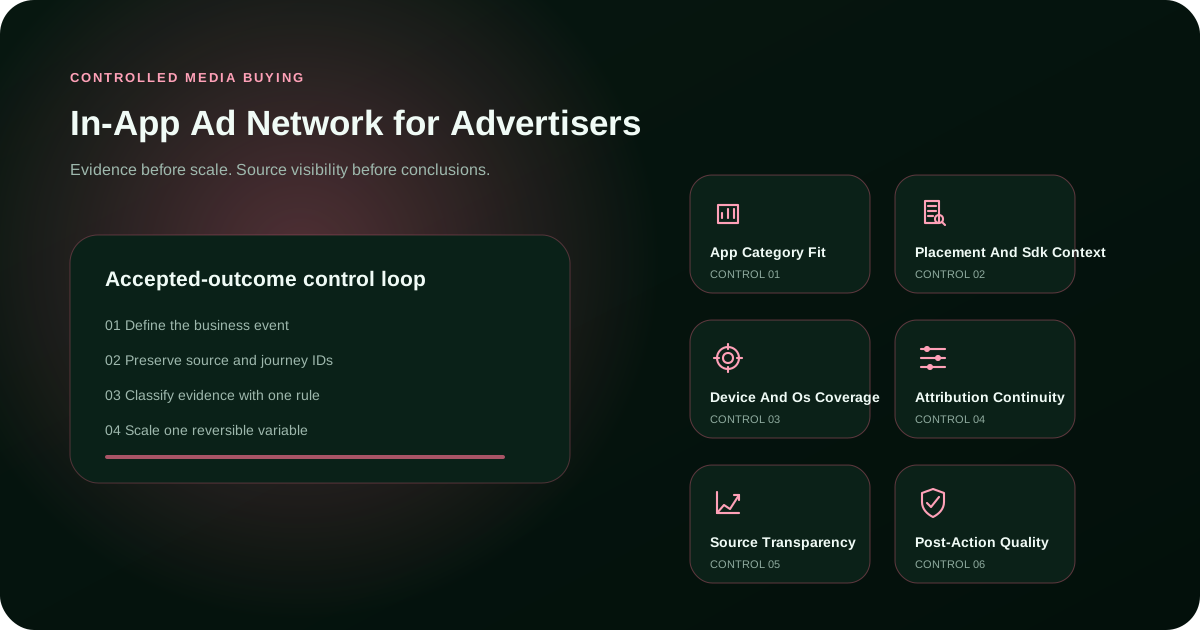
Practical scope
What this guide covers
This guide focuses on in app ad network for advertisers for advertisers. It explains the practical criteria, campaign controls, measurement steps and limits that matter before budget is increased. For broader context, continue with Buy In-App Traffic.
Direct answer
What this page helps an advertiser decide
Operational fit belongs in the economics of in-app ad network for advertisers. Count setup effort, moderation, reporting exports, tracking work, source review and troubleshooting alongside media cost. Evaluate app category fit with the same seriousness as delivery volume. A channel that appears cheaper may be less efficient when the team cannot identify sources or reconcile outcomes without manual repair.
Apply the first decision in FroggyAds
Use the section above to define one accepted outcome for In App Ad Network for Advertisers: Buyer Guide. Keep the first test bounded so the result can be diagnosed before more budget is committed.
Create your free FroggyAds accountOperating framework
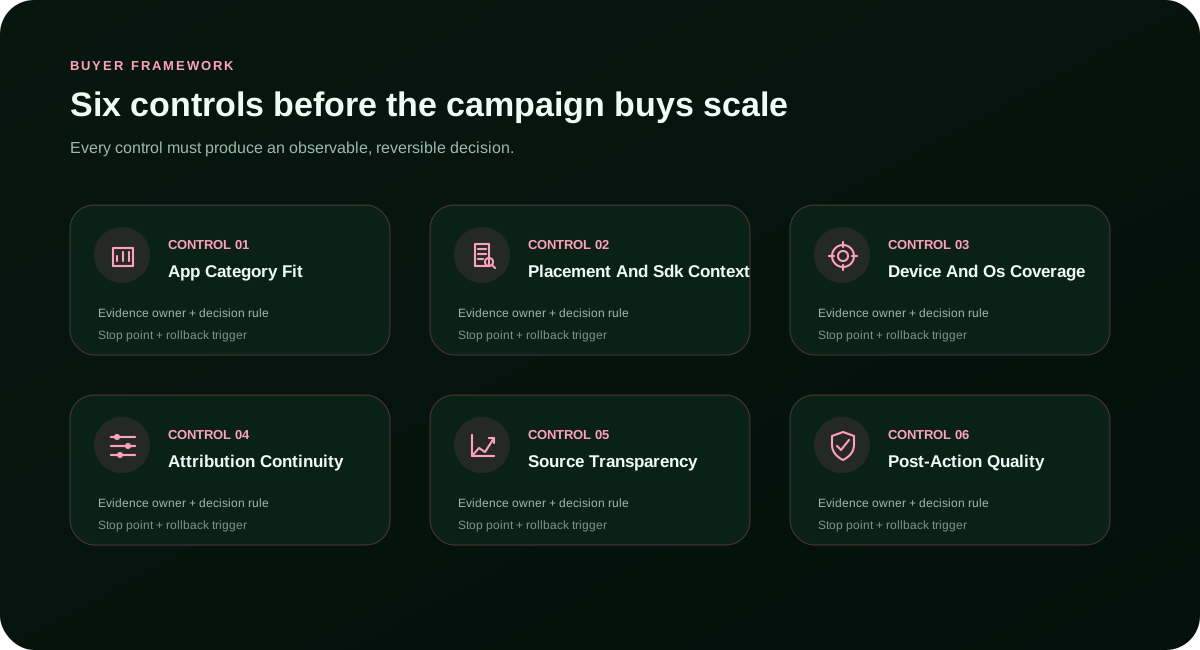
A visual system for evidence-led campaign decisions
Connect eligibility, source, journey, measurement and rollback before the campaign buys scale.
Use placement and SDK context as an action layer. Define the evidence threshold, the person responsible for review, the permitted response and the condition that restores the previous configuration. Pair it with attribution continuity to confirm that improvement is not simply a change in traffic composition. Scale only after the accepted outcome remains stable through the required validation period.
Operator guide
Build the decision from requirements to accepted value
Use the detailed checks below to keep the campaign measurable, comparable and reversible.
Define the exact in-app ad network for advertisers decision
Source governance matters because app inventory and app-mediated user journeys can change as budgets, bids and inventory conditions move. Classify sources as new, uncertain, promising, reduced or excluded. Apply one promotion rule and one exclusion rule across the test. Recheck app category fit after every material scale step, because a winning average may weaken when the source portfolio expands.
Before spending on in-app ad network for advertisers, write the exact audience, country, device, format, destination and policy boundary. This prevents the campaign from drifting toward easier but less valuable delivery. During creative and placement comparison, compare like with like and preserve the original control. Any necessary exception should be visible in the final report with its reason and likely effect.
Match campaign conditions before comparing sources
Build an equal evidence window for app inventory and app-mediated user journeys
Compare source mix instead of blended averages
For the new in-app source test scenario, isolate the smallest set of variables that can answer the question. Hold the accepted event, attribution window and destination logic steady. Change one bid, audience, source group or creative family at a time. If the result deteriorates, return to the last stable configuration rather than widening targeting to recover volume.
Keep creative fairness without forcing identical assets
Finish with a dated decision memo for app inventory and app-mediated user journeys. State the tested scope, evidence window, excluded variables, source distribution, accepted result and rollback trigger. Explain how post-action quality affected the conclusion and what new evidence would overturn it. This keeps the outcome useful after inventory, policy, pricing or campaign conditions change.
Reconcile attribution before choosing a source
Include policy and operational fit in the decision
Write a limited and reproducible conclusion
The measurement plan should connect raw delivery to an attributed in-app outcome that passes eligibility, deduplication and downstream acceptance rules. Record eligible exposure, source distribution, landing continuity, conversion status and downstream acceptance in separate layers. Use device and OS coverage to diagnose where value is gained or lost. Do not let a lower cost per click override evidence that the final business event is weaker or less repeatable.
Intent-specific audit
Four checks tied to this exact advertiser problem
These checks stop broad platform assumptions from distorting this specific buyer question.
Confirm app category fit before launch
Map the operational chain as eligible app placement to interaction to store or landing journey to accepted outcome. Preserve campaign, creative, source, device and GEO identifiers wherever the journey permits. Review device and OS coverage separately from source transparency so one strong average cannot conceal a weak segment. Reconcile front-end activity with the accepted business record before declaring the test successful or increasing spend.
Keep placement and SDK context visible
A practical review of in-app ad network for advertisers must account for opaque sources, mismatched in-app context, weak journey continuity, duplicate activity, premature scaling and changing success rules. Document each material difference instead of hiding it inside a blended average. If settings, eligibility or source mix cannot be matched, record that limitation in the decision memo. A narrow result that can be reproduced is more valuable than a broad claim that cannot survive a second test.
Validate source transparency independently
For app inventory and app-mediated user journeys, begin with the business decision, not the delivery metric. Assign source transparency to a named owner and state what evidence changes a bid, budget, source status or pause decision. Keep the definition fixed through the observation window. The useful output is an attributed in-app outcome that passes eligibility, deduplication and downstream acceptance rules, while early clicks and visits remain supporting signals rather than the final proof.
Tie post-action quality to the final memo
Buyer framework
Six controls before the campaign buys scale
Each control must lead to an observable decision rather than a decorative report.
App Category Fit
Evidence → owner → action → rollbackPlacement And Sdk Context
Treat creative and placement comparison as a bounded experiment. Set a daily ceiling, a total loss limit, a minimum evidence window and a rollback point before launch. New sources begin in an uncertain state and earn promotion through the same rule. When sample size is thin, keep the decision open rather than forcing a winner from unstable data. For In App Ad Network For Advertisers, validate this point against Network for Advertisers, Buyer Guide Home, app category fit and keep it separate from the In App Ads For Advertisers intent.
Evidence → owner → action → rollbackDevice And Os Coverage
Evidence → owner → action → rollbackAttribution Continuity
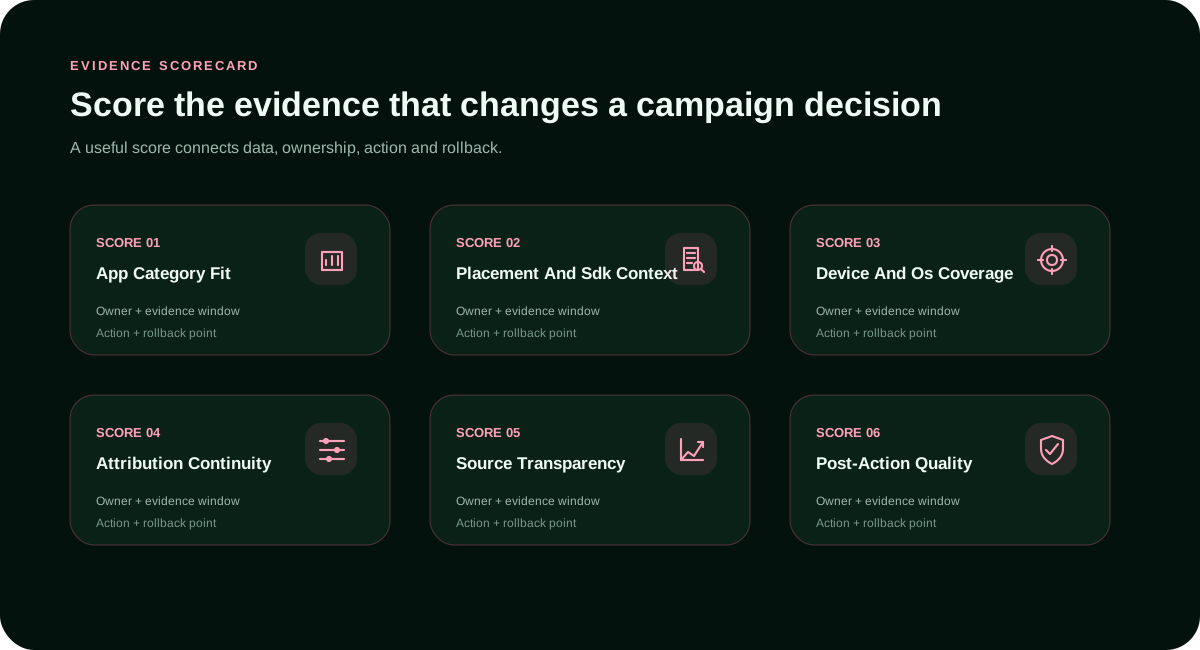
Build the scorecard around decisions the team is prepared to execute. Attribution Continuity requires a defined owner, evidence window and stop rule; post-action quality confirms whether the change survives beyond the front-end metric. Unknown values should stay unknown until measured. Estimating missing evidence merely to complete a table creates false confidence and weakens later optimization.
Evidence → owner → action → rollbackSource Transparency
Evidence → owner → action → rollbackPost-Action Quality
Evidence → owner → action → rollbackTest the recommendation with controlled traffic
Choose the audience, format and campaign controls that actually affect In App Ad Network for Advertisers: Buyer Guide. Verify tracking and compare source-level performance before increasing spend.
Create your free FroggyAds accountWorkflow
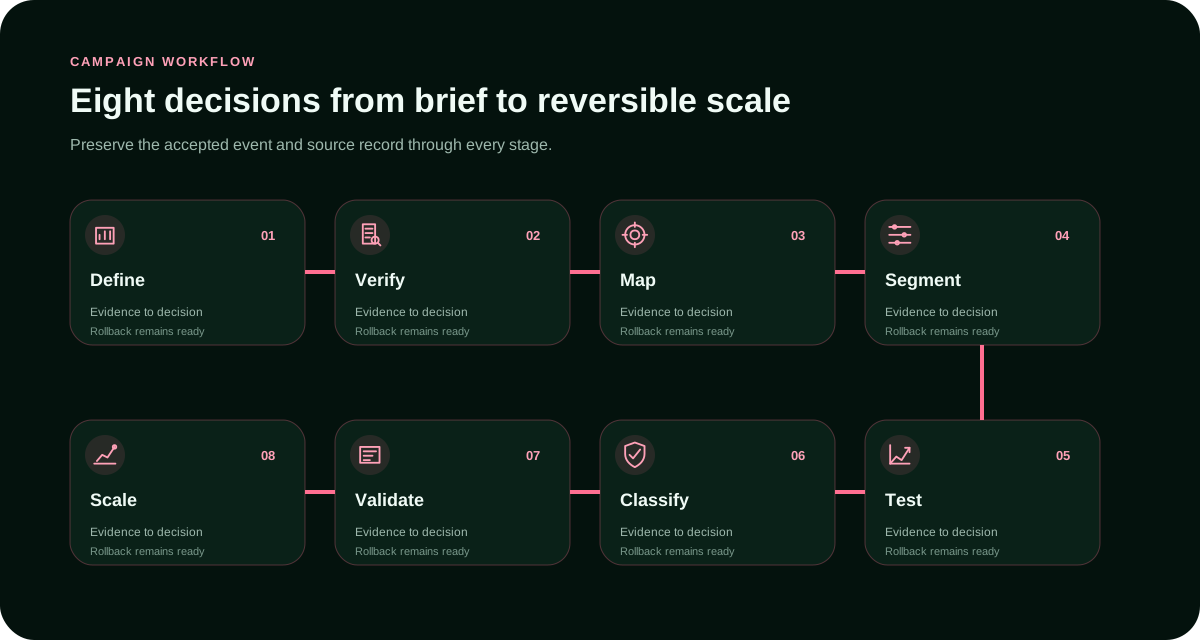
An eight-step campaign operating sequence
Move from business definition to controlled scale without losing the source-to-outcome record.
- 01
Define the accepted event
- 02
Verify eligibility and policy fit
- 03
Map the complete user journey
- 04
Create decision cells
- 05
Launch a bounded test
- 06
Classify sources consistently
- 07
Validate downstream quality
- 08
Scale one reversible variable
Measurement model
Measure the complete path, not the cheapest activity
Delivery layer
Build the scorecard around decisions the team is prepared to execute. App Category Fit requires a defined owner, evidence window and stop rule; device and OS coverage confirms whether the change survives beyond the front-end metric. Unknown values should stay unknown until measured. Estimating missing evidence merely to complete a table creates false confidence and weakens later optimization.
Evidence scorecard
Evidence required for each control
Score only evidence that can change a real campaign action.
| Control | Evidence | Decision |
|---|---|---|
| App Category Fit | Use app category fit as an action layer. Define the evidence threshold, the person responsible for review, the permitted response and the condition that restores the previous configuration. Pair it with device and OS coverage to confirm that improvement is not simply a change in traffic composition. Scale only after the accepted outcome remains stable through the required validation period. | Keep, reduce, test, exclude or scale under the documented rule. |
| Placement And Sdk Context | Operational fit belongs in the economics of in-app ad network for advertisers. Count setup effort, moderation, reporting exports, tracking work, source review and troubleshooting alongside media cost. Evaluate placement and SDK context with the same seriousness as delivery volume. A channel that appears cheaper may be less efficient when the team cannot identify sources or reconcile outcomes without manual repair. | Keep, reduce, test, exclude or scale under the documented rule. |
| Device And Os Coverage | Map the operational chain as eligible app placement to interaction to store or landing journey to accepted outcome. Preserve campaign, creative, source, device and GEO identifiers wherever the journey permits. Review device and OS coverage separately from source transparency so one strong average cannot conceal a weak segment. Reconcile front-end activity with the accepted business record before declaring the test successful or increasing spend. | Keep, reduce, test, exclude or scale under the documented rule. |
| Attribution Continuity | Map the operational chain as eligible app placement to interaction to store or landing journey to accepted outcome. Preserve campaign, creative, source, device and GEO identifiers wherever the journey permits. Review attribution continuity separately from post-action quality so one strong average cannot conceal a weak segment. Reconcile front-end activity with the accepted business record before declaring the test successful or increasing spend. | Keep, reduce, test, exclude or scale under the documented rule. |
| Source Transparency | Map the operational chain as eligible app placement to interaction to store or landing journey to accepted outcome. Preserve campaign, creative, source, device and GEO identifiers wherever the journey permits. Review source transparency separately from app category fit so one strong average cannot conceal a weak segment. Reconcile front-end activity with the accepted business record before declaring the test successful or increasing spend. | Keep, reduce, test, exclude or scale under the documented rule. |
| Post-Action Quality | For the creative and placement comparison scenario, isolate the smallest set of variables that can answer the question. Hold the accepted event, attribution window and destination logic steady. Change one bid, audience, source group or creative family at a time. If the result deteriorates, return to the last stable configuration rather than widening targeting to recover volume. | Keep, reduce, test, exclude or scale under the documented rule. |
Turn the guide into a measurable campaign
Launch one reversible In App Ad Network for Advertisers: Buyer Guide test, reconcile FroggyAds reporting with your downstream data, and scale only the segments that continue to create accepted value.
Create your free FroggyAds accountPractical scenarios
Four practical ways to use this framework
Adapt the framework to a bounded business problem without changing the underlying evidence rules.
New In-App Source Test
Creative And Placement Comparison
Device Or Geo Split
Source-Level Scale Review
Stop rules
Write the stop rules before the campaign starts
Failure modes
What to prevent before more budget enters the campaign
Unsupported winner claims
Use app category fit as an action layer. Define the evidence threshold, the person responsible for review, the permitted response and the condition that restores the previous configuration. Pair it with device and OS coverage to confirm that improvement is not simply a change in traffic composition. Scale only after the accepted outcome remains stable through the required validation period.
Limits and compliance
Use realistic expectations and responsible controls
Traffic-quality controls can reduce risk but cannot eliminate every invalid interaction. Approval, inventory, delivery and results depend on campaign details, policy, GEO, format, bid, creative, destination, tracking and optimization. No page should be interpreted as a guarantee of traffic quality, conversions, ROI, ranking, approval or business performance. For In App Ad Network For Advertisers, validate this point against Network for Advertisers, Buyer Guide Home, app category fit and keep it separate from the In App Ads For Advertisers intent.
Frequently asked questions
Questions about in-app ad network for advertisers
What should advertisers evaluate in a in-app ad network for advertisers?
Source governance matters because app inventory and app-mediated user journeys can change as budgets, bids and inventory conditions move. Classify sources as new, uncertain, promising, reduced or excluded. Apply one promotion rule and one exclusion rule across the test. Recheck source transparency after every material scale step, because a winning average may weaken when the source portfolio expands.
How much budget should a first in-app ad network for advertisers test use?
For the creative and placement comparison scenario, isolate the smallest set of variables that can answer the question. Hold the accepted event, attribution window and destination logic steady. Change one bid, audience, source group or creative family at a time. If the result deteriorates, return to the last stable configuration rather than widening targeting to recover volume. For In App Ad Network For Advertisers, validate this point against Network for Advertisers, Buyer Guide Home, app category fit and keep it separate from the In App Ads For Advertisers intent.
Which metric matters most for in-app ad network for advertisers?
Answer to Which metric matters most for in-app ad network for advertisers?: A practical review of in-app ad network for advertisers must account for opaque sources, mismatched in-app context, weak journey continuity, duplicate activity, premature scaling and changing success rules. Document each material difference instead of hiding it inside a blended average. If settings, eligibility or source mix cannot be matched, record that limitation in the decision memo. A narrow result that can be reproduced is more valuable than a broad claim that cannot survive a second test.
How should traffic quality be checked?
Source governance matters because app inventory and app-mediated user journeys can change as budgets, bids and inventory conditions move. Classify sources as new, uncertain, promising, reduced or excluded. Apply one promotion rule and one exclusion rule across the test. Recheck placement and SDK context after every material scale step, because a winning average may weaken when the source portfolio expands.
Why is source-level reporting important?
Before spending on in-app ad network for advertisers, write the exact audience, country, device, format, destination and policy boundary. This prevents the campaign from drifting toward easier but less valuable delivery. During new in-app source test, compare like with like and preserve the original control. Any necessary exception should be visible in the final report with its reason and likely effect.
How long should the evidence window run?
Answer to How long should the evidence window run?: For the creative and placement comparison scenario, isolate the smallest set of variables that can answer the question. Hold the accepted event, attribution window and destination logic steady. Change one bid, audience, source group or creative family at a time. If the result deteriorates, return to the last stable configuration rather than widening targeting to recover volume.
When should a source be paused?
Build the scorecard around decisions the team is prepared to execute. Source Transparency requires a defined owner, evidence window and stop rule; app category fit confirms whether the change survives beyond the front-end metric. Unknown values should stay unknown until measured. Estimating missing evidence merely to complete a table creates false confidence and weakens later optimization.
Can in-app ad network for advertisers guarantee conversions?
Source governance matters because app inventory and app-mediated user journeys can change as budgets, bids and inventory conditions move. Classify sources as new, uncertain, promising, reduced or excluded. Apply one promotion rule and one exclusion rule across the test. Recheck post-action quality after every material scale step, because a winning average may weaken when the source portfolio expands.
How should a winning cell be scaled?
Answer to How should a winning cell be scaled?: Source governance matters because app inventory and app-mediated user journeys can change as budgets, bids and inventory conditions move. Classify sources as new, uncertain, promising, reduced or excluded. Apply one promotion rule and one exclusion rule across the test. Recheck app category fit after every material scale step, because a winning average may weaken when the source portfolio expands.
What belongs in the final decision memo?
Map the operational chain as eligible app placement to interaction to store or landing journey to accepted outcome. Preserve campaign, creative, source, device and GEO identifiers wherever the journey permits. Review placement and SDK context separately from attribution continuity so one strong average cannot conceal a weak segment. Reconcile front-end activity with the accepted business record before declaring the test successful or increasing spend.
Related resources
Continue with the relevant FroggyAds pillar pages
Ready to test with control?
Create My Free Account →Launch one bounded campaign and scale only accepted value.
Search intent and buyer decision
In App Ad Network for Advertisers: Buyer Guide: the decision this URL owns
The purpose of In App Ad Network for Advertisers: Buyer Guide is to help a app growth buyer make a controlled next-step decision: decide whether the format fits the message, device and conversion path. Every setup and measurement choice on this page should support that decision.
URL boundary for In App Ad Network for Advertisers: Buyer Guide: This URL owns In App Ad Network for Advertisers: Buyer Guide; In App Ads For Advertisers is the nearest neighboring topic and should keep its separate task. Use this page only for the decision implied by In App Ad Network for Advertisers: Buyer Guide.
Decision inputs for In App Ad Network for Advertisers: Buyer Guide: in-app inventory, mobile device, app install, post-install event. Keep these inputs tied to accepted install or post-install event and the page-specific job: decide whether the format fits the message, device and conversion path.
What this page helps an advertiser decide is the measurement checkpoint for this URL. Resolve “How much budget should a first in-app ad network for advertisers test use?” while retaining mobile device, post-install event, spend and cohort age so the result can be reconciled with accepted install or post-install event.
What this guide covers is an evidence checkpoint for In App Ad Network for Advertisers: Buyer Guide. To answer “What should advertisers evaluate in a in-app ad network for advertisers?”, keep in-app inventory in the same campaign record and use it to decide whether the format fits the message, device and conversion path.
Apply the first decision in FroggyAds is the action checkpoint for In App Ad Network for Advertisers: Buyer Guide. Before acting on “Which metric matters most for in-app ad network for advertisers?”, document app install, the resulting campaign action and the rollback or retest condition.
| Page checkpoint | How to use it | Evidence to retain |
|---|---|---|
| What this guide covers | Use What this guide covers to establish the first evidence boundary for In App Ad Network for Advertisers: Buyer Guide; then record which part of OS/device path, acquisition source, attribution, activation and retention it changes. | Keep in-app inventory, source/campaign ID and the accepted-event definition together. |
| What this page helps an advertiser decide | Use What this page helps an advertiser decide as the second checkpoint and reconcile it with accepted install or post-install event before changing budget or source allocation. | Retain mobile device, spend, timestamp/cohort age and accepted/rejected outcomes. |
| Apply the first decision in FroggyAds | Use Apply the first decision in FroggyAds as the final checkpoint: if it does not change the evidence for accepted install or post-install event, keep the test narrow rather than scaling. | Document app install, the decision taken and the rollback or retest condition. |
Transparent In App Ad Network for Advertisers: Buyer Guide decision example
Hypothetical example: For In App Ad Network for Advertisers: Buyer Guide, a hypothetical controlled cell that spends USD 180 and records 6 accepted install or post-install event after the same maturity window has an accepted cost of USD 30.00 per outcome. Replace the figures, outcome and review window with your own economics; this is not a FroggyAds performance claim.
Why use FroggyAds here?
For the controlled test described by In App Ad Network for Advertisers: Buyer Guide, FroggyAds lets you manage paid delivery, targeting and source actions while your accepted-event data decides whether the cell should be kept, capped or expanded. Create your free FroggyAds account.
Research basis for In App Ad Network for Advertisers: Buyer Guide: This URL helps app growth teams decide whether the format fits the message, device and conversion path. It is mapped to the mobile app research cluster. Our current review used support.google.com and developers.google.com to check terminology, buyer questions and decision coverage relevant to In App Ad Network for Advertisers: Buyer Guide. These external sources are research inputs, not evidence of FroggyAds campaign performance.
Direct answer
In App Ad Network for Advertisers: Buyer Guide — what matters first
In App Ad Network for Advertisers: Buyer Guide is most useful when it helps a buyer decide whether the format fits the message, device and conversion path. Define the accepted outcome first, then use targeting, budget and source-level evidence to decide what deserves more spend.