
From signup to scale, step by step.
FroggyAds is a self-serve DSP – you stay in control from your first deposit to high-volume campaigns. Here is exactly how advertisers launch, optimize and scale across 750+ SSP integrations.
From signup to scale, step by step: at a glance
What does this page explain about How FroggyAds Works: Launch and Optimize Campaigns?
Quick answer: Create your free FroggyAds account, prepare the offer and conversion route, then build a campaign with the right format, creative, targeting, bid and budget. Fund the account from the published $50 minimum and submit the campaign for review. After approval, check delivery and source-level results before changing the allocation. You control the traffic purchase; confirmed customer actions guide what to improve or expand.
| Section | Distinct excerpt from this page |
|---|---|
| Deposit from $50 | You only pay for the traffic you bid on – no setup or monthly fees. |
| Choose your ad format | Pick Push, Native, Display, Pop, Interstitial, Video or Audience targeting – or run several formats from one account. |
| Set GEO, device & source targeting | Layer GEO, city, device, OS, browser, carrier, category and source-ID targeting to focus on the right users. |
Reference for How FroggyAds Works: Launch and Optimize Campaigns: FTC guidance on online advertising and marketing.
- Planning: Eight steps from account to scale.
- Control: Common questions before you launch.
- Decision: Ready to launch?
Eight steps from account to scale
Prepare a focused campaign, verify its first delivery and use source-level results to decide what to change next.
Create your account
Open the self-serve DSP and follow the account setup workflow.
Deposit from $50
Fund your account from a $50 minimum. You only pay for the traffic you bid on – no setup or monthly fees.
Choose your ad format
Choose a supported format such as Push, Native, Display, Pop, Interstitial or Video. Use audience targeting as a separate campaign control, not as a creative format.
Set GEO, device & source targeting
Layer GEO, city, device, OS, browser, carrier, category and source-ID targeting to focus on the right users.
Launch your campaign
Upload creatives, set budgets, caps and bids, then launch after campaign approval.
Track performance
Read transparent reports down to the source and zone – impressions, clicks, spend and conversions.
Block weak sources
Use source-level inclusions and exclusions when reliable evidence supports changing the inventory your campaign buys.
Scale what converts
Review confirmed customer outcomes before increasing the campaign allocation. SmartCPC is a bidding option; it does not replace your spending limit, destination checks or source-level evaluation.
Build your first campaign through the self-serve workflow
Open your FroggyAds account, deposit from $50 and launch after approval across global supply.
Ready to launch?
Create your FroggyAds account, deposit from $50 and reach 20B+ daily impressions – backed by conditional 7-day refund eligibility.
See it inside the platform
Everything runs from one self-serve dashboard – launch, target precisely, then watch results by source and optimize in real time.
- Launch and target in one workflow
- Read performance by source ID
- SmartCPC and Adscore in the background
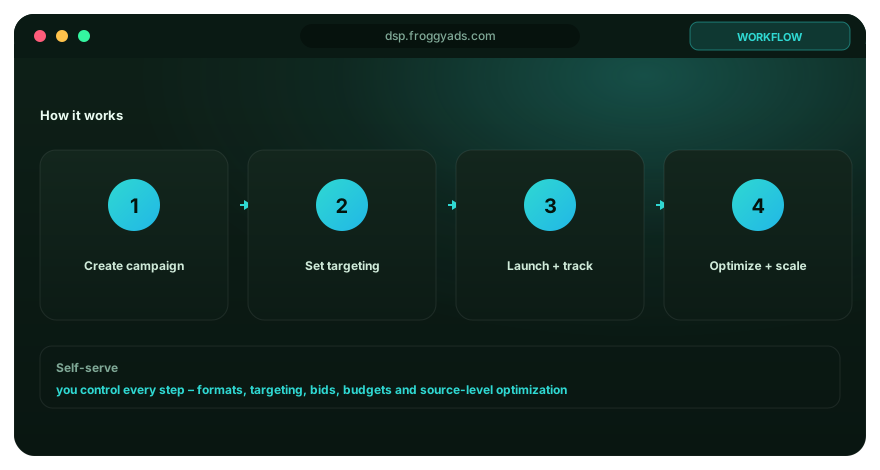
Use FroggyAds as a controlled self-serve buying workflow from campaign hypothesis to source-level optimization
FroggyAds is designed for advertisers and media buyers who want to create, fund, launch and optimize campaigns from a self-serve dashboard. The strongest workflow begins before the campaign is built. Define the offer, accepted conversion, eligible markets, supported devices and maximum learning loss. Those decisions give the platform settings a business context. Without them, a campaign can deliver traffic successfully while the advertiser still lacks a rule for deciding whether the traffic is worth buying again.
Choose the ad format according to the attention context and offer. Push provides concise notification-style visibility, native introduces a message within content or recommendation environments, display provides visual placements commonly bought on CPM, and pop can create broad arrival opportunities at very low entry pricing. FroggyAds supports these formats inside one buying environment, allowing the advertiser to test several routes while keeping the same downstream conversion definition.
| Workflow stage | Advertiser decision | FroggyAds control |
|---|---|---|
| Plan | Define accepted conversion, value and test ceiling | Budget and campaign structure |
| Target | Choose eligible users and technical environments | Country, city, device, OS, browser, carrier and category settings |
| Create | Write truthful creative that matches the destination | Format-specific campaign assets |
| Launch | Submit a tested destination and funded campaign | Self-serve review and delivery controls |
| Measure | Connect media with the accepted business event | Campaign and source-level reporting |
| Optimize | Concentrate on repeated useful patterns | Source allowlist, blocklist and targeting changes |
Funding should follow the test plan rather than replace it. FroggyAds has a low minimum deposit and low entry media pricing, so advertisers can begin with bounded experiments instead of committing a large budget before tracking and landing-page quality are proven. Decide how much spend is acceptable while learning and what event will justify a scale increase. A larger account balance gives more room to operate; it does not make an unvalidated funnel safer.
Targeting should begin with the constraints the business cannot violate. If the offer is only available in certain countries or cities, encode that boundary. If the landing page or product supports specific devices or operating systems, reflect those conditions. Browser, carrier, category and other controls can then be used where they answer a real campaign question. Start broad enough inside the eligible pool to learn rather than narrowing the campaign so far that no source can collect a meaningful sample.
Creative is the promise that connects media with the destination. Keep headlines, images and calls to action accurate and make the first landing screen confirm the same reason for visiting. Avoid fabricated urgency or claims that cannot be supported. A clean message handoff improves the usefulness of campaign data because poor conversions are less likely to be caused by a mismatch between what attracted the click and what the user actually found.
Before submission, test the destination on the main targeted devices and browsers. Verify load behavior, forms, checkout, authentication, redirects and conversion tracking. A campaign that cannot complete its business action should not be scaled merely because traffic delivery looks strong. Technical QA is part of media buying because every broken step reduces the amount the advertiser can afford to pay for an impression or click.
After launch, separate delivery metrics from business outcomes. Impressions, clicks and spend show that the campaign is running. The accepted conversion shows whether the traffic supports the advertiser's goal. Wait for the normal conversion delay before judging recent sources, while using a hard budget guardrail to limit downside. This prevents good inventory from being blocked before outcomes arrive and protects the account from unlimited learning spend.
Source-level optimization is one of the most practical self-serve controls. Preserve source identifiers into the advertiser's analytics where possible, compare mature CPA, revenue, qualified leads or another approved value measure, and record the reason before allowlisting or blocking. One source can behave differently across campaigns, so keep decisions tied to the offer, market and funnel that produced the evidence.
Scale in reversible steps. Raise budget, bid, geographic reach or eligible inventory one major dimension at a time, then review the next mature cohort. If quality falls, the buyer can identify which expansion changed the source or audience mix and return to the last known-good state. This is safer than changing several settings together and then trying to reconstruct why performance moved.
FroggyAds provides access to extensive programmatic supply through hundreds of SSP integrations, multiple ad formats and granular campaign controls. The advertiser supplies the economic model, truthful offer and measurement discipline. The self-serve workflow works best when those responsibilities are connected: plan what a valuable result is, configure an eligible campaign, test the destination, buy enough traffic to learn, optimize repeated source patterns and scale only when mature evidence supports the next budget step.
Keep campaign ownership clear throughout the self-serve workflow. One responsible buyer should know which offer version is live, which tracking event is authoritative, which source actions were taken and what budget guardrail applies. Shared access can support collaboration, but undocumented changes make later optimization harder because the team cannot tell whether performance moved because of the market or because a setting changed.
Use the dashboard as an operating system for experiments rather than as a place to make constant unlogged adjustments. Each material change should answer a question: whether a source deserves more volume, whether a GEO is profitable, whether a creative concept improves accepted conversions or whether a higher bid unlocks economically useful inventory. A short change log makes the next decision faster because the campaign history remains interpretable.
From signup to scale, step by step FAQ
How do I start advertising with FroggyAds?
Create an advertiser account through our signup page and prepare the destination you want to promote. Choose an appropriate ad format, add the required creative, set targeting, bids and a campaign spending limit, and verify conversion tracking. Account funding and campaign approval are separate steps. Once the campaign is approved and active, review the first delivery records before assuming the setup is ready for a larger allocation.
Do I have to pay before creating a FroggyAds account?
Creating your account is free. Our published minimum deposit is $50 when you fund the account for paid advertising. That funding is not a subscription to guaranteed visitors or a fixed quantity of leads. Plan the campaign allocation separately, including the creative and tracking work it needs. You should know what the first traffic purchase is intended to test before committing the full amount.
What should I have ready before building my first campaign?
Have a permitted offer, a working destination, a clear customer action to measure and suitable creative for the chosen format. Confirm which countries and devices can use the product, and test the visitor route on those devices. For an affiliate offer, check the programme's traffic rules as well. This preparation makes the FroggyAds setup about choosing useful buying controls rather than discovering a broken offer after spending begins.
How do I choose the right ad format in the FroggyAds workflow?
Match the format to the message and destination you can support. A compact Push message, a Native headline-and-image card, a Display banner and a URL-first Pop campaign ask for different creative preparation. Video and Interstitial need their own placement checks. Start with a focused choice when that makes the initial results easier to read, then test another format as a separate buying question.
Which settings determine who can receive my campaign?
Your selected format and available inventory work with targeting such as geography, device, operating system, browser, carrier, category and source controls. Use the settings needed to reach people who can actually use the offer. Adding every possible restriction can leave too little eligible traffic. Check the current campaign options and keep the initial audience understandable enough to diagnose delivery and customer response.
Will my campaign start immediately after I deposit money?
Not from the deposit alone. The campaign needs a completed setup and approval before it can deliver, and its active status, schedule, bid, targeting and spending limits must allow buying. Funding the account does not bypass review or reserve inventory. Check the actual status in your account rather than assume a universal approval time or that every approved campaign will receive the same volume.
How do I know whether conversions are being tracked correctly?
Test the intended action and confirm that the selected tracking method records it once with the required campaign identifiers. Follow the instructions for your account and chosen tracking route; do not reuse another network's macro syntax. Compare the report with your own customer or affiliate records. A recorded event should mean the action you intended, not simply a page load or a failed form submission.
Which reports should I inspect after the campaign launches?
Start with delivery and spend, then review clicks and conversions in the context of the chosen format. Use source or zone detail to see where the activity comes from. Align the reporting period with your destination and customer records, especially when a lead or sale takes time to be approved. Our source-level view helps turn the first results into a specific decision rather than a reaction to one blended total.
What can I change when a FroggyAds campaign underperforms?
First identify the problem. Low delivery calls for checks of status, limits, targeting, bid and inventory. Traffic arriving without useful outcomes calls for destination, tracking, message and source review. You can then adjust the relevant campaign control or exclude a demonstrated source problem. Keep unrelated settings stable where practical so the next result shows whether the correction helped.
How do I move from a first test to a larger campaign?
Increase spend after confirmed customer results support the acquisition cost and the destination can handle more demand. Choose one expansion, retain the previous settings and inspect the added traffic after conversions arrive. SmartCPC is a bidding option, not a substitute for that business review. Choose FroggyAds for an advertiser workflow you can refine from setup through source-level optimization, with each new allocation tied to a clear customer goal.
From signup to scale, step by step.: what should the advertiser decide next?
For From signup to scale, step by step., the commercial task is to turn how it works into one measurable campaign decision. Use From signup to scale, step by step: at a glance to define the audience or problem, use What does this page explain about How FroggyAds Works: Launch and Optimize Campaigns? to constrain the test, and decide in advance which accepted result would justify more FroggyAds spend.
On this From signup to scale, step by step. page, the decision should remain tied to the existing evidence around From signup to scale, step by step: at a glance, What does this page explain about How FroggyAds Works: Launch and Optimize Campaigns? and Eight steps from account to scale. Those sections give how it works its specific context; the table below turns that context into campaign actions rather than adding another generic definition.
| Decision | What to verify | FroggyAds action |
|---|---|---|
| From signup to scale, step by step. objective | Use From signup to scale, step by step: at a glance to define the accepted business event and the maximum learning loss for how it works. | Launch one FroggyAds campaign objective for From signup to scale, step by step. and keep the conversion definition stable. |
| From signup to scale, step by step. audience | Use What does this page explain about How FroggyAds Works: Launch and Optimize Campaigns? to verify market, device, language and offer eligibility for how it works. | Apply only the FroggyAds targeting controls that change the real From signup to scale, step by step. customer journey. |
| From signup to scale, step by step. source evidence | Use Eight steps from account to scale to keep source-level differences visible instead of relying on one blended how it works average. | Keep, cap, exclude or retest From signup to scale, step by step. inventory from documented source evidence. |
| From signup to scale, step by step. economics | Use Create your account to connect media spend with accepted conversions and downstream value for how it works. | Protect the From signup to scale, step by step. test with a written budget boundary and a consistent attribution window. |
| From signup to scale, step by step. scale rule | Use Deposit from $50 to define the exact evidence that earns the next budget increase for how it works. | Scale From signup to scale, step by step. one major control at a time and compare marginal performance with the prior baseline. |
A page-specific FroggyAds test sequence for From signup to scale, step by step.
- From signup to scale, step by step. outcome: define the accepted event for how it works and the maximum loss permitted while the first test is learning.
- From signup to scale, step by step. path: verify market eligibility, device experience, landing-page continuity and tracking against From signup to scale, step by step: at a glance before buying more traffic.
- From signup to scale, step by step. hypothesis: launch one bounded FroggyAds test tied to What does this page explain about How FroggyAds Works: Launch and Optimize Campaigns?; do not change bid, creative, audience and destination together.
- From signup to scale, step by step. source review: compare qualified activity, accepted conversions, timing and cost by the source or segment dimensions relevant to Eight steps from account to scale.
- From signup to scale, step by step. scaling: use Create your account and Deposit from $50 to define what must reproduce before the next budget increase.
Why FroggyAds is relevant to From signup to scale, step by step.
For From signup to scale, step by step., FroggyAds gives advertisers a self-serve DSP and ad-network workflow for buying supported traffic with campaign-level budgets and targeting. Depending on format and campaign context, available controls can include country, city, device, operating system, browser, carrier, category, source, ID and IP options. SmartCPC and Adscore-supported traffic-quality controls can support the how it works optimization process, while the advertiser's tracker, analytics and backend acceptance remain the final evidence for commercial quality.
Use Deposit from $50 as the final checkpoint for From signup to scale, step by step.. If the accepted result does not reproduce after the next meaningful volume step, return to the last stable configuration instead of widening several controls at once.
From signup to scale, step by step: the buyer task this URL owns
Treat From signup to scale, step by step as an operating page for performance-focused advertisers, not as a synonym page. Its job is to help you make a measurable paid-acquisition decision, with the evidence kept against this exact decision. The nearest related FroggyAds page is How Online Advertising Works; this URL keeps ownership of the distinct task to make a measurable paid-acquisition decision.
The page-specific control set for From signup to scale, step by step is campaign objective, audience and market fit, ad format, budget and bid. Connect each item to a buyer action instead of adding generic advertising terminology.
| Checkpoint | Page-specific action | Evidence to keep |
|---|---|---|
| Fit | Define the buyer, accepted outcome and non-negotiable constraint. | Retain evidence specific to From signup to scale, step by step and its accepted outcome. |
| Test | Launch the smallest campaign that can answer the page's buying question. | Retain evidence specific to From signup to scale, step by step and its accepted outcome. |
| Decision | Keep, cap, exclude or expand from accepted-outcome evidence. | Retain evidence specific to From signup to scale, step by step and its accepted outcome. |
Hypothetical calculation: if a controlled campaign for from signup to scale, step by step spends USD 100 and produces 7 accepted conversions, accepted CPA is USD 100 / 7 = USD 14.29. Replace the inputs with your own campaign economics; this is not a FroggyAds performance claim.
Start the paid-media test for From signup to scale, step by step with FroggyAds when you need direct control over formats, targeting, budgets and source evidence. Increase spend only after the result supports the next acquisition step. Create your free FroggyAds account.
From signup to scale, step by step — what matters first
From signup to scale, step by step is most useful when it helps a buyer decide whether this option fits the buyer's acquisition workflow. Define the accepted outcome first, then use targeting, budget and source-level evidence to decide what deserves more spend.