
Control every source and zone.
Buy at the source level. Use source IDs, whitelists and blacklists to keep the traffic that performs and cut the zones that waste budget – on every campaign.
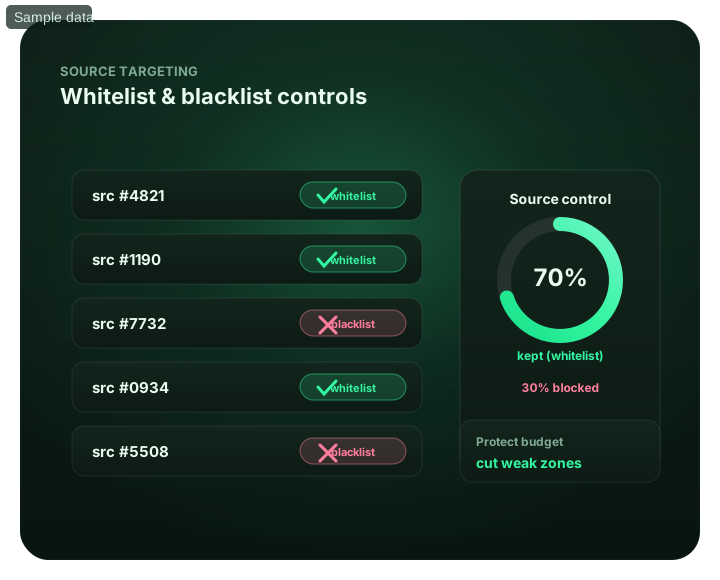
Control every source and zone: at a glance
What does this page explain about Source Targeting: Whitelists, Blacklists and Scale?
Quick answer: With FroggyAds source targeting, compare spend and conversions by source, then choose the appropriate action: adjust a bid, exclude an unsuitable source or concentrate delivery on an approved list. Keep discovery separate from concentrated buying and preserve the campaign context behind each decision. Source controls help direct your budget; they do not guarantee the remaining traffic will convert.
| Section | Distinct excerpt from this page |
|---|---|
| Buy only what works | Compare individual sources before drawing a conclusion from the campaign average. |
| What you can do | Let SmartCPC adjust bids from available campaign signals toward winners. |
| Source IDs | See performance down to the individual source and zone, not just the campaign. |
Reference for Source Targeting: Whitelists, Blacklists and Scale: FTC guidance on online advertising and marketing.
- Planning: Buy only what works.
- Control: See source targeting inside the platform.
- Decision: Buy only the traffic that works.
Buy only what works
A campaign average can hide useful differences between traffic sources. Our source-level reports let you connect delivery and spend with the conversions you measure, then investigate which source, device or creative deserves attention. Use that detail to make a focused buying decision instead of changing the whole campaign in response to one blended number.
Use an allowlist to concentrate buying on approved sources, a blocklist for justified exclusions and source bids when useful traffic needs a different price. SmartCPC supports bid optimization, while Adscore and our internal controls support traffic-quality screening. Keep checking customer outcomes after each change. Our $50 minimum deposit funds the account; you choose a separate campaign allocation for discovery and further testing.
What you can do
- See performance at source-ID level
- Whitelist converting sources and zones
- Blacklist weak or low-quality sources
- Let SmartCPC adjust bids from available campaign signals toward winners
- Improve budget control with Adscore and internal traffic-quality controls
See source targeting inside the platform
For Control every source and zone, the FroggyAds self-serve workflow keeps campaign setup, targeting, budget controls, source-level reporting and optimization in one dashboard so advertisers can make evidence-led keep, cap, exclude and retest decisions.
- See performance at source-ID level
- Whitelist converting sources and zones
- Blacklist weak or low-quality sources
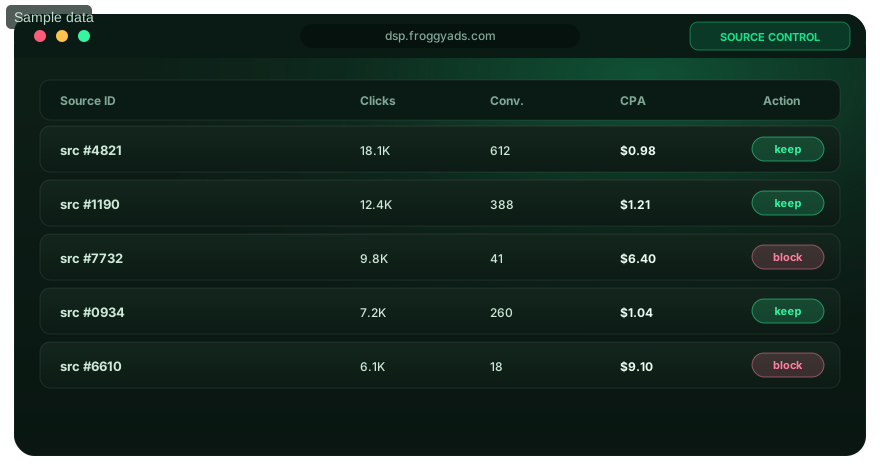
Buy only the traffic that works
Granular controls let you shape exactly where your budget goes.
Source IDs
See performance down to the individual source and zone, not just the campaign.
Whitelists
Keep buying from approved sources so spend concentrates on winners.
Blacklists
Exclude a source when its eligibility, quality or sufficiently mature results justify the restriction.
SmartCPC steering
Use SmartCPC to support bid adjustments, then assess the resulting source costs and conversions.
Take control of your sources
Open an account and optimize at source level from $50.
Source-targeting FAQ
How does source targeting help me buy better traffic with FroggyAds?
Source targeting lets you act on individual traffic sources rather than treat the campaign average as the whole story. Our source-level reporting, bids and inclusion or exclusion controls help you direct spend toward the inventory that suits your offer. Start by connecting source spend with completed sales, accepted leads or registrations. Then decide whether the right action is a price change, a focused test or an exclusion.
Should a new campaign start with all eligible sources or a whitelist?
Use a budget-limited discovery campaign when you do not yet have relevant source evidence. Start with an approved-source list when recent results from the same offer, market and format justify it. A narrow list can reduce delivery and prevent you from finding new opportunities. We recommend keeping discovery separate from concentrated buying so you can see whether established sources continue to perform while new ones are tested.
What information do I need before comparing two traffic sources?
Keep the source identifier, actual spend, delivery volume and final conversion status together for the same period. Include the offer, creative, device and market because a source can perform differently under those conditions. Confirm the tracking route preserves the identifiers supported by your account. A list of clicks without their later outcomes cannot show which source deserves a larger share of your FroggyAds budget.
Is the traffic source with the lowest CPC always the best choice?
No. In a hypothetical comparison, Source A supplies 1,000 clicks at $0.01 each and produces one accepted lead: $10 per lead. Source B supplies 1,000 clicks at $0.03 each and produces six accepted leads: $5 per lead. The dearer click produced the cheaper lead in this example. Use your own lead quality and costs; these are assumed numbers, not FroggyAds rates or results.
When should I lower a source bid instead of blocking the source?
Consider a lower bid when the source brings useful customers but its current media cost leaves too little margin. Consider exclusion when the traffic is ineligible, a verified quality problem exists or the source has reached your test limit without supporting further spend. A cheaper bid does not repair a broken landing page. Our source controls let you make that distinction without changing the entire campaign.
Can I reuse a good source list for another country or offer?
Treat it as a starting hypothesis, not a transferable performance guarantee. Offer acceptance, device mix, language and conversion value may change even when the source ID stays familiar. Confirm that the IDs apply to the new campaign's supply, then run a separately measured test. A source list earned under one set of buying conditions should not silently become permanent approval for every campaign.
Why can one source look strong on desktop but weak on mobile?
The destination may work differently across screens, or the device groups may see different placements and creatives. Check form completion, load behavior and conversion tracking before judging the whole source. When the difference repeats, separate the relevant device group in your campaign analysis. FroggyAds device and source controls help you test the explanation instead of discarding useful desktop traffic because the combined average looks weak.
Does Adscore replace the need to review source performance?
No. Adscore and our internal controls support traffic-quality screening; source performance also depends on whether valid visitors need your offer and complete the desired action. Keep suspicious activity separate from ordinary low conversion rates. Review the source's cost and accepted outcomes even after quality screening, and provide specific evidence to support when an unusual pattern needs investigation.
How can I keep finding sources while scaling a successful campaign?
Maintain a separate discovery allocation with its own spending limit and clear promotion criteria. Move a source into concentrated buying only after relevant results justify the decision, and continue reviewing it afterward. Do not require the discovery campaign to spend its whole balance or assume the established campaign can absorb unlimited traffic. This keeps new-source learning visible without hiding its costs inside your proven results.
What should I ask FroggyAds support when source results are unclear?
Share the campaign reference, source or zone IDs, format, target market and date range. Explain whether the problem is missing delivery, reporting differences, suspected invalid activity or weak conversions, and include relevant screenshots with sensitive details removed. That context lets us investigate a specific buying issue. Start with a focused FroggyAds campaign and a tested conversion route so source-level decisions have reliable evidence behind them.
Optimize at source level on FroggyAds
Create your account and use source-level reporting to plan a focused traffic test.
Use source targeting to turn repeated inventory evidence into narrow, reversible campaign decisions
Source targeting becomes useful after the advertiser can connect traffic with a stable downstream outcome. A source ID is an optimization handle, not a guarantee of quality on its own. The same source can perform differently across offers, markets, devices and landing pages. Define the accepted conversion and preserve source identity through the measurement path where possible before deciding which inventory deserves more or less exposure.
Start with enough eligible breadth to learn. If a new campaign launches only on a small inherited whitelist, the buyer may never discover better inventory. If it launches without any budget or eligibility guardrails, discovery can become unnecessarily expensive. Use a bounded exploratory budget and a written source-review rule. The rule can specify minimum spend or observations, the normal conversion delay, maximum loss and the downstream threshold that qualifies a source for promotion or restriction.
| Source action | Evidence threshold | Reason to keep it reversible |
|---|---|---|
| Observe | Insufficient mature data | Early noise should not create a permanent rule |
| Promote | Repeated accepted outcomes inside the target economics | Higher volume can change the inventory mix |
| Restrict | Repeated mature underperformance or hard loss boundary | Offer or destination changes may justify a later retest |
| Retest | Material campaign context has changed | Historical evidence may no longer describe the new setup |
| Diagnose | Source weakness is concentrated in one device or market | A narrower fix can preserve useful traffic |
FroggyAds provides source-level allowlist and blocklist controls alongside country, city, device, operating-system, browser, carrier and category targeting. This makes it possible to diagnose performance at more than one level. If a source appears weak, check whether the problem is actually concentrated in one technical segment before blocking the entire source. If many sources decline at once, investigate shared factors such as creative, tracking or the destination before applying dozens of source restrictions.
Use whitelists to concentrate proven performance, but preserve controlled discovery when economics allow it. A campaign can allocate most budget to sources that have already met the mature outcome threshold and reserve a smaller portion for new eligible inventory. New winners can then be promoted into the preferred group. This keeps optimization dynamic and reduces dependence on sources that were strong only during an earlier market state.
Blocklists need context too. A source that failed for one offer should not automatically be blocked for every future campaign. Record the campaign, date, format, GEO, device mix, sample and reason for restriction. If the landing page or product changes materially, the team can decide whether a bounded retest is justified. This preserves useful institutional memory without turning an old source result into an unsupported universal reputation.
Source-level bidding can be considered when the platform and campaign setup support it, but the bid should reflect value rather than reward activity. A source with a higher CPC can deserve more budget if it creates better accepted CPA or retained value. Conversely, a very inexpensive source can still be a poor use of spend. Compare downstream economics after the same maturity window and use the narrowest pricing or eligibility action supported by evidence.
Keep source decisions time-stamped. Inventory, competition and audience composition can change. Schedule periodic review of both blocked and preferred sources, especially after major creative, offer, GEO or landing changes. A whitelist that is never revalidated can slowly become a list of historical assumptions, while a permanent blocklist can prevent the campaign from learning whether conditions improved.
Watch concentration risk. If most accepted conversions come from a single source, the campaign can become fragile even when current CPA looks excellent. Test whether several qualified sources can support useful volume. FroggyAds broad supply gives advertisers room to balance proven inventory with ongoing discovery instead of optimizing until one source carries the whole acquisition program.
Use a simple change log to close the loop. Record which source action was taken, why, the evidence available and when the decision should be reviewed again. When performance later moves, the buyer can see whether the source mix changed because of deliberate optimization or normal market variation. That makes source targeting a measurable operating process rather than a collection of IDs changed from memory.
The best source strategy therefore combines scale, patience and specificity. FroggyAds gives buyers granular source controls and broad programmatic reach. The advertiser makes those controls valuable by preserving attribution, waiting for mature outcomes and applying reversible decisions at the narrowest level the evidence supports.
Separate traffic-quality problems from tracking loss. If source identifiers stop passing into the advertiser's analytics, several sources may suddenly appear to have no outcomes even though the campaign itself did not change. Verify the tracking chain before applying restrictions. A source control is a strong lever, so the evidence that justifies it should be stronger than a reporting gap.
When multiple buyers share an account, use common reason codes for source changes such as mature CPA failure, invalid technical environment, volume concentration or successful requalification. Consistent reason codes make later audits faster and prevent duplicate work. FroggyAds provides the operational controls; a shared decision vocabulary helps the team use those controls in a repeatable way.
Use source reports as a learning record for future tests, not as a shortcut around campaign-specific evidence. Store the strongest observations with their date and context, then let the next campaign confirm whether the pattern still applies. This keeps optimization fast without assuming that supply, competition and user behavior remain unchanged forever.
Control every source and zone.: what should the advertiser decide next?
For Control every source and zone., the feature is useful only when it changes a real buying, targeting or measurement decision. Start from the baseline described in Control every source and zone: at a glance, apply the control discussed around What does this page explain about Source Targeting: Whitelists, Blacklists and Scale?, and preserve a rollback point so the effect on source targeting can be interpreted.
On this Control every source and zone. page, the decision should remain tied to the existing evidence around Control every source and zone: at a glance, What does this page explain about Source Targeting: Whitelists, Blacklists and Scale? and Buy only what works. Those sections give source targeting its specific context; the table below turns that context into campaign actions rather than adding another generic definition.
| Decision | What to verify | FroggyAds action |
|---|---|---|
| Control every source and zone. objective | Use Control every source and zone: at a glance to define the accepted business event and the maximum learning loss for source targeting. | Launch one FroggyAds campaign objective for Control every source and zone. and keep the conversion definition stable. |
| Control every source and zone. audience | Use What does this page explain about Source Targeting: Whitelists, Blacklists and Scale? to verify market, device, language and offer eligibility for source targeting. | Apply only the FroggyAds targeting controls that change the real Control every source and zone. customer journey. |
| Control every source and zone. source evidence | Use Buy only what works to keep source-level differences visible instead of relying on one blended source targeting average. | Keep, cap, exclude or retest Control every source and zone. inventory from documented source evidence. |
| Control every source and zone. economics | Use What you can do to connect media spend with accepted conversions and downstream value for source targeting. | Protect the Control every source and zone. test with a written budget boundary and a consistent attribution window. |
| Control every source and zone. scale rule | Use See source targeting inside the platform to define the exact evidence that earns the next budget increase for source targeting. | Scale Control every source and zone. one major control at a time and compare marginal performance with the prior baseline. |
A page-specific FroggyAds test sequence for Control every source and zone.
- Control every source and zone. outcome: define the accepted event for source targeting and the maximum loss permitted while the first test is learning.
- Control every source and zone. path: verify market eligibility, device experience, landing-page continuity and tracking against Control every source and zone: at a glance before buying more traffic.
- Control every source and zone. hypothesis: launch one bounded FroggyAds test tied to What does this page explain about Source Targeting: Whitelists, Blacklists and Scale?; do not change bid, creative, audience and destination together.
- Control every source and zone. source review: compare qualified activity, accepted conversions, timing and cost by the source or segment dimensions relevant to Buy only what works.
- Control every source and zone. scaling: use What you can do and See source targeting inside the platform to define what must reproduce before the next budget increase.
Why FroggyAds is relevant to Control every source and zone.
For Control every source and zone., FroggyAds gives advertisers a self-serve DSP and ad-network workflow for buying supported traffic with campaign-level budgets and targeting. Depending on format and campaign context, available controls can include country, city, device, operating system, browser, carrier, category, source, ID and IP options. SmartCPC and Adscore-supported traffic-quality controls can support the source targeting optimization process, while the advertiser's tracker, analytics and backend acceptance remain the final evidence for commercial quality.
Use See source targeting inside the platform as the final checkpoint for Control every source and zone.. If the accepted result does not reproduce after the next meaningful volume step, return to the last stable configuration instead of widening several controls at once.
How to tell whether Control every source and zone. is working
For Control every source and zone., record the state before the feature changes, then compare the same evidence window after the change. Use Control every source and zone: at a glance to keep the source targeting interpretation tied to a real campaign decision.
Reconcile Control every source and zone. on one evidence window
For Control every source and zone., compare FroggyAds reporting with the advertiser's tracker, analytics and backend records for the same dates and attribution rules. Record media spend, relevant delivery events, qualified landing activity, accepted conversions and rejection reasons, then use What does this page explain about Source Targeting: Whitelists, Blacklists and Scale? to investigate material gaps before they become optimization rules.
Diagnose the smallest failing layer in Control every source and zone.
If source targeting delivery is weak, review eligibility, targeting, bid and inventory first. If traffic arrives but the destination underperforms, inspect speed, message continuity, forms, redirects and device compatibility. If front-end conversions look healthy but backend acceptance is weak, use Buy only what works to isolate audience or source quality after tracking has been verified.
Set the next Control every source and zone. scale and stop rule
Write the exact Control every source and zone. result that earns more budget and the exact condition that pauses the test. Increase one major control at a time and compare marginal source targeting performance with the prior configuration. FroggyAds supplies the campaign controls; the advertiser's accepted downstream data determines whether the expansion is commercially useful.
Control every source and zone.: preserve the evidence behind the next campaign change
For Control every source and zone., keep a dated decision note that records the source targeting campaign scope, the accepted conversion, the evidence window and the maximum additional loss allowed before another review. Tie that note to Control every source and zone: at a glance so the next FroggyAds action remains grounded in this page's actual subject.
Separate observation from explanation for Control every source and zone.. Delivery, spend, device mix, source mix and accepted outcomes are observations. Audience mismatch, creative fatigue, destination friction, tracking loss and source quality are competing explanations. Use Buy only what works to test the narrowest explanation first; changing several source targeting variables together makes the next result difficult to attribute.
Before increasing Control every source and zone. spend, preserve the last stable FroggyAds configuration and write the result that must reproduce after the next volume step. Use See source targeting inside the platform as the review point. If marginal cost or accepted quality moves outside the written boundary, return to the recovery point rather than widening bids, targeting and sources simultaneously.
This evidence record turns source targeting into an auditable buying process: another media buyer should be able to see what was tested, what changed, which source or segment caused the result and why the next action was chosen. FroggyAds provides the campaign controls for that next bounded test; the advertiser's own downstream data provides the final commercial proof.
Control every source and zone.: the decision this URL owns
Use this page to decide when source targeting should move a placement from discovery into keep, cap, exclude or whitelist status. The source ID must remain stable through the conversion window. Keep this URL focused on that decision; use What Is Source Id Targeting for the adjacent task.
Decision inputs for Control every source and zone.: location targeting, device targeting, audience segment, exclusion. On this URL, use those inputs to understand the control and decide when to use it and keep each one tied to the same accepted-event definition.
Page-specific evidence path: Use the visible sections Control every source and zone. as evidence for Control every source and zone.. They should answer the page's own buying question before budget is increased; they are not interchangeable with the neighboring URL or with a generic traffic checklist.
| Checkpoint | Page-specific action | Evidence to retain |
|---|---|---|
| Source map | Identify the placement/source before making a quality judgment. | Source ID, format, GEO/device and spend. |
| Evidence window | Wait for the accepted event to mature before changing the source rule. | Accepted/rejected outcomes and cohort age. |
| Action rule | Whitelist, cap or exclude only from repeated source-specific evidence. | Accepted CPA/value and action history. |
Transparent decision example
Hypothetical example: For Control every source and zone., if a controlled test spends USD 175 and records 7 accepted outcomes after the same review window, accepted cost is USD 25.00 per outcome. Replace the inputs with your own economics and the event definition appropriate to this page.
Why use FroggyAds for this step?
For Control every source and zone., FroggyAds lets you isolate the targeting rule, preserve source-level evidence and compare the rule with a controlled alternative before reallocating spend. Create your free FroggyAds account.
Control every source and zone — what matters first
Control every source and zone is a campaign-control decision: state the problem the control solves, define the rule before enabling it, and measure its effect on delivery and accepted outcomes.