
Digital advertising glossary for media buyers.
New to programmatic, or just want a quick reference? These are the core terms behind FroggyAds – DSPs, SSPs, bidding models, ad formats, targeting and traffic quality – in plain language.
Digital advertising glossary for media buyers: at a glance
What does this page explain about Digital Advertising Glossary: Terms and Definitions?
Quick answer: Use the FroggyAds digital advertising glossary to understand media buying, traffic, targeting, bidding, measurement, optimization and platform terminology. New to programmatic, or just want a quick reference? These are the core terms behind FroggyAds – DSPs, SSPs, bidding models, ad formats, targeting and traffic quality – in plain language. A plain-language reference for the formats, pricing models and controls you will use on FroggyAds. The terms below come up constantly on FroggyAds and across the wider industry – understanding them helps you read reporting correctly, set bids sensibly and optimize with intent rather than guesswork.
| Section | Distinct excerpt from this page |
|---|---|
| DSP (Demand-Side Platform) | Software that lets advertisers buy programmatic ad inventory across many sources from one dashboard. |
| SSP (Supply-Side Platform) | A platform publishers use to sell their ad inventory. |
| RTB (Real-Time Bidding) | An auction that decides which ad is shown in the milliseconds a page loads. |
Reference for Digital Advertising Glossary: Terms and Definitions: FTC guidance on online advertising and marketing.
- Planning: Programmatic advertising terms, explained.
- Control: Start buying traffic on FroggyAds.
- Decision: Core media-buying terms, defined.
Programmatic advertising terms, explained
A plain-language reference for the formats, pricing models and controls you will use on FroggyAds.
DSP (Demand-Side Platform)
Software that lets advertisers buy programmatic ad inventory across many sources from one dashboard. FroggyAds is a self-serve DSP.
Learn moreSSP (Supply-Side Platform)
A platform publishers use to sell their ad inventory. FroggyAds connects to 750+ SSP integrations for global supply.
Learn moreRTB (Real-Time Bidding)
An auction that decides which ad is shown in the milliseconds a page loads. Advertisers bid programmatically per impression.
Learn moreCPC (Cost Per Click)
A pricing model where you pay per click. Push and Native start from $0.003 CPC on FroggyAds.
Learn moreCPM (Cost Per Mille)
Cost per thousand impressions. Display starts from $0.10 CPM on FroggyAds.
Learn moreCPV (Cost Per Visit)
A pricing model used for Pop traffic, where you pay per visit. Pop starts from $0.0001 on FroggyAds.
Learn morePush Ads
Clickable notification-style ads delivered to opted-in users on desktop and mobile.
Learn moreNative Ads
Ads that match the look and feel of the content feed they appear in, reading like recommended content.
Learn moreDisplay Ads
Banner and rich-media placements shown across websites and apps in standard ad sizes.
Learn morePop Ads
Full-page placements (pop / popunder) that open in a new window or tab for high-volume reach.
Learn moreInterstitial Ads
Full-screen ads shown at natural transition points, capturing full attention before continuing.
Learn moreAudience Targeting
Reaching users by interest, intent and behavior, including retargeting of warm visitors.
Learn moreSmartCPC
FroggyAds automatic bid-optimization engine that steers spend toward the sources and segments most likely to convert.
Learn moreAdscore
The traffic-quality layer that screens Traffic delivery for bots, proxies and fraud before it reaches your budget.
Learn moreSource ID
An identifier for an individual traffic source or zone, used to analyze and control performance at a granular level.
Learn moreWhitelist
A list of approved sources you want to keep buying from, so spend concentrates on what performs.
Learn moreBlacklist
A list of blocked sources you want to exclude, so budget stops going to weak or low-quality zones.
Learn moreConversion tracking
Measuring the actions that matter (sign-ups, sales, installs) with a pixel or postback so you can optimize to results.
Learn moreAd fraud / IVT
Invalid traffic can waste budget and weaken optimization data. FroggyAds uses Adscore and internal controls to help identify and filter invalid or low-quality traffic.
Learn moreBot filtering
Using automated signals to help identify and filter non-human or low-quality activity.
Learn moreGEO targeting
Choosing the countries, regions or cities your campaign serves in, down to the city level.
Learn morePut it into practice
Open your FroggyAds account and launch your first campaign from $50.
Start buying traffic on FroggyAds
Create your account and reach 20B+ daily impressions across 750+ SSP integrations.
Core media-buying terms, defined
Programmatic media buying has its own vocabulary, and using it precisely makes you a sharper buyer. The terms below come up constantly on FroggyAds and across the wider industry – understanding them helps you read reporting correctly, set bids sensibly and optimize with intent rather than guesswork.
Pricing models are the foundation. CPC (cost per click) charges per click and suits direct-response push and native; CPM (cost per mille) charges per thousand impressions and suits display and branding; CPV (cost per view) charges per view and makes pop traffic extremely cheap to test. CPA (cost per acquisition) is the outcome metric you ultimately optimize toward – what it costs to win a conversion.
Supply and quality terms matter just as much. An SSP (supply-side platform) is where inventory comes from; a DSP (demand-side platform) like FroggyAds is what you buy with. A source ID identifies an individual traffic source so you can whitelist (allow) or blacklist (block) it. Bot traffic is automated, non-human activity that traffic-quality systems attempt to identify and filter. Knowing these lets you run the core optimization loop – read by source, cut waste, scale winners – with confidence.
| Term | Meaning |
|---|---|
| CPC / CPM / CPV | Cost per click / per 1,000 impressions / per view |
| CPA | Cost per acquisition (the outcome metric) |
| DSP / SSP | Demand-side platform / supply-side platform |
| Source ID | Identifier for a single traffic source |
| Whitelist / Blacklist | Allow / block specific sources |
| Bot traffic | Automated non-human traffic (Traffic quality signals supported by Adscore) |
Use the glossary to give campaign terms one shared meaning before budgets or reports are compared. Clear definitions reduce mistakes when a brief moves between buyers, analysts and support.
An audience signal describes the type of user a campaign aims to reach. A source ID identifies the inventory source or zone whose delivery and outcomes can be reviewed.
The format describes how the ad appears, while CPC, CPM or CPV describes the billed event. Choose each against the campaign goal instead of treating them as the same decision.
Define the source ID, click identifier, conversion event and attribution method before launch. Those terms connect paid delivery with the outcome recorded on the destination.
Each model bills a different media event, so the unit prices answer different questions. Compare them through valid visits and accepted outcomes under one measurement window.
Name the user action, firing rule, identifier, owner and conditions that reject or reverse it. State if the event arrives through a browser pixel or a server postback.
A whitelist keeps delivery on approved source IDs, while a blacklist excludes sources that fail the buyer's rule. Both work best when the reason and evidence window are recorded.
Invalid-traffic screening provides risk signals and can help filter suspect activity. It does not turn every remaining impression or click into a valuable customer outcome.
Block a source after tracking checks and sufficient matched evidence show it breaches the campaign's quality, policy or loss rule. Save the source, period and reason for review.
Look for repeated accepted outcomes at a workable cost with stable attribution and source identity. Increase one limit gradually and keep the earlier control available.
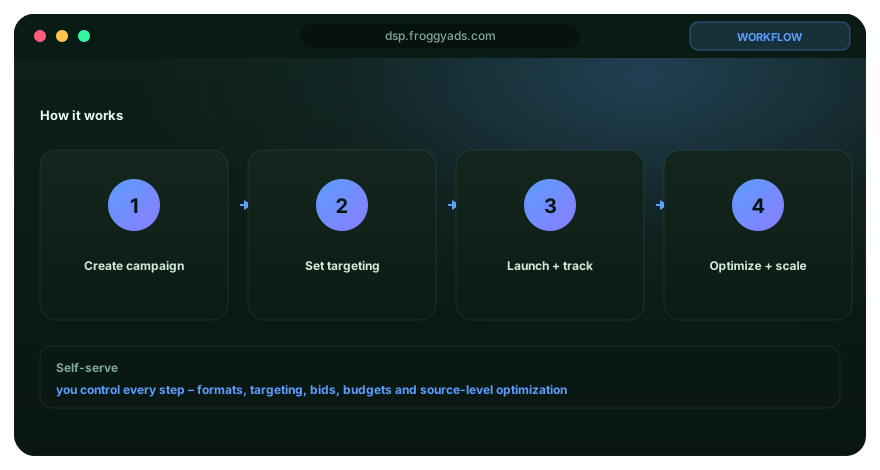
See it inside the platform
Everything runs from one self-serve dashboard – launch, target precisely, then watch results by source and optimize in real time.
- Launch and target in one workflow
- Read performance by source ID
- SmartCPC and Adscore in the background
Turn advertising terminology into consistent buying decisions
A useful advertising glossary does more than define isolated terms. It gives the people funding, operating and measuring a campaign the same language for the decisions they make. Before a test starts, agree on what a click, impression, conversion, source, bid, budget and attribution window mean inside the specific workflow. Then connect each term to the field or event that will be used in reporting. This prevents a common problem in media buying: two people can use the same word while looking at different stages of the funnel. FroggyAds gives advertisers campaign, targeting and source-level controls, so clear definitions help ensure that the rule written before launch matches the action taken later in the dashboard.
Terms also need context. CPC describes the price of a click, but it does not by itself describe whether the visitor was eligible for the offer or whether an accepted downstream event occurred. CPM describes the cost of delivered impressions, but the buyer still needs a conversion or value framework to decide whether that exposure worked. Source identifiers are useful only when they remain connected to the advertiser's outcome data. The same principle applies to audience, device, browser, carrier, city, country and category targeting: each dimension should answer a real campaign question rather than simply create more report columns. Use the definitions on this page as a reference point, then write the campaign's operational meaning beside the metrics that can trigger spend changes.
When reviewing performance, keep definition changes separate from media changes. If the team changes what counts as a conversion, adjusts the attribution window or modifies a landing-page event, mark that change before comparing the new period with the old one. Otherwise a reporting change can be mistaken for an improvement in traffic quality. FroggyAds supports testing across multiple ad formats and targeting dimensions, and that flexibility is easier to manage when the terminology remains stable throughout the test. A simple operating habit is to include the relevant definition next to every important threshold: what is being measured, where it is recorded, when it is considered mature and which action follows if the threshold is crossed. That turns glossary knowledge into a repeatable media-buying process.
Digital advertising glossary for media buyers. FAQ
What should I decide first about Digital advertising glossary for media buyers.?
Start with the accepted business outcome and the campaign constraint that Digital advertising glossary for media buyers. is supposed to improve. That gives agencies and media buyers a clear reason to test it.
How should I test Digital advertising glossary for media buyers. with FroggyAds?
Run a bounded test with stable tracking, one primary conversion and the FroggyAds targeting or format controls that match the page's intent.
Which metric matters most for Digital advertising glossary for media buyers.?
Use client-level campaign economics as the final standard, with delivery and click metrics treated as diagnostic signals rather than the end result.
How much data should I collect before changing Digital advertising glossary for media buyers.?
Wait through a representative conversion and approval window. Small samples can make normal variance look like a durable source difference.
What can make a Digital advertising glossary for media buyers. test misleading?
Broken tracking, simultaneous changes, a weak destination or an undefined acceptance rule can make the traffic look better or worse than it really is. For Glossary, apply this rule to the page-specific audience, market, format or buying decision described here.
How should I compare sources for Digital advertising glossary for media buyers.?
Preserve source identifiers and compare sources on the same outcome definition, time window and campaign context before increasing or excluding spend.
When should I scale a Digital advertising glossary for media buyers. campaign?
Scale after the baseline is stable, then increase one major lever at a time and compare marginal accepted performance with the previous level.
When should I pause or cap Digital advertising glossary for media buyers. traffic?
Pause or cap when a source crosses a pre-written loss boundary after tracking and the outcome window are complete enough to support the decision. For Glossary, apply this rule to the page-specific audience, market, format or buying decision described here.
How do I keep Digital advertising glossary for media buyers. measurement trustworthy?
Validate redirects, parameters, conversion events and backend acceptance before using performance data to make permanent source decisions.
Why use FroggyAds for Digital advertising glossary for media buyers.?
FroggyAds gives advertisers a self-serve workflow for budgets, targeting, formats, reporting and source-level optimization so Digital advertising glossary for media buyers. can be tested as a measurable campaign decision.
Digital advertising glossary for media buyers.: the decision this URL owns
Treat Digital advertising glossary for media buyers. as an operating decision, not a definition page. A performance advertiser should use it to decide how Digital advertising glossary for media buyers. should be tested, measured and acted on, with the same accepted outcome preserved from setup through review.
URL boundary for Digital advertising glossary for media buyers.: This URL owns Digital advertising glossary for media buyers.; Cheap Advertising For Media Buyers is the nearest neighboring topic and should keep its separate task. Use this page only for the decision implied by Digital advertising glossary for media buyers..
Decision inputs for Digital advertising glossary for media buyers.: campaign objective, source quality, source evidence, conversion tracking. Keep these inputs tied to accepted conversion or business-value event and the page-specific job: decide how Digital advertising glossary for media buyers. should be tested, measured and acted on.
Digital advertising glossary for media buyers: at a glance is an evidence checkpoint for Digital advertising glossary for media buyers.. To answer “What should I decide first about Digital advertising glossary for media buyers.?”, keep campaign objective in the same campaign record and use it to decide how Digital advertising glossary for media buyers. should be tested, measured and acted on.
Start buying traffic on FroggyAds is the action checkpoint for Digital advertising glossary for media buyers.. Before acting on “Which metric matters most for Digital advertising glossary for media buyers.?”, document source evidence, the resulting campaign action and the rollback or retest condition.
Programmatic advertising terms, explained is the measurement checkpoint for this URL. Resolve “How should I test Digital advertising glossary for media buyers. with FroggyAds?” while retaining source quality, conversion tracking, spend and cohort age so the result can be reconciled with accepted conversion or business-value event.
| Page checkpoint | How to use it | Evidence to retain |
|---|---|---|
| Digital advertising glossary for media buyers: at a glance | Use Digital advertising glossary for media buyers: at a glance to establish the first evidence boundary for Digital advertising glossary for media buyers.; then record which part of campaign objective, targeting, source evidence, conversion tracking and economics it changes. | Keep campaign objective, source/campaign ID and the accepted-event definition together. |
| Programmatic advertising terms, explained | Use Programmatic advertising terms, explained as the second checkpoint and reconcile it with accepted conversion or business-value event before changing budget or source allocation. | Retain source quality, spend, timestamp/cohort age and accepted/rejected outcomes. |
| Start buying traffic on FroggyAds | Use Start buying traffic on FroggyAds as the final checkpoint: if it does not change the evidence for accepted conversion or business-value event, keep the test narrow rather than scaling. | Document source evidence, the decision taken and the rollback or retest condition. |
Transparent Digital advertising glossary for media buyers. decision example
Hypothetical example: For Digital advertising glossary for media buyers., a hypothetical controlled cell that spends USD 350 and records 4 accepted conversion or business-value event after the same maturity window has an accepted cost of USD 87.50 per outcome. Replace the figures, outcome and review window with your own economics; this is not a FroggyAds performance claim.
Why use FroggyAds here?
Choose FroggyAds for the media-buying part of Digital advertising glossary for media buyers. when you need controllable traffic and source evidence; keep the commercial decision anchored to accepted conversion or business-value event, not delivery volume alone. Create your free FroggyAds account.
Digital advertising glossary for media buyers — what matters first
Digital advertising glossary for media buyers is most useful when it helps a buyer make a concrete, measurable buying decision. Define the accepted outcome first, then use targeting, budget and source-level evidence to decide what deserves more spend.