
Optimize at the source-ID level.
The real money in media buying is made one source at a time. Target, score and control individual source IDs on FroggyAds – the granular layer most networks hide.
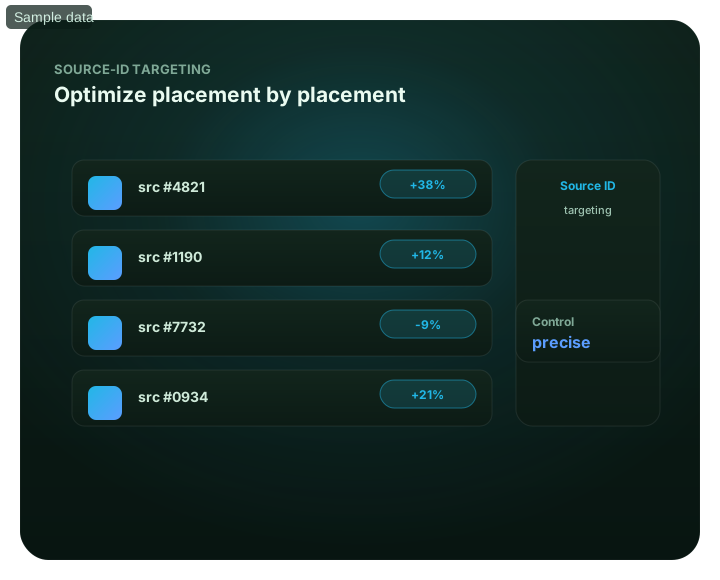
What this guide covers
This guide focuses on source id targeting for advertisers. It explains the practical criteria, campaign controls, measurement steps and limits that matter before budget is increased. For broader context, continue with Win at the source level..
The granular layer that drives ROI
Most underperforming campaigns aren't bad campaigns – they're good sources mixed with bad ones, hidden behind a single averaged number. Source-ID targeting exposes that: every source and zone has an identifier, so you can see exactly which ones convert and which quietly drain budget.
On FroggyAds you read performance down to the source ID, then act – bid up on winners, blacklist the wasters, and whitelist proven sources to scale. SmartCPC can adjust bids from available campaign signals within your chosen sources and Adscore and internal controls add traffic-quality signals. This granular control is where serious buyers make their margin, and it starts from $50.
Best for
- Finding the sources that actually convert
- Cutting budget drains surgically
- Bidding per source, not per campaign
- Building whitelists of proven sources
- Scaling on clean, granular data
See source-id targeting inside the platform
Everything runs from one self-serve dashboard – launch the campaign, target precisely, then watch results by source and optimize in real time.
- Finding the sources that actually convert
- Cutting budget drains surgically
- Bidding per source, not per campaign
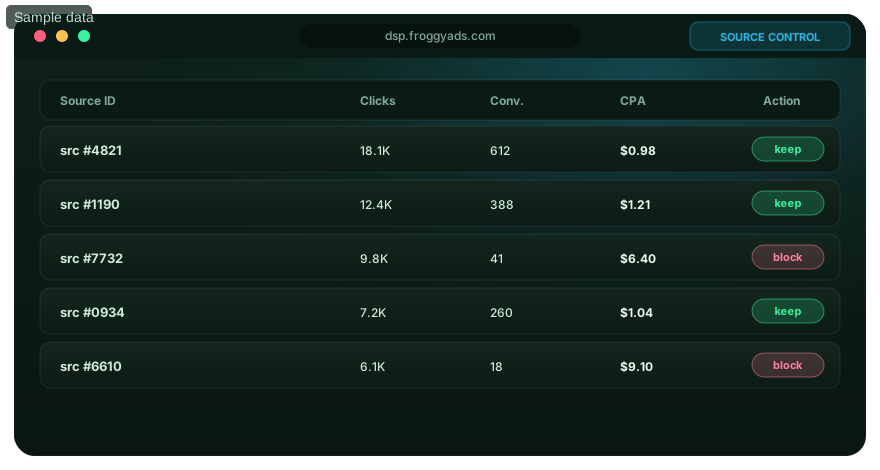
Campaign averages hide the truth
Winners and losers live at the source level.
Every source has an ID
Each traffic source/zone is identified, so you can analyze and act on it individually.
Score each source
See clicks, conversions and cost per source – not just a campaign average.
Bid per source
Raise bids on converting sources and lower them on weak ones.
Keep or cut
Whitelist the winners and blacklist the wasters in a couple of clicks.
Optimize by source on FroggyAds
Open an account and control source IDs from $50.
Three source-level controls
Identify traffic sources
Use source and zone IDs to connect spend with conversions and keep traffic comparisons tied to the right campaign.
Compare conversion costs
Review confirmed leads or sales against source spend before increasing a bid or excluding traffic.
Adjust bids and source lists
Our source controls let you change bids, include selected IDs or exclude sources that do not fit the campaign.
Control your sources
Create your account and optimize by source ID across 20B+ daily impressions.
Source ID targeting: questions from media buyers
What is a source ID in FroggyAds reporting?
A source ID identifies a traffic source or placement in our buying and reporting workflow. It connects spend and results with something more specific than the campaign average. Keep that identifier with your conversion records so you can decide which traffic to buy again, investigate or exclude. Choose FroggyAds when that source-level control matters to your media buying.
Is a source ID the same as a publisher domain?
Not necessarily. An identifier may represent a source or zone rather than a readable website address. Use the labels and detail shown in your FroggyAds report, and ask us when the mapping is unclear. Do not assume an identical number on another ad network identifies the same publisher. That distinction helps you avoid importing a source list that does not match the inventory you are buying.
How does a traffic-source whitelist differ from a blacklist?
A whitelist limits buying to the source IDs you select. A blacklist excludes selected IDs while allowing other eligible traffic. Our source controls support both approaches. Use a whitelist to concentrate a campaign on sources with suitable results, and keep a separate test for discovering new ones. A successful list for one offer should not become an untested assumption for every campaign.
Which metrics should I compare before blocking a source ID?
Compare spend, confirmed conversions and cost per useful result over the same period. Then check the source's devices, creative and destination for an explanation. For affiliate offers, use approved payouts and account for rejected leads. A source with many clicks can still be uneconomical, while one with delayed conversions may need more time before you can judge it fairly.
How many clicks are enough to judge a traffic source?
There is no useful universal click threshold. It depends on your offer's conversion rate, approval delay, conversion value and the amount you can spend testing. Set a loss limit before launch, but do not mistake that limit for statistical proof. When few conversions have arrived, keep the uncertainty visible rather than permanently labelling the source as poor quality.
How do I connect source IDs with affiliate conversions?
Retain the source reference alongside the click identifier as a visitor moves to the offer, using the parameters supported by your tracking setup. Test that approved conversions can be matched back to the campaign, then compare them with FroggyAds source spend. Follow the actual integration's instructions rather than copying another network's macro names into a FroggyAds tracking link.
Can I give a converting source a higher bid?
Our DSP provides source-level bid controls. Base an increase on confirmed conversion value rather than a low average CPC or a few early sales. Keep the offer and destination stable while testing the change, and review the additional traffic separately. A higher bid can change which auctions you win; it does not guarantee that every extra visitor will have the same value.
Why did traffic volume fall after I added a whitelist?
A whitelist reduces the sources your campaign can buy. Delivery also depends on your bid, budget, targeting and those sources' available inventory. Check that you entered the intended IDs before increasing bids. Our source controls help you expand deliberately: test additional sources separately instead of removing every restriction just to recover the previous traffic volume.
Should I reuse the same source blacklist for every offer?
Not automatically. A source that underperforms for one product, country or device can behave differently with another offer. Keep the reason for each exclusion with its campaign evidence. Separate documented traffic-quality concerns from ordinary conversion underperformance, and review whether the original reason still applies before carrying the restriction into a new FroggyAds campaign.
How do source ID targeting and Adscore work together?
Our Adscore-supported screening and internal controls help assess traffic quality; source ID targeting lets you decide which sources to buy. Combine those signals with confirmed lead, sale or registration records. A real visitor can still be unsuitable for your offer, so screening and commercial fit are separate checks. Start a source-targeted campaign with FroggyAds and use both when reviewing your results.
Optimize at the source-ID level.: decision depth without generic filler
This section exists to support one page-specific task for performance-focused advertisers: understand the control and decide when to use it. It uses the page’s own headings, entity coverage and current comparison research as decision prompts. It does not turn external terminology into FroggyAds product claims, and it does not guarantee traffic quality, sales, profit or rankings. For Source Id Targeting, validate this point against the page-specific evidence and accepted outcome and keep it separate from the What Is Source Id Targeting intent.
| Decision layer | Evidence to retain | Review rule |
|---|---|---|
| Control Purpose | Record the current location targeting context and the assumption being tested. | Review data management platforms only if it changes the setup, measurement or accepted business outcome. |
| Eligibility And Prerequisites | Record the current device targeting context and the assumption being tested. | Review adobe audience manager only if it changes the setup, measurement or accepted business outcome. |
| Configuration Boundary | Record the current audience criteria context and the assumption being tested. | Review audience manager only if it changes the setup, measurement or accepted business outcome. |
| Interaction With Other Settings | Record the current exclusions context and the assumption being tested. | Review data management platform only if it changes the setup, measurement or accepted business outcome. |
| Measurement Of The Control | Record the current source IDs context and the assumption being tested. | Review data management only if it changes the setup, measurement or accepted business outcome. |
Control Purpose for Optimize at the source-ID level.
Use What this guide covers as the evidence anchor for this layer. For Optimize at the source-ID level., control purpose should help performance-focused advertisers understand the control and decide when to use it. Record the assumption, the campaign control it changes, and the evidence that would reject it before increasing spend.
Keep location targeting and audience criteria attached to that decision. A neighboring page such as What Is Source Id Targeting may share vocabulary, but it owns a different buyer task; use this page only when the operating question remains understand the control and decide when to use it.
Eligibility And Prerequisites for Optimize at the source-ID level.
For Optimize at the source-ID level., treat eligibility and prerequisites as a decision gate rather than a descriptive paragraph. Start from The granular layer that drives ROI, name the accepted business event, and state what must remain stable while the test runs. That keeps a delivery change from being mistaken for a commercial improvement.
When alternatives are compared, include adobe audience manager and data in the checklist. These are decision concepts, not promises about FroggyAds performance. Use device targeting to segment the evidence and exclusions to reconcile the result before a permanent source, budget or targeting change. For Source Id Targeting, validate this point against the page-specific evidence and accepted outcome and keep it separate from the What Is Source Id Targeting intent.
Configuration Boundary for Optimize at the source-ID level.
The practical purpose of configuration boundary on this page is to make the next action explainable. For performance-focused advertisers, connect Best for to one controlled variable, one review window and one accepted outcome. If several variables move at once, the result cannot tell you which change created the difference. For Source Id Targeting, validate this point against the page-specific evidence and accepted outcome and keep it separate from the What Is Source Id Targeting intent.
Use audience criteria as a diagnostic dimension and keep source IDs consistent across the comparison. If audience manager becomes relevant to the live campaign, document how it changes eligibility, delivery or measurement before using it to justify more spend. For Source Id Targeting, validate this point against the page-specific evidence and accepted outcome and keep it separate from the What Is Source Id Targeting intent.
Interaction With Other Settings for Optimize at the source-ID level.
Build the interaction with other settings check for Optimize at the source-ID level. from the page's existing evidence around See source-id targeting inside the platform. Define who owns the decision, what input can be changed, what cannot be changed during the test and which result is mature enough to review. This makes the workflow reusable without making the copy interchangeable with another URL.
For this task, exclusions and accepted conversion should remain visible in the decision log. The related concept data management platform is useful only when it changes a real setup or interpretation choice. Do not add it merely because competing pages mention similar terminology. For Source Id Targeting, validate this point against the page-specific evidence and accepted outcome and keep it separate from the What Is Source Id Targeting intent.
Measurement Of The Control for Optimize at the source-ID level.
Use Campaign averages hide the truth as the evidence anchor for this layer. For Optimize at the source-ID level., measurement of the control should help performance-focused advertisers understand the control and decide when to use it. Record the assumption, the campaign control it changes, and the evidence that would reject it before increasing spend.
Keep source IDs and location targeting attached to that decision. A neighboring page such as What Is Source Id Targeting may share vocabulary, but it owns a different buyer task; use this page only when the operating question remains understand the control and decide when to use it.
Exceptions And Rollback for Optimize at the source-ID level.
For Optimize at the source-ID level., treat exceptions and rollback as a decision gate rather than a descriptive paragraph. Start from Every source has an ID, name the accepted business event, and state what must remain stable while the test runs. That keeps a delivery change from being mistaken for a commercial improvement.
When alternatives are compared, include adobe audience and data in the checklist. These are decision concepts, not promises about FroggyAds performance. Use accepted conversion to segment the evidence and device targeting to reconcile the result before a permanent source, budget or targeting change. For Source Id Targeting, validate this point against the page-specific evidence and accepted outcome and keep it separate from the What Is Source Id Targeting intent.
Review Cadence for Optimize at the source-ID level.
The practical purpose of review cadence on this page is to make the next action explainable. For performance-focused advertisers, connect Score each source to one controlled variable, one review window and one accepted outcome. If several variables move at once, the result cannot tell you which change created the difference.
Use location targeting as a diagnostic dimension and keep audience criteria consistent across the comparison. If manager becomes relevant to the live campaign, document how it changes eligibility, delivery or measurement before using it to justify more spend. For Source Id Targeting, validate this point against the page-specific evidence and accepted outcome and keep it separate from the What Is Source Id Targeting intent.
Control Purpose for Optimize at the source-ID level.
Build the control purpose check for Optimize at the source-ID level. from the page's existing evidence around Bid per source. Define who owns the decision, what input can be changed, what cannot be changed during the test and which result is mature enough to review. This makes the workflow reusable without making the copy interchangeable with another URL.
For this task, device targeting and exclusions should remain visible in the decision log. The related concept adobe is useful only when it changes a real setup or interpretation choice. Do not add it merely because competing pages mention similar terminology. For Source Id Targeting, validate this point against the page-specific evidence and accepted outcome and keep it separate from the What Is Source Id Targeting intent.
Eligibility And Prerequisites for Optimize at the source-ID level.
Use Keep or cut as the evidence anchor for this layer. For Optimize at the source-ID level., eligibility and prerequisites should help performance-focused advertisers understand the control and decide when to use it. Record the assumption, the campaign control it changes, and the evidence that would reject it before increasing spend.
Keep audience criteria and source IDs attached to that decision. A neighboring page such as What Is Source Id Targeting may share vocabulary, but it owns a different buyer task; use this page only when the operating question remains understand the control and decide when to use it.
Configuration Boundary for Optimize at the source-ID level.
For Optimize at the source-ID level., treat configuration boundary as a decision gate rather than a descriptive paragraph. Start from Source-ID FAQ, name the accepted business event, and state what must remain stable while the test runs. That keeps a delivery change from being mistaken for a commercial improvement.
When alternatives are compared, include adobe audience manager and data in the checklist. These are decision concepts, not promises about FroggyAds performance. Use exclusions to segment the evidence and accepted conversion to reconcile the result before a permanent source, budget or targeting change. For Source Id Targeting, validate this point against the page-specific evidence and accepted outcome and keep it separate from the What Is Source Id Targeting intent.
Interaction With Other Settings for Optimize at the source-ID level.
The practical purpose of interaction with other settings on this page is to make the next action explainable. For performance-focused advertisers, connect What is a source ID? to one controlled variable, one review window and one accepted outcome. If several variables move at once, the result cannot tell you which change created the difference.
Use source IDs as a diagnostic dimension and keep location targeting consistent across the comparison. If audience manager becomes relevant to the live campaign, document how it changes eligibility, delivery or measurement before using it to justify more spend. For Source Id Targeting, validate this point against the page-specific evidence and accepted outcome and keep it separate from the What Is Source Id Targeting intent.
Measurement Of The Control for Optimize at the source-ID level.
Build the measurement of the control check for Optimize at the source-ID level. from the page's existing evidence around Why optimize at source level?. Define who owns the decision, what input can be changed, what cannot be changed during the test and which result is mature enough to review. This makes the workflow reusable without making the copy interchangeable with another URL.
For this task, accepted conversion and device targeting should remain visible in the decision log. The related concept data management platform is useful only when it changes a real setup or interpretation choice. Do not add it merely because competing pages mention similar terminology. For Source Id Targeting, validate this point against the page-specific evidence and accepted outcome and keep it separate from the What Is Source Id Targeting intent.
Exceptions And Rollback for Optimize at the source-ID level.
Use What this guide covers as the evidence anchor for this layer. For Optimize at the source-ID level., exceptions and rollback should help performance-focused advertisers understand the control and decide when to use it. Record the assumption, the campaign control it changes, and the evidence that would reject it before increasing spend.
Keep location targeting and audience criteria attached to that decision. A neighboring page such as What Is Source Id Targeting may share vocabulary, but it owns a different buyer task; use this page only when the operating question remains understand the control and decide when to use it.
Next step: When this page calls for paid traffic, create a bounded FroggyAds test with stable conversion tracking, the relevant targeting and format controls, and source-level evidence. Increase spend only after the accepted outcome and its cost relationship are mature enough to support the next decision. Create your free FroggyAds account. For Source Id Targeting, validate this point against the page-specific evidence and accepted outcome and keep it separate from the What Is Source Id Targeting intent.
Optimize at the source-ID level.: the decision this URL owns
Decision inputs for Optimize at the source-ID level.: location targeting, device targeting, audience segment, placement. Keep these inputs tied to accepted conversion or value event and the page-specific job: understand the control and decide when to use it.
The purpose of Optimize at the source-ID level. is to help a targeting-focused media buyer make a controlled next-step decision: understand the control and decide when to use it. Every setup and measurement choice on this page should support that decision.
URL boundary for Optimize at the source-ID level.: This URL owns Optimize at the source-ID level.; What Is Source Id Targeting is the nearest neighboring topic and should keep its separate task. Use this page only for the decision implied by Optimize at the source-ID level..
What this guide covers is an evidence checkpoint for Optimize at the source-ID level.. To answer “What is a source ID in FroggyAds reporting?”, keep location targeting in the same campaign record and use it to understand the control and decide when to use it.
See source-id targeting inside the platform is the action checkpoint for Optimize at the source-ID level.. Before acting on “How does a traffic-source whitelist differ from a blacklist?”, document audience segment, the resulting campaign action and the rollback or retest condition.
The granular layer that drives ROI is the measurement checkpoint for this URL. Resolve “Is a source ID the same as a publisher domain?” while retaining device targeting, placement, spend and cohort age so the result can be reconciled with accepted conversion or value event.
| Page checkpoint | How to use it | Evidence to retain |
|---|---|---|
| What this guide covers | Use What this guide covers to establish the first evidence boundary for Optimize at the source-ID level.; then record which part of targeting rule, source identity, control group and mature outcome it changes. | Keep location targeting, source/campaign ID and the accepted-event definition together. |
| The granular layer that drives ROI | Use The granular layer that drives ROI as the second checkpoint and reconcile it with accepted conversion or value event before changing budget or source allocation. | Retain device targeting, spend, timestamp/cohort age and accepted/rejected outcomes. |
| See source-id targeting inside the platform | Use See source-id targeting inside the platform as the final checkpoint: if it does not change the evidence for accepted conversion or value event, keep the test narrow rather than scaling. | Document audience segment, the decision taken and the rollback or retest condition. |
Transparent Optimize at the source-ID level. decision example
Hypothetical example: For Optimize at the source-ID level., a hypothetical controlled cell that spends USD 210 and records 7 accepted conversion or value event after the same maturity window has an accepted cost of USD 30.00 per outcome. Replace the figures, outcome and review window with your own economics; this is not a FroggyAds performance claim.
Why use FroggyAds here?
For the controlled test described by Optimize at the source-ID level., FroggyAds lets you manage paid delivery, targeting and source actions while your accepted-event data decides whether the cell should be kept, capped or expanded. Create your free FroggyAds account.
Research basis for Optimize at the source-ID level.: This URL helps performance-focused advertisers understand the control and decide when to use it. It is mapped to the targeting research cluster. Our current review used support.google.com and support.google.com to check terminology, buyer questions and decision coverage relevant to Optimize at the source-ID level.. These external sources are research inputs, not evidence of FroggyAds campaign performance.
Optimize at the source-ID level — what matters first
Optimize at the source-ID level is most useful when it helps a buyer understand the control and decide when to use it. Define the accepted outcome first, then use targeting, budget and source-level evidence to decide what deserves more spend.