
How to Block Bad Traffic Sources
Keep the offer and conversion rule stable while you review the flagged source. Verify identifiers and wait for the normal approval window before choosing to watch, cap, pause or block.
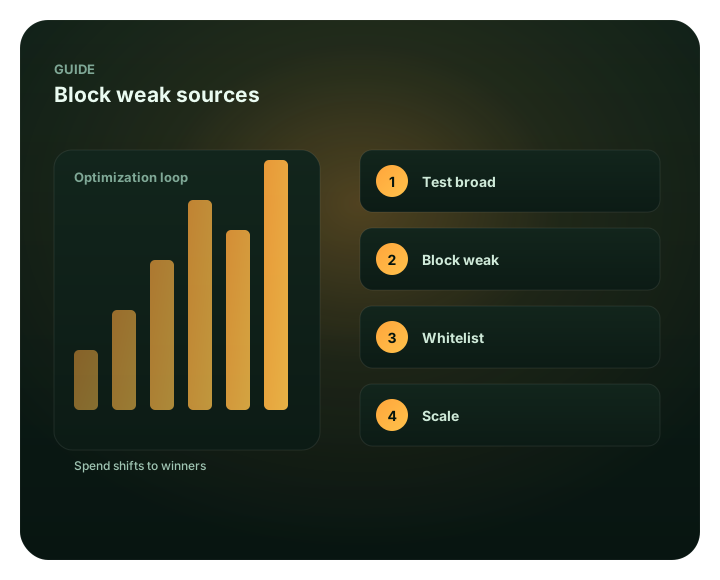
What this guide covers
This guide focuses on how to block bad traffic sources for advertisers. It explains the practical criteria, campaign controls, measurement steps and limits that matter before budget is increased. For broader context, continue with Block weak sources with a blacklist..
Apply the first decision in FroggyAds
Use one accepted outcome, then test source-level evidence against it before changing delivery. Keep the initial review bounded so you can diagnose a mismatch before committing more budget.
Create your free FroggyAds accountA measured review before you block
A block is a budget-control decision, not a guaranteed saving. Low outcomes can point to a weak source, but they can also come from an immature approval window, a broken destination, or a mismatch between the ad and the offer. Confirm the signal before changing delivery, and judge impact using mature accepted outcomes rather than click volume alone.
Our self-service advertising platform lets you manage campaign targeting, bids and budgets. For a source-level exclusion, start with the identifier available in your campaign records and confirm that the campaign controls support the same unit. Set the offer, conversion rule and review window first; then use the findings to decide whether to observe, cap, pause or block. No source change guarantees a lower cost per accepted outcome, so keep a comparison where feasible and review after the normal conversion delay.
Blocking workflow
- Sort sources by spend vs conversions
- Identify zero/low-converting source IDs
- Apply the narrowest verified source exclusion
- Review remaining sources against the same outcome rule
- Repeat as the campaign scales
Test the recommendation with controlled traffic
Set the conversion rule and review window before changing a source. Verify that the click route and identifier survive the same campaign path, then compare mature accepted outcomes before increasing spend.
Create your free FroggyAds accountSee block bad sources inside the platform
A campaign dashboard can speed routine review, but keep the underlying source IDs and advertiser-side conversion record so a block decision can be audited later.
- Rank source IDs by spend, accepted conversions, and conversion delay
- Flag source IDs that crossed the agreed loss limit without an accepted outcome
- Exclude only the verified source IDs, then watch the remaining traffic mix
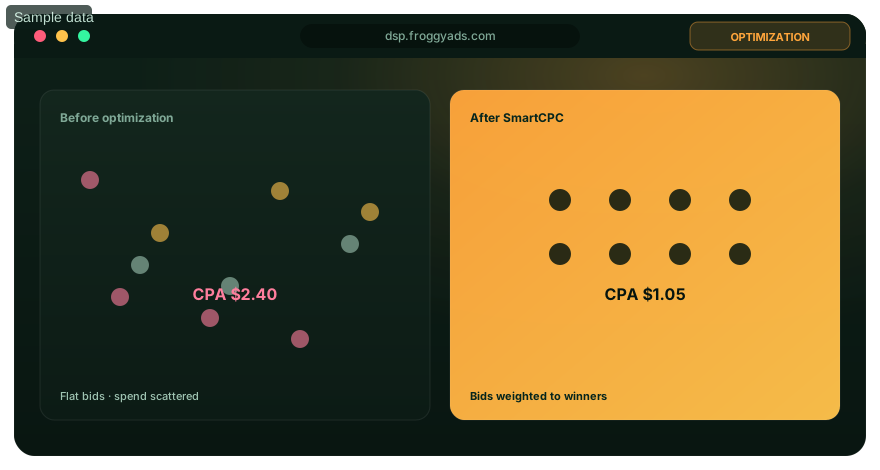
Turn the guide into a measurable campaign
Start with a bounded campaign test, keep the conversion rule consistent, and reconcile delivery data with your own outcome records. Increase spend only after a source passes your acceptance criteria over a mature review window.
Create your free FroggyAds accountFind, block, reclaim, repeat
A simple loop that compounds.
Find the wasters
In source-level reporting, sort by spend with zero or poor conversions.
Block at source ID
Blacklist those source IDs so the campaign stops buying them.
Reclaim the spend
Review the remaining source mix against the same mature outcome rule.
Repeat regularly
New weak sources appear as you scale – make blocking a routine.
Block bad sources on FroggyAds
Set a bounded campaign test and review mature outcomes.
Blocking FAQ
What should I investigate first?
Compare the source identifier with spend, accepted conversions and the normal approval delay before changing delivery.
When should I exclude a source?
Use the narrowest verified source ID and record the evidence, action date and condition for reviewing the exclusion.
How often should I review sources?
Review after enough delivery and conversion time to support a decision, and again after a material campaign or tracking change.
Related pages
Blacklist Targeting
Review when a defined source exclusion is appropriate and how to keep its scope narrow.
Test Traffic Quality
Use a separate validation workflow when you need to distinguish weak performance from a delivery or measurement issue.
Campaign Optimization
Continue with campaign-level testing after the source data is reconciled.
Whitelist Targeting
See how positive source selection differs from excluding a suspect identifier.
Clean up your campaign
Set up a campaign with a clear source-review rule and measurement window.
Questions about identifying and blocking weak traffic
What should I check before blocking a source?
Confirm the exact source ID, verify that it survives redirects, and compare tracker events with accepted backend outcomes over the same date range and time zone.
Does a high click-through rate prove invalid traffic?
No. It can reflect a creative or audience mismatch, accidental interactions, placement context or invalid activity. Treat it as a prompt to inspect more evidence, not a verdict.
How do I distinguish bad traffic from a tracking fault?
Test the click path, confirm campaign parameters persist, and verify that the expected conversion event appears in both the tracker and backend. Repair attribution before making a permanent source decision.
When should I pause instead of block?
A temporary cap or pause is suitable while you confirm a suspected problem or wait for delayed outcomes. Use a lasting exclusion only when the identifier and repeated evidence support it.
How long should I wait before changing a source?
Allow the cohort to pass the offer’s usual conversion and approval delay. Set the review window before launch and avoid interpreting an immature sample as a final result.
Which measurements help review a source?
Compare spend, delivered events, accepted and rejected outcomes, time to conversion, duplicate patterns and backend value. No single metric establishes fraud or commercial quality.
Should one weak placement trigger a category-wide block?
No. Start with the narrowest verified source identifier. Expand the exclusion only if adjacent sources show the same documented issue.
What should a block log contain?
Record the campaign and source IDs, date range, spend, evidence, action, decision owner, follow-up date and the condition for narrowing or reversing the block.
How can I retest an excluded source?
Use a bounded, separately labeled test only after the suspected tracking or quality issue has been addressed. Compare its mature results with a control under the same outcome rule.
How can FroggyAds help advertisers act on source evidence?
FroggyAds provides a self-service platform for campaign management. Use the source data and controls available in your campaign to verify the identifier and scope before changing delivery. Compare mature accepted outcomes, and choose a narrow, reversible action where your setup allows it.
Keep a source-review log that supports the block decision
A useful block record shows the identifier, evidence, action, review date and reversal rule.
Source decisions become difficult to audit when teams write only “bad traffic” in a spreadsheet. Use a short case record for each proposed exclusion so a second buyer can reconstruct what happened. Include the campaign and source IDs, the first and last delivery dates, spend, click count, mature conversion count, rejected or duplicated events, the conversion window and the system used for each number.
| Log field | Example of the evidence to retain | Decision it supports |
|---|---|---|
| Observed symptom | Spend increased while accepted leads stayed flat; source ID remained stable in the tracker | Whether to investigate the source, the funnel or the reporting path |
| Alternative explanations | Approval delay, destination error, offer mismatch, duplicate event or suspected invalid interaction | Which checks must pass before calling the source wasteful |
| Action and scope | Watch, temporary cap, pause or block; list the exact ID and time applied | Whether the response is proportional and reversible |
| Follow-up rule | Next mature cohort date, adjacent IDs to inspect and the condition for restoring delivery | When to keep, narrow or reverse the exclusion |
Do not expand one blocked ID into a whole category unless the additional sources show the same evidence. A narrow action limits the cost of a false positive and preserves a useful control group. If the problem disappears after a tracking repair, reopen the source review instead of leaving a permanent block that no longer reflects current evidence.
Keep the original export and a short change note together. The record should state who reviewed the data, what conversion definition was used and whether the decision relied on a provider report, analytics, or advertiser-side outcomes. That is enough to make a future review specific without turning the log into a claim that every excluded impression was invalid.
Put a controlled source-review plan into practice with FroggyAds: Create your free FroggyAds account.
Match the response to the failure you can verify
Choose the smallest reversible action that addresses the evidence, and keep unrelated sources running as a comparison where the campaign allows it.
Before changing delivery, classify the symptom. Several systems count clicks, sessions and conversions differently, and a missed identifier or delayed approval can make good traffic look poor. A narrow investigation protects the budget without turning one measurement fault into a broad exclusion.
| Observed mismatch | First verification | Proportionate response |
|---|---|---|
| Clicks have no matching sessions | Test the redirect chain, landing-page availability, device path and analytics tag using the same click parameters. | Repair the route or measurement first; do not treat an unmeasured visit as a proven invalid interaction. |
| Tracker events differ from backend approvals | Compare time zone, duplicate handling, attribution window, pending status and the offer’s acceptance delay. | Reconcile definitions and wait for the normal review window before labeling outcomes as rejected. |
| One placement spends without accepted outcomes | Confirm the exact source ID and whether the cohort has enough mature delivery for the written loss boundary. | Watch or cap that identifier while the next cohort matures; record a block only if repeated evidence supports it. |
| Clicks look unusually repetitive or accidental | Compare timestamps, duplicate events, device patterns, landing behavior and provider-side records; preserve the original export. | Ask the provider to review the specific sample and pause the narrow segment if continued spend risks the test limit. |
| Several IDs show the same symptom | Check for a shared redirect, creative, audience rule, offer restriction or conversion-tag failure. | Fix a shared setup fault before expanding the exclusion to neighboring sources. |
For each case, preserve the evidence that another buyer would need: campaign and source identifiers, reporting window, spend, delivered clicks or impressions, tracker events, accepted and rejected outcomes, and the date the decision was made. Add the owner of the review and the next point when the cohort can be judged again. This is particularly helpful when an affiliate network approves leads after a delay or a merchant adjusts orders for returns.
Consider a clearly labeled diagnostic scenario: the buying platform reports clicks, analytics shows few sessions, and the advertiser backend reports no conversions. That pattern alone cannot identify the cause. Test whether the destination loads through the same redirects, check that campaign parameters survive, and compare analytics consent and time settings. If the route is intact but sessions are still missing for one source ID, give the provider the time-bounded evidence and ask for a review before treating the case as a traffic-quality finding.
When evidence does support exclusion, make the change narrowly, note its exact scope and set a review condition. A temporary pause can be safer than a permanent block while the investigation is open. After the next mature cohort, compare adjacent IDs and the remaining campaign; reverse or narrow the action if the original issue was tracking, audience fit or offer eligibility rather than repeated invalid activity.
Keep the distinction explicit in reports: “low accepted conversion rate” describes a commercial result; “invalid activity” is a separate conclusion that requires supporting evidence. This language helps media buyers make defensible source decisions and keeps supplier conversations focused on observable records.
Use an evidence ladder before blocking a traffic source
Check the source ID, tracking path and conversion window before excluding traffic.
“Bad traffic” describes several different problems. An invalid interaction, an accidental click, an audience that does not fit the offer and a broken conversion tag can all produce poor results, but they call for different actions. A high click-through rate, a short visit or one rejected lead is a reason to investigate; none proves fraud by itself.
| Evidence stage | What to verify | Safe next action |
|---|---|---|
| 1. Confirm identity | Check that the source or placement ID persists through redirects and appears in the tracker and backend. | Repair missing or overwritten identifiers before judging a source. |
| 2. Check event integrity | Compare platform clicks with analytics sessions and accepted backend events over the same time zone and attribution window. | Reconcile counting differences; do not blacklist a source for a reporting mismatch alone. |
| 3. Separate the symptom | Review landing-page compatibility, accidental-click clues, duplicate events, rejected outcomes and offer eligibility. | Label the issue as tracking, audience fit, interaction quality or suspected invalid activity. |
| 4. Choose a reversible response | Compare spend and mature outcomes with the loss boundary you wrote before launch. | Watch, cap, pause or block one identified source; record why and when. |
| 5. Recheck the decision | Review the next cohort and neighboring IDs after the exclusion. | Keep, narrow or reverse the action if the evidence points to a wider tracking or setup fault. |
Make the first action proportional to the evidence. A cap or temporary pause can protect a test budget while you confirm attribution. A permanent block is easier to defend when the identifier is stable, the outcome window has matured and the same failure repeats under a consistent campaign setup. Keep a change log so another buyer can see which evidence triggered the action.
Google’s invalid-traffic guidance and provider checklist offer useful industry context, but they describe Google’s systems and general due diligence. They do not verify that a particular FroggyAds source is invalid or establish a FroggyAds detection feature. Use your own campaign records and the traffic provider’s documented controls for the final decision.
Independent references: These sources describe their own products and practices; they do not establish FroggyAds features: shopify.com; support.google.com
Start your next traffic campaign with a clear exclusion and review rule: Create your free FroggyAds account.
A hypothetical block decision with a clear comparison
Hypothetical example: a buyer spends USD 175 on one source and records 7 accepted outcomes after the agreed review window, giving an accepted CPA of USD 25. This arithmetic does not prove the source should be blocked. The buyer still compares that result with the offer's allowable acquisition cost and checks tracking, eligibility and any evidence of invalid activity before changing delivery.
A careful source review: from signal to action
Confirm the source identifier is blockable
Start with the exact campaign and source identifier shown in the report. Confirm that the identifier remains stable across the relevant date range and that the campaign control can act on that same unit. If the report groups several placements together or the label changes between exports, ask for a more precise breakdown before blocking; otherwise, the action may remove traffic you did not investigate.
Use the campaign ID and source ID together as the join key; a source label alone can collide across campaigns or change between reports. Keep the raw export and note whether the identifier represents a domain, placement, seller or another unit. If two systems show different labels, obtain the mapping before applying an exclusion. That check prevents a broad or misdirected block.
Use one reporting window across systems
Put spend, delivered clicks, tracker events and accepted outcomes on the same date range and time basis. Record the conversion window and any approval delay before comparing them. A lead that is still pending should not be counted as rejected, and a late event should not be assigned to a different source merely because the systems report in different time zones. Reconcile the definitions first, then decide whether the pattern persists.
Anchor the review to the click or impression date, then track conversion and approval dates separately. Write down each report’s time zone and whether its range uses calendar days or a rolling window. For lead campaigns, keep pending, accepted and rejected statuses distinct until the normal review cycle ends. This prevents late approvals from being mistaken for source failure.
Check the click path before judging quality
When clicks fail to appear as landing sessions, reproduce the route with the campaign parameters intact. Check redirects, page availability, device-specific behavior and whether analytics records the expected event. If the click path or tag is broken, repair that fault and repeat the comparison. A measurement gap can make a source look weak even when the visitor reached the offer; it is not proof of invalid activity.
Use the same test URL and expected event when checking the click path. Follow each redirect, confirm the landing page loads on the affected device, and inspect whether campaign and source parameters remain present at the conversion point. Compare a normal visit with a diagnostic visit without exposing personal data. Record the step where a value disappears so the repair addresses the actual break.
Separate invalid activity from weak fit
Low accepted conversion volume is a commercial result, not automatically a fraud finding. Compare the source against the offer's geographic and eligibility rules, the promise in the creative and the destination experience. A mismatch can justify changing the audience or landing page, while repeated invalid interactions require separate supporting evidence. Write down which conclusion the evidence supports so a low-performing source is not mislabeled.
Keep two labels in the decision record: commercial performance and traffic-integrity evidence. Low accepted volume may reflect an offer restriction, poor message match, a slow page or tracking loss. An invalid-activity concern needs its own observable pattern and provider review. If only the commercial threshold is missed, say so plainly and do not describe the source as fraudulent.
Set the evidence threshold before acting
Before delivery begins, define what would justify an exclusion: the outcome being measured, the minimum observation period, the repeat pattern that matters and the loss boundary the buyer is willing to accept while investigating. Use thresholds that fit the offer and its approval cycle; do not borrow a universal click count. A written rule prevents an alarming but immature sample from driving an irreversible decision.
One way to set an economic ceiling is to subtract variable fulfilment, refund and servicing costs, plus the margin you need to retain, from the contribution available per accepted result. Compare mature eligible spend with accepted outcomes against that ceiling. If no outcomes have matured, the calculation cannot distinguish a poor source from a pending cohort; use the prewritten spend limit while evidence develops.
Choose a proportionate campaign response
Match the control to the certainty and cost of waiting. Continue observation when evidence is inconclusive and spend remains within the test limit; use a narrower cap or temporary pause when more delivery could create material risk; block only the stable identifier supported by repeated evidence. Record the chosen scope and date. Do not broaden a source-level decision to a format, market or provider without separate proof.
Choose an action with an explicit boundary. Observation keeps the source eligible while more data matures; a cap limits further exposure; a pause stops additional spend during a diagnosis; a block excludes the identified unit. Record who can reverse the action and what evidence will trigger review. Confirm the campaign control and its scope before telling another buyer that delivery has stopped.
Keep a valid comparison where possible
Where campaign conditions permit, leave comparable sources active while changing only the suspect identifier. Keep the offer, creative, destination and outcome definition steady long enough to interpret the result. If you must change several settings at once, record that limitation; the comparison may explain whether overall performance improved, but it cannot isolate the effect of the block.
A comparison is most useful when the suspect source is the only changed input. Keep the offer, creative, destination, audience rules, bidding method and outcome definition steady where possible. If budget allocation or creative changes during the same period, label the test as mixed and avoid attributing the total difference to one exclusion. Compare equivalent mature windows and retain the original export.
Verify the effect after the change
After applying an exclusion, inspect the same source-level and accepted-outcome measures over a mature window. Confirm that the targeted identifier stopped receiving the relevant delivery and that the remaining campaign still follows its budget and audience rules. If the symptom continues across other identifiers, investigate a shared tracking or offer issue rather than expanding the block automatically.
After the change, check execution before interpreting results: confirm the excluded identifier matches the saved rule and see whether an equivalent alias or grouped placement remains. Then compare remaining delivery, accepted outcomes, spend and downstream value against the same pre-change window. A successfully applied rule shows that the control operated; commercial improvement still has to appear in mature outcomes.
Reopen the decision when conditions change
Set a review date and a reversal condition when the exclusion is made. Reopen the case after a tracking repair, material offer change, new source evidence or a change to the attribution window. Restore or narrow the decision if its original cause no longer applies. This keeps a block tied to current evidence instead of turning an old diagnostic judgment into an unreviewed permanent rule.
Reopen the case if the measurement route, offer terms, eligibility, creative, source mapping or attribution window changes. Document the new fact and decide whether the previous exclusion still fits. If retesting is justified, make it time bounded, label the source separately, set a loss boundary and keep the prior baseline. Restore the source only after testing the original reason for the block.
How to block bad traffic sources — what matters first
Check the source identifier, tracking path and conversion window before blocking traffic. A weak click signal alone cannot separate invalid activity from poor offer fit or broken measurement.