
Block weak sources with a blacklist.
Use FroggyAds blacklist targeting to exclude specific source IDs or zones while retaining other eligible traffic. Base each restriction on offer suitability, a verified quality issue or a spending decision supported by your campaign data.
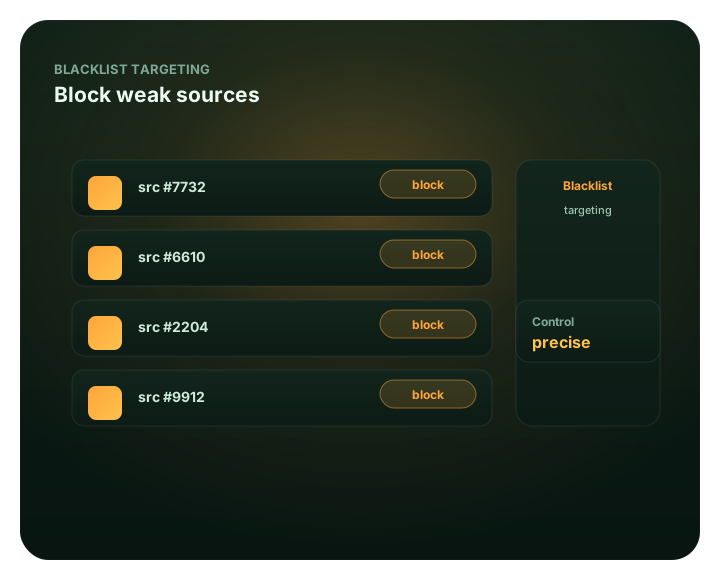
What this guide covers
This guide focuses on blacklist targeting for advertisers. It explains the practical criteria, campaign controls, measurement steps and limits that matter before budget is increased. For broader context, continue with How to block bad traffic sources..
This page covers using blacklist controls in your FroggyAds campaigns. For the definition and concept, see What is blacklisting.
Optimization is mostly subtraction
Blacklisting is useful when you can explain which source needs to be excluded and why. Our source-level controls let you act on that finding without removing unrelated inventory. Separate a hard budget stop from a permanent performance judgment: an early pause can protect spending even when the source has not yet produced enough data for a lasting conclusion.
Read the source report, check tracking and conversion delay, then apply the exclusion that matches the problem. Bids, whitelists and Adscore-supported screening provide complementary controls; none makes every remaining visitor profitable. Fund the account from our published $50 minimum deposit and set a separate campaign limit so exclusions remain part of a controlled buying plan.
Best for
- Cutting sources that spend but don't convert
- Protecting a test with explicit spending limits
- Removing low-quality or bot-heavy zones
- Acting on specific source-level findings
- Keeping scaled campaigns lean
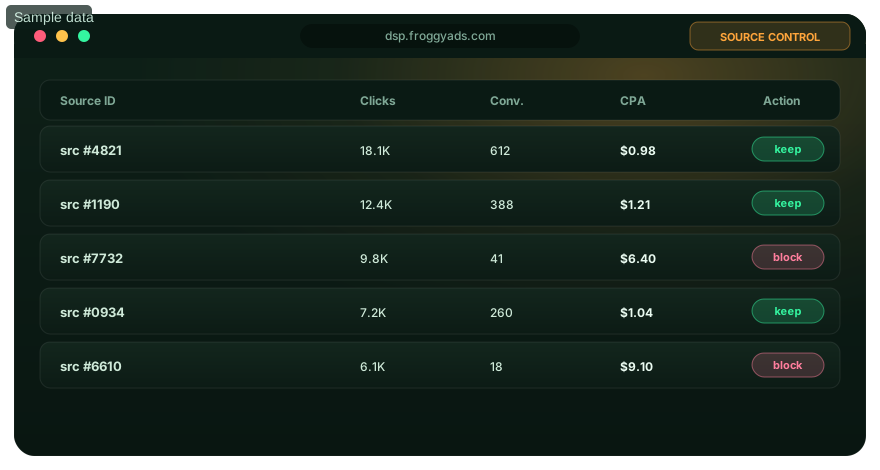
See blacklist targeting inside the platform
Everything runs from one self-serve dashboard – launch the campaign, target precisely, then watch results by source and optimize in real time.
- Cutting sources that spend but don't convert
- Protecting a test with explicit spending limits
- Removing low-quality or bot-heavy zones
Cut the leaks fast
The quickest way to stop wasted spend.
Block underperformers
Exclude source IDs or zones when the relevant evidence or spending boundary supports a pause.
Improve budget control
After an exclusion, check how the remaining budget and source mix change rather than assume all released spend will perform.
Source-ID precision
Blacklists work at the individual source level, so you cut surgically, not bluntly.
Layer with Adscore
We use Adscore and internal controls to support traffic-quality screening alongside your source exclusions.
Blacklist weak sources
Create your account, fund from $50 and set a separate budget for your source test.
Blacklist FAQ
What is blacklist targeting?
Excluding specific source IDs and zones so your campaign never buys from them.
How fast does it take effect?
You can block weak sources as soon as the data shows them underperforming.
Should I use whitelists or blacklists?
Often both – blacklist to cut losers early, whitelist to concentrate on winners as you scale.
Improve budget control
Create your account and blacklist weak sources across 20B+ daily impressions.
Blacklist targeting should remove proven waste without killing useful exploration
A blacklist excludes sources that no longer deserve spend. The key word is “proven.” Blocking too early can remove sources that simply have delayed conversions or small samples; blocking too late lets the same weak segment consume budget repeatedly. Use a written exclusion rule tied to meaningful spend and your accepted business outcome.
| Observed pattern | Action | Why |
|---|---|---|
| Meaningful spend, no accepted outcomes after the full delay | Blacklist or materially reduce exposure. | The source has crossed the test boundary without producing value. |
| Some conversions, but poor backend acceptance | Investigate tracking and audience fit, then exclude if the quality gap persists. | Front-end conversion rate can hide downstream rejection. |
| Low volume with inconclusive evidence | Keep capped or retest later. | Small samples are a weak basis for permanent exclusion. |
| Previously weak source after a major offer change | Retest in a separate campaign cell. | The original blacklist decision may no longer match the new funnel. |
Keep the blacklist tied to a measurable baseline
Record the source or ID, the date, spend, conversion delay and rejection reason behind every exclusion. When campaign volume changes, review whether the blacklist is protecting budget or simply shrinking delivery. This turns exclusion into an auditable optimization decision rather than a collection of forgotten source IDs.
FroggyAds gives you source and ID controls alongside market, device and other campaign targeting, so you can cut weak traffic without losing the rest of the campaign. Pair those controls with your own accepted conversion data and use blacklisting as one part of an ongoing test-and-scale process.
How to build a blacklist that removes evidence-based waste without overblocking
Blacklist targeting works when exclusion is the end of a measurement process, not the beginning. The purpose is to stop paying for a source or available traffic ID after the evidence shows it no longer deserves exposure. The difficult part is deciding when the evidence is strong enough. Block too early and you can remove inventory that simply has delayed conversions or a small sample. Block too late and a source can continue spending after the learning value is gone. A good blacklist therefore needs a loss boundary, a conversion-delay rule, an audit trail and a retest policy.
1. Define the event that a source must produce
Before you set an exclusion threshold, define the accepted business outcome. A click, engaged visit or front-end lead may be useful diagnostic signals, but they are not always the final value event. If your leads are validated later, use accepted leads in the blacklist decision. If your affiliate conversions can be rejected, use approved conversions. If your ecommerce funnel has cancellations or payment failures that materially change value, make sure your decision window captures the event you actually care about. This prevents a source with cheap front-end activity from remaining active even though the business rejects the outcome.
2. Write the no-conversion loss boundary before launch
A source with no accepted conversions has no calculable CPA, so you need another boundary. That can be a maximum spend, number of qualified visits or another unit that reflects the campaign economics. The exact threshold is yours because it depends on expected conversion rate, value per accepted event and risk tolerance. Write it before the source starts spending. Pre-committing to the boundary prevents two opposite errors: cutting a source after a few unlucky visits or allowing a favorite source to keep spending indefinitely because you hope the next conversion will arrive.
3. Respect conversion and approval delay
A source can look empty when conversions have not had time to mature. Record the normal delay from visit to accepted outcome and do not make a permanent blacklist decision until that window is reasonably complete. If spend is approaching the loss boundary before the delay ends, cap or pause the source temporarily rather than treating the absence of immediate conversions as proof of permanent weakness. When the delayed data arrives, you can decide whether to reopen, keep capped or exclude.
| Source state | Recommended action | Reason |
|---|---|---|
| Low spend, incomplete outcome window | Observe or cap | The evidence is too early for a permanent decision. |
| Meaningful spend, accepted outcomes within target | Keep | The source is producing value under the current rules. |
| Meaningful spend, repeated accepted outcomes but weak marginal cost | Reduce exposure before full exclusion | Part of the source may still be economically useful. |
| Loss boundary crossed with stable tracking and no accepted value | Blacklist | The learning case has been exhausted under the current hypothesis. |
4. Check tracking before you blacklist
A missing conversion event, broken postback or redirect problem can make every source look weak. If several sources suddenly stop converting at the same time, investigate measurement and the destination before excluding inventory. Compare platform delivery with tracker sessions and backend events for the same window. A blacklist built during a tracking outage can remove the sources that were actually working, and the damage may remain after measurement is fixed.
5. Avoid overlapping exclusions that hide the real cause
If you blacklist a source, remove a device type and narrow a GEO at the same time, you lose the ability to tell which exclusion improved performance. Apply the smallest control supported by the evidence. A source-specific failure deserves a source-specific action. A mobile landing-page issue deserves a device or page fix. A country-specific compliance restriction deserves a market-level decision. FroggyAds targeting gives you multiple levers, so choosing the narrowest defensible one helps preserve reach.
6. Distinguish source weakness from bid economics
A source may have accepted conversions but at a cost above your limit. That does not always mean a permanent blacklist is the only option. Depending on the campaign structure, reducing exposure, changing the bid or moving the source into a separately controlled test may be more appropriate. The goal is to stop uneconomic spend, not to maximize the number of blocked sources. When SmartCPC is used, continue to judge the result on accepted outcomes because automated bid changes do not make an unsuitable source valuable by themselves.
7. Use backend rejection reasons as blacklist evidence
For funnels with validation, the rejection reason can be more informative than the raw conversion count. If one source repeatedly produces duplicates, ineligible submissions or another clearly defined low-value result while other sources under the same funnel do not, the evidence for source-level action becomes stronger. Keep the categories factual and tied to your own backend. Do not assume a rejected lead is fraudulent unless your validation process supports that conclusion. A commercial-quality blacklist and an invalid-traffic blacklist can overlap, but they are not the same thing.
8. Record every exclusion
Your blacklist should be accompanied by a simple decision log. Record source or ID, campaign, market, date, spend, outcome window, accepted conversions, rejection pattern, action and reason. If the source is retested later, record the new hypothesis and result. This turns the blacklist into a reusable knowledge base rather than a set of unexplained identifiers. It also protects against duplicate testing by different buyers or account managers.
9. Create a retest policy
A source that failed one campaign context may perform differently after a meaningful change in the offer, landing page, market or creative. Retesting should not be automatic, but it should be possible when you can state why the old evidence may no longer apply. Use a separate, bounded campaign cell and keep the original blacklist history. If the source fails again under the new conditions, the repeated evidence strengthens the exclusion. If it improves, you can reintroduce it gradually rather than opening full exposure immediately.
10. Compare blacklist and whitelist strategies correctly
A blacklist starts broad and removes proven weakness. A whitelist starts narrow and buys only approved sources. Blacklisting can preserve discovery and scale because new sources remain eligible until they fail the rule. Whitelisting can protect a mature campaign by concentrating spend on known sources, but it may reduce exploration. Many buyers use both at different stages: broad test with blacklist discipline first, then a production whitelist or source-priority structure once enough winners exist. The right choice depends on whether your current problem is discovery, protection or scale.
11. Watch blacklist growth as a campaign-health signal
If the blacklist grows rapidly, ask why. The campaign may be reaching a long tail of weak inventory, the offer may have become less competitive, the landing page may be failing, or the exclusion threshold may simply be too aggressive. A bigger blacklist is not automatically evidence of better optimization. Review how much eligible reach remains and whether accepted outcomes are improving as sources are removed. If spend drops faster than quality improves, you may be shrinking the campaign without solving the underlying problem.
12. Re-evaluate exclusions after large campaign changes
A major shift in GEO, device, offer or destination can change the meaning of historical source data. Do not discard the history, but label which exclusions were made under the previous configuration. This is particularly important when the same source identifier can contain different audience mixes across campaigns. Historical evidence should guide the next test, not be treated as a universal truth independent of context.
13. Protect strong sources while testing new blacklist rules
If you change the exclusion logic, preserve a reference group when practical. That might be a stable campaign with the old source policy or a documented set of proven sources whose treatment does not change during the test. The reference helps you distinguish the effect of the new blacklist rule from broader market movement. Without a reference, a good week or bad week can be mistakenly credited to the exclusion policy.
14. Use a measured sequence inside FroggyAds
Start with targeting that matches the offer, verify tracking, define the accepted event and test-loss boundary, then collect source-level evidence. Where applicable, Adscore-supported traffic-quality controls can add screening before your own business validation. When a source crosses the written threshold, use source or ID controls to reduce or exclude it. Review marginal results after each wave of changes and keep a rollback point. This sequence uses FroggyAds controls as part of a decision system rather than as isolated switches.
15. Optimize for a better remaining portfolio, not for more exclusions
The measure of blacklist quality is what remains: traffic that continues to produce accepted outcomes and enough eligible reach to support the campaign. We recommend evaluating the portfolio after exclusions on accepted CPA, approval quality, source concentration and marginal scale. FroggyAds gives you the self-serve campaign tools to manage that portfolio, including budgets, targeting and source-level controls depending on campaign context. Your tracker and backend data determine which sources have earned continued access to spend.
Create your free FroggyAds account and build a disciplined source strategy
Audit the blacklist so exclusions keep helping the campaign
A blacklist should be reviewed like any other optimization asset. For each excluded source, keep the original evidence and the campaign context in which the decision was made. Then review the list after major offer, landing-page or targeting changes. The goal is not to remove exclusions casually; it is to know whether each exclusion still protects the current campaign rather than a campaign that no longer exists.
Check for overblocking
Watch the relationship between the size of the blacklist, eligible delivery and accepted performance. If exclusions continue to grow while accepted CPA does not improve, investigate whether the threshold is too aggressive or whether a campaign-wide problem is being misdiagnosed as many source problems. A healthy blacklist should improve the remaining traffic portfolio, not merely shrink it.
Use a rollback and restore process
When a blacklist change causes an unexpected drop in useful delivery, you should be able to identify which sources were added in that change and restore them selectively. Batch exclusions without a change log make rollback difficult. Record the before-and-after source set so you can reverse the latest action instead of rebuilding the list from scratch.
Separate permanent restrictions from performance exclusions
Some traffic may be ineligible because of compliance or offer rules; other traffic is excluded because it underperformed. Keep those reasons separate. A performance exclusion may deserve a retest after the funnel changes, while a compliance restriction remains in force until the underlying rule changes. Mixing both categories in one undocumented list creates unnecessary risk.
Give teams one source of truth
If multiple buyers manage the account, maintain a shared blacklist log with source ID, campaign context, date, reason, evidence and retest status. This avoids a source being re-enabled by one person while another believes it is still excluded for a valid reason. FroggyAds controls execute the traffic decision; the shared log preserves the business rationale.
Judge the blacklist by what remains
After every major exclusion wave, review accepted conversions, marginal CPA, source concentration and available scale. If quality improves and enough reach remains, the policy is doing useful work. If performance stays flat while volume collapses, revisit the diagnosis. The best blacklist is not the longest one; it is the smallest set of exclusions needed to protect the campaign under the current evidence.
Blacklist Targeting: final decision check
A final blacklist check should ask whether the remaining eligible traffic can still support the campaign objective. If exclusions improve average quality but leave too little reach to learn or scale, move from permanent blocking to capped retests for the most defensible candidates. The purpose of blacklist targeting is to improve the traffic portfolio, not to reduce the eligible source count as an end in itself.
Final operating rule
When a source is added to the blacklist, note the condition that would make its status worth reviewing. That may be a new landing page, a different offer, a material targeting change or evidence that the original tracking window was incomplete. A review condition does not automatically restore traffic; it creates a disciplined reason for a bounded retest and keeps the blacklist aligned with the current campaign rather than with an outdated configuration.
Blacklist targeting FAQ
What does blacklist targeting do on FroggyAds?
Blacklist targeting excludes the source IDs or zones you specify from a campaign's eligible traffic. It is useful when a source does not fit the offer, a verified quality issue needs action or its results no longer justify more spend. Our source controls let you make a focused exclusion while preserving other eligible inventory. Removing one source does not guarantee that the remaining traffic will convert or spend at the same rate.
When should I blacklist a source that spends without conversions?
First check that the destination and conversion tracking work, then allow for the offer's normal conversion delay. Use the spending limit you set for the test to decide when to pause further exposure. A hard budget stop can protect your account before the data is conclusive, but record that the result is still uncertain rather than label the source permanently bad from a small sample.
Should I block a source as soon as it costs twice my target CPA?
A spending multiple can be a planning rule, but it is not universal proof that a source cannot work. The useful threshold depends on conversion probability, delay, payout and how much you can risk learning. Set the rule before the test and distinguish a temporary pause from a permanent exclusion. Do not copy another network's example threshold without adapting it to your own campaign economics.
Can I blacklist traffic while conversion tracking is broken?
You can pause spending to protect the budget, and you should act on a separately verified safety or eligibility problem. But missing conversions during a tracking failure are not reliable evidence that a source is poor. Repair the measurement route, identify the affected period and keep that period out of performance comparisons. This avoids building a blacklist from records that never captured the customer's actual actions.
How do I distinguish low-converting traffic from invalid traffic?
Low conversion can reflect an unsuitable offer, weak creative, a broken form or normal variation; it does not establish bots. Investigate unusual timing, repeated events and other corroborating evidence before making an invalid-traffic claim. Adscore and our internal controls support screening, while your source and conversion reports help assess commercial fit. These are related checks, but they answer different questions.
Should I block a whole source when only one placement performs poorly?
Use the narrowest supported control that matches the evidence. Confirm what the source and zone identifiers represent in your FroggyAds report before excluding a larger group. A restriction on a parent source may remove more traffic than intended, and identifier hierarchies differ between networks. Check the selected level with support when it is unclear rather than importing another platform's subzone rules.
Will adding more sources to my blacklist always improve results?
No. Overblocking can remove useful traffic, reduce discovery and concentrate spending on a small pool that cannot support your goal. Review remaining delivery, customer quality and acquisition cost together as the list grows. A lower total spend is not an improvement by itself if you also lose valuable sales. Keep the reason for each exclusion visible so you can identify rules that are no longer useful.
Can I reuse the same blacklist across all my campaigns?
Keep exclusions tied to their reason. A documented ineligible placement may remain unsuitable for the same business, while weak results for one offer do not prove it will fail every other offer or country. Verify that the source identifiers apply to the new campaign, and separate permanent suitability rules from performance-based decisions. Avoid copying a large legacy list into a new test without checking its relevance.
When should a blacklisted source be tested again?
Retest when something meaningful has changed: the landing page was repaired, the offer now fits the audience or an old measurement issue has been resolved. Use a separate limited allocation and compare the new result with the original exclusion reason. Do not retest merely because the active campaign needs more volume. Our source controls help keep a justified retest distinct from traffic you already trust.
What should I record before saving a source blacklist?
Save the campaign reference, exact source IDs, exclusion level, review period, spend, conversion status and reason for the decision. Note whether it is a temporary budget pause, an offer restriction or a verified quality concern. Keep the previous list so you can reverse a mistake. Start with FroggyAds source reporting, then use blacklist controls to act on a specific finding rather than an unexplained campaign average.
Block weak sources with a blacklist: the buyer task this URL owns
Use Block weak sources with a blacklist when the immediate task is to understand the control and decide when to use it. For performance-focused advertisers, the useful output is a documented media decision rather than another broad advertising overview. The nearest related FroggyAds page is Whitelist Targeting; this URL keeps ownership of the distinct task to understand the control and decide when to use it.
For Block weak sources with a blacklist, the operating evidence to keep visible is invalid traffic, bot traffic, source quality, fraud prevention. Use these entities only when they change setup, measurement or the commercial decision.
| Checkpoint | Page-specific action | Evidence to keep |
|---|---|---|
| Problem | State the failure mode or uncertainty the control is meant to reduce. | Retain evidence specific to Block weak sources with a blacklist and its accepted outcome. |
| Setting | Define when the control should be enabled, limited or reversed. | Retain evidence specific to Block weak sources with a blacklist and its accepted outcome. |
| Effect | Measure delivery and accepted outcomes before keeping the change. | Retain evidence specific to Block weak sources with a blacklist and its accepted outcome. |
Hypothetical calculation: if a controlled campaign for block weak sources with a blacklist spends USD 100 and produces 7 accepted conversions, accepted CPA is USD 100 / 7 = USD 14.29. Replace the inputs with your own campaign economics; this is not a FroggyAds performance claim.
Start the paid-media test for Block weak sources with a blacklist with FroggyAds when you need direct control over formats, targeting, budgets and source evidence. Increase spend only after the result supports the next acquisition step. Create your free FroggyAds account.
Block weak sources with a blacklist — what matters first
Block weak sources with a blacklist is most useful when it helps a buyer understand the control and decide when to use it. Define the accepted outcome first, then use targeting, budget and source-level evidence to decide what deserves more spend.