
iOS App Install Campaign
An iOS app-install campaign should measure more than a download. Decide whether you are buying first installs, redownloads or re-engagement, instrument the post-install event that represents progress, and wait for privacy-preserving attribution and app-side outcomes to mature. FroggyAds can support the paid traffic test; Apple attribution and in-app event setup must be verified with your app team and participating vendors.
How should you define an iOS app-install campaign?
An iOS app-install campaign pays to bring eligible users into an iOS app; the download is only the first measured step.
For an iOS acquisition test, paid media brings eligible users to the App Store listing or the app journey. A download is an acquisition event rather than proof of activation, retention, subscription, or revenue. Choose the primary post-install success event before launch, and keep first downloads, redownloads, and later re-engagement under separate labels.
For a media buyer, the real decision is whether a source can acquire users who reach a defined product milestone within the time and cost limits the business can accept. A cost-per-install report can explain acquisition volume, but it cannot replace cost per activated user or the value of a later paid action. We recommend that you treat installs as the start of the measurement sequence and budget decisions as a separate step after evidence matures.
Which app audience and install objective should you choose?
Start with the product’s actual eligibility and user journey. Confirm that the app is available in the target territory, the store page matches the ad, the first-run experience works on supported devices and the offer can be fulfilled after installation. Decide whether the campaign seeks new users, returning users who reinstall, or people who already have the app and should reopen it. Those are different populations and should not share one success label.
Ask the product owner which early event predicts progress toward the business goal. A game may care about tutorial completion; a subscription app may care about trial start or renewal; a utility may value a completed setup. These are examples to adapt, not universal benchmarks. Record who owns each event and how it is validated. The campaign should not claim user quality before the app event and its business meaning are agreed.
How does privacy-preserving iOS install measurement work?
Privacy-preserving iOS install measurement uses limited, delayed postbacks and app-side events to assess eligible campaign outcomes.
Separate four layers: ad interaction, install or redownload, first app launch, and the post-install event your business accepts. Apple’s AdAttributionKit provides privacy-preserving attribution for eligible participating networks and apps through signed, limited postbacks. It does not expose a complete person-level journey to every party. Some fields can be conditional, and the app must implement the conversion-value behavior used in its measurement plan.
Apple’s documentation states that attribution postbacks are delayed; the minimum elapsed time between a conversion and network receipt is generally 24 to 48 hours, with additional event windows and app-side requirements. Do not treat a new install as a failed activation while the agreed cohort is still maturing. Verify network registration, app configuration and attribution rules with the app developer or vendor. Apple’s AdAttributionKit overview and Apple’s postback timing documentation explain the official framework and timing.
How should you budget an iOS app-install campaign?
Calculate separate ceilings for an install and for a later accepted user. Cost per install is spend divided by measured installs. Cost per activated user is spend divided by users who meet your written activation rule. If the business makes money later, compare the cohort’s observed net value with acquisition cost over a stated payback period. Do not treat estimated lifetime value as cash already earned.
Choose a spend cap that protects the downside while allowing the post-install event and attribution window to mature. Set a review schedule for technical delivery and a later schedule for business outcomes. A first-day install count is not enough to set a retention bid. If the event definition or conversion-value mapping changes, timestamp that change and keep the affected cohort separate from the earlier version.
What is a practical iOS app-install launch workflow?
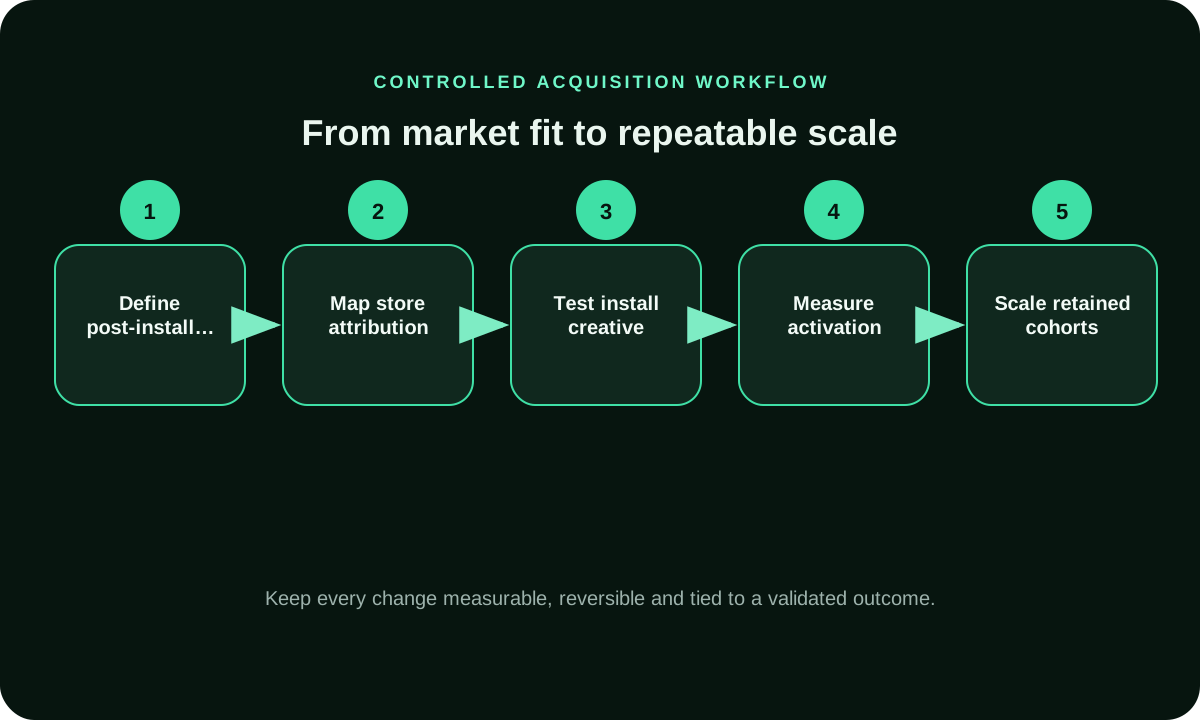
Build the campaign around the event sequence your app can really observe. Keep the acquisition setting simple enough to diagnose and the reporting detailed enough to separate a download from the product milestone.
- Separate first installs, redownloads and re-engagement before building the report.
- Choose an app event with a written definition and a responsible owner.
- Confirm app instrumentation, attribution participation and the destination path.
- Set a spend cap and let the relevant cohort and postback windows mature.
- Compare cost per accepted app event and later value before reallocating.
How should you segment iOS app-install campaigns?
Restrict delivery first to eligible territories, supported devices and the audience that can use the product. Split by source, creative or device only when the split answers a real question. Too many small ad groups can leave each with insufficient mature events, especially when postback delay and privacy thresholds limit early visibility.
Keep new install and re-engagement campaigns in separate reporting views. They have different starting states and should use different accepted outcomes: a first activation for new users, or a meaningful return action for existing users. If your measurement cannot distinguish these cohorts reliably, keep the comparison at a level your data supports rather than inventing precision.
How do you align an iOS install ad with the app experience?
The ad promise, App Store product page and first app session should tell the same story. Match the creative to the feature the user sees after install. If the ad promotes a trial, explain the trial terms before the user commits. If the app needs permissions or account creation, show why the step is useful and ask at the appropriate point in the experience.
Check the route on actual supported devices: tap, store listing, install, first open and event delivery. Confirm that deep links and re-engagement links open the intended screen when the app is already installed. Record a broken handoff separately from a media source result. We recommend you fix message or onboarding friction before increasing bids; paid reach cannot repair a confusing first session.
How do you evaluate app-install sources beyond CPI?
Keep source ID, spend and cohort date beside every reported install and post-install event. Separate invalid traffic, duplicate events, incomplete data and users who have not yet reached the measurement window. Then review source cost at each stage: cost per install, cost per first meaningful action and cost per retained or paying user where measured. A source can be strong on installs and weak on activation; the stage-by-stage view shows where value drops.
Use an explicit action for each diagnosis. Fix instrumentation when events are missing everywhere. Check source quality when one placement produces repeatable invalid or irrelevant behavior. Review onboarding when users install but do not reach the first milestone. Keep unknown rows pending rather than assigning them to a source without evidence. FroggyAds provides available campaign and source-level controls; app-side validation remains with your analytics and product systems.
When should an iOS app-install campaign be scaled?
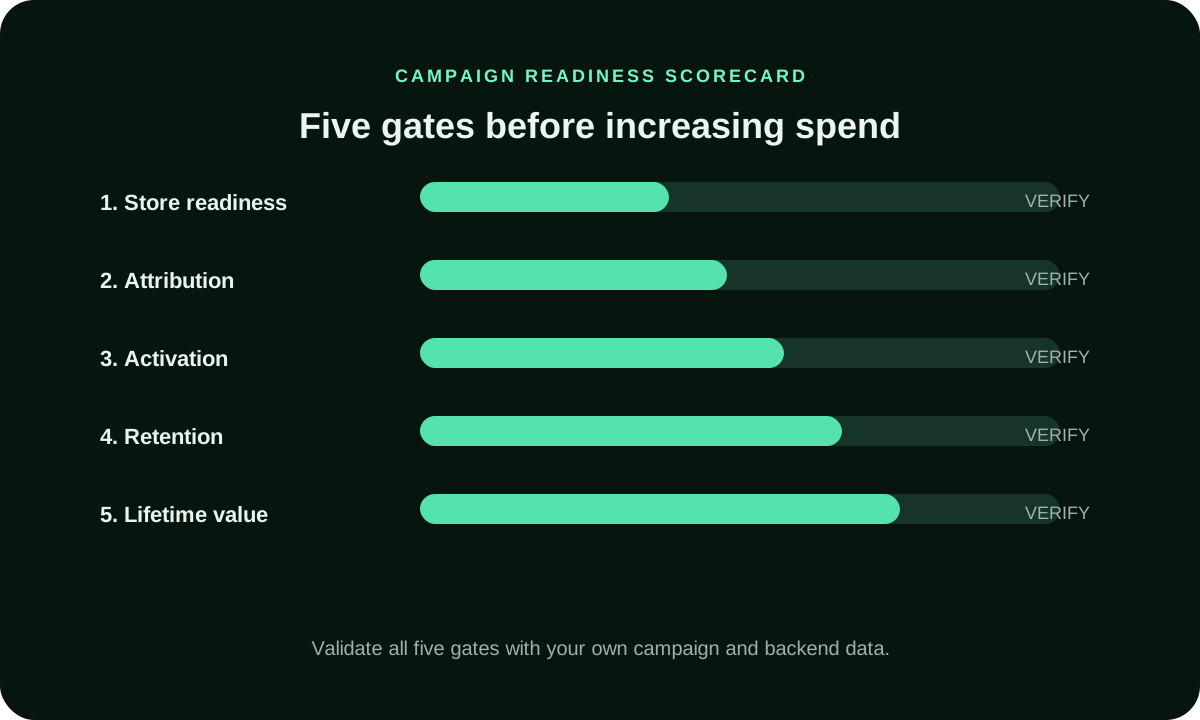
Scale only after both attribution and the selected app event are mature enough for comparison. A fresh cohort may have installs but not yet have time to complete onboarding, start a trial or make a purchase. Use the same event rule and observation window for the baseline and the proposed increase. When re-engagement is the goal, analyze the return action separately from the first-install cohort.
Increase one source, budget or audience dimension at a time. Track marginal cost and post-install quality rather than the blended campaign average. If attribution results are aggregated, delayed or conditional, use the strongest verified app-side evidence available and record the uncertainty. Pause expansion when acquisition cost exceeds your pre-set ceiling or when the measurement pipeline cannot distinguish real progress from duplicate or invalid events.
How should app teams interpret delayed install and event reports?
Maintain a cohort table with install date, source, event definition, attribution status, first app open, activation and any later value event. Label each row as received, pending, aggregated or rejected according to the source system. This prevents two common reporting mistakes: comparing a mature cohort with a new one, and counting an absent postback as a user who never converted.
Apple may delay attribution postbacks and restrict fields to protect privacy. Apple documentation also describes conversion-value updates and, for supported re-engagement flows, reporting that differs from first-install measurement. Compare platform totals with app analytics only after aligning the event, date, time zone and conversion window. Apple’s postback timing documentation and Apple’s postback parameter reference help interpret the signal; they do not establish that a particular FroggyAds campaign is connected to Apple’s framework.
What mistakes distort iOS install campaign decisions?
Do not optimize the campaign to the easiest event if the business cares about a later one. Cheap installs can mask poor onboarding, low retention or invalid users. Do not compare first installs with re-engagement opens, change the event mapping mid-cohort, or assume every delayed postback is a missing conversion. Those practices make source decisions difficult to repeat.
Do not infer individual identity through fingerprinting or combine browser, device and network attributes to recreate a user path. Apple limits attribution data for privacy and prohibits using device-derived data to uniquely identify people. Confirm the participating network and app configuration before relying on AdAttributionKit. If any integration or source is unverified, mark it pending and keep spend within a controlled limit rather than presenting a platform feature as proven.
How does FroggyAds support an iOS install test?
We provide advertisers with a self-serve way to configure paid traffic campaigns and work with the targeting, budget and source-level reporting controls available in their account. That helps your team run a bounded acquisition test, compare eligible sources and connect campaign decisions to app-side evidence. Use the settings actually exposed for the campaign and keep a baseline while you learn.
We do not claim here that FroggyAds is registered with or integrated into Apple AdAttributionKit. Apple says network attribution depends on registered participants and app configuration, so confirm those details with the relevant vendor before planning around postbacks. Your app team owns event instrumentation, conversion-value design and retention validation. Choose FroggyAds for the media buying workflow when you are ready to manage traffic and evaluate each stage honestly; create an account and start with a controlled campaign.
What should you verify before launching an iOS app-install campaign?
Before launch, decide whether the campaign is for a new install, redownload or re-engagement. Name one early success event and one later business outcome. Confirm the app is available, the store page matches the creative, event delivery is tested, and attribution participants and rules are documented. Set a spend cap and the date when each cohort becomes eligible for a decision.
During delivery, monitor clicks and installs for technical problems, but do not reallocate on raw volume alone. Afterward, reconcile source IDs, postback timing, app-side events and deduplication. Keep unknown data pending. Scale only when the accepted event and its economic value support the next increment.
iOS Install Measurement Preflight
- Keep first download, redownload and re-engagement as separate campaign outcomes.
- Name the app event that indicates progress beyond the install.
- Record the event owner, trigger, validation rule and deduplication method.
- Verify network registration and app configuration before relying on Apple postbacks.
- Version conversion-value mappings and annotate any change during delivery.
- Track install cohort age so a new cohort is not compared with mature users.
- Label postbacks as received, pending, aggregated or rejected rather than filling gaps.
iOS App Install Campaign FAQ
What is an iOS app-install campaign?
It is paid acquisition aimed at bringing users to an iOS app. A download is the first measurement stage; activation, retention, subscription and purchase are later outcomes. Define which one your business accepts before comparing traffic sources.
What is the difference between an install and re-engagement?
An install or redownload begins with app acquisition, while re-engagement aims to bring someone who already has the app back into it. Apple’s AdAttributionKit supports specific re-engagement flows for eligible implementations. Keep returning users separate from first-install cohorts.
Which post-install event should I optimize for?
Choose an event that reflects meaningful product progress and can be validated in your app systems. Examples include completed onboarding, a qualified trial start or a purchase, but the right event depends on your product. Document the trigger, time window and rejection rules.
How does Apple AdAttributionKit measure an install?
Apple describes a privacy-preserving system that sends signed, limited attribution postbacks to registered networks and participating developers. It can distinguish download and redownload and may include conversion values when the relevant conditions are met. Confirm current app and vendor setup before relying on the signal.
How long does iOS attribution take?
There is no immediate universal report. Apple documents a minimum delay of about 24 to 48 hours between a conversion and network postback, alongside event and conversion windows. Your app, configuration and measurement provider also affect when post-install outcomes become ready for a decision.
What does privacy-preserving install measurement mean?
It means measurement uses constrained, aggregated or delayed signals rather than exposing a complete individual path across apps. Some fields may be conditional or absent. Do not fill gaps through device fingerprinting; record what the system returned and what remains unknown.
How should I budget an iOS install test?
Use separate ceilings for installs and later accepted users. Estimate the maximum cost your business can tolerate from its margins and payback assumptions, set a spend cap, and let the chosen event window mature. No fixed CPI or test budget fits every app.
Why do installs and backend events disagree?
They can use different event definitions, time zones, attribution windows, deduplication rules and reporting delays. Compare the same cohort and action, document each system’s basis, and keep unresolved records pending instead of forcing totals to match.
When should I scale an iOS app-install campaign?
Wait until the install cohort and chosen post-install event are mature enough to compare. Confirm that accepted-event cost stays within your limit and that source quality holds after a measured increase. Treat re-engagement separately from new-user acquisition.
Does FroggyAds integrate with AdAttributionKit?
This page does not claim FroggyAds registration or direct AdAttributionKit integration. Apple requires participating networks and app-side configuration for postbacks. Confirm support with the responsible vendor, then validate your own event path before using the signal to scale.
Plan a controlled iOS app-install test
Before launch, decide whether you are buying first downloads, redownloads or re-engagement. Name one post-install event, its owner, validation rule and maturity window. Confirm the Apple attribution and app instrumentation path with the responsible developer or vendor; then set a spend cap before configuring your FroggyAds media test. Create your free FroggyAds account
Measure iOS installs beyond the install event
An install starts the funnel. Track activation and later commercial actions separately by install cohort.
| Decision layer | Evidence to retain | Review rule |
|---|---|---|
| Campaign objective | First install, redownload, re-engagement and later product milestones. | Do not report a download as an activated, retained or paying user. |
| Event design | Event name, owner, business meaning, trigger time and deduplication rule. | Count only validated app events; separate test, duplicate and invalid activity. |
| Attribution and conversion values | Network participation, app implementation, attribution rule and versioned event-to-value mapping. | Confirm eligible participation and keep the mapping stable; do not assume a FroggyAds integration. |
| Cohort maturity | Install/re-engagement date, postback receipt, event age and app-side outcome. | Account for event windows and delayed/conditional postback fields before reallocating. |
| Unit economics | Spend, attributed install, accepted event and later value by source. | Judge marginal cost per activated/retained user against your own payback limit. |
Which post-install event should count?
Choose a product milestone your app can verify, then define its trigger, owner, deduplication rule, and observation window.
AdAttributionKit postbacks are privacy-preserving, signed and limited. Apple says some fields, including conversion values and source-app identifiers, are conditional on privacy thresholds; a missing field is not proof of zero engagement. Review Apple’s AdAttributionKit overview and Apple’s postback parameter reference and keep the raw app-side event separate from attribution status.
Confirm the current participant and app configuration with your developer or measurement vendor. This page does not claim that FroggyAds is registered with or integrated into AdAttributionKit.
Make the next budget decision from mature app events
Compare cohorts at the same age and with the same event definition. For an install campaign, review first download and post-install milestone; for re-engagement, review the return action separately. Keep attribution receipt time next to the app event so reporting delay does not look like a failed user.
Hypothetical arithmetic: a test spends USD 300 and records 30 installs, so cost per install is USD 10. If 15 of those users complete the defined activation event, cost per activated user is USD 20. These figures illustrate the calculation only; they are not FroggyAds performance data. For a separate price-focused campaign comparison, review Cheap App Install Campaign; this page focuses on attribution and app-event maturity.
When your event path is verified, use FroggyAds to configure a controlled paid test, then expand only when mature source-level outcomes support it. Create your free FroggyAds account
| Checkpoint | App-install campaign action | Evidence before the next step |
|---|---|---|
| Define | Choose a post-install event that signals progress. | Owner, exact event rule, cohort and economic meaning. |
| Validate | Test event delivery, deduplication and attribution setup. | App-side event, postback timing, source record and unresolved rows. |
| Decide | Keep new users separate from re-engagement cohorts. | Mature event cost and later value where actually measured. |
What matters first in an iOS install campaign
Decide whether the campaign measures first install, redownload or re-engagement. Then define the event your product values and verify how Apple or your measurement provider reports it. Only after those two choices are stable can cost per install or post-install event guide the next spend decision. Apple’s postback timing documentation