
How to Scale Ad Campaigns
By FroggyAds
Scaling an ad campaign means buying additional traffic after a defined campaign has shown that the next unit of spend can still meet your business limit. The decision is not simply whether the current campaign looks profitable; it is whether additional impressions, clicks or conversions can be acquired at an acceptable marginal cost without reducing lead acceptance, purchase quality or fulfilment capacity. We help you turn that decision into a controlled media-buying test: keep the proven baseline identifiable, change one expansion lever, compare mature outcomes, and only then direct more budget to the next opportunity. With FroggyAds, you can choose supported ad formats, set campaign budgets and bids, apply eligible targeting, and review delivery by source in a self-serve workflow.
What Does It Mean to Scale an Ad Campaign?
Scale an ad campaign only when added spend can meet your acceptable acquisition cost and the offer, tracking and fulfilment can handle the extra volume.
When Is a Campaign Ready for More Spend?
A campaign is ready for more spend when its measured result has matured, tracking reconciles to the advertiser's accepted outcome, and the current audience or source still has room. One inexpensive conversion is not enough if an affiliate offer pays only after approval, refunds can still arrive, or the conversion window is longer than the test so far. Set the business ceiling first: maximum acceptable CPA for a lead or sale, minimum contribution per order, or target cost for an approved signup. Then compare the newest cohort with earlier cohorts using the same event definition and attribution window. If you cannot explain why the current result is good, hold the budget and fix measurement before widening delivery. Record the accepted-event count, spend tied to it, number still pending, and source mix. That prevents provisional actions from masking a costly cohort. If the event is a qualified lead, define the CRM status that qualifies; if it is a sale, record whether cancellations or refunds change the value.
Should You Increase the Budget or Expand the Campaign?
Increase budget inside the existing campaign when its audience or source still has headroom; expand reach when the current segment is the constraint. Keep the two tests separate.
Create your free FroggyAds accountHow Do You Set a Safe Next Budget Step?
There is no universal percentage that is safe for every ad platform or campaign. Choose an increment that is small enough to reverse if marginal economics weaken, but large enough to test a real delivery change. Before editing, write down the current budget, the new cap, the allowable marginal CPA, the review window and the rollback rule. Keep other settings stable for that window. If your platform uses an automated learning process, follow its own published guidance; do not import a percentage rule from another ad system and assume it applies to FroggyAds.
How Should You Judge the Extra Spend?
Judge a budget increase by the added accepted value relative to the added spend, not by the blended campaign average. Marginal CPA divides incremental spend by incremental accepted outcomes.
What Does Marginal CPA Look Like in Practice?
For example, a clearly hypothetical first cohort spends $200 and produces eight accepted leads, or $25 average CPA. A later $100 increase produces two additional accepted leads, so the added cohort's CPA is $50. Across both cohorts the blended CPA is $30 ($300 divided by ten leads). That average is useful for account context, but the $50 marginal figure answers the scale question: does the next block of spend fit your approved ceiling? This is arithmetic for illustration, not a FroggyAds performance forecast. For Google Smart Bidding specifically, Google's published discussion explains why marginal ROI can differ from average segment CPA or ROAS; our test still uses the outcome your own tracker and backend accept.
How Do You Expand by Traffic Source?
Use source-level expansion when one placement, zone or traffic source is driving the constraint. Preserve the source identifier in your tracker, compare spend with accepted outcomes after the conversion window, and separate a low-volume source from one that has enough mature spend to show it misses your economic limit. If a source is promising at a lower bid, test that price adjustment before discarding the whole campaign. If it repeatedly produces invalid, rejected or uneconomic actions, stop funding that source and keep the evidence in your change log. A source report helps you choose where to investigate; it does not by itself explain why a conversion happened. Match comparisons by format, GEO, device, bid and review window when those settings differ. If a source is under-sampled, mark it inconclusive rather than weak. When it has enough data, hold other settings steady and state what evidence would return it to active rotation.
Create your free FroggyAds accountHow Can You Add Reach Without Losing Diagnosis?
Open a new GEO or device segment as a fresh hypothesis, not as an invisible addition to the winning baseline. Keep the offer, creative promise and accepted event consistent while you test one new market or device group. Confirm that the page, payment flow, compliance and support can serve that audience before you buy more reach. If several settings change together, a better result does not tell you which change mattered, and a worse result does not show what to roll back. Name the segment in campaign tracking and review its economics separately until the new cohort has enough mature evidence for a budget decision.
What Should You Change When Efficiency Slips?
When efficiency slips after an increase, first separate measurement noise from a real change in the added cohort. Check whether source mix shifted, approval rates changed, attribution matured, the landing page slowed, or the offer reached a different quality tier. Compare the last stable cohort with the new marginal cohort instead of comparing two different date ranges or counting provisional events as final. If the accepted CPA is over your limit after the agreed window, revert the last expansion or reduce its cap. If the signal is inconclusive, hold the budget and collect the missing evidence rather than making several reactive edits. Also test the destination independently. A slower page, broken form, changed checkout or new consent prompt can reduce valid outcomes even when traffic has not changed. Check the same mobile journey and backend acceptance definition before blaming the source.
What Is a Useful Campaign-Scaling Workflow?
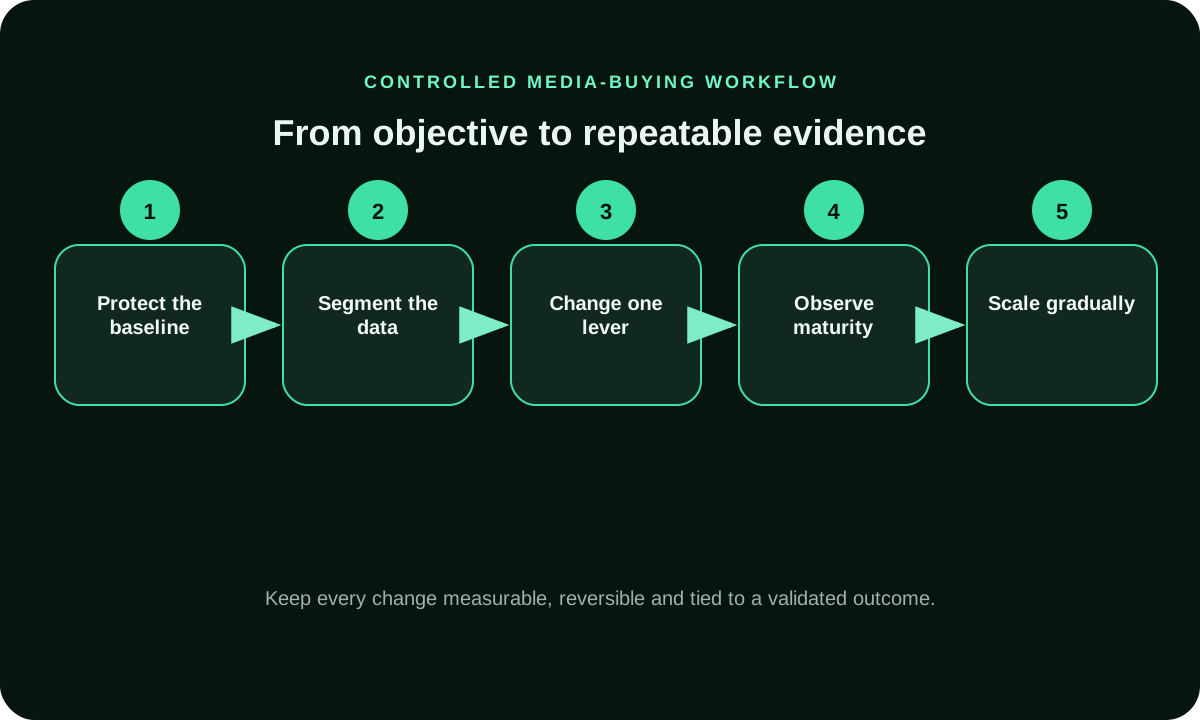
A useful scaling workflow has five decisions. First, freeze a baseline with the objective, accepted event, attribution window and current source mix. Second, confirm the baseline meets your economics and the funnel can handle more demand. Third, choose one lever: budget, source, audience, GEO, device or creative. Fourth, set the new cap and a review point before launch. Fifth, compare the added cohort with the baseline using the same accepted outcome. This sequence is different from raising a daily limit whenever spend looks good. It tells you what changed, which evidence supports the next step, and how to restore the previous setup if quality or margin weakens. Save a change record with the old and new setting, expected effect, owner and readout date. If the outcome moves, you can attribute the difference to the tested lever; if it does not, you know which assumption to revisit instead of replaying the same edit.
When Should You Keep the Winning Campaign Separate?
Keep the proven campaign intact when you need a clean comparison or a large structural change would make its result hard to interpret. Start a separate, clearly named test for a new market, offer, creative angle or traffic source; give it its own cap and reporting view. This does not guarantee the duplicate will perform like the original. It protects the baseline and lets the new version earn budget on its own accepted results. If the change is only a minor bid or cap adjustment and your platform supports a controlled edit, the same campaign may be easier to manage. Record why you chose the route before making the change. Where audiences can overlap, note that separate campaigns may still reach the same users; use exclusions only when supported and permitted, and interpret results with that overlap in mind. A duplicate is a comparison structure, not a guaranteed source of incremental reach.
How Can You Test More Volume Without Confounding Results?
Do not raise budget, replace the creative, widen targeting and change the conversion event in the same test. Keep the offer and destination promise, accepted event and attribution window stable where practical. Change one expansion lever, then label the new cohort so it can be compared with the previous one. When a genuine business constraint requires several changes at once, document them as one combined test and avoid attributing the outcome to a single setting. That discipline is especially useful for affiliate buyers: a higher click count may look like growth while the offer's approval rate or net payout is deteriorating.
Create your free FroggyAds accountWhen Should You Continue, Hold or Roll Back?
Continue when the new cohort has mature accepted outcomes inside your limit and the added volume is operationally manageable. Hold when delivery or conversion data has not matured enough to distinguish noise from a trend. Roll back the last expansion when the agreed review window closes and marginal cost exceeds your ceiling, accepted quality drops, or the destination cannot serve the added demand. These are buyer rules, not guarantees about how an ad platform will distribute traffic. Write the thresholds before the change, because moving them after a weak result turns a test into a story about why the loss should be ignored.
Which Metrics Belong in Each Review Window?
Review delivery and spend frequently enough to catch pacing or setup errors, but judge conversion quality only after its actual maturation period. A practical record separates delivery checks from cohort decisions: spend, impressions and clicks show whether the campaign is running; accepted leads, approved sales, refunds and contribution show whether the added traffic is valuable. Review source-level results when identifiers and sample volume support a comparison. Do not compare raw conversion counts across cohorts with different windows, offers or attribution rules. Set the review schedule around your sales cycle and approval process, rather than an arbitrary daily ritual. For affiliates, pair source spend with offer approval and net payout. For ecommerce, read accepted order value after cancellations or refunds; for SaaS, distinguish a trial start from a paid subscription when that is the business outcome. These events should not share one scale threshold.
How Do Delayed Conversions Change the Scale Decision?
Keep each cohort open until the advertiser's lead-approval, purchase-validation or refund window is complete. Mark a form submission or postback as provisional if the business can later reject it; do not let early counts trigger a budget increase. Preserve campaign, source and click identifiers from the ad through the tracker and backend so the final accepted event can be reconciled. When delay differs by market or offer, use separate maturity windows rather than applying the fastest window to every segment. This matters for affiliate campaigns, where network-reported clicks and an offer owner's approved conversions may describe different stages of the same journey. Check the cash cycle as well: commissions or invoice payments may arrive after media spend is due. Set a working-capital limit separately from your performance limit, so delayed receipts do not push the test beyond what the business can fund.
FroggyAds Controls for Campaign Expansion
How to Scale Ad Campaigns: Frequently Asked Questions
What must be true before you scale an ad campaign?
Increase spend only after tracking reconciles and the conversion window closes; judge the new budget tranche against your accepted CPA or contribution limit, not click volume alone.
When is an ad campaign ready for more spend?
A campaign is ready when tracking reconciles, the conversion window has matured, accepted CPA or contribution meets your limit, and the offer can handle more volume. One early conversion is not a reliable scale signal.
How much should I increase an advertising budget?
There is no cross-platform budget percentage that is safe for every campaign. Set the next cap from your loss tolerance and use the platform's own change guidance, then wait through your defined conversion window before deciding again.
Should I increase the budget or expand to a new audience?
Increase budget when the current audience or source still has efficient headroom. Test a new audience, GEO, device, format or source separately when reach is the constraint, so the expansion has its own evidence.
What is marginal CPA in campaign scaling?
Marginal CPA is the additional spend divided by additional accepted conversions after a change. Compare that cost with your business ceiling; the full-campaign average can hide a weaker new cohort.
Why can average CPA hide a weak scale-up?
Average CPA summarizes the full campaign, while marginal CPA measures the latest added spend and outcomes. Use the average for account context and the marginal figure for the next scale decision.
How long should I wait before judging a budget increase?
Wait until your selected outcome has matured under the offer's approval or refund rules and the comparison cohort is large enough to be useful. The right window depends on conversion delay, traffic volume and business variance.
How do source-level reports help me scale traffic?
Source-level reporting helps you find where spend and tracked outcomes differ, so you can investigate, adjust bids or exclude a repeatedly poor source. Confirm the identifier and accepted outcome before interpreting the comparison.
How should affiliate marketers count pending approvals?
Track clicks, postbacks, pending actions and offer-approved outcomes as separate states. Keep sub-IDs intact and use the offer's approval window before treating a lead or sale as final.
How can FroggyAds help me test additional campaign volume?
FroggyAds lets you choose supported ad formats, set campaign budgets and bids, apply eligible targeting, and review traffic by source in a self-serve workflow. Use those controls to test additional volume; your own accepted conversions determine whether it is worth scaling.
Related Tools for Your Next Campaign Decision
Turn a Measured Next Step into a FroggyAds Campaign
Before the next increase, confirm the accepted outcome, baseline dates, current cap, next test cap, allowable marginal cost, conversion-maturity window and rollback owner. Record the single lever that will change and where its source or audience identifier will appear in reporting. Check whether the offer, landing page, support team or payment system can accept additional demand. This short record stops a promising campaign from being scaled on incomplete numbers and makes the next review reproducible for another media buyer. A clear scale rule is valuable even when the correct decision is to hold.
Complete This Scale-Readiness Record Before Changing Spend
You do not need to rebuild a campaign to begin a scale test. Keep the baseline settings recorded, decide whether budget or reach is the constraint, and configure one controlled expansion with a separate review window. FroggyAds supports self-serve campaign setup, targeting and source-level review, so you can make an evidence-led choice about the traffic you buy. Start with the accepted business event, then check that the campaign's reporting identifiers connect to your tracker before committing the test budget. For a related guide to campaign structure, see How to scale campaigns.
For affiliate marketers, the decision needs one extra reconciliation step: compare source and click identifiers with the offer owner's accepted conversion record. For ecommerce or SaaS advertisers, include the downstream order, refund, trial or subscription status that defines value. The same click can be counted differently across platform, tracker and CRM, so store the event definition beside the review dates. When the campaign reaches its next review, compare like-for-like cohorts and keep any incomplete period out of the final scale decision.
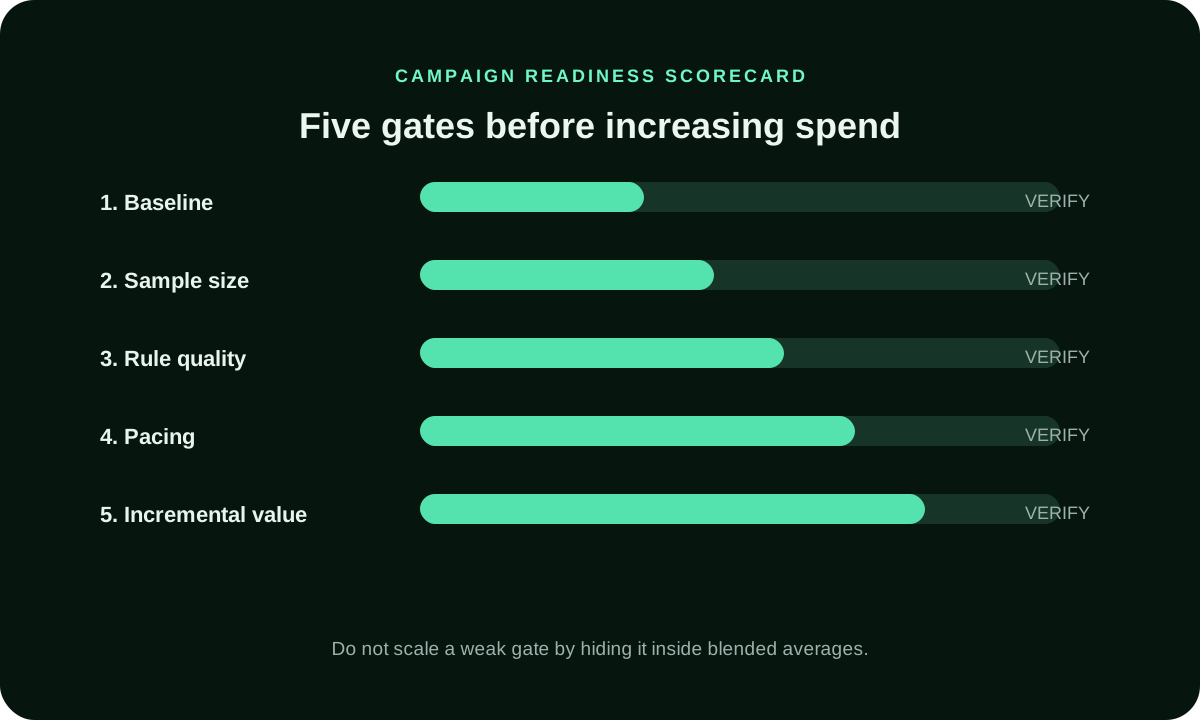
| Readiness gate | Buyer action | Evidence before adding spend |
|---|---|---|
| Sample sufficiency and outcome maturity | Set your evidence threshold before review; count accepted outcomes only after the relevant approval or refund window. | Cohort size, attribution window and acceptance status tied to the same source and click identifiers, reconciled with backend records. |
| Acceptable marginal economics | Add the next budget increment only when its incremental cost and accepted value stay within your own limit. | Incremental spend and incremental accepted outcomes measured under the same attribution rule and maturity window. |
| Payout timing and cash-flow capacity | Keep media-funding limits separate from performance; account for offer approval and payout timing before increasing spend. | Available test budget, media payment obligations, verifiable offer-program approval and payout terms, and capacity to serve added volume. |
Use the three-row record below before changing spend. If the outcome is still provisional, keep the current cap. If marginal economics fail, roll back the last lever. If economics hold but volume is constrained, open one separately named reach test and preserve the control.
Create your next FroggyAds campaign after you have chosen the accepted event, a bounded cap and one expansion variable. Use our source and targeting controls to make the test diagnosable, then return to your business data before moving the budget again. Create your free FroggyAds account.
Illustrative calculation: blended cost versus marginal cost
Hypothetical example: a first cohort spends $200 and produces eight accepted leads, for a $25 average CPA. A measured expansion adds $100 and produces two more accepted leads. The new blended CPA is $30 ($300 divided by ten), while the added cohort's marginal CPA is $50 ($100 divided by two). If the advertiser's limit is $55, the added cohort remains inside it; if the limit is $40, it does not. This arithmetic illustrates the decision only; it does not predict FroggyAds campaign results.
What to Do After the First Increase
After the first increase, wait for the stated cohort window, compare marginal accepted cost with your ceiling, and decide whether to continue, hold or revert. Then record what the added traffic changed: source mix, audience reach, accepted quality, contribution or operational load. FroggyAds gives you campaign and source controls for the next test; your own measurement decides whether another increase makes commercial sense.