
Android App Install Ads
Understand android app install ads, how to segment and measure it, and how to protect budget with source-level validation and controlled scaling.
What Android App Install Ads Means in Paid Acquisition
Android App Install Ads is best treated as a controlled acquisition method rather than a promise of instant customers. The operating purpose is to acquire app users through measurable paid campaigns while separating installs from activation, retention and revenue quality. The useful result is verified users whose post-install behavior supports the campaign’s cost and growth objective. Before buying traffic, document the conversion event, the accepted-value definition and the maximum loss the test can absorb. This protects the budget from a common mistake: treating every install as equal, confusing paid acquisition with organic app-store optimization, or scaling before retention data matures. FroggyAds provides self-serve access to broad inventory, targeting and source controls, while the advertiser remains responsible for the offer, creative, destination, tracking and commercial decision. The direct answer is practical. Use android app install ads when the available targeting and reporting can be connected to a real business outcome, then judge performance by cost per activated or retained user. Raw visits, clicks or installs are diagnostic signals, not the final definition of success.
Build the Market and Offer Fit First
A campaign should begin with a fit check between the offer, the audience and the destination. For Android App Install Ads, write down who can use the product, where it is available, which devices or environments are supported and what the user should understand before converting. Confirm pricing, fulfillment, language, policy restrictions and customer-support capacity. An app campaign can compare Android and iOS cohorts using the same value definition while keeping store conversion and post-install activation separate. This preparation keeps media analysis honest because a weak market match cannot be repaired by cheaper clicks alone. It also prevents unrelated variables from being combined into one campaign. Keep the first test narrow enough to diagnose, but broad enough to produce a useful sample. The central planning lens is install attribution, activation, retention, store readiness and cohort economics. Each element should have a measurable hypothesis and a clear owner before spend begins.
Define a Trustworthy Measurement Model
Measurement should be complete before android app install ads receives meaningful budget. Pass a unique click identifier, preserve campaign and source parameters, and return validated conversions through a server-to-server postback or another reliable event integration where available. Align attribution windows and time zones across the buying platform, tracker, analytics property and advertiser backend. Separate provisional events from accepted outcomes. An install, lead or purchase can require later validation for activation, quality, refund risk or fulfillment. Review discrepancies on a fixed cadence matched to the conversion delay and operational risk, instead of reacting to each isolated conversion. The primary decision metric is cost per activated or retained user, supported by conversion rate, rejection rate, time-to-conversion and downstream value.
Forecast Budget, Bids and Test Exposure
Start with the value of the accepted outcome. Subtract product, fulfillment, payment, support and variable operating costs, then set a conservative maximum acquisition cost. Translate that ceiling into a CPC or CPM range using a cautious conversion-rate assumption. Reduce the opening bid to preserve room for uncertainty, creative variation and source-level testing. A useful android app install ads budget must collect enough observations to compare sources without exposing the account to an unlimited loss. Record a hard stop and the evidence required to extend the test. A practical starting review point can be around 41 meaningful conversion opportunities, adjusted for payout, variance and conversion delay. The goal is not to buy the cheapest traffic. It is to buy enough measurable traffic to decide whether the economics can repeat.
A Five-Step Workflow for Android App Install Ads
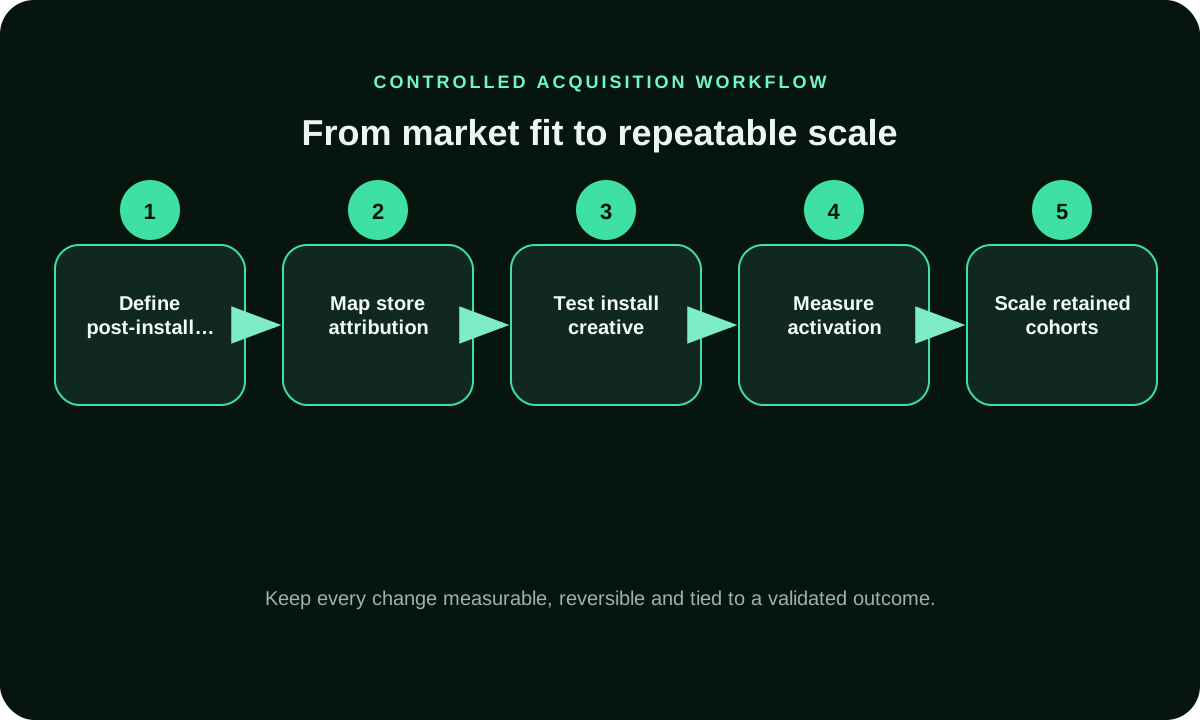
For Android App Install Ads, the workflow follows five connected decisions. First, confirm the market, audience and valid outcome. Second, prepare the creative and destination so the message continues after the click. Third, launch with separate reporting for the most important segment differences. Fourth, let data mature across sources and time periods. Fifth, scale only the combinations that remain inside the acquisition ceiling. This order matters because premature optimization can remove viable inventory, while premature scaling can amplify a short-lived result. Hold major campaign settings stable for at least 3 review cycles whenever the conversion volume allows it. The workflow visual below keeps the team focused on evidence and prevents budget changes from becoming disconnected from the original hypothesis.
Segment Android App Install Ads Without Losing Reach
Segmentation should explain performance, not simply make the campaign look precise. Begin with essential restrictions such as supported GEOs, languages, device compatibility and offer rules. Add category, keyword, device, operating-system, connection or source controls only when they support the user experience or a testable hypothesis. Keep optional targeting broader until enough accepted results exist to compare. A narrow segment can produce an attractive rate but too little volume to support growth. Broad inventory can also contain profitable placement pockets that become visible only after source IDs are preserved. For android app install ads, compare segments under the same conversion definition and avoid changing bids, creative and destination at the same time. This makes each conclusion more defensible and easier to repeat.
Creative, Message and Destination Continuity
The ad and destination should tell one truthful story. Use a headline that describes a real benefit or next step, a visual that supports the message, and a first screen that confirms what the user clicked. Avoid fake system warnings, unsupported performance claims, misleading scarcity and interface elements that imitate device controls. Test the destination on the devices, operating systems and network conditions represented in the campaign. Page speed is part of media performance because every delay creates paid abandonment before the offer can be evaluated. For Android App Install Ads, use one primary call to action and remove distractions that do not support the conversion. When a pre-lander is used, it should qualify or educate the visitor rather than hide the actual product or destination.
Use Source-Level Quality Controls
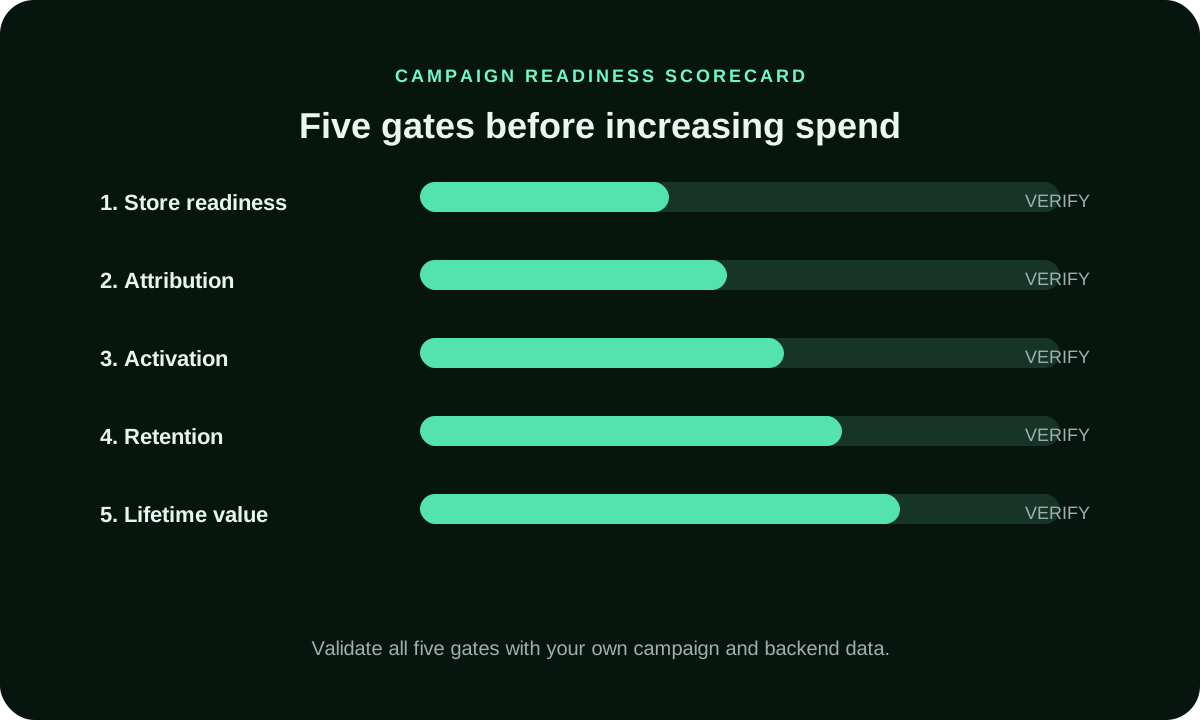
Preserve publisher, placement or source identifiers so android app install ads can be optimized at the level where performance differences actually occur. Classify sources by spend, sample maturity, accepted conversion quality and economic result. A source with no conversions may need more data when the expected rate is low, while a source that repeatedly generates rejected or invalid outcomes can be stopped earlier. Use blacklists for proven waste, whitelists for repeatable supply and bid adjustments for sources that are viable at a different price. Keep a baseline segment so the effect of each change remains visible. The readiness scorecard below applies five gates: Store readiness, Attribution, Activation, Retention, Lifetime value. Passing one gate does not compensate for failure in another.
Scale Android App Install Ads in Measured Increments
Scaling should increase profitable volume without assuming the original efficiency will remain unchanged. Raise bids or daily caps in measured steps, and let each increase collect mature data. Expansion can also come from additional GEOs, devices, audience groups, formats or source whitelists, but every expansion should have a separate reporting view. Watch marginal performance rather than the blended account average. A large proven segment can hide a new source group that is losing money. Stop scaling when accepted acquisition cost moves outside the planned range, quality deteriorates, the destination slows down or operational capacity becomes constrained. The objective of android app install ads is repeatable value, not the largest possible one-day traffic number.
Interpret Volume and Quality Together
Volume and quality should be reviewed as a pair. High volume is useful only when the tracking stack can attribute it and the business can process the outcomes. Low volume can appear efficient because a few conversions dominate the average, yet still be too fragile for planning. For Android App Install Ads, compare reach, win rate, click cost, conversion delay, accepted action rate and downstream value over multiple time periods. Identify whether performance changes when the budget increases. A stable source should remain commercially useful beyond the first small sample. Paid installs should not be presented as an organic ranking guarantee. App-store optimization and paid acquisition are connected disciplines with different signals. This is why source-level exports, backend validation and change logs are essential. They convert a traffic label into evidence that can support or reject a scaling decision.
Common Failure Modes to Avoid
The most common failures are operational. Tracking is incomplete, the destination does not continue the ad promise, budgets are divided across too many small campaigns, or sources are blocked before they reach a useful sample. Another failure is optimizing to CTR, install count or visit volume while the backend result is the true objective. Teams can also compare headline CPC or CPM without normalizing for conversion quality. For android app install ads, require evidence for every exclusion, bid increase and scale decision. Keep campaign exports, screenshots and a dated change log. These records make it easier to diagnose a decline, reconcile systems and prevent the same failed test from being repeated under a new name.
How FroggyAds Supports Android App Install Ads
For Android App Install Ads, FroggyAds is a self-serve media buying platform for advertisers, affiliates and performance teams that want direct campaign control. The platform provides access to 750+ SSP integrations and more than 20 billion daily impressions across supported formats and markets. Buyers can use GEO, city, device, operating system, browser, carrier, category, source, ID and IP controls where available, together with budgets and reporting. Those tools support install attribution, activation, retention, store readiness and cohort economics, but they do not replace truthful creative, offer compliance, reliable attribution or backend validation. Begin with a controlled budget, inspect source-level results and expand only when the campaign produces commercially useful outcomes. Results vary by market, format, competition, destination, conversion value and optimization quality.
Final Buyer Checklist for Android App Install Ads
Before launch, confirm five things. The audience and market must be eligible. The accepted outcome must have a documented value. Tracking must pass a live click-to-conversion test. The destination must load quickly and match the creative. The budget must include a stop rule. During the test, review source quality, conversion delay, rejected outcomes and effective acquisition cost. After the test, document the winning and losing hypotheses, the exact settings used and the assumptions that changed. Android App Install Ads becomes strategically useful when another buyer can repeat the decision process from the same evidence. No page, platform or traffic label can guarantee profit, rankings, installs, sales or lead quality.
Supporting controls for Android App Install Ads
Android App Install Ads FAQ
What is android app install ads?
Android App Install Ads is a paid-acquisition concept used to acquire app users through measurable paid campaigns while separating installs from activation, retention and revenue quality. It should be evaluated through cost per activated or retained user, not raw traffic volume alone.
Who should test android app install ads?
Advertisers, affiliates and media buyers can test it when the offer is eligible, the destination is ready, tracking works and a controlled loss limit is defined. For Android App Install Ads, validate this point against Android App Install, App Install Ads, App Install and keep it separate from the Android Traffic intent.
How much budget does android app install ads require?
Budget depends on the bid model, expected conversion rate, outcome value, GEO, competition and variance. Calculate a maximum acquisition cost before launch.
Which metric matters most for android app install ads?
The primary metric is cost per activated or retained user. CPC, CPM, CTR and visit volume are supporting signals that help explain the final result. For Android App Install Ads, validate this point against Android App Install, App Install Ads, App Install and keep it separate from the Android Traffic intent.
How should android app install ads be tracked?
Pass unique click and source identifiers, return validated events through a postback or reliable integration, and reconcile platform, tracker and backend data.
How long should a android app install ads test run?
Run until multiple sources and time periods have mature outcome data. The correct duration depends on volume, conversion delay and expected variance.
How can traffic quality be checked?
Review source-level behavior, duplicate patterns, time-to-conversion, accepted outcomes, backend value and attribution discrepancies rather than relying on one score.
When should android app install ads be scaled?
Scale after attribution is stable, accepted acquisition cost is within range, source quality is verified and performance survives a meaningful volume increase.
What should be avoided with android app install ads?
Avoid treating every install as equal, confusing paid acquisition with organic app-store optimization, or scaling before retention data matures. Also avoid misleading creative, unsupported claims and decisions based on very small samples. For Android App Install Ads, validate this point against Android App Install, App Install Ads, App Install and keep it separate from the Android Traffic intent.
Can FroggyAds support android app install ads?
FroggyAds provides self-serve inventory access, targeting, budgets and source-level reporting that can support a measured test. Results depend on the complete campaign system.
Continue the acquisition workflow
Build a controlled android app install ads test
Define one objective, verify tracking, protect the test budget and make source-level decisions from mature data. Results vary by offer, GEO, creative, destination, competition and optimization. For Android App Install Ads, validate this point against Android App Install, App Install Ads, App Install and keep it separate from the Android Traffic intent.
Android App Install Ads: decision depth without generic filler
This section exists to support one page-specific task for app growth teams: decide whether this option fits the buyer's acquisition workflow. It uses the page’s own headings, entity coverage and current comparison research as decision prompts. It does not turn external terminology into FroggyAds product claims, and it does not guarantee traffic quality, sales, profit or rankings. For Android App Install Ads, validate this point against the page-specific evidence and accepted outcome and keep it separate from the Android Traffic intent.
| Decision layer | Evidence to retain | Review rule |
|---|---|---|
| Scope And Accepted Outcome | Record the current conversion action context and the assumption being tested. | Review triple whale only if it changes the setup, measurement or accepted business outcome. |
| Audience And Eligibility | Record the current conversion window context and the assumption being tested. | Review whale only if it changes the setup, measurement or accepted business outcome. |
| Offer And Destination Continuity | Record the current attribution context and the assumption being tested. | Review northbeam only if it changes the setup, measurement or accepted business outcome. |
| Inventory And Source Context | Record the current source-level reconciliation context and the assumption being tested. | Review triple only if it changes the setup, measurement or accepted business outcome. |
| Budget And Bid Discipline | Record the current backend acceptance context and the assumption being tested. | Review rockerbox only if it changes the setup, measurement or accepted business outcome. |
Scope And Accepted Outcome for Android App Install Ads
Use What Android App Install Ads Means in Paid Acquisition as the evidence anchor for this layer. For Android App Install Ads, scope and accepted outcome should help app growth teams decide whether this option fits the buyer's acquisition workflow. Record the assumption, the campaign control it changes, and the evidence that would reject it before increasing spend.
Keep conversion action and attribution attached to that decision. A neighboring page such as Android Traffic may share vocabulary, but it owns a different buyer task; use this page only when the operating question remains decide whether this option fits the buyer's acquisition workflow.
Next step: When this page calls for paid traffic, create a bounded FroggyAds test with stable conversion tracking, the relevant targeting and format controls, and source-level evidence. Increase spend only after the accepted outcome and its cost relationship are mature enough to support the next decision. Create your free FroggyAds account. For Android App Install Ads, validate this point against the page-specific evidence and accepted outcome and keep it separate from the Android Traffic intent.
Android App Install Ads — page-specific decision checks
Android App Install Ads decision check 1: Define the install event separately from the post-install event the business actually values; install volume alone is not an acceptance rule.
Android App Install Ads decision check 2: Record operating-system version and device family when they materially affect compatibility, onboarding or downstream behavior.
Android App Install Ads decision check 3: Check the store listing and first-run experience before blaming media quality for weak activation after an install.
Android App Install Ads decision check 4: Keep source identifiers connected to install and post-install events so source-level acquisition quality remains diagnosable.
Android App Install Ads decision check 5: Use the same attribution and maturity window when comparing install sources; delayed actions can otherwise distort CPI and accepted cost.
Android App Install Ads decision check 6: Separate paid acquisition from store-page optimization so a change in listing assets is not mistaken for a traffic-source improvement.
Android App Install Ads decision check 7: Document the app version used during the test because product changes can alter activation, retention and conversion independently of media.
Android App Install Ads decision check 8: Review device eligibility before scaling; adding lower-compatibility devices can increase volume while reducing usable users.
Android App Install Ads decision check 9: Compare accepted post-install outcomes with spend before treating a lower CPI as a better commercial result.
Android App Install Ads: the buyer task this URL owns
The buying decision on this URL is specific: advertisers, affiliate marketers, media buyers and growth teams should use Android App Install Ads to calculate return from a defined accepted-value numerator and complete eligible-cost denominator. Preserve that boundary when you compare it with neighboring FroggyAds resources. The nearest related FroggyAds page is Android Traffic; this URL keeps ownership of the distinct task to calculate return from a defined accepted-value numerator and complete eligible-cost denominator.
Keep conversion action, conversion window, CPA, ROAS in the Android App Install Ads evidence record because they can change how this media test is configured, measured or scaled.
Android App Install Ads measurement context: Keep the measurement definition, source identifiers, observation window and advertiser-side system of record explicit so the result can be reproduced and challenged.
| Checkpoint | Page-specific action | Evidence to keep |
|---|---|---|
| Value basis | Define whether the numerator is contribution, profit or another approved value basis. | Retain the source definitions, timestamps and accepted-outcome evidence needed to reproduce the Android App Install Ads decision. |
| Cost basis | Include the eligible costs required by the stated ROI definition. | Retain the source definitions, timestamps and accepted-outcome evidence needed to reproduce the Android App Install Ads decision. |
| Attribution | Use one source/attribution rule and a mature observation window. | Retain the source definitions, timestamps and accepted-outcome evidence needed to reproduce the Android App Install Ads decision. |
| Decision | Use marginal ROI and business constraints to decide keep, change or scale. | Retain the source definitions, timestamps and accepted-outcome evidence needed to reproduce the Android App Install Ads decision. |
Hypothetical ROI example for Android App Install Ads: if accepted value attributable under the documented rule is USD 775 and eligible cost is USD 400, net return is USD 375 and ROI is 93.8%. Define the value basis and eligible costs for Android App Install Ads before using the result; this is not a FroggyAds performance claim.
When Android App Install Ads informs a traffic decision, FroggyAds lets advertisers, affiliate marketers, media buyers and growth teams isolate the media cell, retain source-level reporting and change one major control at a time. Let the advertiser-side conversion or value record decide whether the result deserves more spend. Create your free FroggyAds account.
Android App Install Ads worked application example
Hypothetical example: a buyer using this Android App Install Ads guide can turn one recommendation into a test by naming the accepted event, fixing the review window and changing one campaign variable. If USD 125 produces 6 accepted outcomes, the resulting accepted CPA is USD 20.83; use your own numbers and economics before deciding what to change next.
Android App Install Ads — what matters first
Android App Install Ads is most useful when it helps a buyer decide whether this option fits the buyer's acquisition workflow. Define the accepted outcome first, then use targeting, budget and source-level evidence to decide what deserves more spend. Interpret this point through the Android App Install Ads buyer task: decide whether this option fits the buyer's acquisition workflow. The neighboring Android Traffic page should not inherit this conclusion.