
SEO and GEO-ready campaign guide

App Install Ads

App Install ads should make one truthful promise to an eligible audience, use a format that fits the message, and lead to a matching destination. Keep creative IDs, targeting, budgets and tracking stable. Confirm store, privacy and permission disclosures, then judge concepts by accepted outcomes after conversion delay matures rather than clicks alone.

Reviewed and materially updated 2026-09-11 for App Install Ads. Recheck current inventory, approval conditions, pricing and campaign economics before launch.

App Install Ads planning visual
Key takeaways

App Install Ads in three decisions

What does this page explain about App Install Ads: Plan, Launch & Optimize Campaigns?

Quick answer: App Install Ads are creative and campaign executions designed for users whose operating system, device, language, country and problem fit the application. App Install Ads should lead to the correct store listing or deep link with consistent screenshots, permissions and product claims. Before launching app install ads, describe the app accurately, disclose material subscription or permission terms and respect store, privacy and audience rules. Scale app install ads only when tracking quality, source mix and an attributed install plus a qualified post-install event such as first open, signup, trial or purchase remain stable after a controlled increase.

SectionDistinct excerpt from this page
A creative and campaign frameworkCompare problem-to-solution demonstration, feature proof and fast first-value experience through an attributed install plus a qualified post-install event such as first open, signup, trial or purchase, not visual preference alone.
Questions about app install adsSet daily and total limits, then compare spend with install-to-open rate, cost per qualified activation and accepted value before changing the bid or budget.
Android and iOS app install campaigns: a source-level decision frameworkDirect answer: Android and iOS app install campaigns need platform-specific store links, attribution methods, privacy controls and post-install goals.

Reference for App Install Ads: Plan, Launch & Optimize Campaigns: Google Ads App campaigns.

Editorial review for App Install Ads: Plan, Launch & Optimize Campaigns: , .

  • Define users whose operating system, device, language, country and problem fit the application and exclude users who cannot lawfully or practically complete the offer. For App Install Ads, validate this point against App Install Ads, App Install, Install Ads and keep it separate from the Best Ad Network For App Install intent.
  • Keep the creative concept, destination, tracking and accepted-event definition stable while the first test matures.
  • Scale only when an attributed install plus a qualified post-install event such as first open, signup, trial or purchase and campaign economics remain inside the documented decision range. For App Install Ads, validate this point against App Install Ads, App Install, Install Ads and keep it separate from the Best Ad Network For App Install intent.

Planning note for App Install Ads: these takeaways support campaign decisions but do not guarantee pricing, available inventory, approval or performance.

What app install ads means

Definition: App install campaigns acquire compatible users for a named application and measure activity beyond the install event.

App Install Ads begins with a precise operating definition. Identify users whose operating system, device, language, country and problem fit the application; state the markets, devices and placements; and name an attributed install plus a qualified post-install event such as first open, signup, trial or purchase. The destination should be the correct store listing or deep link with consistent screenshots, permissions and product claims. A broad vertical name is useful for navigation, but the campaign itself must be expressed as concrete eligibility, creative, tracking and budget settings.

This page focuses on creative, format and campaign execution for App Install ads. The traffic resource covers acquisition planning, while the advertising-network resource covers provider evaluation. This separation helps operators choose the correct resource and prevents one page from pretending to answer every stage of the buying decision. It also gives search and answer engines a clearer relationship among provider selection, traffic acquisition and creative execution.

The main avoidable risk for app install ads is optimizing to install volume while ignoring activation, retention, duplicate events and unsupported devices. Put the risk into the brief before launch, assign an owner and define the signal that will pause the campaign. A written stop condition is more useful than a general intention to monitor quality because it creates an auditable decision when results move quickly.

A creative and campaign framework

Plan app install ads through five connected layers: audience insight, promise, format, destination and accepted economics. A creative can win attention and still fail when the promise attracts the wrong user, the format hides necessary context or the destination cannot complete the same expectation.

The strongest app install ads test is reproducible. Give each concept a stable identifier, keep targeting and destination versions documented, and change one major variable at a time. Compare problem-to-solution demonstration, feature proof and fast first-value experience through an attributed install plus a qualified post-install event such as first open, signup, trial or purchase, not visual preference alone.

Decision layerWhat to verifyWhy it matters
Scopeusers whose operating system, device, language, country and problem fit the applicationDefines who should see the campaign and who must be excluded.
PromiseProblem-to-solution demonstrationCreates one understandable reason to continue.
AccessMarkets, devices, formats and source availabilityConfirms the campaign can reach the intended context.
ControlBudget, bid, frequency, source and targeting controlsProtects the test and keeps decisions reversible.
Measurementinstall-to-open rate, cost per qualified activation and accepted valueConnects media activity with a mature business result.
SafeguardsDescribe the app accurately, disclose material subscription or permission terms and respect store, privacy and audience rulesReduces avoidable user, policy and brand risk.
Decision rule: Do not choose or scale app install ads from headline reach, a low CPM, early clicks or isolated conversions. Require stable tracking and mature accepted value.

Document the decision range before launch. For example, name the maximum spend without an accepted event, the minimum data required before a source exclusion, the conversion delay that must pass, and the margin needed before a budget increase. Those rules reduce emotional optimization and make the same evidence understandable to analysts, buyers and account owners. For app install ads, record this checkpoint in the campaign brief with the page-specific audience, destination, and accepted outcome before the next decision.
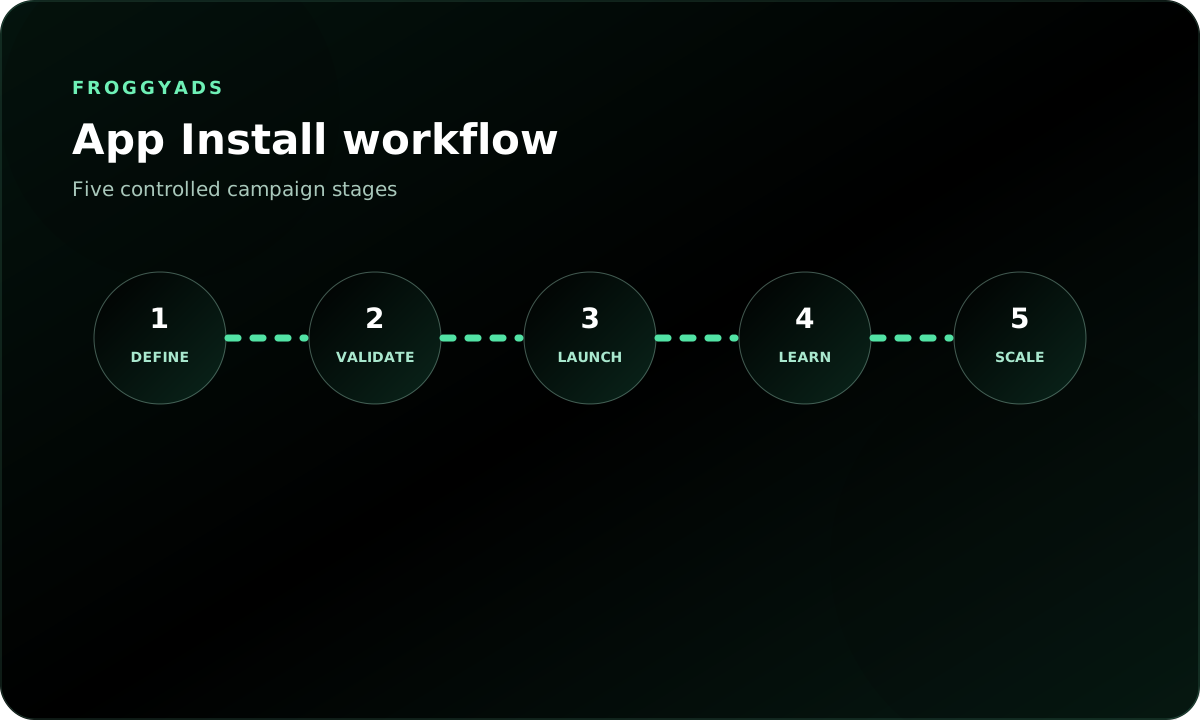
Controlled launch workflow for app install ads

Before buying app install ads, verify the complete user journey from impression to advertiser-side acceptance. Test the destination on representative devices, preserve the click identifier, fire the intended event once, and confirm that time zone, currency, attribution and duplicate handling agree across systems. This validation should happen before scale because later reconciliation cannot repair missing identifiers.

Keep a change log for app install ads. Record launch time, bid, budget, targeting, source status, creative identifier, destination version and every material edit. When performance changes, the log separates a real response from auction variation and shows which setup can be restored if the new version underperforms.

Define the operating brief

Name the markets, devices, audience, format, destination, an attributed install plus a qualified post-install event such as first open, signup, trial or purchase, attribution window, budget ceiling and decision owner for app install ads. Record exclusions and material safeguards before the first impression.

Validate the complete path

For App Install Ads, connect this point to the declared conversion path and accepted business outcome for this page. Open the correct store listing or deep link with consistent screenshots, permissions and product claims on every targeted device. Test click identifiers, conversion events, duplicate handling, currency, time zones and the advertiser-side acceptance logic.

Launch a protected test

For App Install Ads, connect this point to the declared conversion path and accepted business outcome for this page. Use daily and total limits, stable identifiers and a small set of variables. Keep major settings unchanged long enough for an attributed install plus a qualified post-install event such as first open, signup, trial or purchase to mature.

Diagnose by source and concept

For App Install Ads, translate this point into the actual operating-cost boundary for the decision on this page. Review market, device, source and creative results together. Compare install-to-open rate, cost per qualified activation and retained-user value instead of optimizing to inexpensive clicks.

Scale or restore the baseline

For App Install Ads, increase one dimension only after mature accepted economics remain stable; if quality, policy or destination performance weakens, roll back to the last documented setup and investigate the change.

Five-step workflow for App Install Ads

Do not compress this workflow into a single launch-and-scale action. Each step answers a different question: whether the campaign is eligible, whether the path works, whether the initial evidence is trustworthy, whether the source or concept is responsible for the result, and whether an increase preserves the same economics. For app install ads, record this checkpoint in the campaign brief with the page-specific audience, destination, and accepted outcome before the next decision.

Budget and measurement model

Budget app install ads for learning rather than for a predetermined number of conversions. Begin with a total amount the business can risk, divide it into a protected daily limit and reserve enough time for conversion delay. A cheap click can be expensive when it never becomes an attributed install plus a qualified post-install event such as first open, signup, trial or purchase; a higher-cost source can be useful when accepted value and downstream quality are stronger.

Use a metric ladder. At the top, track delivery and destination health. In the middle, review install-to-open rate and cost per qualified activation. At the bottom, reconcile retained-user value, refunds, reversals, retention or other final value. Optimization should move down the ladder as data matures rather than stopping at the easiest event. For app install ads, record this checkpoint in the campaign brief with the page-specific audience, destination, and accepted outcome before the next decision.

Measurement layerExample signalDecision use
DeliverySpend, impressions, clicks, frequency and source mixConfirm that the test is running as configured.
Path qualityLoad success, event integrity and destination completionDetect technical loss before judging media.
Qualified actioninstall-to-open rate and cost per qualified activationCompare sources and concepts after maturation.
Business valueretained-user valueDecide whether the campaign can scale.

Test budget

For App Install Ads, set daily spend and total test-loss limits that allow a useful comparison without exposing the full campaign budget before evidence matures.

Maturity window

For App Install Ads, wait through the documented conversion, approval, reversal or retention delay before excluding a source or declaring a creative, offer or concept successful.

Accepted value

For App Install Ads, reconcile platform events with the advertiser-side system used for approvals, revenue, activation or retained-customer value before making source decisions.

Measurement scorecard for App Install Ads

A practical example for app install ads is to launch three controlled source groups with the same destination and measurement window. Keep one group as the baseline, allow one group to test a different concept and reserve the third for a carefully chosen expansion. Compare after the accepted event matures, then move budget only when the change improves value without weakening eligibility or destination quality.

Creative, format and destination fit

For app install ads, useful creative directions include problem-to-solution demonstration, feature proof and fast first-value experience. These are starting hypotheses, not guaranteed winners. Give each concept a stable identifier and judge it through accepted outcomes. Cosmetic changes such as a slightly different color should not be presented as independent strategic tests.

Native and display placements can explain utility, push can support concise value propositions, and interstitial or in-app placements should preserve app-store continuity. Whichever format is used, the creative must make one accurate promise and the destination must complete that promise. The best format is therefore conditional on the amount of explanation needed, the user context and the accepted action. For app install ads, record this checkpoint in the campaign brief with the page-specific audience, destination, and accepted outcome before the next decision.

FormatApp Install executionPlanning note
PushUse a concise App Install proposition and a clear destination expectation.Best when the value can be understood quickly without imitating system alerts.
NativeExplain problem-to-solution demonstration with enough context to prequalify the user.Useful for education, comparison and considered actions.
DisplayUse recognizable, lawful imagery and a single legible promise for App Install.Supports repeated recognition across device and source groups.
Pop or interstitialPreserve immediate continuity with the correct store listing or deep link with consistent screenshots, permissions and product claims.Requires strict frequency, destination quality and policy review.
VideoDemonstrate feature proof without unsupported outcomes.Useful when motion genuinely clarifies the product or experience.

The destination for app install ads should be the correct store listing or deep link with consistent screenshots, permissions and product claims. Repeat the main proposition, identify the advertiser, disclose material terms and make the next action obvious. Test the page on the actual device and network conditions targeted by the campaign. A destination that is slow, unavailable or contradictory can create a false negative for every source and concept.

Creative review should include policy and user-impact questions before performance questions. Confirm that the image, headline and call to action do not exaggerate the offer or conceal a material condition. Then verify that the content is appropriate for the audience and placement. Only after those checks should the team compare attention and conversion signals. For app install ads, record this checkpoint in the campaign brief with the page-specific audience, destination, and accepted outcome before the next decision.

Source optimization, scale and rollback

Optimize app install ads at the most specific reliable level available. Review source, placement, country, device, operating system, browser, time and creative identifiers together. A broad campaign average can hide a strong segment and a weak segment. Source-level reporting turns that mixture into decisions, but exclusions still require enough mature evidence to justify the lost reach.

The primary risk to watch is optimizing to install volume while ignoring activation, retention, duplicate events and unsupported devices. Add a monitoring view that makes the relevant signal visible, and define what happens when it appears. Depending on the evidence, the correct action may be observation, a lower bid, a narrower audience, a destination repair, a creative pause or a complete stop. Blocking every weak early result is not the same as optimization. For app install ads, record this checkpoint in the campaign brief with the page-specific audience, destination, and accepted outcome before the next decision.

Observed statePreferred actionEvidence required
Tracking or destination failurePause and repairTechnical validation, not more spend
Promising but immature sourceObserve or limitMore mature accepted outcomes
Repeated negative source economicsReduce, exclude or lower bidAdequate spend, maturity and stable tracking
Stable accepted valueIncrease one dimension graduallyEconomics survive the previous increase
Performance breaks after scaleRoll back to the last stable setupDocumented baseline and change log

Scale app install ads with one controlled increase at a time. Expanding budget, audience, market and creative simultaneously changes the system too quickly to explain the result. A measured step preserves the learning from the baseline, while a rollback point protects the campaign when auction conditions, source mix or destination behavior shifts.

Use stop rules as actively as scale rules. Stop when the offer becomes unavailable, a required approval changes, tracking cannot be reconciled, the destination no longer matches the creative, or accepted economics remain outside the permitted range. A disciplined stop preserves capital and trust and prevents weak traffic from being blamed for a problem elsewhere in the path. For app install ads, record this checkpoint in the campaign brief with the page-specific audience, destination, and accepted outcome before the next decision.

Limitations and responsible use

App Install Ads does not guarantee impressions, clicks, accepted conversions, revenue or profitability. Auction availability, competition, user behavior, source mix, creative, destination quality, tracking and optimization all affect outcomes. FroggyAds can provide self-serve buying controls and reporting, but the advertiser remains responsible for the offer, campaign configuration, compliance and business decisions.

For app install ads, describe the app accurately, disclose material subscription or permission terms and respect store, privacy and audience rules. These safeguards are part of campaign quality, not a separate legal checkbox. A campaign that attracts ineligible users or uses a misleading promise can appear active while producing unusable events, complaints or policy risk. This guide is operational information and not legal advice.

  • For App Install Ads, use truthful creative and send only eligible users to a destination that is live, accessible and appropriate for the targeted market.
  • For App Install Ads, protect personal data and apply consent, tracking, disclosure and retention practices that fit the campaign, market and user context.
  • For App Install Ads, label estimates, starting bids, benchmarks and past results as non-guaranteed planning inputs rather than promises of future performance.
  • For App Install Ads, pause when offer eligibility, policy fit, destination integrity or measurement can no longer be verified.

Use cost examples and previous campaign observations as inputs, not promises. Replace assumptions when new evidence appears, update the page date only after a material change and keep the source or evidence trail for every time-sensitive claim. Those practices improve both operator decisions and the reliability of passages quoted by search or answer engines. For app install ads, record this checkpoint in the campaign brief with the page-specific audience, destination, and accepted outcome before the next decision.

Questions about app install ads

What should be verified before running app install ads?

Confirm the app, claims, audience, markets and store availability meet current platform and applicable requirements before paid delivery begins. Check the destination on representative devices and record technical failures separately from user rejection.

How does the app store page affect install advertising?

Store visitors should find supported product details, representative visuals, compatible devices and a reasoned next step that matches the acquisition message.

Which creative ideas are useful for app install campaigns?

Demonstrate a genuine use case, recognizable interface or outcome and compare distinct motivations instead of changing only colors or buttons.

How narrowly should a new install campaign target users?

Start with an audience broad enough to learn but limited by real eligibility, language, device support and the app's practical use case.

What attribution setup is needed for app install ads?

Define install, first open and downstream events, verify deep links and deduplication, and document any modeled or unavailable signals. Before buying app install ads, verify the complete user journey from impression to advertiser-side acceptance.

How can advertisers investigate suspicious app installs?

Compare timing, devices, source identifiers, repeated patterns and post-install behavior, then preserve evidence before requesting a source review. An app install campaign should connect the ad impression or click to the store visit, install or first open, activation event, retention checkpoint and in-app value.

Should an app campaign optimize for installs alone?

Usually not when the business needs active customers. Track activation, retention and an approved value event beside install volume and cost.

How should the first app install ad budget be limited?

Set a loss ceiling the business can absorb, divide it among a few accountable cohorts and keep budget available for correcting the listing or onboarding journey.

What should change during an app install ad test?

Vary one meaningful creative, audience or bidding hypothesis while keeping event definitions and the store experience stable enough for interpretation.

When is an install campaign ready for careful scaling?

Increase delivery after qualified post-install behavior repeats by source and market, with fraud checks and unit economics still inside the approved range.

campaign growth update

Direct answer: app install campaign

An app install campaign should connect the ad impression or click to the store visit, install or first open, activation event, retention checkpoint and in-app value. Creative truthfulness, store continuity and post-install quality matter more than the cheapest reported install.

Closely related service, platform, price and year variants reinforce one decision resource instead of creating competing pages.

Keyword ownership

  • app install campaign
  • app install campaign services
  • cheap app install campaign
  • app install campaign 2026

Decision boundary

Evidence event: a click or impression linked to install or first open, activation, retention and in-app value.

Decision: whether retained users or value justify the full acquisition cost.

Primary risk: optimizing installs without store continuity, attribution reconciliation or post-install quality.

LayerEvidence to preserveAction rule
ObjectivePrimary business outcome, eligibility rules, conversion definition, attribution window and expected decision date.Do not optimize until the objective and the event used for bidding or evaluation match.
DeliverySource, placement, GEO, device, creative, impression, click, session and spend records with stable identifiers.Separate delivery loss, tracking loss and value loss before changing bids or targeting.
QualityEngagement, consent, lead validity, activation, retention, accepted revenue and adjustment status.Judge the deepest reliable outcome that has enough volume and has reached maturity.
Change controlBaseline settings, hypothesis, budget cap, loss ceiling, observation window, stop rule and rollback state.Change one material variable at a time and preserve the previous stable configuration.

Operating checklist

  • Define the primary event and the diagnostic events separately.
  • Preserve campaign and source identifiers through the complete path.
  • Reconcile platform, analytics and business-system totals.
  • Wait for delayed outcomes and invalid-activity adjustments.
  • Record the scale, limit, investigate or stop decision.
Controlled self-serve media buying

Build a measured App Install Ads test

Define the eligible audience, destination, accepted outcome and limits for app install ads, verify tracking and make source-level decisions from mature evidence. Results vary by campaign and are not guaranteed.

Android and iOS app install campaigns: a source-level decision framework

Direct answer: Android and iOS app install campaigns need platform-specific store links, attribution methods, privacy controls and post-install goals. Use installs as an intermediate event and make scaling decisions from activated, retained or revenue-producing users.

android app install adsios app install campaign

1. Define the eligible opportunity

For android and ios app install campaigns, write the measurement unit before choosing inventory or creative. The unit for this page is an attributable app-store visit or install linked to campaign, source and retained post-install event. That definition prevents impressions, clicks, visits, installs and accepted business outcomes from being mixed into one ambiguous conversion total. State the inclusion rule, the disqualifying conditions and the time at which the event becomes final.

For App Install Ads, state one falsifiable targeting hypothesis comparing the selected signal with a broader baseline; when several signals are bundled, separate major assumptions into campaign or ad-group cells so results can be attributed without guessing.

2. Separate targeting from observation

For App Install Ads, apply this control to the page's stated scope and evidence window. The main planning dimensions are operating system, store, app version, creative, source, GEO, install attribution, activation, retention and value. Decide which dimensions actively restrict delivery and which remain reporting fields. Observation can preserve learning and reach while the team measures whether a segment deserves a stricter targeting rule. Exclusions must be documented with the same care as inclusions because an exclusion can remove profitable demand just as easily as a target can add relevance.

For App Install Ads, keep a compact taxonomy for campaign, source, placement, creative, audience or device rule and destination, preserving identifiers through redirects, analytics, conversion tracking and the final business system because platform reporting alone cannot prove advertiser-defined accepted outcomes.

3. Design the controlled test

For App Install Ads, run the first comparison with one stable destination, one primary accepted event, one attribution window and one loss ceiling; keep the offer and core creative promise constant, cover normal weekday, device and conversion-delay variation, and do not declare a winner from one cheap day or isolated placement.

For App Install Ads, compare a broader control cell with one or more targeted cells using enough budget to observe the useful event but a small enough exposure that failure remains affordable; if volume is thin, widen one restriction at a time and document every change.

4. Protect experience continuity

For App Install Ads, carry the creative, audience or device promise through the destination so visitors recognize relevance; validate load speed, form usability, deep links, compatibility, language, location availability and the primary-action path because targeting cannot rescue a slow, misleading or broken destination.

For App Install Ads, review the journey on representative devices and environments rather than desktop preview alone; test mobile or app keyboard, orientation, consent and return navigation where relevant, use desktop space accessibly, and log technical failure separately from user rejection.

5. Evaluate quality, not nominal price

A cheap android and ios app install campaigns campaign is useful only when the lower media price survives quality reconciliation. Compare valid delivery, engaged visits, useful actions, accepted conversions, refunds or reversals, and complete acquisition cost. Segment size and click-through rate are diagnostics, not proof of profit. Mature the data before comparing cells whose conversion or approval delays differ.

When using App Install Ads, apply this rule only to the conditions and decision described on this page. The most dangerous shortcut is optimizing to cheap installs without checking fraud, activation or retention. Prevent it with source-level monitoring, clear frequency rules, invalid-activity review and a stop condition defined before launch. When the platform reports modeled or estimated results, label them separately from directly observed first-party events so decision makers understand the evidence quality.

6. Scale without losing the explanation

For App Install Ads, apply this control to the page's stated scope and evidence window. The operational role of this page is to connect acquisition inventory to privacy-aware install and post-install measurement. Scale only after the targeted cell repeats across enough time, sources and creatives. Increase one material dimension per step, such as budget, GEO, audience size, placement count or creative volume. Keep the prior stable state available so the team can roll back quickly if quality deteriorates.

For App Install Ads, judge scaling on marginal rather than blended performance; recheck exclusions, frequency, source concentration and destination performance after each expansion, then stop or reduce spend when mature marginal results fall below the written threshold.

7. Privacy, consent and data boundaries

For App Install Ads, use only targeting and measurement signals permitted for the platform, destination, jurisdiction and user relationship; label each signal type, respect consent and opt-out states, minimize retained data and avoid implying user-level precision when evidence is aggregate or modeled.

For App Install Ads, plan for remarketing, app and operating-system identifier or authorization limits so aggregate evidence remains useful when user-level identifiers are absent; do not treat missing attribution automatically as zero value or present modeled value as directly observed fact.

8. Decision and rollback rule

For App Install Ads, connect this rule to the named audience, workflow, or comparison before acting. The final decision is whether retained user value exceeds complete acquisition cost on a repeatable basis. Define the acceptable range before traffic starts. A scale decision should require the primary accepted event, a complete cost calculation and enough repetition to reject an obvious one-day anomaly. Secondary metrics explain why performance changed, but they do not replace the primary business threshold.

For App Install Ads, keep a rollback package with the prior budget, targeting rules, exclusions, creative set, destination version and tracking configuration; pause affected expansion, preserve logs, diagnose the cause and reopen only after the cause and validation test are documented.

GateRequired evidencePass conditionFailure response
EligibilityWritten targeting rule, exclusions, consent basis and supported destination.Every delivered opportunity fits the declared rule or an explicitly measured exception.Correct targeting, remove unsupported segments and rerun a small validation cell.
Delivery qualitySource, placement, device or audience reporting; invalid-activity checks; frequency and technical logs.Valid delivery and experience quality remain inside the predeclared range.Block weak sources, repair the destination or reduce frequency before buying more.
Business outcomeAccepted event, revenue or value, reversals, delay and full acquisition cost.Mature contribution clears the written threshold on a comparable attribution basis.Stop the losing cell and diagnose targeting, creative, destination and tracking separately.
RepeatabilityMultiple days, sources, creatives and relevant environments under controlled settings.The result repeats without depending on one placement, day or unverifiable estimate.Keep the campaign capped until another independent cell confirms the result.
Scale readinessMarginal cost and value, source concentration, frequency, destination capacity and rollback state.New spend remains profitable and the previous stable configuration can be restored.Return to the last stable state and reopen only one expansion variable at a time.

Launch checklist

  1. For App Install Ads, name the primary accepted event and its maturity window before evaluating performance.
  2. For App Install Ads, document the targeting rule, observation fields and exclusions before the comparison starts.
  3. For App Install Ads, confirm source, placement, device, audience and destination identifiers so downstream evidence can be reconciled.
  4. Validate consent, privacy, location and operating-system constraints.
  5. Test the creative-to-destination journey in representative environments.
  6. For App Install Ads, set the budget, loss ceiling, stop rule and rollback state before launch.
  7. For App Install Ads, reconcile platform delivery with analytics and advertiser-side business outcomes before changing budget or targeting.
  8. For App Install Ads, scale one material variable only after the result repeats across the declared maturity window.
Stop rule: pause the affected segment when tracking fails, invalid activity exceeds the declared tolerance, the destination no longer supports the promised journey, or mature accepted value falls below the maximum acquisition cost. Keep diagnostic data, restore the last stable configuration and reopen only after a smaller validation test passes.
Search intent and buyer decision

How to use this App Install Ads page

This URL has one primary job for app growth teams: decide whether this option fits the buyer's acquisition workflow. Keep this page focused on that buying decision instead of turning it into a generic advertising article. The nearest related FroggyAds page is Best Ad Network For App Install; use that URL when its narrower task is the one you actually need. Applied to App Install Ads, this check should support the distinct decision to decide whether this option fits the buyer's acquisition workflow and remain traceable to the page's own evidence.

For App Install Ads, the remaining decision vocabulary is OS targeting and interstitial timing. Use these concepts only as practical checks tied to the page's buyer task and measurement rule.

StepCommercial General workflowEvidence to retain
1Define the buyer and accepted outcomeKeep the evidence tied to App Install Ads and the accepted outcome defined for this URL.
2Configure the smallest useful campaign testKeep the evidence tied to App Install Ads and the accepted outcome defined for this URL.
3Keep, cap or expand only from accepted-outcome evidenceKeep the evidence tied to App Install Ads and the accepted outcome defined for this URL.

Transparent App Install Ads decision example

Hypothetical example: if a controlled App Install Ads test spends USD 125 and records 8 accepted outcomes after the same review window, accepted CPA is USD 125 divided by 8 = USD 15.62. Replace the example inputs with your own economics; this is not a FroggyAds performance claim.

Use FroggyAds as the execution layer only when the page's decision calls for paid traffic. Set the relevant budget, targeting and format controls, verify conversion tracking, keep source-level evidence, and increase spend only when the accepted outcome supports the next step. Create your free FroggyAds account. Applied to App Install Ads, this check should support the distinct decision to decide whether this option fits the buyer's acquisition workflow and remain traceable to the page's own evidence.

Direct answer

App Install Ads — what matters first

App Install Ads is most useful when it helps a buyer decide whether this option fits the buyer's acquisition workflow. Define the accepted outcome first, then use targeting, budget and source-level evidence to decide what deserves more spend.