
App install advertising at scale.
Reach high-intent users on mobile with high-visibility formats and granular device targeting, then steer spend toward the sources that deliver quality installs.
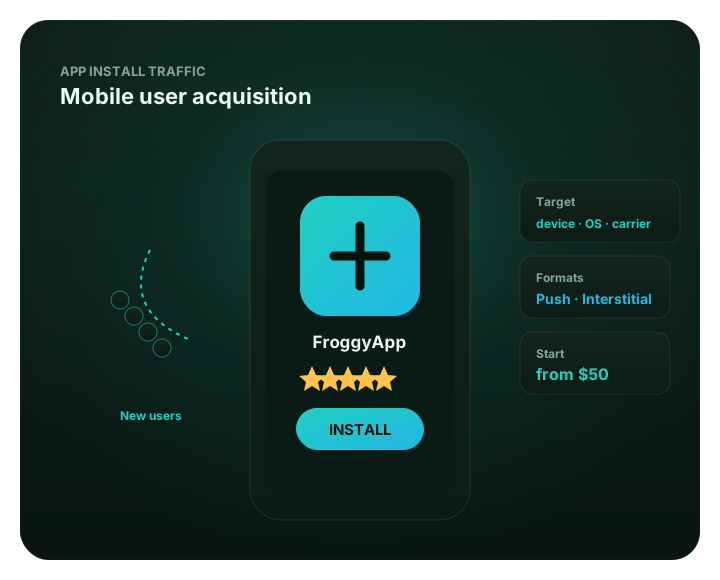
App install advertising at scale: at a glance
What does this page explain about App Install Advertising?
Quick answer: Reach high-intent users on mobile with high-visibility formats and granular device targeting, then steer spend toward the sources that deliver quality installs. FroggyAds reaches high-intent mobile users with high-visibility formats – Push, Interstitial and Video – and lets you target by OS, device, carrier and GEO so you focus spend on the users most likely to engage after install. Use source-level blacklists to cut sources with poor post-install behavior, whitelist the zones that deliver engaged users, and let SmartCPC help adjust bidding toward more efficient traffic based on available campaign signals and performance data. Cutting sources with poor post-install behavior — See app installs inside the platform.
| Section | Distinct excerpt from this page |
|---|---|
| Installs that stick, not just numbers | Our $50 minimum deposit funds the account, not a prescribed install test. Check eligible supply for your app and selected devices. |
| See app installs inside the platform | Driving installs with Push and Interstitial — See app installs inside the platform. |
| Blacklist weak sources | Fund your account from $50, set a separate mobile test budget, and compare installs with activation. |
Reference for App Install Advertising: FTC guidance on online advertising and marketing.
- Planning: Installs that stick, not just numbers.
- Control: See app installs inside the platform.
- Decision: Quality installs, not just volume.
Installs that stick, not just numbers
User acquisition is about quality installs, not raw volume. FroggyAds reaches high-intent mobile users with high-visibility formats – Push, Interstitial and Video – and lets you target by OS, device, carrier and GEO so you focus spend on the users most likely to engage after install. Our $50 minimum deposit funds the account, not a prescribed install test. Check eligible supply for your app and selected devices.
The controls protect install quality as you scale. Use source-level blacklists to cut sources with poor post-install behavior, whitelist the zones that deliver engaged users, and let SmartCPC help adjust bidding toward more efficient traffic based on available campaign signals and performance data. Results depend on tracking quality, conversion volume, the offer and campaign settings. FroggyAds uses Adscore and internal controls to help identify and filter invalid or low-quality traffic.
Best for
- Driving installs with Push and Interstitial
- Targeting by OS, device and carrier
- Cutting sources with poor post-install behavior
- Scaling quality installs with whitelists
- Using traffic-quality and source controls for install campaigns
See app installs inside the platform
For App install advertising at scale, the FroggyAds self-serve workflow keeps campaign setup, targeting, budget controls, source-level reporting and optimization in one dashboard so advertisers can make evidence-led keep, cap, exclude and retest decisions.
- Driving installs with Push and Interstitial — See app installs inside the platform
- Targeting by OS, device and carrier
- Cutting sources with poor post-install behavior — See app installs inside the platform
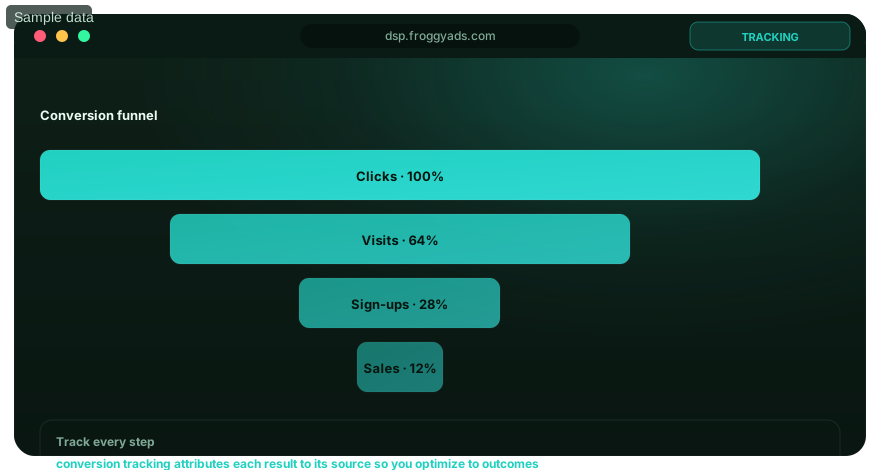
Quality installs, not just volume
High-visibility formats and device-level control for user acquisition.
High-visibility Push
Reach opted-in mobile users with notification ads that drive action.
Interstitial & Video
Capture full attention with full-screen and video placements.
Device-level targeting
Target by OS, device, carrier and GEO to reach the right users.
Blacklist weak sources
Cut sources with poor post-install behavior and scale clean zones.
Acquire users with FroggyAds
Fund your account from $50, set a separate mobile test budget, and compare installs with activation.
App-install FAQ
Which FroggyAds formats can support an app install campaign?
Eligible campaigns can use Push, Interstitial and Video formats. The right starting format depends on the app, audience, creative asset and destination flow rather than a universal winner.
How narrowly can an app install audience be defined?
FroggyAds provides controls for geography, operating system, device and carrier where inventory supports them. Begin with settings that match app availability and leave enough traffic for a useful test.
How can an advertiser prevent device mismatches in the app download journey?
Send the visitor to the correct store or approved landing route for the detected device. Test redirects, tracking parameters and the install path on every operating system included in the campaign.
Which event should determine app campaign success?
Choose an accepted event that reflects the business goal, such as a verified install followed by a required in-app action. Clicks and store visits help diagnose the funnel but are not the same result.
How can source controls improve an app install test?
Review results by source after enough attributable activity, then use blacklists or whitelists to act on documented patterns. Preserve the before-and-after record so a source decision can be reversed.
What protection does FroggyAds use against invalid app traffic?
The page describes Adscore and internal controls as parts of traffic review. Advertisers should still reconcile platform events with their own analytics and investigate unusual quality patterns.
Is SmartCPC always the right bidding choice for app installs?
No bidding method is automatically best. SmartCPC can be tested against the campaign's accepted event, budget and attribution window, with one material variable changed at a time.
What budget can open an app install advertising test?
Our $50 minimum deposit funds your advertising balance; it is not a guaranteed sufficient app-install test budget. Set the campaign allocation separately and allow time to measure installs and the post-install event you value.
Why should Android and iOS results be reviewed separately?
Store journeys, device mixes, tracking behavior and post-install actions can differ. Separate reporting prevents one operating system from hiding a problem or an opportunity in the other.
When is an app install campaign ready to scale?
Raise spend only after installs and the chosen downstream event reconcile, source quality is stable and the app can support the added users. Increase one controlled segment or bid step at a time.
Scale app installs on FroggyAds
Create your account and reach mobile users across 750+ SSP integrations.
New App Install Advertising resources
Related monetization guides
Optimize app install advertising for the first meaningful in-app outcome
An install is an important acquisition event, but it does not by itself prove that media produced a useful user. Define the next meaningful event the advertiser can measure responsibly, such as successful first open, completed registration, tutorial completion, subscription start or another app-specific activation. Keep that event stable while the campaign learns. This gives the media team a quality signal that can distinguish sources producing usable users from sources that generate inexpensive installs with weak post-install engagement.
FroggyAds gives app advertisers access to multiple formats, including push, native, display and pop, together with country, city, device, operating-system, browser, carrier, category and source-level controls. Device and OS targeting are especially important when the app supports only particular environments or store paths. Exclude combinations that cannot complete the intended install journey, and test every destination or store route before increasing delivery. A compatibility failure can look like poor media quality even when the underlying traffic is eligible.
| Acquisition stage | Possible advertiser-defined event | Optimization question |
|---|---|---|
| Ad engagement | Qualified click or destination visit | Is the message attracting the intended audience? |
| Install | Validated app installation | Does the acquisition path complete successfully? |
| Activation | First open, registration or onboarding completion | Which sources produce usable new users? |
| Quality | Advertiser-defined retained or value event | Does acquisition remain economical downstream? |
| Scale | Stable quality after higher delivery | Does the source mix remain healthy? |
Match creative with the actual app. State the utility, experience or offer accurately and avoid unsupported claims about earnings, results, rankings or rewards. A message that creates the wrong expectation can lift the click or install rate while reducing activation after the app opens. Test genuinely different concepts and compare them using the later quality event where measurement allows it. Keep the winning creative as a control when introducing a new concept so the campaign retains a useful reference.
Preserve source and campaign identifiers through the attribution path where the advertiser's setup supports them. Wait for the normal post-install delay before making permanent source exclusions unless a hard safety or spend rule is reached. FroggyAds source controls can help isolate repeated weak patterns after enough mature observations exist. If poor activation is concentrated on one OS version, device type or market, investigate compatibility and onboarding before blocking unrelated inventory.
Scale in stages. Increase budget or bid deliberately, review whether new sources enter the mix and compare the same post-install quality event after each material change. A source that performed well in a small sample may not have unlimited volume at the same quality level. Likewise, a campaign can often recover from weaker performance by correcting creative or onboarding friction rather than abandoning the traffic format entirely.
FroggyAds gives app marketers a flexible programmatic environment for acquiring users across several ad formats while retaining granular targeting and source-aware optimization. The advertiser's job is to connect those controls with a truthful creative, compatible install path and meaningful post-install measurement. When that chain is intact, app install advertising can be optimized for user quality instead of only the cheapest top-of-funnel event.
Audit the attribution path when install volume changes suddenly. A new app version, store redirect, consent flow or measurement SDK update can alter recorded installs or post-install events even when media quality has not changed. Compare platform delivery with store and app analytics, check whether identifiers still survive the handoff and confirm that the accepted activation event fires under the same conditions as before. Fixing measurement drift early prevents the campaign from blocking sources or changing bids in response to a technical artifact.
Segment post-install quality by the conditions that can plausibly affect the user journey. Device type, operating-system version, market and carrier can influence compatibility, download speed or onboarding completion. FroggyAds targeting gives advertisers ways to control several of those dimensions, but exclusions should follow evidence rather than assumptions. If one OS cohort has weak activation, reproduce the install and onboarding path on that environment first. A product or compatibility problem should be repaired before healthy media is removed from the campaign.
Use a staged scale plan that protects the quality signal. Increase spend gradually, watch whether new sources and device combinations enter the mix and compare the same mature activation event after each change. Keep install cost visible, but make the scale decision on the event that best represents a useful new user for the business. FroggyAds can supply the reach and granular controls for that process, while the advertiser's attribution and app analytics determine whether additional installs continue to create downstream value.
App install advertising at scale.: what should the advertiser decide next?
For App install advertising at scale., the commercial task is to turn app install advertising into one measurable campaign decision. Use App install advertising at scale: at a glance to define the audience or problem, use What does this page explain about App Install Advertising? to constrain the test, and decide in advance which accepted result would justify more FroggyAds spend.
On this App install advertising at scale. page, the decision should remain tied to the existing evidence around App install advertising at scale: at a glance, What does this page explain about App Install Advertising? and Installs that stick, not just numbers. Those sections give app install advertising its specific context; the table below turns that context into campaign actions rather than adding another generic definition.
| Decision | What to verify | FroggyAds action |
|---|---|---|
| App install advertising at scale. objective | Use App install advertising at scale: at a glance to define the accepted business event and the maximum learning loss for app install advertising. | Launch one FroggyAds campaign objective for App install advertising at scale. and keep the conversion definition stable. |
| App install advertising at scale. audience | Use What does this page explain about App Install Advertising? to verify market, device, language and offer eligibility for app install advertising. | Apply only the FroggyAds targeting controls that change the real App install advertising at scale. customer journey. |
| App install advertising at scale. source evidence | Use Installs that stick, not just numbers to keep source-level differences visible instead of relying on one blended app install advertising average. | Keep, cap, exclude or retest App install advertising at scale. inventory from documented source evidence. |
| App install advertising at scale. economics | Use Best for to connect media spend with accepted conversions and downstream value for app install advertising. | Protect the App install advertising at scale. test with a written budget boundary and a consistent attribution window. |
| App install advertising at scale. scale rule | Use See app installs inside the platform to define the exact evidence that earns the next budget increase for app install advertising. | Scale App install advertising at scale. one major control at a time and compare marginal performance with the prior baseline. |
A page-specific FroggyAds test sequence for App install advertising at scale.
- App install advertising at scale. outcome: define the accepted event for app install advertising and the maximum loss permitted while the first test is learning.
- App install advertising at scale. path: verify market eligibility, device experience, landing-page continuity and tracking against App install advertising at scale: at a glance before buying more traffic.
- App install advertising at scale. hypothesis: launch one bounded FroggyAds test tied to What does this page explain about App Install Advertising?; do not change bid, creative, audience and destination together.
- App install advertising at scale. source review: compare qualified activity, accepted conversions, timing and cost by the source or segment dimensions relevant to Installs that stick, not just numbers.
- App install advertising at scale. scaling: use Best for and See app installs inside the platform to define what must reproduce before the next budget increase.
Why FroggyAds is relevant to App install advertising at scale.
For App install advertising at scale., FroggyAds gives advertisers a self-serve DSP and ad-network workflow for buying supported traffic with campaign-level budgets and targeting. Depending on format and campaign context, available controls can include country, city, device, operating system, browser, carrier, category, source, ID and IP options. SmartCPC and Adscore-supported traffic-quality controls can support the app install advertising optimization process, while the advertiser's tracker, analytics and backend acceptance remain the final evidence for commercial quality.
Use See app installs inside the platform as the final checkpoint for App install advertising at scale.. If the accepted result does not reproduce after the next meaningful volume step, return to the last stable configuration instead of widening several controls at once.
How to tell whether App install advertising at scale. is working
For App install advertising at scale., separate traffic delivery, landing-page response and accepted business outcomes. Use App install advertising at scale: at a glance to identify the first failing layer before changing the next app install advertising campaign control.
Reconcile App install advertising at scale. on one evidence window
For App install advertising at scale., compare FroggyAds reporting with the advertiser's tracker, analytics and backend records for the same dates and attribution rules. Record media spend, relevant delivery events, qualified landing activity, accepted conversions and rejection reasons, then use What does this page explain about App Install Advertising? to investigate material gaps before they become optimization rules.
Diagnose the smallest failing layer in App install advertising at scale.
If app install advertising delivery is weak, review eligibility, targeting, bid and inventory first. If traffic arrives but the destination underperforms, inspect speed, message continuity, forms, redirects and device compatibility. If front-end conversions look healthy but backend acceptance is weak, use Installs that stick, not just numbers to isolate audience or source quality after tracking has been verified.
Set the next App install advertising at scale. scale and stop rule
Write the exact App install advertising at scale. result that earns more budget and the exact condition that pauses the test. Increase one major control at a time and compare marginal app install advertising performance with the prior configuration. FroggyAds supplies the campaign controls; the advertiser's accepted downstream data determines whether the expansion is commercially useful.
App install advertising at scale: the buyer task this URL owns
For app growth teams, App install advertising at scale should shorten the path from research to action: make a measurable paid-acquisition decision. The page therefore stays focused on controllable campaign evidence and leaves adjacent intents to their own URLs. The nearest related FroggyAds page is Best Ad Network For App Install; this URL keeps ownership of the distinct task to make a measurable paid-acquisition decision.
For the App install advertising at scale decision, in-app inventory, mobile device, app-install or post-install event, OS and device context are the useful operating concepts. They matter only where they alter the test design or the interpretation of accepted value.
| Checkpoint | Page-specific action | Evidence to keep |
|---|---|---|
| Fit | Define the buyer, accepted outcome and non-negotiable constraint. | Retain evidence specific to App install advertising at scale and its accepted outcome. |
| Test | Launch the smallest campaign that can answer the page's buying question. | Retain evidence specific to App install advertising at scale and its accepted outcome. |
| Decision | Keep, cap, exclude or expand from accepted-outcome evidence. | Retain evidence specific to App install advertising at scale and its accepted outcome. |
Hypothetical calculation: if a controlled campaign for app install advertising at scale spends USD 100 and produces 4 accepted conversions, accepted CPA is USD 100 / 4 = USD 25.0. Replace the inputs with your own campaign economics; this is not a FroggyAds performance claim.
Start the paid-media test for App install advertising at scale with FroggyAds when you need direct control over formats, targeting, budgets and source evidence. Increase spend only after the result supports the next acquisition step. Create your free FroggyAds account.
App install advertising at scale — what matters first
App install advertising at scale is most useful when it helps a buyer decide whether this option fits the buyer's acquisition workflow. Define the accepted outcome first, then use targeting, budget and source-level evidence to decide what deserves more spend.