
S2S Postback Tracking: Server-to-Server Conversion Workflow
Connect your backend conversions to paid clicks with S2S postbacks. We help you use your own tracker, preserve click identity and verify event delivery before campaign decisions depend on it.
How does S2S postback tracking work?
Quick answer: S2S postback tracking sends conversion information between servers so a receiver can associate an event with a recorded paid click. FroggyAds supports S2S postbacks and URL macros for compatible tracking workflows. Your click identifier must survive the visitor journey. Your backend then reports the event under the receiver's documented contract. This guide follows storage, dispatch, repeats and reconciliation. A response alone does not prove attribution or business acceptance.
| Stage | What you need to establish |
|---|---|
| Origin | Your backend has a real event and the click identifier needed to associate it with the traffic purchase. |
| Send | The sender can distinguish an event from each attempt to deliver it, including uncertain responses. |
| Match | The receiver's unique records can be matched to your original events and current business status. |
Conversion-measurement background: Google Ads conversion tracking definition.
Make each backend event traceable
Use FroggyAds with your compatible tracker when you want paid-traffic decisions tied to verified conversion feedback. Start with an event your backend can prove and record which system owns its status.
Keep click identity and business-event identity separate. The click links the event to traffic; a stable event ID distinguishes a real action from another delivery attempt. One click can still produce several legitimate actions, so test the receiver's counting rules.
Do not treat an HTTP response as proof of attribution. Verify transport, receiver recording, campaign matching and business acceptance separately before changing bids or source allocation.
Keep six controls around the event lifecycle
You own the sender records and rules. Use current receiver documentation for supported fields, security, acknowledgements and repeat handling.
Click identity
Preserve the click identifier through every permitted redirect and page step. Store it with the relevant journey or business record before conversion. Test the missing-identifier case: your business event can exist while attribution remains unavailable.
Parameter contract
Document required parameter names, encoding, optional values and event types. Keep a versioned field mapping. The parameter contract defines the message; the delivery lifecycle determines whether it leaves your system and becomes a usable record.
Callback security
Validate origins, secrets or signatures where supported and avoid sensitive data in URLs. Follow the receiver's documented security method. Mask shared diagnostic logs while retaining the identifiers needed to trace the event. An invented signature field does not secure an integration.
Deduplication
Keep internal event identity stable across attempts. Verify the receiver's actual duplicate and update rules before resending. A repeat should represent the same business event, not a new sale; internal deduplication alone cannot establish what the receiver recorded.
Logging and retries
Record request, response, timestamp and retry behavior. Preserve attempt history alongside the event. A timeout leaves uncertainty: the receiver may have processed the request before its response was lost. The documented repeat rules determine your next action.
Business reconciliation
Compare recorded events with accepted conversions, values and cancellations. Keep original event time, receiver time and business status separately. A late delivery can close a technical gap while the business outcome remains provisional.
Connect the guide to live testing
Test the connection before buying more traffic
Create your FroggyAds account and connect a compatible tracker using current integration details. With a defined event and small allocation, confirm the click, backend event, postback and receiver record before judging source quality.
Create My Free Account
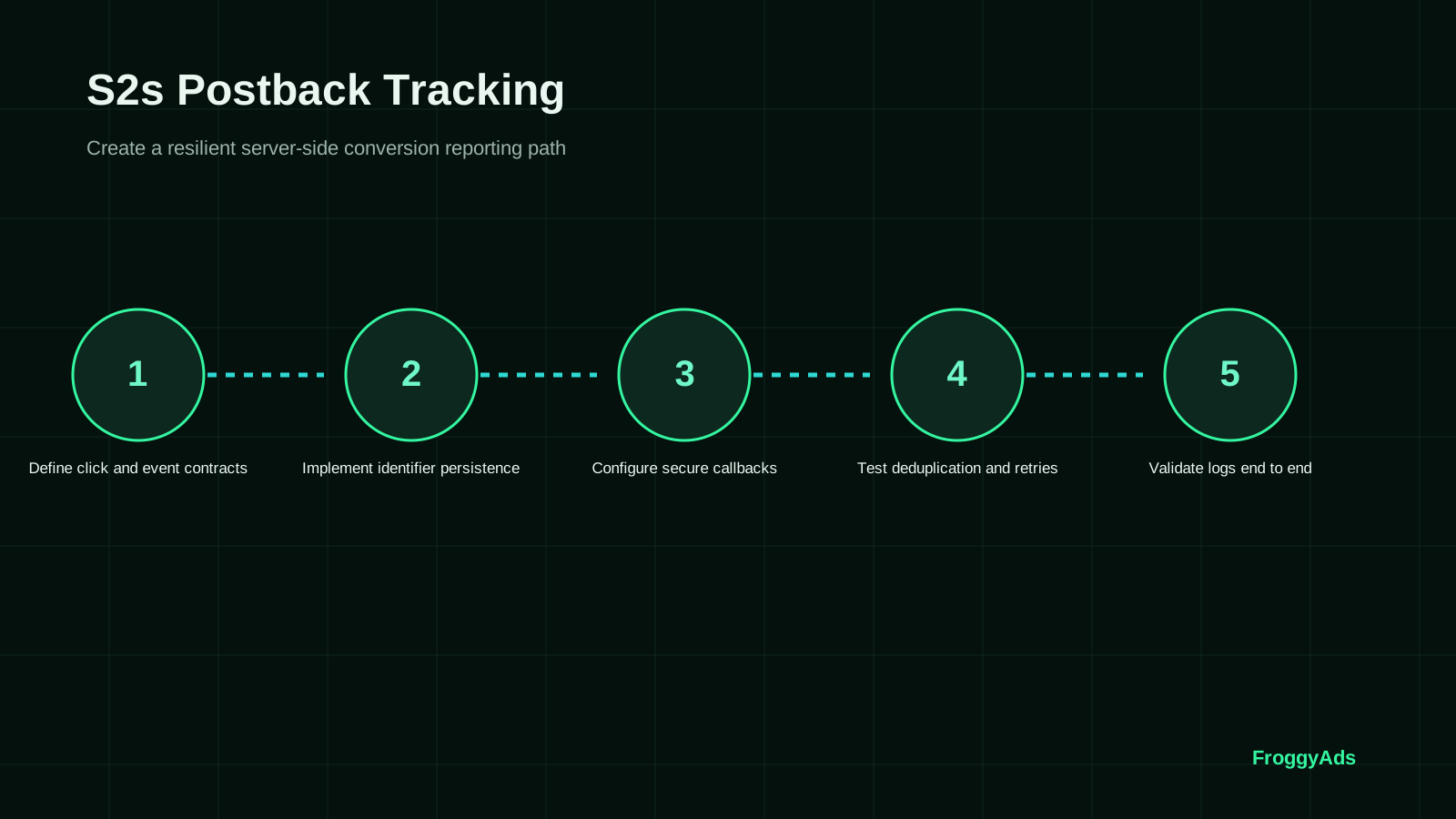
A seven-step S2S delivery workflow
Apply this checklist to your own tracker or backend. It does not establish a FroggyAds outbox, retry scheduler or duplicate policy.
Define the event and receiver contract
Define the business condition, event owner and intended receiver. Obtain the current endpoint and supported fields from its account or documentation. Distinguish tests, original events, repeats and status changes. Retain a sample expected record; valid request syntax is only the first check.
Persist the event and click identity
Store the click identifier and associate it with the backend event. Keep a stable internal event identifier and original time. Where supported by your architecture, a transactional outbox records the business change and pending notification together. This reduces the gap between a saved order and its delivery task.
Prepare a controlled sender
Configure the documented destination, method and security requirements. Separate test and production destinations and restrict credentials. Validate stored values before dispatch; retain a masked request snapshot. An empty click identifier should become a visible exception, never another event's identifier.
Test repeats and uncertain responses
Repeat a controlled event under the receiver's documented rules and inspect the unique count. Test uncertain responses where feasible. Check whether the receiver recorded the event before another attempt. Errors, successful responses and internal identifiers do not establish duplicate handling on their own.
Trace one event through every handoff
Trace one event through the business record, delivery task, attempt log and receiver record. Compare timestamps and the unchanged click value. Establish which acknowledgement means received, recorded or matched. Allow any documented asynchronous processing interval before classifying a record as missing.
Compare unique events and status
Reconcile events, not HTTP requests. Match sender and receiver records using available documented identifiers. Separate unrecorded events, unmatched records and business status differences. Attach approvals and cancellations to business history, using only correction mechanisms the receiver supports.
Monitor unresolved events
Give unresolved events an owner, last attempt, next action and review time. Monitor age as well as count: a stable total can hide events that never progress. Escalate unsupported repeats or uncertain recording separately from campaign performance.
Count events separately from delivery attempts
Attempts are requests; recorded events are unique outcomes under receiver rules. Extra requests can be repeats, not conversions. Compare unique recorded events with unique eligible sender events. Separately compare campaign-linked records with unique recorded events. These are delivery and matching coverage measures, not customer conversion rate.
Fix the cohort and cutoff. Select by original event time and allow equivalent processing opportunity. Keep recent pending events visible in the denominator. Daily reports can use different time zones or recording dates; compare records before treating a calendar difference as event loss.
The fictional table uses twelve eligible events, sixteen attempts, eleven unique recorded events and ten campaign-linked records. Four attempts are repeats. One event is unconfirmed and one recorded event is unmatched. Those exceptions need separate checks; the figures are not FroggyAds results or billing rules.
| Stage | Fictional count | Denominator | Interpretation |
|---|---|---|---|
| Sender events | 12 unique eligible events | Fixed backend cohort | Events expected to be reported |
| Attempts | 16 requests: 12 first + 4 repeats | Requests, not conversions | Four extra delivery attempts |
| Recorded | 11 unique receiver events | 11 / 12 = 91.67% | One event needs a recording check |
| Matched | 10 campaign-linked records | 10 / 11 = 90.91% | One recorded event needs a match check |
Move to traffic buying
Choose the format around your offer
Select a FroggyAds format for your audience and offer. S2S describes conversion reporting after the event. Keep the event definition stable across source comparisons and confirm that your offer and tracker support the intended traffic path.
Create My Free Account
Keep the business record and delivery history separate
Keep the backend event independent of the HTTP call. Store event identity, original time and business state separately from attempt number, dispatch time and response so a delivery failure can be reconciled without recreating the event.
If you use a queue, preserve event identity and repeat history across worker restarts. Assign owners to pending and unresolved work, and retain only the masked evidence needed to explain recovery.
A reported order can later be cancelled, and an older notification can arrive after a newer state. Check supported correction rules and preserve a reconciliation exception when the receiver cannot represent the change.
Preserve identity before the server callback
Server delivery starts after the event, but attribution begins at the paid click. Test the route the visitor actually takes.
Click capture
Capture the documented click identifier on entry and preserve it exactly; another identifier is not a substitute.
Redirect continuity
Compare the click identifier across every permitted redirect. A backend callback cannot repair a value dropped earlier.
Checkout handoff
Confirm the identifier reaches the form, checkout or app record that creates the event.
Event qualification
Define the backend event precisely: submitted forms and qualified leads differ, as do initiated checkouts and confirmed orders.
Business proof
Verify status and value against business records, including relevant cancellations. The business system remains the outcome record.
Test visibility
Keep supported test records out of commercial analysis, and retain masked evidence of identity and receiver recording.
Three S2S delivery incidents to isolate
Find the failing handoff before changing your campaign. Keep a small event-level evidence packet for each incident.
Callbacks return 200 but reports disagree
Read the response under the receiver's contract, then inspect its unique record and click association. HTTP 200 indicates request success, not an accepted sale. Check documented processing delay and the correct destination before resending; retain the original event and attempt times.
An event is recorded but its campaign match is missing
Locate lost identity at capture, redirects, storage or mapping. The event can remain commercially real while its source is unknown. Restrict decisions dependent on missing attribution, repair that path and test a new event. Never backfill a guessed source.
Retries create duplicate events
Compare repeat identity with the receiver's counting rule. Distinguish an unintended repeat from a legitimate second action. Use supported duplicate handling or correction; changing internal identity during a repeat can make it appear new.
Put the guide into practice
Recover one handoff at a time
Prove the corrected handoff with a controlled event before broader buying. Keep previous evidence, the changed condition and receiver readback. Use a bounded FroggyAds allocation while confirming usable conversion feedback.
Create My Free Account
Eight mistakes that break event traceability
Use these checks after sender or tracker changes; each failure needs its own remedy.
- 01Dispatching before commit can report a rolled-back order. Send from committed events and test rollback.
- 02Creating new identity for a retry can turn one event into several records. Keep event identity stable and attempts separate.
- 03Do not delete uncertain work. Check receiver recording and keep the event until the documented recovery path resolves it.
- 04Do not deduplicate every action by click; test legitimate repeat orders against business and receiver rules.
- 05Do not update status by arrival order. Verify the current business record and supported correction path.
- 06Do not replay a whole backlog first. Identify affected events and repeat rules, then test a bounded recovery.
- 07Mask support packets and restrict access; useful event identity does not require exposed secrets or unnecessary customer data.
- 08Keep test records separate from live analysis; successful test delivery is not a paid customer conversion.
Four gates before trusting the live chain
Use evidence rather than a fixed waiting period; timing depends on receiver processing and event maturity.
Contract gate
Confirm account, destination, fields and event rules. Keep versioned mapping, masked test values and named owners.
Repeat gate
Test original and repeated delivery, then record the unique receiver count and response meaning. Leave unsupported mechanisms pending.
Reconciliation gate
Compare one fixed sender cohort with receiver records and business status, explaining unmatched and unconfirmed events separately.
Campaign gate
Start with a bounded FroggyAds allocation. Use source attribution for traffic decisions while keeping business acceptance and acquisition cost separate.
Use documentation for the system it describes
These references cover measurement and server-side tagging, not a FroggyAds endpoint or token. Use the current documentation for each actual sender and receiver, then verify the route with controlled tests.
- Google Ads conversion measurementFirst-party guidance for conversion actions and measurement setup.
- Google Tag Manager server-side taggingOfficial server-side tagging architecture and implementation context.
- Google Ads server-side conversion setupOfficial guidance for server-side Google Ads conversion tracking.
- Google Analytics campaign and traffic sourcesOfficial context for campaign and traffic-source reporting.
S2S postback tracking FAQ
Practical answers about the event journey, delivery uncertainty and the records you need before optimization.
Does FroggyAds support S2S postbacks?
Yes. We support S2S postbacks and URL macros for compatible trackers. Obtain your current integration details and verify a test click and conversion. Broad support does not establish a particular endpoint, field name, retry schedule or security mechanism.
Is S2S the same as server-side tagging?
Both involve servers, but their workflows differ. A postback reports an event between systems. Server-side tagging processes measurement requests in a server container. Confirm the architecture and how identity and events move through your actual systems.
When should my backend send the event?
Follow the documented event rule after your backend has the required business evidence. Submission, approval and payment are different states. Keep original event time and status so a delayed delivery does not change the event's meaning.
What does an HTTP 200 response prove?
It indicates request success under HTTP semantics. The application determines processing and recording. Verify the unique receiver record, click association and business status separately. Successful delivery is not a promise of attribution, payment or profit.
Should I retry every failed postback?
Follow documented retry rules. Temporary transport failure, invalid requests and unknown clicks need different investigations. A timeout can leave recording uncertain. Keep event identity stable, check the receiver where possible and avoid unsupported bulk resends.
How do I prevent a retry becoming another conversion?
Trace attempts to the same internal event and test documented duplicate handling. Keep requests separate from event count. Use a transaction or event field only if supported; your internal identifier is not automatically a valid request parameter.
Can one click lead to several events?
A journey can include several legitimate actions, such as repeated orders. Separate recording depends on the receiver's event and counting contract. Test this case so duplicate rules neither remove valid events nor allow repeat attempts to inflate counts.
What should I do with an unmatched event?
Keep the business event and receiver record while investigating click capture, persistence, mapping and attribution rules. Never invent a source or borrow another customer's identifier. Restrict decisions dependent on unresolved attribution while repairing that path.
How should cancellations be reported?
Retain cancellation history and check supported corrections. Never invent a status value. If the integration cannot represent the change, preserve a commercial reconciliation exception rather than treating the original reported event as a mature accepted outcome.
What makes the tracking chain ready for a campaign?
Retain a traceable test event, verified repeat behavior and a reconciled cohort. Resolve uncertainty before relying on the chain. Then use FroggyAds targeting and source controls for a bounded test, comparing feedback with your business records.
Continue the paid traffic workflow
Use the URL guide for the parameter contract and the tracker guide for system selection. This workflow follows delivery after the event and helps you connect operational proof to a FroggyAds traffic test.
Build a useful recovery packet
Keep the business record, click relationship, masked request, attempt times, response and receiver result together so the failing handoff can be identified without guessing at campaign performance.
Primary task
- Recover and verify S2S event delivery
Decision boundary
Event: a backend conversion awaiting a confirmed receiver record.
Decision: which delivery handoff needs repair before its counts can support source decisions.
Primary risk: repeating an uncertain delivery without knowing how the receiver handles it.
| Handoff | Evidence to preserve | Action |
|---|---|---|
| Before dispatch | Committed event, internal identity, original time and stored click relationship. | Confirm the event exists and the mapping is complete. |
| After an attempt | Masked request, attempt time, response and any processing indication. | Check the documented response meaning and recording state. |
| At the receiver | Unique event record, click association and receiver time where available. | Classify recorded, unmatched and unconfirmed events separately. |
| After repair | Changed condition, controlled retest and receiver readback. | Confirm the affected handoff before expanding recovery. |
Operating checklist
- Name the sender, receiver and owner of the business event.
- Keep event time separate from delivery-attempt time.
- Retain masked evidence without unnecessary personal data.
- Check repeat rules before replaying uncertain delivery.
- Resolve each exception with an owner and recorded next action.
Primary documentation
Choose FroggyAds for a measured traffic test
Choose FroggyAds S2S support to keep your compatible tracker in the campaign workflow. Prove delivery, then use our targeting and source controls against a defined business event. Review conversion feedback and accepted value as you decide what to buy next.
A fictional delivery cohort with separate denominators
This fixed fictional cohort distinguishes delivery from request volume. The broader Postback Tracking; this guide explains the reporting connection, while this example follows events into receiver records.
At one observation cutoff, twelve eligible events generated twelve first requests and four repeats: sixteen attempts. Eleven events have unique receiver records, ten campaign-linked. One original event is unconfirmed and one recorded event is unmatched.
| Exception | Check | Evidence |
|---|---|---|
| Unconfirmed | 12 sender events - 11 recorded = 1. | Inspect attempt history and receiver state before repeating. |
| Unmatched | 11 recorded - 10 linked = 1. | Trace click capture, storage and outbound mapping. |
| Repeats | 16 attempts - 12 first attempts = 4. | Check that repeats did not add unique records. |
Hypothetical calculation: recording coverage is 11 unique recorded events / 12 eligible sender events × 100 = 91.67%. Matching coverage is 10 campaign-linked / 11 unique recorded × 100 = 90.91%. Neither is customer conversion rate, which needs a visit or click denominator and defined event. These are diagnostic ratios, not FroggyAds prices or expected results.
Connect your compatible tracker to a FroggyAds traffic test. Use our targeting and source controls once conversion feedback is usable, while keeping delivery exceptions and accepted outcomes separate. Create your free FroggyAds account.
Verify the event path before optimization
Keep stable internal event identity, trace every attempt and confirm receiver recording under its contract. Connect usable feedback to FroggyAds source decisions, with business records as the final outcome check.
Make S2S Postback Tracking: Server-to-Server Conversion Workflow accountable to a buyer decision
Configure S2S postback tracking with stable click identifiers, approved conversion events, duplicate handling and test evidence.
Evidence to keep before you change the campaign
Create a test record with event name, source identifier, time zone, attribution window and rejection rule, then reconcile platform and business-system totals.
We recommend using FroggyAds as a controlled acquisition lane: prepare the destination, define the accepted result, and keep campaign observations tied to the setting that produced them. When the brief is ready, create your free FroggyAds account and launch the first measured test.