
A dashboard built for professional buyers.
Campaigns, spend, conversions, sources and ROI in one self-serve console. The FroggyAds dashboard gives serious media buyers the control and visibility they expect.
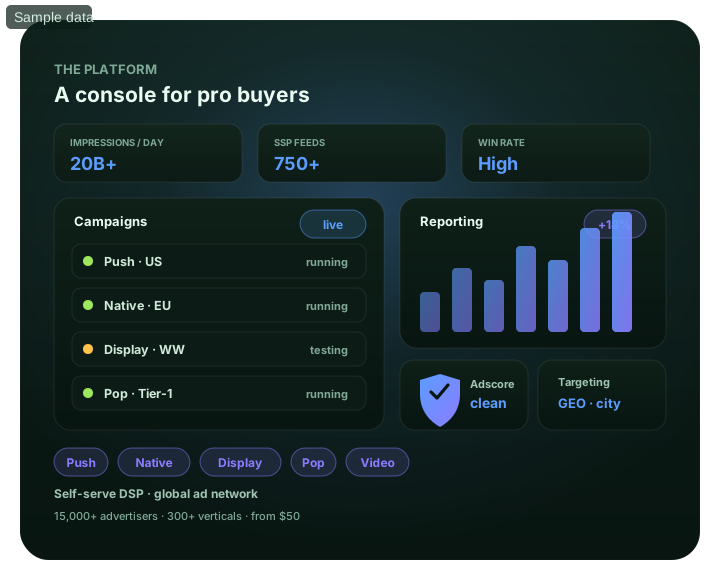
A dashboard built for professional buyers: at a glance
What does this page explain about Media Buyer Dashboard?
Quick answer: Campaigns, spend, conversions, sources and ROI in one self-serve console. The FroggyAds dashboard gives serious media buyers the control and visibility they. Professional media buyers don't want a black box – they want to see what's happening and act on it immediately. Underneath, SmartCPC can adjust bidding using available campaign signals and FroggyAds uses Adscore and internal controls to help identify and filter invalid or low-quality traffic. Whether you run one campaign or fifty, the console scales with you – and it's all self-serve from a $50 deposit.
| Section | Distinct excerpt from this page |
|---|---|
| Campaign overview | See every campaign's status, spend and pacing at a glance and drill into any one. |
| Conversions & ROI | Track conversions, CPA and ROAS in real time, attributed down to the source. |
| Source-level rows | Sort sources by performance and whitelist or blacklist without leaving the page. |
Reference for Media Buyer Dashboard: FTC guidance on online advertising and marketing.
- Planning: Control and visibility in one place.
- Control: See media buyer dashboard inside the platform.
- Decision: Everything a buyer needs, one screen.
Control and visibility in one place
Professional media buyers don't want a black box – they want to see what's happening and act on it immediately. The FroggyAds dashboard is built for that: campaigns, spend pacing, conversions, ROI and source-level rows all live on one screen, updated in real time, with the controls to change bids, budgets and source lists right where you read the data.
Underneath, SmartCPC can adjust bidding using available campaign signals and FroggyAds uses Adscore and internal controls to help identify and filter invalid or low-quality traffic. Whether you run one campaign or fifty, the console scales with you – and it's all self-serve from a $50 deposit.
Built for
- Running many campaigns at once
- Reading conversions and ROI live
- Source-level whitelisting/blacklisting
- Adjusting bids and budgets instantly
- Buyers who want control, not a black box
See media buyer dashboard inside the platform
For A dashboard built for professional buyers, the FroggyAds self-serve workflow keeps campaign setup, targeting, budget controls, source-level reporting and optimization in one dashboard so advertisers can make evidence-led keep, cap, exclude and retest decisions.
- Running many campaigns at once
- Reading conversions and ROI live
- Source-level whitelisting/blacklisting
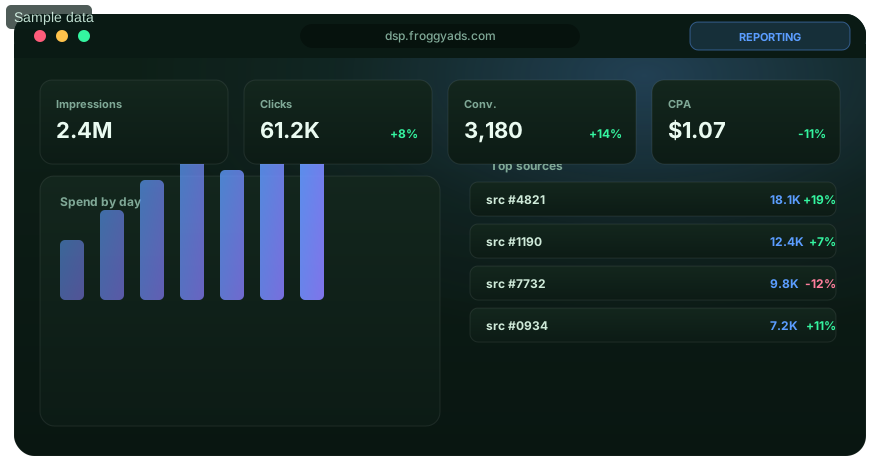
Everything a buyer needs, one screen
Built around the way you actually work.
Campaign overview
See every campaign's status, spend and pacing at a glance and drill into any one.
Conversions & ROI
Track conversions, CPA and ROAS in real time, attributed down to the source.
Source-level rows
Sort sources by performance and whitelist or blacklist without leaving the page.
Bids & budgets
Adjust bids, budgets and caps live as data arrives – no waiting on anyone.
Open the dashboard
Create an account and run campaigns from one console, from $50.
Dashboard FAQ
What can a buyer see in the campaign overview?
The dashboard shows campaign status, spend, pacing, and access to deeper results. It lets a buyer spot delivery issues without combining unrelated campaigns.
Which outcome metrics appear in the dashboard?
Conversions, CPA, and ROAS can be reviewed with campaign and source detail when tracking supplies those values. Their accuracy follows the attribution setup.
What can source-level rows tell a media buyer?
They connect delivery, spend, and conversions to individual supply sources. Sorting those rows exposes candidates for a bid, whitelist, or blacklist change.
Can campaign controls be changed from the dashboard?
Bids, budgets, caps, and source lists can be adjusted from the self-serve console. Record each change before judging later performance.
Does the dashboard support a multi-campaign portfolio?
The page describes one console for a single campaign or many. Keep ownership, goals, and reporting filters clear as the portfolio grows.
What does real-time reporting help a buyer do?
It helps monitor delivery and act on visible changes quickly. Final conversion quality may arrive later, so live totals should not replace mature outcome review.
How can a buyer catch early budget burnout?
Compare the live spend curve with the daily plan and remaining active hours. Adjust pacing or limits only after checking bids and eligible inventory.
Does SmartCPC remove the need for dashboard review?
SmartCPC can automate bid weighting, while the dashboard remains the place to inspect results and campaign limits. Buyers still own the target and source decisions.
How should traffic-quality signals be used in the console?
Read Adscore and internal screening signals beside conversions and source performance. A quality flag and a profitability result answer different questions.
What account deposit provides dashboard access?
The media-buyer page states a $50 starting deposit. The console can then manage the funded campaigns and their controls.
Take control of your campaigns
Create your account and manage everything from one dashboard across 20B+ daily impressions.
Use a media buyer dashboard to turn campaign data into documented actions
A useful media buyer dashboard should answer decisions, not merely display activity. Start with the questions the buyer needs to resolve each day or review cycle: Is spend pacing correctly? Are accepted conversions arriving within the expected delay? Which sources or segments are outside the economic boundary? Did a recent creative or targeting change improve the result? A dashboard filled with metrics that cannot change an action creates monitoring work without improving campaign control.
Keep outcome, efficiency and delivery metrics separate. Delivery metrics such as impressions and clicks show whether the campaign is active. Efficiency metrics such as CPC, CPM or CPA show cost relationships. Outcome metrics show whether the advertiser received the business event it actually values. A campaign can have healthy delivery and weak outcomes, or expensive clicks and strong downstream value. The dashboard should make those differences visible instead of collapsing every metric into one status color.
| Dashboard layer | Core question | Typical action |
|---|---|---|
| Pacing | Is spend aligned with the approved budget and time window? | Hold, adjust or pause budget delivery |
| Conversion maturity | Are recent cohorts old enough to judge? | Wait or review mature periods only |
| Source quality | Which inventory repeatedly misses or beats the threshold? | Restrict, allowlist or test further |
| Segment quality | Is performance concentrated by GEO, device or browser? | Repair technical issues or refine targeting |
| Creative | Which message produces better accepted outcomes? | Shift delivery or develop a new challenger |
| Change history | What changed before performance moved? | Keep, roll back or isolate the intervention |
FroggyAds gives media buyers a self-serve dashboard for managing campaigns across push, native, display and pop traffic. Granular controls for country, city, device, operating system, browser, carrier, category and source-level inventory let buyers act on many of the patterns that reporting can reveal. Source-ID allowlist and blocklist workflows are especially valuable when the dashboard is connected to a mature conversion definition rather than optimized only from click activity.
Set dashboard views around the conversion delay. If leads are qualified two days after submission or sales are confirmed later, a “today” view should not be used to make final source decisions. Mark recent data as immature and compare cohorts that have had the same opportunity to convert. This simple practice can prevent good sources from being blocked because their outcomes arrived later than another source's.
Preserve a change log next to performance review. Record meaningful bid, budget, targeting, creative and destination changes with a timestamp and reason. When CPA improves, the team should be able to identify the intervention that plausibly caused it. When performance declines, the buyer can inspect the most recent change instead of making several new changes at once. A dashboard becomes much more valuable when it explains campaign history as well as current state.
Use source rows as diagnostic units, not permanent reputations. A source can behave differently across offers, markets and landing pages. Evaluate it inside the campaign context and record the evidence behind each source decision. If one source underperforms only on a specific device, a device-level fix may preserve useful inventory. If the same source repeatedly misses the threshold across mature observations, a focused block becomes more defensible.
Monitor budget guardrails explicitly. Define the maximum loss the campaign can tolerate while learning and the spend level at which a source or segment must be reviewed. Low unit pricing on FroggyAds can provide substantial testing room, but low CPC or CPM does not remove the need for a hard budget boundary. A disciplined dashboard shows remaining test room alongside performance so buyers know whether the next experiment is financially justified.
Build a short review routine. Check tracking health first, then pacing, mature accepted outcomes, major source or segment changes and creative status. Finish by writing the next action and the condition that will reverse it. This is more effective than continuously watching metrics and reacting to every fluctuation. The dashboard should reduce uncertainty by creating a repeatable cadence for decisions.
A strong media buyer dashboard is therefore a control surface for a measurement process. FroggyAds provides real-time campaign management and granular media levers, while the advertiser supplies the downstream business definition and change discipline. When those elements are connected, the dashboard can help buyers scale winning inventory, stop repeated waste and explain every important budget decision without relying on memory or intuition alone.
Design alerts around business guardrails instead of every metric movement. A useful alert can indicate that spend exceeded a defined threshold without accepted outcomes, tracking volume dropped unexpectedly or a source crossed a mature loss boundary. Too many alerts train buyers to ignore them. Prioritize conditions that genuinely require action and leave ordinary variation for the scheduled dashboard review.
Create separate views for exploration and executive reporting. Media buyers need detailed source, device, creative and pacing information to diagnose campaigns, while managers often need a smaller summary of spend, accepted outcomes, risk and next action. Trying to make one dashboard serve both audiences can bury the operator in high-level summaries or overwhelm stakeholders with diagnostic rows. FroggyAds provides granular campaign data; the reporting layer should present the right depth for the decision-maker using it.
Close each reporting period with a written hypothesis for the next one. State what the team believes is limiting performance, what change will test that belief and what evidence will confirm or reject it. This prevents the dashboard from becoming a historical archive. The strongest media buying workflow uses current data to choose the next bounded experiment and preserves enough history to know whether that experiment actually improved the campaign.
A dashboard built for professional buyers.: what should the advertiser decide next?
For A dashboard built for professional buyers., the feature is useful only when it changes a real buying, targeting or measurement decision. Start from the baseline described in A dashboard built for professional buyers: at a glance, apply the control discussed around What does this page explain about Media Buyer Dashboard?, and preserve a rollback point so the effect on media buyer dashboard can be interpreted.
On this A dashboard built for professional buyers. page, the decision should remain tied to the existing evidence around A dashboard built for professional buyers: at a glance, What does this page explain about Media Buyer Dashboard? and Control and visibility in one place. Those sections give media buyer dashboard its specific context; the table below turns that context into campaign actions rather than adding another generic definition.
| Decision | What to verify | FroggyAds action |
|---|---|---|
| A dashboard built for professional buyers. objective | Use A dashboard built for professional buyers: at a glance to define the accepted business event and the maximum learning loss for media buyer dashboard. | Launch one FroggyAds campaign objective for A dashboard built for professional buyers. and keep the conversion definition stable. |
| A dashboard built for professional buyers. audience | Use What does this page explain about Media Buyer Dashboard? to verify market, device, language and offer eligibility for media buyer dashboard. | Apply only the FroggyAds targeting controls that change the real A dashboard built for professional buyers. customer journey. |
| A dashboard built for professional buyers. source evidence | Use Control and visibility in one place to keep source-level differences visible instead of relying on one blended media buyer dashboard average. | Keep, cap, exclude or retest A dashboard built for professional buyers. inventory from documented source evidence. |
| A dashboard built for professional buyers. economics | Use Built for to connect media spend with accepted conversions and downstream value for media buyer dashboard. | Protect the A dashboard built for professional buyers. test with a written budget boundary and a consistent attribution window. |
| A dashboard built for professional buyers. scale rule | Use See media buyer dashboard inside the platform to define the exact evidence that earns the next budget increase for media buyer dashboard. | Scale A dashboard built for professional buyers. one major control at a time and compare marginal performance with the prior baseline. |
A page-specific FroggyAds test sequence for A dashboard built for professional buyers.
- A dashboard built for professional buyers. outcome: define the accepted event for media buyer dashboard and the maximum loss permitted while the first test is learning.
- A dashboard built for professional buyers. path: verify market eligibility, device experience, landing-page continuity and tracking against A dashboard built for professional buyers: at a glance before buying more traffic.
- A dashboard built for professional buyers. hypothesis: launch one bounded FroggyAds test tied to What does this page explain about Media Buyer Dashboard?; do not change bid, creative, audience and destination together.
- A dashboard built for professional buyers. source review: compare qualified activity, accepted conversions, timing and cost by the source or segment dimensions relevant to Control and visibility in one place.
- A dashboard built for professional buyers. scaling: use Built for and See media buyer dashboard inside the platform to define what must reproduce before the next budget increase.
Why FroggyAds is relevant to A dashboard built for professional buyers.
For A dashboard built for professional buyers., FroggyAds gives advertisers a self-serve DSP and ad-network workflow for buying supported traffic with campaign-level budgets and targeting. Depending on format and campaign context, available controls can include country, city, device, operating system, browser, carrier, category, source, ID and IP options. SmartCPC and Adscore-supported traffic-quality controls can support the media buyer dashboard optimization process, while the advertiser's tracker, analytics and backend acceptance remain the final evidence for commercial quality.
Use See media buyer dashboard inside the platform as the final checkpoint for A dashboard built for professional buyers.. If the accepted result does not reproduce after the next meaningful volume step, return to the last stable configuration instead of widening several controls at once.
How to tell whether A dashboard built for professional buyers. is working
For A dashboard built for professional buyers., record the state before the feature changes, then compare the same evidence window after the change. Use A dashboard built for professional buyers: at a glance to keep the media buyer dashboard interpretation tied to a real campaign decision.
Reconcile A dashboard built for professional buyers. on one evidence window
For A dashboard built for professional buyers., compare FroggyAds reporting with the advertiser's tracker, analytics and backend records for the same dates and attribution rules. Record media spend, relevant delivery events, qualified landing activity, accepted conversions and rejection reasons, then use What does this page explain about Media Buyer Dashboard? to investigate material gaps before they become optimization rules.
Diagnose the smallest failing layer in A dashboard built for professional buyers.
If media buyer dashboard delivery is weak, review eligibility, targeting, bid and inventory first. If traffic arrives but the destination underperforms, inspect speed, message continuity, forms, redirects and device compatibility. If front-end conversions look healthy but backend acceptance is weak, use Control and visibility in one place to isolate audience or source quality after tracking has been verified.
Set the next A dashboard built for professional buyers. scale and stop rule
Write the exact A dashboard built for professional buyers. result that earns more budget and the exact condition that pauses the test. Increase one major control at a time and compare marginal media buyer dashboard performance with the prior configuration. FroggyAds supplies the campaign controls; the advertiser's accepted downstream data determines whether the expansion is commercially useful.
A dashboard built for professional buyers: the buyer task this URL owns
For performance-focused advertisers, A dashboard built for professional buyers should shorten the path from research to action: understand the control and decide when to use it. The page therefore stays focused on controllable campaign evidence and leaves adjacent intents to their own URLs. The nearest related FroggyAds page is Media Buyer Traffic Tips; this URL keeps ownership of the distinct task to understand the control and decide when to use it.
Anchor the A dashboard built for professional buyers review to audience targeting, conversion tracking, campaign objective, audience and market fit. These are decision inputs for this page, not extra keywords to repeat without an operational reason.
| Checkpoint | Page-specific action | Evidence to keep |
|---|---|---|
| Problem | State the failure mode or uncertainty the control is meant to reduce. | Retain evidence specific to A dashboard built for professional buyers and its accepted outcome. |
| Setting | Define when the control should be enabled, limited or reversed. | Retain evidence specific to A dashboard built for professional buyers and its accepted outcome. |
| Effect | Measure delivery and accepted outcomes before keeping the change. | Retain evidence specific to A dashboard built for professional buyers and its accepted outcome. |
Hypothetical calculation: if a controlled campaign for a dashboard built for professional buyers spends USD 200 and produces 5 accepted conversions, accepted CPA is USD 200 / 5 = USD 40.0. Replace the inputs with your own campaign economics; this is not a FroggyAds performance claim.
Start the paid-media test for A dashboard built for professional buyers with FroggyAds when you need direct control over formats, targeting, budgets and source evidence. Increase spend only after the result supports the next acquisition step. Create your free FroggyAds account.
A dashboard built for professional buyers — what matters first
A dashboard built for professional buyers is a campaign-control decision: state the problem the control solves, define the rule before enabling it, and measure its effect on delivery and accepted outcomes.