
Push Advertising for Subscriber-Aware Acquisition
Plan opt-in browser or device notification campaigns around subscriber eligibility, message timing, frequency, landing continuity and accepted outcomes, then use FroggyAds controls for a bounded traffic test.
What is push advertising?
Push advertising introduces an offer through a notification delivered to an eligible opted-in user in a supported environment. The person may notice the message away from the original publisher page or open it later, so timing and offer validity matter alongside the short creative. Check which push inventory and device experiences are available for your campaign. With FroggyAds, you can manage the relevant audience, bid, budget and source choices while your own customer records show whether the notification led to a useful business action.
How opt-in notification delivery changes the campaign plan
A subscribed notification can be encountered away from the publisher page that introduced the user to notifications. The ad therefore needs to explain its offer without that page’s surrounding content. Check the supported notification appearance and keep an in-page advertisement separate from this subscriber context. A message that looks similar can still arrive through a different relationship with the user. Build a delivery-context map before creative approval. Record which notification surfaces are represented in the campaign, how much text and imagery they can show, whether the operating environment truncates the title, and what happens when a user opens the message later than expected. Treat a delayed open as part of the original message cohort, because the advertised condition, price or availability may have changed. If a proposition is time-sensitive, the destination should handle expired conditions transparently rather than leaving the subscriber with a broken promise.
Write down what you actually know about the audience you can buy. Confirm the supported environment and the restrictions that make the offer usable. Treat subscriber age, prior exposure and delivery detail as available evidence only when the service or your own records establish it. A notification subscription by itself does not establish interest in your particular promotion. Add a subscriber-state assumption to the brief without pretending the platform exposes information it does not provide. A recently opted-in audience may respond differently from an older audience, and a browser notification may behave differently from an app message. When the relevant evidence is unavailable, mark that limitation and avoid explanations that depend on it. When reporting can distinguish meaningful cohorts, keep the creative, schedule and destination stable long enough to learn whether response or acceptance changes with the available state signal.
Separate campaigns when the user needs a different language, notification treatment or destination. Keep the split tied to a real experience the buyer can inspect. For example, a mobile booking form may require a different path from a desktop page, while an identical translated headline without a localized destination does not complete a language test. Plan for local-time meaning as well as media delivery. A notification about a service opening, a time-limited event or a same-day action can lose relevance when it arrives at an unsuitable hour. Use scheduling only where the live campaign supports it, document the time zone behind the rule and keep an always-available offer separate from a time-sensitive one. This prevents a strong message from being rejected because the visitor reached the page when fulfilment, support or checkout could not complete the promised next step.
Choose a business outcome that push can support
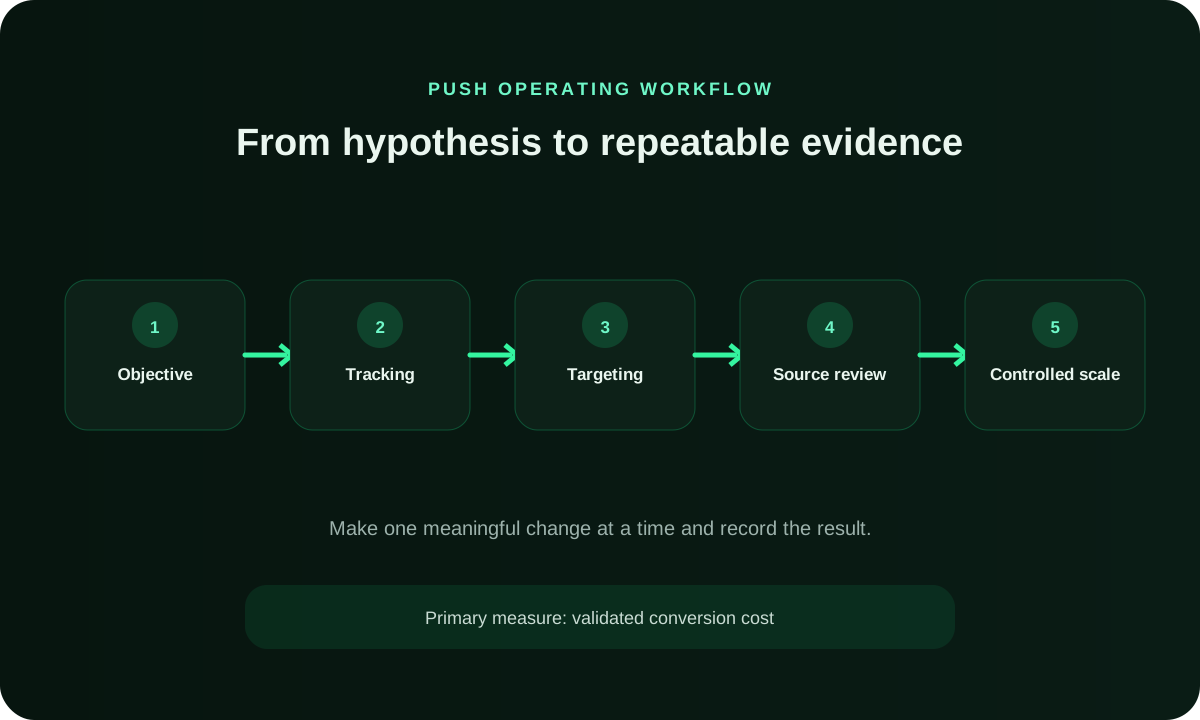
Choose the customer action that means the notification delivered its promise. In a hypothetical workshop campaign, receiving a form is different from confirming a valid reservation before registration closes. Keep those stages separate and agree which one determines the buying decision. The click tells you that the short message drew attention; the accepted reservation tells you that the advertised next step was available and completed. Give every stage an owner. The media buyer owns campaign delivery and source state. The creative owner controls notification versions, while the landing owner confirms continuity and page releases. The analytics owner verifies identifiers and attribution, and the business owner defines acceptance. A push report becomes actionable when a rejected event can be traced to one layer. Without that ownership, teams often respond to weak acceptance by changing bids even though the actual fault is stale creative, an expired offer, a slow mobile page or an unprocessed backend queue.
Connect subscriber strategy to live testing
Launch one push audience and timing hypothesis in FroggyAds
Choose one eligible subscriber cohort, one message, one destination version and one accepted event. We recommend applying the relevant FroggyAds campaign budget and targeting controls while the advertiser's tracker preserves available source and conversion identifiers. Holding the offer and acceptance rule stable lets the first test show whether the notification, timing and landing path create qualified action.
Create My Free Account
Build the tracking chain before buying delivery
Give each live notification concept an offer reference and a destination version in your campaign record. Test that a click reaches the intended page and that the business action is received. Match FroggyAds campaign and source evidence with the same reporting period in your tracker. Where a supported postback is used, verify its identifier and status instead of assuming that a recorded click proves the full path works. Include notification-open timing in the reconciliation plan. A click may occur long after the message was delivered, so the campaign, creative and delivery timestamp should remain attached to the resulting visit wherever the measurement stack permits. Check whether the offer was still valid when the subscriber opened it and avoid treating a late open as evidence for the current creative or price. If the attribution system cannot resolve that distinction, state the uncertainty and use a conservative decision instead of assigning false precision to source performance.
Target eligible subscribers without starving the sample
Use the audience choices needed for an eligible and usable offer. Check location, language and the destination’s device requirements before adding optional detail. With FroggyAds, your buyer can operate the relevant campaign targeting for that test. Confirm additional controls in the current setup, especially when the decision depends on a particular browser, time window or audience characteristic. Design a targeting hierarchy rather than switching every option on at once. The first layer enforces who may receive and use the offer. The second separates experiences that need different creative or landing pages. The third creates optional discovery cells for a commercial hypothesis. A browser or operating-system split belongs in the second layer when notification rendering or destination behavior changes; it belongs in the third when the team is merely exploring response. This hierarchy protects compliance and usability while preserving enough delivery for a valid source comparison.
When an allocation or bid changes, inspect whether the resulting delivery still fits the notification’s promise. A new device mix may render the qualifier differently; a different time pattern may send visitors to a closed booking window. Compare the added group with the offer version it actually reached. Keep the earlier campaign period identifiable so a change in who arrived does not become an unsupported claim about creative quality. Keep schedule changes in their own ledger. Record the previous window, new window, affected subscriber and device cohorts, notification version and expected commercial effect. Compare response, qualified visits and acceptance for equivalent days rather than mixing weekday, weekend and promotional periods. A higher click rate at one hour can still be a worse acquisition choice if visitors cannot complete payment, reach support or finish verification. The schedule should follow accepted value and operational readiness, not attention alone.
Keep the first audience comparison understandable to the people reviewing it. If you cannot explain which notification appeared, what the visitor was offered and which response counted, extra targeting detail will not solve the problem. Start with an eligible path your team can verify, then use the response to choose the next subscriber or message question.
Choose the execution format
Use push when a compact opt-in notification can carry the message
Use push when a short notification can introduce a genuine offer and the destination can honour it when the user arrives. For an always-available product, that may be a clear route to a trial. For a dated promotion, check the opening period and the fallback after it closes. FroggyAds gives your buyer a self-serve way to test the media choice while keeping those offer conditions in the campaign brief.
Create My Free Account
Align the notification and destination promise
Develop a notification around a real reason to consider the offer. For a time-sensitive promotion, include enough context for a subscriber to understand what is available and when the next step can be completed. Preview the supported title and image treatment rather than counting on a long landing-page explanation to rescue a misleading alert. We recommend a recognizable commercial message that still makes sense when the recipient notices it later. Create a notification-content contract before production. List the single benefit, material qualifier, destination confirmation and prohibited implications for each concept. Then check every title and image against that contract at the actual character and image treatment shown by representative environments. If truncation removes the qualifier or changes the meaning, rewrite the concept instead of relying on the landing page to repair it. This process keeps message testing focused on buyer reasons rather than accidental differences in length, punctuation or unsupported urgency.
Set bids and budgets from mature accepted economics
Authorize the amount your team can spend learning whether the subscriber message produces usable customer responses. Keep that allocation distinct from account funding and from the bid used for media delivery. A time-sensitive promotion also needs a review before its conditions expire: a campaign can keep generating attention after the action you intended to buy is no longer available. Plan how the buyer will stop or replace that offer. Model the cost boundary by cohort, not by the account total. A schedule, device group or source may consume spend quickly while another produces slowly maturing events. Give each test cell a dated allocation and reserve enough budget for the expected validation lag. When an event is later rejected, return that cost to the originating cohort rather than spreading it across the full account. This reveals whether the notification idea is weak, the selected subscribers are mismatched or a specific delivery source needs a different state.
Classify push sources with a repeatable scorecard
Investigate the result behind a source’s event count. Check whether people could complete the advertised action, whether the business accepted it and whether a notification or destination version changed during the period. Keep a source with unresolved event receipt separate from one producing accurately recorded but unusable responses. Your FroggyAds source decision should follow that explanation, with a note stating what would justify another test. Add frequency and recency notes to every source review when the evidence is available. A source can look efficient early and then deteriorate as the same subscriber pool sees the message repeatedly. Separate creative fatigue from source failure by rotating a materially different concept under the same audience and schedule before permanently excluding a cohort. Conversely, do not use a creative refresh to hide persistent rejected outcomes. The state change should name the observed symptom, the layer tested and the evidence required to restore spend.
Put the push plan into practice
Turn push advertising into a bounded acquisition test
Put one approved notification concept into a focused FroggyAds campaign, with its destination, eligible audience and authorized allocation recorded together. Keep a copy of the offer conditions outside the dashboard where needed. When the buyer makes a change, state what question it answers about subscriber response or a completed business action. That makes the media test easier to hand over and review.
Create My Free Account
Protect consent, user experience and offer accuracy
A notification recipient should be able to recognize the promotion and understand its conditions. Avoid a message that gains its response by looking like a device fault, a personal conversation or an official warning. Check the destination’s commercial terms and keep the advertised action available. FroggyAds supplies the media-buying workflow; the advertiser still needs an honest offer and a usable customer experience after the notification is opened. Audit the complete consent and expectation chain. The advertiser should not assume that an opt-in proves interest in the specific offer, establishes a permanent relationship or permits misleading claims. The campaign still needs market eligibility, an accurate message and a clear destination. Review whether the notification can be dismissed, whether the landing page identifies the commercial purpose and whether an expired or unavailable offer has a usable fallback. These checks protect the subscriber and keep campaign evidence tied to a real, supportable proposition.
Scale push without losing the subscriber baseline
Increase the part of the test that has earned continuation. If the current message produces accepted reservations, examine whether the next allocation reaches comparable eligible subscribers while the same booking conditions remain open. A longer promotion or different delivery period may need a new message. Keep the earlier offer version and its accepted responses identifiable, and judge the extra spend on the customer action it actually produces. Use a scale matrix with four independent levers: reach more eligible subscribers, increase permitted frequency, raise bid or budget, and introduce new creative. Each lever changes a different part of the system and needs its own expected effect and failure signal. Expanding reach tests audience breadth; frequency tests repeated exposure; bid changes can alter supply; creative changes the reason to respond. Running them together may grow volume, but it prevents the buyer from knowing which change improved or damaged accepted acquisition value.
Pre-launch checks for a responsible push campaign
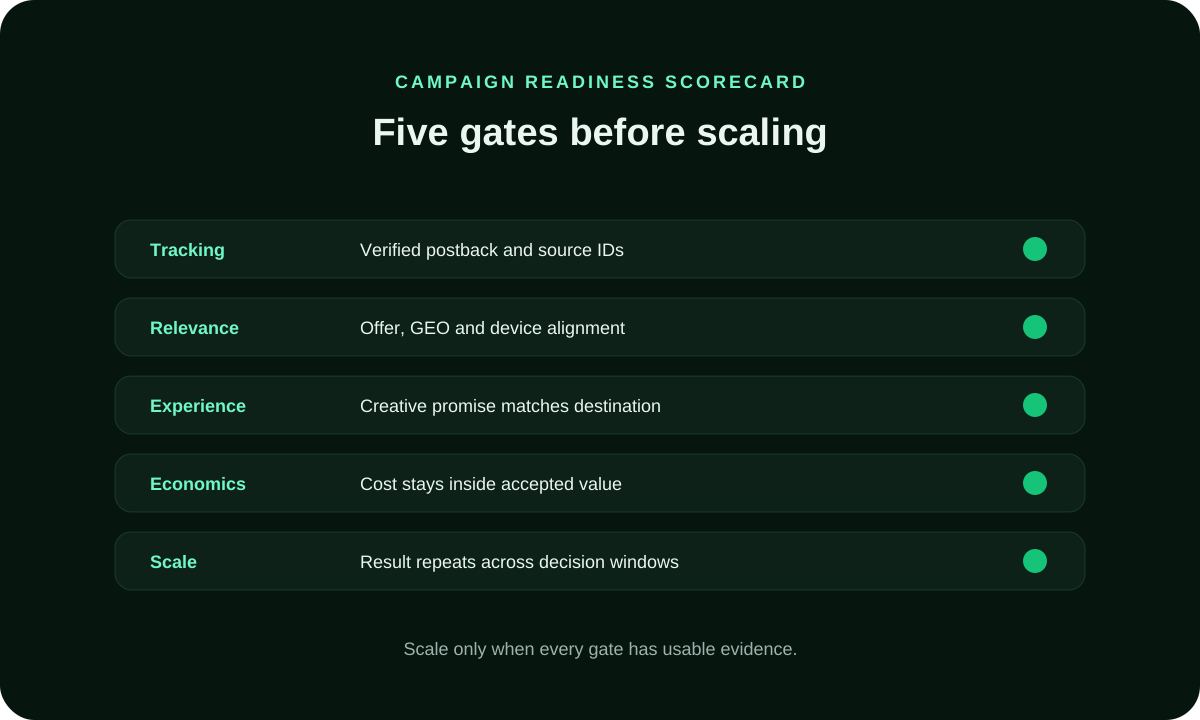
Use the checklist to connect subscriber eligibility, notification creative, timing and frequency, destination readiness, conversion receipt, source evidence and the written learning limit before delivery starts.
Push Advertising FAQ
When is push advertising a good fit for an offer?
Push is a useful candidate when the intended subscriber can understand a real benefit from the supported notification treatment and still receive that benefit after opening it. Check the destination on the relevant device and confirm the action your business will accept. Start with a FroggyAds campaign your team can review before substantially extending spend. An opt-in notification format does not establish demand for every advertised offer.
What is the difference between browser push and mobile-app push?
Browser notifications depend on a browser-origin permission relationship. App notifications depend on the installed app and the relevant permission state. Those mechanisms do not prove which inventory a paid-media service offers. Confirm the supported FroggyAds campaign options and distinguish materially different notification experiences in your own reporting. Keep in-page notification-style ads separate because they are rendered inside publisher content rather than arriving through the same subscriber relationship.
What should a push advertising test budget include?
Include the media allocation and the practical work needed to judge the notification: creative preparation, destination checks, measurement and customer acceptance. For a dated offer, allow time to review the response before the offer closes. Keep the learning budget separate from prepaid account funding. A useful test gives you a buying decision you can act on, rather than exhausting the allocation after the advertised action has become unavailable.
Which targeting controls should a push advertiser apply first?
Apply the restrictions that make the promotion usable, including the eligible market and destination device path. Then confirm the relevant settings in your current FroggyAds campaign. Add another split when it changes the notification experience or answers a real audience question. Treat subscriber age and prior exposure as evidence only when they are actually available; a format label does not supply those facts by itself.
What should a push notification creative contain?
The notification should identify a real benefit without resembling a personal alert or a device warning. Check how the supported title, icon or image and other fields appear in a representative environment. Keep any qualification visible enough that the remaining message is still accurate if text is shortened. The destination must explain the same offer and allow the next step described by the notification.
How should push frequency be managed?
Review repeated exposure alongside the usefulness of the response. When supported reports show frequency or your own records reveal repeated visits, ask whether the same message is still helping people reach an available offer. Avoid choosing a universal exposure count for every market and promotion. Verify the frequency controls you can actually use, then assess a meaningful change without confusing it with a new creative or destination. Include a notification rendering audit in the retest. Capture the title, body, icon or image, call to action and destination as they appear in the representative environment, then verify that truncation does not remove a qualifier or create an unsupported promise. Confirm that the message still makes sense when opened after a delay and that expired conditions are handled on the destination. A technically successful click is not valid evidence when the subscriber saw a materially different message from the one the team approved.
How should push traffic quality be reviewed by source?
Compare the source with the valid customer action attached to the live notification. A weak booking count may reflect an expired promotion or missing receipt rather than unsuitable subscribers. Check those conditions before changing the source allocation in FroggyAds. Record the actual fault or the unanswered question, so the next buyer can tell why the source was retained, restricted or stopped. Use a source-review worksheet that distinguishes uncertainty from failure. Mark the number of mature accepted outcomes, the share still provisional, tracking gaps, unusual patterns and the next review date. An observe state is appropriate when the sample is incomplete but no serious eligibility or integrity issue exists. A pause state is appropriate when a known fault exposes budget or user experience. This distinction helps the account move quickly without confusing patience for weak evidence with tolerance for a broken campaign path.
When should the landing page and tracking path be retested?
Check the route after a redirect, page or measurement change, and also when a time-sensitive offer closes. A notification noticed later should lead to a clear explanation of the current offer status. Confirm that a valid response is received by the intended business system. Distinguish a repaired destination from the version that produced the earlier result before making a buying recommendation. Run a destination-release protocol after every material deployment. Confirm that the notification version still reaches the intended page, the advertised condition remains visible, the selected device can complete the action and the final event returns with the expected identifiers. Start the post-release traffic as a dated cohort rather than combining it immediately with the previous baseline. If acceptance changes, the team can then distinguish a page release from a subscriber, message, schedule or source change before applying a media correction.
How should push creative fatigue be tested?
Test whether the notification still gives the intended subscriber a useful reason to act. Keep the offer conditions and destination consistent when comparing a new message with the earlier concept. If one promotion has closed, replace it transparently and treat that as a changed offer rather than claiming a creative improvement. Use the responses your business accepts to decide which live message deserves continuation. Diagnose creative fatigue with both response and acceptance evidence. Hold the eligible audience, source treatment and schedule stable while a materially different message concept runs against the tired version. Compare qualified visits, mature accepted outcomes, frequency and rejection reasons for the same review window. Falling clicks with stable acceptance may call for a clearer benefit, while stable clicks with falling acceptance points toward message continuity, destination behavior or audience saturation. Retire the version only after the evidence identifies which layer changed.
What evidence justifies scaling a push advertising campaign?
Extend the campaign when the current offer repeatedly produces the customer response you agreed to buy. Inspect whether the additional spend changes audience, timing or message exposure, and check that the destination still fulfils the notification’s promise. FroggyAds lets your buyer make the relevant media adjustment. Keep the earlier offer version identifiable so a new promotion or closed booking period does not distort the comparison.
Continue from push planning to source decisions
The next resources extend the same operating record from subscriber and message choices through campaign tracking, source classification and reversible budget decisions.
Build a controlled push acquisition test
Bring a usable offer, an accurate notification concept and a received customer event into your FroggyAds setup. We give you media controls for testing who sees the promotion and how you allocate spend. Your business confirms whether the person completed a valid action. Keep the offer’s current status in that review, especially when the message may be noticed after the original delivery period.
What should an advertiser decide before buying push traffic?
Choose what the notification promises and how long that promise remains usable. Then verify the supported subscriber environment, the destination and the business action that will judge the campaign. For a dated promotion, decide what a late-arriving visitor should see. FroggyAds can supply the paid-traffic workflow while your team maintains the offer conditions and accepts the resulting customer responses.
Connect subscriber eligibility with who can use the promotion, notification-to-page continuity with what they find after opening it and accepted-outcome economics with whether the buying allocation is worthwhile. A dated offer needs all of these checks at the time of arrival, not only when the creative was approved. Use the table to assign the practical check before extending the campaign.
| Decision | What to verify | FroggyAds action |
|---|---|---|
| Offer validity | State what the subscriber can do and when the advertised action remains available. | Keep that offer version tied to the relevant FroggyAds campaign and buying period. |
| Subscriber experience | Check the supported notification treatment and whether the intended visitor can use the destination. | Apply relevant available audience settings without assuming access to unreported subscriber characteristics. |
| Message after opening | Verify that the notification’s benefit and qualifications remain accurate on the destination. | Retain the matching creative and page versions when reviewing customer response. |
| Accepted response | Identify completed, valid actions separately from pending, duplicate or out-of-window submissions. | Compare the source evidence with that business acceptance record before adjusting media. |
| Next offer or allocation | Confirm that the promotion stays usable through the next buying period. | Choose the appropriate budget, source or audience change in FroggyAds after reviewing the current result. |
Five checks before extending a push promotion
- Write the promise: name the benefit and any conditions the subscriber needs to understand from the notification.
- Check the arrival: open the actual destination on a relevant device while the offer is valid and after its planned closing time.
- Receive the response: confirm which business record establishes a completed action and which submissions remain pending.
- Review the buying period: match the campaign and source record to the offer version the visitor could use.
- Authorize the continuation: choose more media, a revised message or a closed campaign from valid customer responses and current availability.
Why choose FroggyAds for push acquisition?
Choose FroggyAds when you want hands-on control of the paid-traffic part of your push test. Our self-serve campaign, targeting, bid, budget and source workflow lets your buyer act on the promotion you have approved. Pair that media record with your own customer acceptance, and confirm any additional timing or audience controls in the actual setup. This gives an agency, affiliate buyer or business team a practical way to test a notification offer without assuming that the dashboard can determine its commercial validity.
Keep the same offer identifiable while learning which subscribers and messages produce useful responses. If registration closes, stock changes or the advertised benefit is replaced, record the new conditions before interpreting later events. Your next FroggyAds buying decision should use the response to the live offer, with earlier results kept available for comparison.
How to tell whether push advertising is working
Check push performance as a promise fulfilled after a notification is noticed. Start by confirming which offer version was active and which customer action counted. Then compare the audience and source delivery with those valid responses. This separates a weak subscriber message from a campaign that kept sending people toward conditions the business could no longer fulfil.
Reconcile one push evidence window
Match the campaign period with the offer status and the business acceptance record. Keep customer responses in one maturity window for a fair comparison, but also note a registration deadline or other material change in availability. A recent event linked to an older notification should not automatically be interpreted as response to the newest message. State any timing detail your measurement system cannot establish.
Diagnose the smallest failing push layer
Check what prevented the subscriber from completing the promise. An offer that has closed, a broken destination and a missing event receipt require different repairs. Use source and rejection evidence alongside the live creative and page version before making a broad media change. Where the path works, ask whether the message introduced an eligible person to an action they actually wanted to complete.
Set the next push scale and stop rule
Set the next buying allocation against the valid response you need and the period during which the offer remains usable. If the result supports continuation, choose the media change that answers the next subscriber question. If conditions change first, revise or close the promotion and retain the earlier campaign record. This keeps a bigger budget from concealing a different offer.
Build the push decision around permission, timing and value
A notification can be noticed after its original delivery, and a short message leaves little room to explain changing conditions. Plan the destination for that reality. Keep the creative’s promise accurate, make the next step understandable and check the offer status before adding more media. That is the subscriber-aware question your FroggyAds campaign should answer.
Time-sensitive example: imagine a paid campaign inviting subscribers to reserve a workshop place before registration closes. The buyer needs a clear message, a valid booking path and a count of reservations the organizer accepts. These are hypothetical planning conditions, not a FroggyAds customer case or an assumption that the platform supplies event-booking features.
Late-open check: inspect what the destination says when registration is no longer open. Explain the closure honestly and show an alternative only if the organizer actually offers it. Do not leave a subscriber completing a form for a place that cannot be reserved, or count that submission as the same result as a valid booking.
Buying check: choose the allocation your team can review while the promotion is still usable. Keep the notification and offer version associated with the campaign. Use supported FroggyAds settings for the media test and confirm optional scheduling or exposure controls before including them in the plan.
Acceptance check: separate confirmed reservations from duplicate, pending and out-of-window submissions in the organizer’s own record. Connect the available campaign context to those categories. If delivery timestamps or notification age are unavailable, state that limitation rather than explaining a result with information you do not have.
Continuation check: review valid reservations and remaining availability before extending the allocation. A different workshop date or revised offer needs an identifiable new message and destination. Keep the previous promotion’s results separate so the buyer can tell what the next campaign actually changed.
| Page checkpoint | How to use it | Evidence to retain |
|---|---|---|
| A usable notification promise | Check what the supported message tells the subscriber and whether the advertised action can still be completed. | Keep the creative wording, device context and offer-validity period in the campaign record. |
| A valid customer action | Compare source delivery with completed actions accepted under the conditions shown to the visitor. | Retain accepted, pending, duplicate and out-of-window responses beside their campaign context. |
| A justified continuation | Confirm both the buying result and the current availability of the advertised benefit. | Record the new allocation or offer version and the response it is intended to produce. |
A push booking example: count valid reservations
Hypothetical example: a workshop promotion spends USD 260 and receives 13 forms, or USD 20 per form. If the organizer accepts five valid reservations and rejects eight duplicate or out-of-window submissions, media cost per accepted reservation is USD 52. The cheaper form figure does not establish the cost of a bookable place. These invented counts illustrate a review method; they are not FroggyAds results, quoted prices or expected conversion rates.
Start a controlled push campaign with FroggyAds
Use FroggyAds to put an approved notification offer into a campaign your team can operate and review. We give you the media controls to test the audience and allocate spend while your business confirms valid customer responses. Create your free FroggyAds account.
Research basis: this page uses existing FroggyAds format and campaign content as its product boundary. The currently linked Shopify paid-advertising overview and Google Ads targeting guidance were retained as general planning references. They do not verify FroggyAds supply, delivery or results.
Keep the notification’s promise valid when it is opened
A push campaign earns its next allocation when eligible subscribers can understand the promotion and complete an action the business accepts. Keep timing, offer conditions and the destination in that decision. With FroggyAds, you can manage the paid-traffic test and respond to source evidence; your customer record shows whether the promised benefit was actually available and used.