
Control spend pacing & delivery.
Keep campaign spend aligned with your delivery plan. Use our budget and reporting controls to compare pacing, source mix and mature conversions before changing the next allocation.
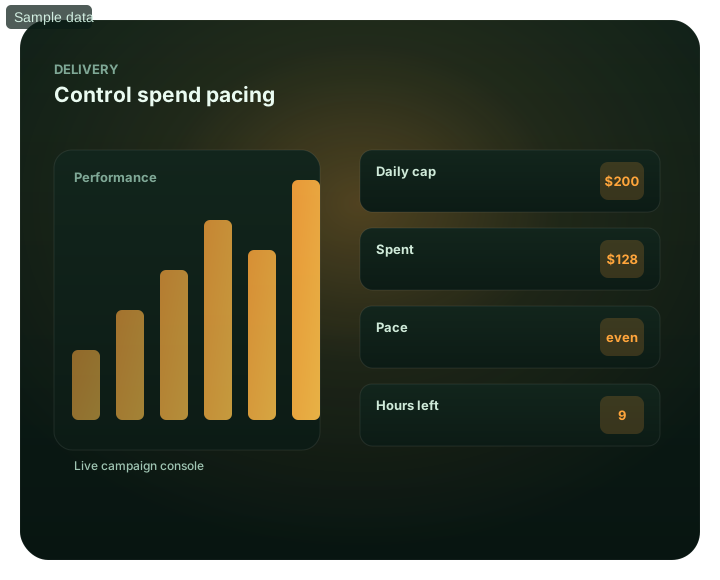
Control spend pacing & delivery: at a glance
What does this page explain about Campaign Pacing: Improve Campaign Performance & Control?
Quick answer: Spending your budget too fast or too slow both hurt results. Control pacing and delivery speed on FroggyAds so your budget lasts the day and lands when it. Pacing concerns the rate of spend within your campaign schedule. Compare it with the timing of visits that lead to accepted conversions; do not assume the hour a conversion is reported is the hour the useful visit occurred. We provide budget, scheduling and source controls for a measured delivery plan. Confirm the pacing options available in your selected campaign setup instead of assuming every format offers the same delivery modes. The $50 minimum deposit funds your account; it does not set the daily campaign budget. Judge a pacing change by mature outcomes, not by whether the account spent its balance.
| Section | Distinct excerpt from this page |
|---|---|
| Make the budget land where it counts | A campaign that exhausts its allocation early cannot buy later opportunities from that allocation. Under-delivery may instead reflect a low bid, narrow eligibility or limited inventory; changing pacing alone may not resolve it. |
| Daily budget caps | Set the daily spending limit, then review the delivery rate separately. A cap alone does not spread that allocation evenly across the day. |
| Even pacing | Consider a more even allocation when the campaign needs coverage throughout its active hours. Confirm the actual spend pattern in reporting. |
Reference for Campaign Pacing: Improve Campaign Performance & Control: FTC guidance on online advertising and marketing.
- Planning: Make the budget land where it counts.
- Control: See campaign pacing inside the platform.
- Decision: How you spend is as important as how much.
Keep budget available for the hours that earn it
Early exhaustion removes the campaign from later auctions even when those hours are commercially useful. A slow curve can come from bids, eligibility or available inventory, so diagnose those constraints before changing distribution. Treat the spend curve as a delivery diagnostic inside the campaign's declared schedule. Link each accepted result back to the originating visit and let the outcome mature before judging a time window.
FroggyAds combines campaign budgeting, schedules and source controls so your team can protect the delivery plan. Check the controls exposed by the chosen format because delivery options can differ by campaign setup. Watch the spend curve in real-time reporting and adjust as you learn your peak windows. Keep account funding separate from the daily amount assigned to this campaign. Evaluate the new curve with mature accepted outcomes instead of treating balance consumption as success.
Best for
- Stopping morning budget burnout
- Spreading delivery across the day
- Pairing with day-parting
- Smoothing reach on a fixed budget
- Monitoring spend pace live
See campaign pacing inside the platform
For Control spend pacing & delivery, the FroggyAds self-serve workflow keeps campaign setup, targeting, budget controls, source-level reporting and optimization in one dashboard so advertisers can make evidence-led keep, cap, exclude and retest decisions.
- Stopping morning budget burnout
- Reserve delivery across the active window
- Pairing with day-parting
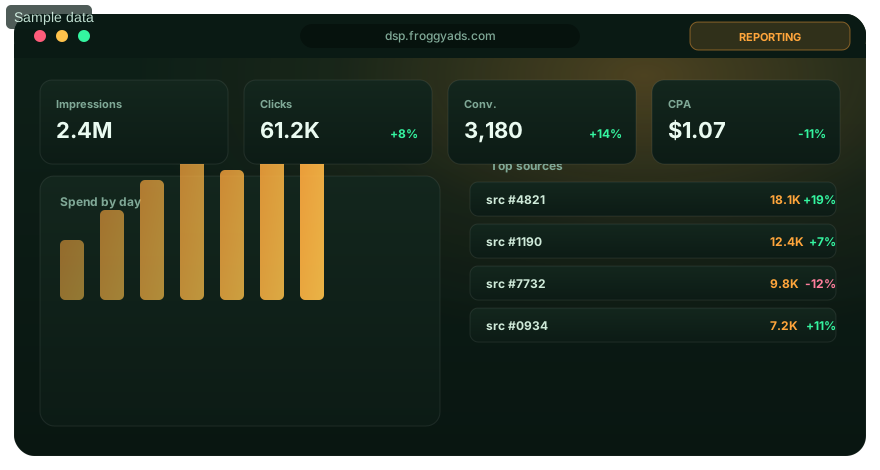
How you spend is as important as how much
Match the spending pattern to the opportunity you can measure.
Daily budget caps
Write the daily loss boundary first and assess the hourly delivery curve as a separate control. The spending ceiling limits exposure but does not determine when eligible delivery occurs.
Even pacing
Preserve budget for later intervals when the campaign must remain eligible throughout its declared buying window. Confirm the actual spend pattern in reporting.
Pair with day-parting
Concentrate pace in your best windows and ease off in dead time.
Watch the curve
Monitor the spend curve live and adjust pace as data arrives.
Control your pacing
Fund your account from the $50 minimum deposit, then set a separate campaign budget and delivery plan.
Pacing FAQ
what does campaign pacing control?
Campaign pacing controls how quickly the daily budget is spent and when delivery occurs. It helps keep spend aligned with the hours the campaign is meant to cover.
when is even delivery useful?
Even delivery is useful when the campaign needs presence across the day instead of a burst at the start. Monitor the spend curve to confirm the budget is lasting as planned.
when could front-loaded pacing make sense?
Front-loaded pacing can fit a campaign whose strongest opportunity is early in its schedule. Use actual conversion timing to support that choice.
how can pacing prevent morning budget burnout?
A daily cap defines the spending boundary; it does not by itself prevent early exhaustion. Review the available pacing and scheduling controls, then monitor actual spend to see whether the planned allocation remains available for later traffic.
what should I check if the campaign is under-delivering?
Review the bid, targeting, eligible inventory, approval state, and pacing choice. A slow spend curve can come from limited opportunity rather than the daily cap itself.
how does day-parting work with campaign pacing?
Day-parting chooses the active time windows; pacing controls the delivery rate inside them. Together they can concentrate spend in hours that have produced stronger results.
why pair a frequency cap with pacing?
The pacing setting manages budget speed, while the frequency limit controls repeated exposure. Pairing them prevents smooth delivery from repeatedly reaching the same users beyond the plan.
what does the live spend curve tell a media buyer?
The curve shows how much of the daily allocation has been used over time. Compare it with conversion timing before changing delivery speed.
when should I adjust the pacing setting?
Adjust it when the spend curve consistently misses the intended schedule or conversion data reveals stronger hours. Keep the budget and attribution stable enough to judge the change.
can pacing be used on a campaign funded from $50?
Our $50 minimum deposit funds the account. Choose the campaign allocation and planned duration separately, and confirm the controls available for the chosen format. Funding alone does not prove that the campaign will deliver for a full day.
Pace your delivery
Create your account and plan delivery for the eligible inventory in your campaign, not for a platform-wide impression total.
Build a pacing plan around opportunity, conversion timing and budget protection
Campaign pacing is a budget-delivery decision, not simply a speed setting. A buyer wants enough delivery to learn and convert while avoiding a spend curve that exhausts the daily allocation before valuable traffic arrives. The right pattern depends on the offer, audience availability, time zones, conversion delay and the amount of evidence the advertiser needs before making the next optimization decision.
Define the daily objective before changing pacing. State the maximum daily spend, the hours the campaign is allowed to run, the accepted conversion event and the point at which performance will be reviewed. If the audience converts throughout the day, even delivery can preserve access to later opportunities. If evidence shows that a specific window carries more value, pacing can be combined with day-parting so the campaign concentrates delivery where the advertiser has a documented reason to do so.
Read the spend curve together with eligible traffic. Under-delivery does not automatically mean the pacing control is too conservative. A low bid, narrow targeting, limited source availability, creative approval issue or another eligibility constraint can also reduce delivery. Before increasing speed, check whether the campaign is actually winning enough opportunities. FroggyAds reporting and targeting controls help buyers separate a delivery-rate problem from an inventory or configuration problem.
| Pacing signal | What it can mean | Controlled next check |
|---|---|---|
| Budget gone early | Delivery is concentrated before later opportunities arrive | Compare conversion value by hour and review pacing |
| Budget barely spending | Pace, bid or eligibility may be limiting delivery | Check targeting, bid, approval and available inventory |
| Spend curve looks smooth | Budget is distributed, but quality still needs proof | Compare mature conversions across time windows |
| Strong hours are known | Some periods may justify more delivery | Test day-parting without changing unrelated variables |
| Frequency rises | Extra delivery may be repeating exposure | Review frequency controls and marginal conversion value |
| Scale changes source mix | More budget can reach different inventory | Recheck source-level quality after each increase |
Use conversion timing instead of intuition to decide when the budget should be available. Record when impressions and clicks occur, then compare them with the time accepted conversions are initiated. Be careful with delayed outcomes: a conversion recorded in the afternoon may have started from a morning visit. Keep attribution rules consistent so a pacing change is not judged against a different measurement window.
Daily caps provide the loss boundary, while pacing determines how the allocation is distributed. These controls solve different problems. A cap limits total spend for the period; pacing helps control the rate of delivery inside that boundary. Set both from the campaign plan. A high cap with uncontrolled delivery can still burn quickly, while an extremely restrictive pace can prevent the campaign from collecting enough evidence to make a reliable source or creative decision.
Pair pacing with source-level analysis. If spend accelerates because one source suddenly supplies much more traffic, the blended curve may hide a change in inventory quality. Review accepted conversions and source mix as delivery grows. FroggyAds source controls let the buyer cap, exclude, allow or retest sources according to the campaign's evidence rules rather than responding to total spend alone.
Frequency matters when a campaign is trying to maintain presence across a long window. Smooth spend is not automatically efficient if later impressions repeatedly reach the same users without adding accepted outcomes. Review exposure and downstream value together. If marginal delivery adds cost without corresponding business value, adjust frequency, creative rotation, source selection or the active window instead of assuming the pacing setting is the only lever.
Make pacing changes one at a time and keep a dated record. Changing the bid, daily budget, GEO, source list and pacing mode together may produce a better result, but it will not reveal which decision helped. Preserve the previous configuration, state what the change is expected to accomplish, and allow enough traffic and conversion time for comparison. A rollback point is especially useful when a new delivery pattern reaches unfamiliar inventory.
New campaigns should prioritize learning before aggressive scale. Choose a daily allocation that can collect a meaningful sample without exceeding the advertiser's test-loss boundary. Once the campaign has enough accepted outcomes to identify useful sources, time windows and creatives, increase budget or delivery in bounded steps. Each increase should answer a new question, such as whether the existing quality remains stable at a larger volume.
Pacing also helps operational planning across markets. A campaign serving several time zones should not assume that one clock-hour pattern represents every audience. Segment or schedule where the business case requires it, then compare results in the relevant local context. Keep the structure simple enough that each segment can still gather usable evidence; excessive fragmentation can leave every cell too small to guide a decision.
FroggyAds gives media buyers self-serve budget, targeting, reporting and source-management controls that can support a measured pacing workflow. The platform can provide delivery tools, but the advertiser still defines the accepted outcome, economic threshold and conversion maturity window. Combining those responsibilities creates a clearer decision system than optimizing merely for the percentage of budget spent.
The practical test for good pacing is whether the next unit of budget is available when it has a reasonable chance to create value. A campaign that lasts all day but delivers into weak periods is not well paced, and a campaign that spends rapidly during proven high-value windows is not necessarily poorly paced. Judge the curve by mature business outcomes, preserve budget protection, and revise the schedule when new evidence changes where opportunity actually exists.
Read the spend curve before you change the cap
Start with four timestamps in the campaign time zone: when delivery opens, when 25% of the daily allocation is spent, when 75% is spent and when delivery closes. Add eligible visits and accepted conversions from the interactions that began in each interval. This shows whether the campaign loses access to later opportunities or simply follows the inventory that is actually available.
An early-spending curve needs a diagnosis before it needs more money. Check whether the schedule deliberately favors those hours, whether one source suddenly supplies most of the volume, and whether the bid or targeting makes the campaign eligible for a broad burst of traffic. Raising the cap can extend the same concentration. Use FroggyAds source reporting and campaign controls to isolate the driver, then change one setting while the previous curve remains your reference.
Separate four pacing decisions
- Keep: delivery is uneven, but mature accepted outcomes remain inside the planned cost and the business can respond.
- Slow: the allocation disappears before later periods that have repeatedly produced qualified outcomes.
- Open: underdelivery comes from a confirmed constraint such as a narrow schedule or insufficient eligibility, and the added exposure stays inside the loss limit.
- Pause: tracking, destination health or operational capacity cannot support more traffic.
We recommend reviewing comparable days at the same local checkpoints. Record promotions, landing-page releases and tracking incidents beside the curve so a one-off event is not promoted into a permanent pacing rule. When the result is ready, make the smallest reversible change in FroggyAds and state what the next curve should look like.
The pacing control sheet
This page is for media buyers who need budget to remain available when eligible users and conversion opportunities are strongest. Use it to control how a campaign spends through its delivery window. The decision is whether the campaign should distribute spend evenly, reserve budget for selected periods or slow down while evidence matures. The accepted outcome is eligible delivery across the planned window without premature budget exhaustion or avoidable underdelivery.
| Evidence field | What your team should record |
|---|---|
| Budget window | Write the daily and total boundary, the campaign timezone and the exact time at which the limit resets. |
| Opportunity window | Compare available traffic and accepted outcomes by hour or day without treating a short spike as a permanent pattern. |
| Maturity window | Delay efficiency decisions until enough conversions have had time to reach the chosen acceptance stage. |
| Protection rule | Define when to cap, pause or reopen delivery if spend accelerates, evidence is incomplete or operations cannot respond. |
Campaign Pacing: Improve Campaign Performance & Control operating scenario
A lead-generation campaign spends most of its daily cap before the sales team is available. The pacing record separates delivery rate, eligible traffic, accepted-lead timing and response capacity before the buyer changes bids or hours.
Apply the pacing rule in your next FroggyAds campaign
- Establish a baseline delivery curve before adding day-parting or bid changes.
- Compare planned cumulative spend with actual cumulative spend at fixed checkpoints.
- Diagnose whether a pacing gap comes from eligibility, bids, source supply, caps or schedule settings.
- Change one delivery control, keep the prior curve, and review the effect after the conversion window matures.
Read four pacing patterns differently
Early exhaustion: when the campaign reaches its cap long before the buying window ends, check whether the schedule intentionally favors those hours. If it does not, inspect bid competitiveness, broad targeting and source concentration before simply raising the cap. A larger cap can extend the same imbalance instead of correcting it.
Persistent underdelivery: when spend stays below plan, separate a genuine lack of eligible inventory from restrictive settings, rejected creative, low bids or a narrow schedule. Relax one constraint at a time. The useful question is which control prevented eligible delivery, not whether the dashboard finished below budget.
Uneven delivery with stable outcomes: a jagged hourly curve can still be commercially acceptable when accepted conversions mature at the expected cost and the business can handle the response. Do not force cosmetic smoothness if the underlying opportunity is naturally uneven.
Even delivery with weak outcomes: a perfectly smooth spend line does not prove that the campaign deserves more budget. Review source, audience, creative and destination evidence. Pacing controls distribution; they do not repair an offer that fails to convert qualified visitors.
Build a pacing review that another buyer can reproduce
Save the campaign timezone, cap, bid state, schedule, target scope and cumulative-spend checkpoints for every material change. Add the conversion-event definition and its maturity delay. This record lets your team compare two pacing periods without relying on screenshots taken at different times.
We recommend reviewing delivery at the same local times on comparable days. Keep promotions, landing-page changes and tracking incidents in the record because they can alter response timing. When the evidence supports a change, apply the smallest reversible adjustment in FroggyAds and state the expected effect before the next checkpoint.
A pacing decision is complete only when it includes a next action. Continue when delivery and accepted outcomes remain inside the plan; narrow the schedule when specific periods repeatedly fail; raise an eligible constraint when qualified demand is being missed; or pause when tracking and operational readiness cannot support more spend.
Separate pacing from the variables around it
Keep the offer, landing page, conversion definition and attribution window stable while a pacing hypothesis is under review. If creative, audience and delivery controls all move together, the next report cannot show which change improved the curve. Record exceptional events such as a promotion, tracking interruption or inventory outage beside the affected hours rather than deleting them from the history.
When the campaign serves several markets, review local time and business availability before combining them. A single account-timezone chart can place different customer moments in the same column. Segment only where that distinction changes the operating decision, then return the evidence to one campaign-level budget view so the total exposure remains visible.
Put the next budget step on the pacing record
Use the pacing sheet to name the campaign time zone, daily boundary, review checkpoints and mature accepted outcome. We give you the self-serve controls to run the next bounded delivery test; your evidence decides whether to keep, slow, open or pause it.