
Popup Ad Network for Advertisers
Buy popup traffic with a clear offer, an intentional destination and a source review you can act on. Use FroggyAds to test the browser experience against real customer outcomes.
What does a popup ad network provide for advertisers?
A popup ad network connects an advertiser with inventory that can open an advertiser destination in a separate browser window or tab when the supported interaction and browser rules allow it. Your buying task is to choose an eligible offer, understand how that destination appears and identify which reported sources bring useful prospective customers. At FroggyAds, we give affiliates, media buyers, agencies and online businesses a self-service environment for buying supported traffic and controlling campaign targeting, budgets and sources. Start with a destination that explains the offer immediately, then judge the traffic by the customer actions your business can verify.
Specify the popup experience you intend to buy
Ask what the network means by popup before comparing its quoted inventory with another supplier. A destination shown in front of the current content and a popunder opened behind that content can receive attention at different times. Some environments may use a new tab instead of a separate window. Browser settings and publisher implementation can also prevent or alter an open. Record the supported treatment, device and browser context for the proposed campaign. You are buying access to an attention opportunity, not a promise that every visitor will view or engage with the page. Keep popup and popunder treatments identifiable when their behavior differs, so a late-arriving popunder visit is not judged as an immediate foreground response.
Choose an offer that can stand on its own
Popup traffic often reaches a destination without the explanatory creative that would precede a banner or native click. Your offer must therefore make sense on its own first screen. An affiliate should confirm that the program permits the traffic source and that the merchant accepts the intended markets. An online store should choose a product or collection with clear availability and an accessible purchase route. A SaaS or app advertiser should explain what the visitor receives before requesting a signup or installation. Establish these conditions before selecting geography and device settings in FroggyAds. Broad reach is useful only where the business can serve the visitor and the destination can earn the next action honestly.
Ask how much source detail the network exposes
A useful popup network report must support the decision you intend to make. Ask whether a source identifier represents a publisher, placement, zone or larger supply group, and whether that same identifier can be excluded or selected in the account. Confirm the date range and breakdowns available in an export before designing the test. If reporting combines several placements, treat the result as a group-level result. Do not attribute it to an individual site you cannot identify. With the supported FroggyAds source controls, you can turn observed differences into buying actions. The benefit is practical: spend can move toward combinations that produce accepted customer value instead of staying inside one unexplained total.
Give the popup landing page one clear job
The popup landing page needs to answer three immediate questions: who is speaking, what is being offered and what the visitor can do next. Lead with a specific benefit and the material qualification that determines whether the offer is useful. For an ecommerce campaign, show the relevant product or collection rather than sending every visitor to an unrelated home page. For lead generation, explain what happens after the form is submitted and request information appropriate to that step. A bridge page should add a reasoned comparison or useful explanation. Extra redirects that repeat the same promise create friction without helping the buyer. Keep your advertiser identity visible and allow the visitor to leave normally.
Put your offer in front of a test audience
Start a popup campaign with a destination built for the visitor
Bring your eligible offer and finished landing route to FroggyAds. We recommend choosing one market and device context for the first popup test, with an opening budget you can review before extending delivery. A focused launch lets you learn whether the destination creates interest from that audience and which available sources deserve another allocation.
Create My Free Account
Make the first screen usable without publisher context
A visitor arriving in a new window may have little context for the advertiser or the offer. Use a clear page title, readable first-screen text and an action that matches the promise. Avoid opening a second unsolicited window or using a fake alert to force attention. Explain pricing, recurring charges, delivery restrictions or eligibility before the visitor commits. When a page needs consent, make sure its next step still works after the visitor makes a choice. Treat mobile browser controls, keyboard use and an interrupted form as ordinary parts of the purchase path. A clean destination gives your popup source test a fair chance to produce a lead, sale or signup that the advertiser can accept.
Track the popup route from network event to customer record
Define what each system counts before comparing its totals. A network delivery event, a destination request, a visible page session and a completed customer action are separate observations. Retain the campaign reference and available source or click value through the redirect chain into your tracking system. Then confirm that the final advertiser record can be connected to the original visit. If your implementation uses a postback, send a controlled test event and inspect its status. Check for reload duplicates and lost parameters. Agree which customer record determines acceptance when analytics and the backend disagree. FroggyAds reporting helps you understand media delivery; your own order, lead or subscription validation completes the commercial picture.
Compare popup buying cost with the value you accept
Check the CPC or CPM billing model that applies to the proposed account inventory. CPC relates cost to billable clicks; CPM relates it to billable impressions in thousands. Neither label tells you how many accepted customers the traffic will create. Calculate CPA as your own spend divided by accepted acquisitions, using the same reporting period and validation rule. Include material variable costs when deciding whether an acquisition is affordable. For example, a lead that cannot be contacted should not receive the same commercial treatment as a qualified, accepted enquiry. We recommend setting the cost limit from your business economics before bidding, so an attractive media rate does not become the campaign objective.
Choose the opening experience deliberately
Use popup traffic when your destination can make the case
Popup traffic is a useful format to test when the landing page can introduce an eligible offer without a long preceding ad message. If the purchase needs that explanation before the visit, compare another supported FroggyAds format in a separate campaign. Keeping the tests identifiable makes the result useful when you decide where to place the next advertising budget.
Create My Free Account
Control the first popup allocation before extending it
Set a daily spending ceiling and an overall amount that may be used before a buying decision is required. Establish how quickly the relevant source reporting becomes available and who can act on it. A fast-delivering zone can consume a small test before its customer outcomes are known. Keep a confirmation amount separate from the opening allocation so you can repeat a promising result. Where frequency controls are available, define what repeat exposure is intended to achieve and review whether later contact adds useful response. Pause immediately for a faulty destination or misleading experience; ordinary uncertainty about an immature conversion sample needs a scheduled review rather than an improvised reaction.
Run a popup source test that answers a buying question
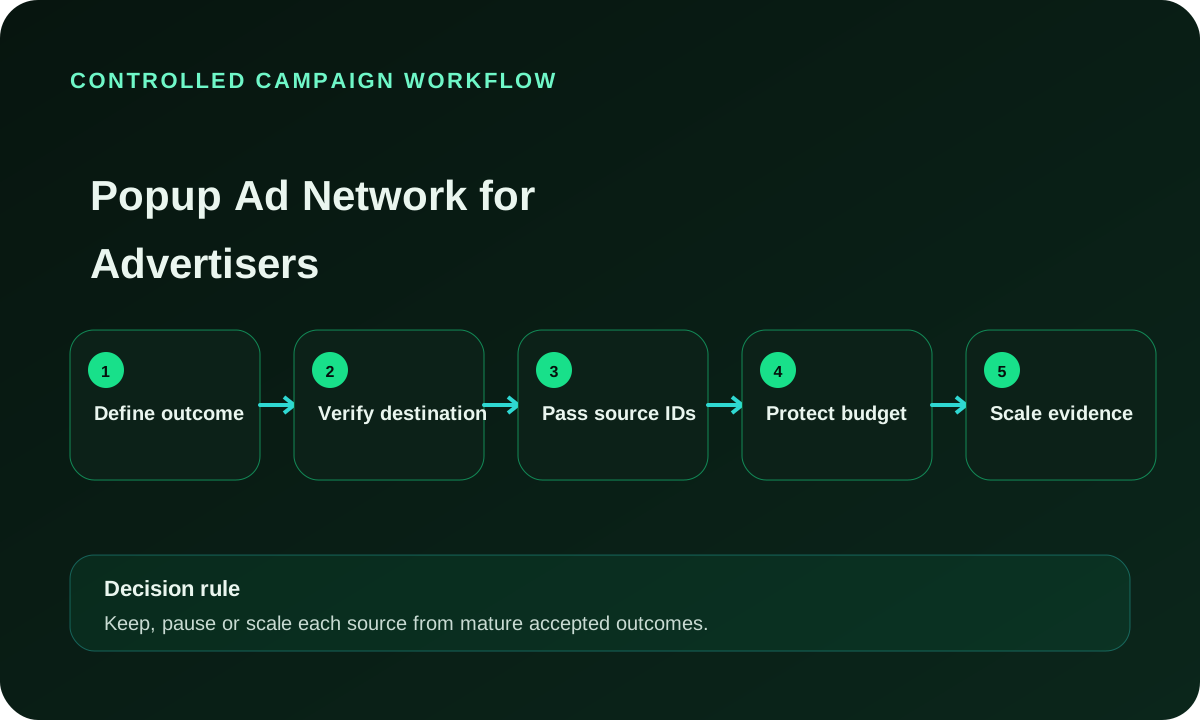
Write the question in terms you can decide: can this reported source, in this market and browser context, generate an accepted action within the allowed acquisition cost? Select a destination version and keep it stable for the opening test. Verify offer eligibility, identifiers and the final customer event before traffic starts. Review the first delivery for technical faults, then let the commercial outcomes complete their normal validation. Compare actionable source groups under that common rule. A source with early interest but pending outcomes may need more observation. A source with a broken route needs repair or exclusion. Use FroggyAds to apply the supported campaign action once the evidence tells you which case you have.
Judge popup traffic quality in the customer journey
Popup traffic quality is best assessed through a sequence of observable steps. Check whether the destination receives requests from the purchased device and market groups, whether the page can be used, and whether submitted customer events survive your validation. Short sessions can reflect low interest, a browser experience problem or a measurement definition; they are not a complete diagnosis on their own. Likewise, a large count of form submissions is weak evidence if most are duplicates or outside the offer rules. Keep invalid, duplicate, rejected and still-pending events separate. When a specific source shows a recurring problem, preserve examples and the affected period before changing its allocation.
Separate a source problem from a landing-page problem
Start with the breadth of the failure. If every popup source loses its parameters at the same redirect, repair the route before buying a different source. If one browser group cannot complete the form, address that destination case or exclude it while a correction is made. When the path works and only one reported source produces poor customer acceptance, review that source independently. After a repair, label the new page or route version so old failures do not remain mixed into the current result. This order saves budget because the chosen action matches the fault. It also keeps a useful source from being discarded for a problem the advertiser can fix.
Expand popup traffic where the additional spend still works
An account average can remain attractive while newly purchased inventory performs poorly. Review the traffic added by a budget, bid, country or device change separately from the earlier purchase. Note which reported sources increased and which new sources appeared. Wait for the relevant customer outcomes before deciding that a larger allocation deserves renewal. If the increment exceeds your accepted acquisition cost, withdraw that expansion and retain the earlier settings that were supported by evidence. Raising a bid, adding countries and replacing the landing page together makes that diagnosis harder. Use a clear sequence of purchases so you know what the extra spend actually bought.
Turn source learning into your next campaign action
Build a popup traffic test you can improve
Create your FroggyAds account and bring one eligible offer into the campaign workflow. Our self-service controls give you a practical way to set the initial audience and budget, then adjust supported source selections as customer evidence develops. You stay in control of what the next allocation is intended to prove.
Create My Free Account
Keep popup advertising honest and easy to leave
A popup destination should be clearly commercial and should allow ordinary browser navigation. Exclude fake security warnings, fabricated rewards, concealed subscription terms and controls that imitate a close action while opening the offer. Confirm that the advertiser is allowed to promote the product in each intended market and that any affiliate agreement permits the source. Keep the approved landing version with the campaign record. If a third-party destination changes its proposition or eligibility, review the campaign before continuing spend. These checks support a more reliable buying decision because the result reflects a truthful offer rather than confusion or forced interaction.
Why choose FroggyAds for your popup buying workflow?
Choose FroggyAds when you want to operate the test yourself and connect delivery observations with campaign changes. Our self-service buying environment provides supported pop inventory, targeting, budget management and source reporting in one working process. You can begin with an eligible market and destination, inspect the source detail available to the campaign and act on the combinations that merit further spend. Our broader access across ad formats also lets you compare a different attention model when the offer needs it. Availability and approval depend on the actual campaign, so build the initial plan around the inventory and controls shown for your account rather than a blanket volume assumption.
Decide whether to retain, repair or stop a popup source
Retain a popup source when its delivered context fits the offer and the accepted customer result falls within your commercial range. Repair the advertiser route when evidence identifies a broken redirect, lost identifier or unusable form. Stop the affected source for a verified unsafe or misleading experience, or when completed evidence shows sustained unacceptable value. Pending outcomes belong in a separate observation category with a review date. These decisions have different causes and should not be collapsed into a single traffic-quality score. FroggyAds gives you supported media controls; the reason for each action should remain visible in your source review.
Review popup delivery and customer acceptance at different times
The first popup review should answer whether the purchased route operates correctly. Inspect destination availability, budget pacing and identifier capture as delivery begins. Look for a concentrated browser failure or an unexpected jump in one source group. Those are operational checks you can act on promptly. Avoid turning a few early customer events into a final economic verdict, especially when lead verification, payment or account activation occurs later.
Set the commercial review around the advertiser's actual decision delay. A completed sale may need refund or cancellation checks; a lead may need qualification; a signup may need activation. Retain the original source and destination version until that status is known. Then compare the media spend with accepted customer value. Use one consistent time basis for the reconciliation so late outcomes are assigned to the purchase that generated them.
At each later review, identify what changed since the previous purchase. If the destination is unchanged but a new browser group has entered delivery, examine that group. If a merchant revised the offer, separate the revised period. A clear purchase history makes the next FroggyAds action easier: repeat an effective setup, investigate a specific break or test a new source without erasing what you have already learned.
Use this popup buying review before renewing spend
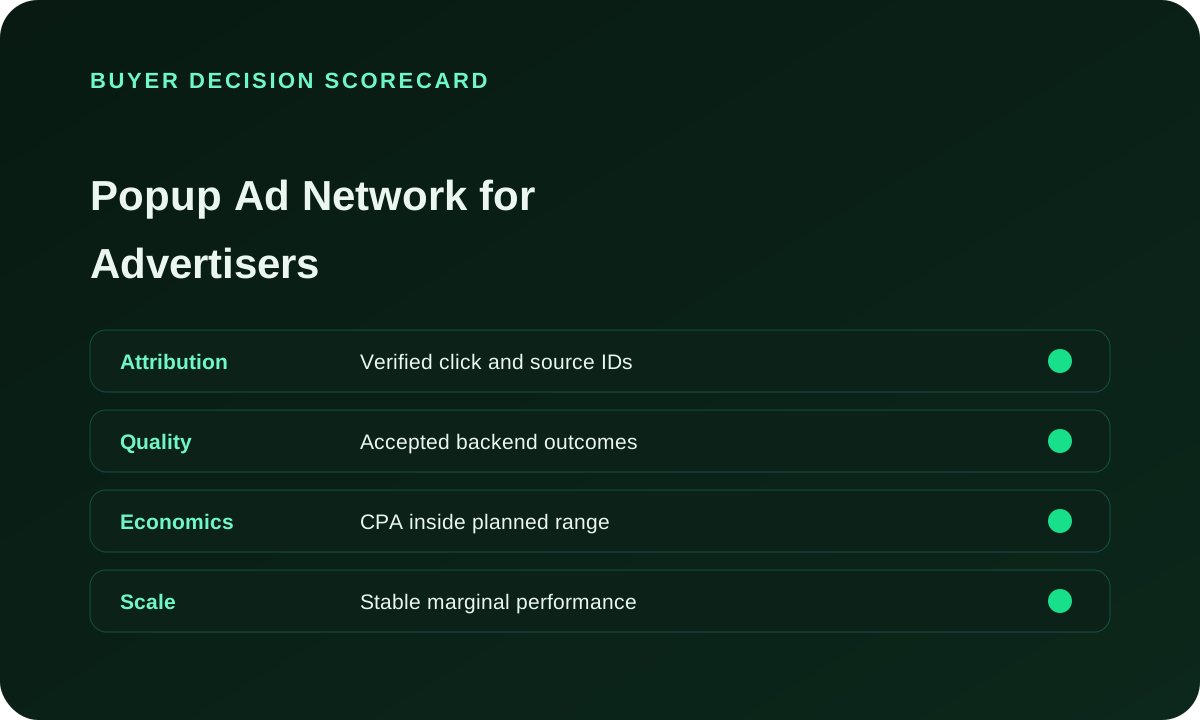
| Area | Evidence required | Action |
|---|---|---|
| Eligibility | Offer approval and supported customer route are confirmed. | Restrict delivery to people the advertiser can actually serve. |
| Attribution | The purchased source reference reaches the final customer record. | Inspect a test visit and resolve any missing tracking handoff. |
| Quality | Pending, accepted, rejected and duplicate events are separated. | Classify the source only after its relevant outcomes are known. |
| Economics | Actual billed spend is related to accepted acquisitions. | Renew only within the advertiser's allowable acquisition cost. |
| Scaling | Additional inventory is identifiable after the last increase. | Judge the increment before approving another purchase. |
Popup ad network questions from advertisers
When is a popup ad network suitable for an advertiser?
A popup ad network can suit an advertiser whose offer permits the traffic source and whose destination can introduce the proposition without preceding creative. It is a testable route for leads, sales or registrations when those conditions hold. Check the supported window or tab behavior for the campaign and retain a customer acceptance measure before buying broad reach.
How should an advertiser start a popup network test?
Prepare an eligible destination, the customer action you will count and a route that preserves available identifiers. In FroggyAds, choose the relevant audience restrictions and an initial allocation you can review. Keep the first source comparison under the same offer and destination version, then extend the combinations that earn further exposure.
Which inputs shape a popup advertising budget?
Work backward from the amount an accepted customer is worth to the advertiser. Allow for the CPC or CPM purchase, the cost of preparing the destination and the delay before outcomes can be accepted. Set aside a separate confirmation allocation. The initial budget should buy a useful comparison without committing all funds before the first sources can be assessed.
How does audience qualification affect popup campaigns?
Popup audience qualification begins with who can use and buy the offer. Match permitted geography, language and supported devices to that customer. Add available browser or source restrictions when they resolve a real experience or eligibility difference. A very narrow filter combination is not automatically more qualified if it simply removes useful discovery without answering a buyer question.
How should a popup message align with the landing page?
Where an entry message is present, keep its claim and material terms consistent with the destination. For popup inventory that opens the destination directly, the page itself must establish the offer and advertiser identity. Verify the actual purchased behavior; do not design a campaign around a preceding message that the visitor may never see.
What landing checks come before popup traffic starts?
Check a fresh visit through the real campaign route. Confirm that the browser can reach and leave the page, consent choices do not break the action, a form or checkout completes, and the correct source reference reaches the customer record. Inspect the devices intended for meaningful spend. Keep the resulting destination version fixed during the first comparison.
Which metrics make popup ad delivery accountable?
Use reported delivery and billed spend to understand the media purchase, then check usable destination visits and accepted customer actions in your own systems. Keep source granularity and outcome age beside the totals. This makes a high-volume source distinguishable from one that produces fewer but more useful customers, and makes a data discrepancy easier to investigate.
How can advertisers diagnose weak popup traffic?
Locate the earliest weak step. Missing destination requests point toward the open or redirect route. Requests without usable sessions require a browser and landing review. Usable sessions without accepted customer actions call for an offer, audience and validation review. Compare the affected source group with other groups before changing the whole campaign.
Which guardrails protect a popup network campaign?
Use a clear opening spend limit, an owner who can pause delivery and a documented route for reporting an incident. Preserve the approved offer, destination and relevant source examples. Frequency and exclusion controls should be confirmed in the actual campaign context. If a guardrail cannot be implemented, narrow the purchase to a scope that you can responsibly operate.
What supports scaling a popup ad network campaign?
Scale a popup campaign when the accepted customer economics repeat and the business can handle the additional demand. Label the next inventory or budget increment, preserve the preceding settings and wait for the added outcomes. More delivery is useful when its extra cost buys customer value inside your range, rather than merely making the account total larger.
Continue with the right pop campaign resources
Use the following resources to examine the popup format, source selection and conversion route in more detail, then return to the campaign with a specific buying decision.
Create your next popup traffic campaign with FroggyAds
Choose an offer your business can fulfil, prepare a destination that earns the visitor's attention and create your FroggyAds account. We recommend buying an initial source comparison you can measure and act on. When the first accepted results are available, use our supported campaign controls to keep useful inventory, repair a specific problem or test a fresh audience with a clear purpose.
Which evidence should guide a popup network purchase?
Use popup network evidence to decide which reported inventory deserves the next advertising allocation. Start with the actual window or tab treatment, then follow the customer route through the destination and validation. A network that exposes only an aggregate source group can be assessed at that level, but not at an undisclosed placement level. A campaign that bills early and validates customers later needs enough reserved budget to wait for the result. Matching the decision to the available evidence keeps the purchase practical.
Connect window behavior with source disclosure and customer completion. Window behavior tells you what opportunity for attention was purchased. Source disclosure tells you how narrowly you can act on a difference. Customer completion tells you what the traffic produced for the advertiser. The following table translates those questions into an initial FroggyAds buying plan.
| Decision | What to verify | FroggyAds action |
|---|---|---|
| Customer action | Choose the accepted lead, sale, registration or activation that earns renewed spend. | Tie the FroggyAds campaign review to that event instead of optimizing to opens alone. |
| Browser treatment | Confirm whether the selected inventory opens a window, tab or delayed popunder context. | Separate materially different treatments when their customer response must be compared. |
| Actionable source | Establish what each source identifier groups and which exclusions can actually be applied. | Use the supported source selection to act at the granularity the report provides. |
| Financial exposure | Confirm the billable event and the time required to accept the resulting customer action. | Release a reviewable allocation while keeping funds available for confirmation. |
| Renewal condition | Name the extra customer value that would justify the next inventory purchase. | Review newly added sources separately before extending the allocation again. |
Five steps from popup account setup to an informed source decision
- Prepare the destination: make the offer, advertiser identity, material terms and next action understandable in a fresh window.
- Confirm permission: check the offer owner's source rules and ensure the intended market and device can complete the transaction.
- Connect the records: pass the available source and click references through the destination into the final customer record.
- Buy a useful comparison: set the audience and budget in FroggyAds, then retain the first destination version while sources develop.
- Act on customer evidence: repeat an effective purchase, repair the failing route or stop the affected source with its reason preserved.
How does FroggyAds help you act on popup results?
Our self-service workflow puts the supported campaign settings in the buyer's hands. You can choose the relevant targeting, set the budget and review the delivery information available for the campaign. That makes FroggyAds a strong fit for performance advertisers who bring their own offer and measurement process and want to make clear purchasing decisions. We recommend using the available source detail to connect each allocation with customer evidence, rather than treating traffic as a single anonymous purchase.
Keep the commercial objective visible while you operate the account. A popup purchase should help you acquire useful prospective customers at an acceptable cost. If the first route does not work, use the source and browser evidence to choose a repair or a different test. If it does work, preserve the winning destination and examine the additional inventory as you increase spend.
Prepare a popup network brief your buying team can use
Give the buyer the offer approval, intended browser treatment, customer acceptance definition and spending authority before the first purchase. Include what the network reports and what the buyer can exclude, because those limits determine the source comparison. For the format itself, review Popup Ads For Advertisers. Use the network brief to decide how that format will be purchased, measured and renewed for your business.
An agency should also agree who owns each part of the route. The media buyer can operate supported source controls, the destination owner can fix an unusable page, and the advertiser can accept or reject the resulting customer event. Assign a contact for each responsibility so a campaign incident does not remain unresolved while spend continues.
| Checkpoint | Page-specific action | Evidence to keep |
|---|---|---|
| Window route | Document the expected browser opening and the destination reached by a fresh visitor. | Retain the device context, redirect path and page version used for the purchase. |
| Offer route | Confirm permission for popup traffic and make commercial conditions visible before commitment. | Retain the offer approval, eligibility rules and advertiser contact for changes. |
| Review route | Connect the network allocation with accepted customers and a specific renewal decision. | Retain billed spend, actionable source groups and the outcome status at review. |
Hypothetical calculation: a popup source test costs USD 275 and yields five accepted customer acquisitions. The accepted CPA is USD 275 divided by 5, or USD 55.00. If two more events are still awaiting validation, keep them pending rather than lowering the reported acquisition cost prematurely. These invented inputs demonstrate the calculation and describe no FroggyAds result or price.
Use FroggyAds to turn your popup plan into a campaign you can operate and improve. Bring an eligible offer, confirm the destination and choose an opening source allocation with a clear customer objective. Create your free FroggyAds account.
A popup network is useful when the destination earns the next action
Direct answer: choose a popup ad network when the offer permits the source, the supported browser experience suits the customer route and you can connect media spend with accepted leads, sales or signups. FroggyAds gives you a self-service way to put that plan into practice with relevant campaign controls. Start with a clear buying question and extend the inventory that earns another purchase.