
Document rights, provenance, version, checksum, publisher, license and the process used to review or remove files.
Download-site monetization guide
Monetize a Download Site With Clear, Safe User Choices
To monetize a lawful download site, protect the real download path first, then test advertising, affiliate offers, subscriptions, sponsorships or paid features around clearly identified files. Verify distribution rights, scan and version files, separate ads from download controls, and measure collected net revenue together with security incidents, delivery cost, repeat use and visitor complaints.
What does this page explain about Monetize Download Site: Improve Campaign Performance & Control?
Quick answer: A software download site can monetize through clearly separated advertising, sponsorships, affiliate relationships, paid support, subscriptions or premium tools. The commercial element must never imitate the real download button, hide a fee, misstate ownership or make an unsafe file appear legitimate. Net value matters more than the highest advertised CPM. A download site can distribute first-party software, open-source packages, documents, templates, media, datasets, drivers, utilities or other authorized files. Closely related searches such as how to monetize a download site, best ad network for a download site, AdSense alternatives and making money from a download catalog belong to one core decision framework.
| Section | Distinct excerpt from this page |
|---|---|
| A download site earns trust before it earns revenue | The monetization layer must not make the requested action harder to identify, introduce unsafe destinations or hide the true economics of storage, bandwidth and support. |
| What download site monetization means | It must be designed around file provenance and visitor trust, not around confusing a user into clicking the wrong control. |
| Six revenue models for a lawful download catalog | The most resilient model may combine a free core download with clearly separated paid support, premium features or relevant affiliate services. |
Reference for Monetize Download Site: Improve Campaign Performance & Control: Google Safe Browsing.
Three non-negotiable layersFile trust Clear user choice Sustainable economics
In the monetize download site review, use this practical rule: A download site earns trust before it earns revenue
Visitors arrive for a specific file or tool. Before you expand monetize download site, confirm this point in the campaign record: The monetization layer must not make the requested action harder to identify, introduce unsafe destinations or hide the true economics of storage, bandwidth and support.
Separate the requested download from advertising, affiliate offers, installers, notifications and account prompts.
Compare collected revenue with delivery, security, refunds, support, complaints and repeat usage.
For your monetize download site decision, we recommend this account-team check: What download site monetization means
Download site monetization is the process of earning revenue around a catalog of lawful files while preserving a clear and safe path to the item the visitor requested. The revenue model may include advertising, affiliate partnerships, subscriptions, paid versions, support, sponsorships or donations. In the monetize download site review, use this practical rule: It must be designed around file provenance and visitor trust, not around confusing a user into clicking the wrong control.
After the download-site evidence window closes, confirm this point in the campaign record: A download site can distribute first-party software, open-source packages, documents, templates, media, datasets, drivers, utilities or other authorized files. The risk and operating cost differ across those categories. An executable file requires a different security process from a PDF template, while a regularly updated dataset requires different versioning and delivery controls from a one-time archive.
For your monetize download site decision, we recommend this account-team check: Closely related searches such as how to monetize a download site, best ad network for a download site, adsense alternatives and making money from a download catalog belong to one core decision framework. Separate canonical pages would add little value unless the user needs a materially different task, such as technical file security or a specific advertising format.
Key takeaways before placing the first ad
The primary file action must remain obvious, accurately labeled and visually separate from commercial creative.
Do not distribute or monetize files without the permissions, licenses and records required for the exact use.
Bandwidth, scanning, storage, support, payment fees, refunds and incident response belong in the business calculation.
A provider approval does not certify the files, and a malware scan does not prove the business has distribution rights. Treat security, legal rights, ad policy and commercial measurement as separate controls that must all pass.
In the monetize download site review, use this practical rule: Six revenue models for a lawful download catalog
| Model | Best fit | Evidence to monitor |
|---|---|---|
| Display or native advertising | Reference pages, version pages and supporting articles | Accepted revenue, viewability, accidental-click indicators and latency |
| Affiliate partnerships | Authorized software, tools, hosting, security or related services | Approved transactions, refunds, disclosure compliance and net commission |
| Premium downloads | Higher-value files, faster delivery, support or advanced versions | Paid conversion, refund rate, support load and delivery cost |
| Subscription or membership | Frequently updated catalogs, tools, archives or communities | Retention, churn, account support, content cost and payment recovery |
| Direct sponsorship | Recognizable technical audience or curated category | Contract value, creative review, delivery, make-goods and renewal |
| Donation or supporter model | Open resources with a loyal community and clear mission | Supporter conversion, repeat giving, communication cost and trust |
Before you expand monetize download site, confirm this point in the campaign record: The most resilient model may combine a free core download with clearly separated paid support, premium features or relevant affiliate services. Keep each commercial relationship visible and independently measurable. Bundling unrelated offers into an installer may create support, consent and trust problems even when the short-term payout appears attractive.
Connect the guide to live testing
Connect Monetize a Download Site With Clear, Safe User to a controlled audience test
Use the choices established in “For your monetize download site decision, we recommend this account-team check: Six revenue models for a lawful download catalog” to define one audience, budget and source set in FroggyAds. Keep the surrounding offer and measurement rule stable so the test adds evidence to monetize a download site with clear, safe user instead of mixing several changes at once.
Create My Free Account
Establish file rights, provenance and version control
Create a record for every file. Include the source, owner or publisher, license, distribution permission, version, release date, file size, checksum, supported platform, dependencies, known limitations and review status. When a third party supplies the file, record the agreement and the person or system that approved publication.
Use a controlled publishing pipeline. Restrict upload access, isolate untrusted files, verify hashes, preserve an original copy, scan using appropriate tools and require review before a public URL is created. Keep a change log and a process for withdrawing a version. A public file should never be silently replaced with unrelated content under the same name and link.
Provide a clear reporting path for rights holders and visitors. Takedown, security and broken-file reports need different handling, but each should produce a trackable case and a timely response. Do not hide the contact route because it creates operational work. A catalog becomes more trustworthy when errors can be corrected.
Protect the real download path
Use one primary control that states the file name or product, version, platform and action. Place secondary mirrors, older versions and related offers in separate areas with distinct labels. Avoid multiple bright buttons competing for the same action. On mobile, verify that the primary control remains visible without being covered by sticky ads, consent banners or browser chrome.
Do not imitate system dialogs, antivirus warnings, browser update messages, progress bars or operating-system buttons. A visitor should not have to guess whether a control belongs to the site, an advertiser or the device. Review creatives and landing behavior, not just the visual size of the placement. Remove demand sources that repeatedly create deceptive experiences.
After the click, keep redirects limited and documented. Show the expected file name, size and checksum where useful. Use secure transport and prevent mixed-content delivery. If the download requires an account, payment or acceptance of terms, explain that before the user begins the action rather than inserting an unexpected gate after the click.
Choose ad placements that do not impersonate file controls
| Page area | Possible monetization | Primary safeguard |
|---|---|---|
| File detail page | Reserved display, contextual native or direct sponsor | Keep the real download button visually dominant and separated |
| Documentation or tutorial | Contextual affiliate or in-content advertising | Do not interrupt instructions or hide essential warnings |
| Category and search pages | Measured display or native placements | Avoid ad cards that copy file-result styling |
| Post-download confirmation | Relevant support, newsletter or optional product offer | Do not create surprise subscriptions or bundled installs |
| Account or billing area | Minimal first-party upgrade messaging | Keep payment, cancellation and security controls unobstructed |
| Mobile download flow | One clearly bounded placement at a non-critical step | Test target size, layout stability and accidental-click signals |
Popunder and interstitial formats require particular caution because the user is already expecting a file action. A new window or full-screen interruption can be mistaken for the requested destination. Use only where provider policy and local law permit, apply strict frequency and remove the implementation when confusion, unsafe redirects or abandonment increases.
Build a practical security and incident process
Security is not a single scanner result. Combine source verification, restricted publishing access, malware analysis, checksum records, monitoring, secure hosting and incident response. Protect the administrative accounts and build systems that can change public files. A clean file can later be replaced if the publishing pipeline is compromised.
Define what happens when a visitor reports a threat. The process should preserve the file and logs for review, remove or quarantine the public version where appropriate, notify the responsible team, investigate mirrors and redirects, and publish a correction when users may have been exposed. Record the decision and the evidence used to restore or permanently remove the file.
Third-party ads are part of the risk surface. Monitor destination changes, forced redirects, misleading creative and unexpected scripts. Use provider controls and source-level blocking where available. No system can eliminate every unsafe event, so maintain a rapid rollback path and do not depend on revenue from a placement that cannot be controlled.
Choose the execution format
Choose a paid-media format that supports Monetize a Download Site With Clear, Safe User
Use the criteria around “Build a practical security and incident process” to decide whether push, native, display or pop fits the message and destination. Set format, targeting and spend as campaign controls in FroggyAds while the monetize a download site with clear, safe user decision remains the standard for judging the result.
Create My Free Account
Measure revenue after delivery, support and security cost
Record the eligible sessions and page templates included in the test. Separate gross ad revenue, affiliate commissions, subscription receipts and sponsorship value. Then subtract fees, refunds, invalid-activity adjustments, payment loss, bandwidth, storage, scanning, moderation, support and incident work. The result may differ significantly from a dashboard CPM.
Track legitimate completed downloads rather than every button click. A click can lead to a blocked file, wrong version, error page, abandoned redirect or accidental ad interaction. Use server logs, file responses, checksum requests and support data where appropriate, while respecting privacy and minimizing personal data.
| Metric | Why it matters | Decision use |
|---|---|---|
| Collected net revenue | Shows money retained after adjustments and costs | Compare models on the same settlement basis |
| Legitimate completed downloads | Connects the experience to the visitor task | Identify broken or misleading steps in the journey |
| Revenue per eligible download session | Normalizes income to sessions that could see the monetization | Avoid counting unrelated documentation traffic |
| Bandwidth and storage cost | Captures the direct cost of serving the files | Set premium, mirror or delivery policies |
| Security and support incidents | Reveals hidden operational cost and trust risk | Pause providers or files that create repeated problems |
| Repeat usage and complaint rate | Shows whether visitors trust the catalog enough to return | Roll back monetization that damages the core product |
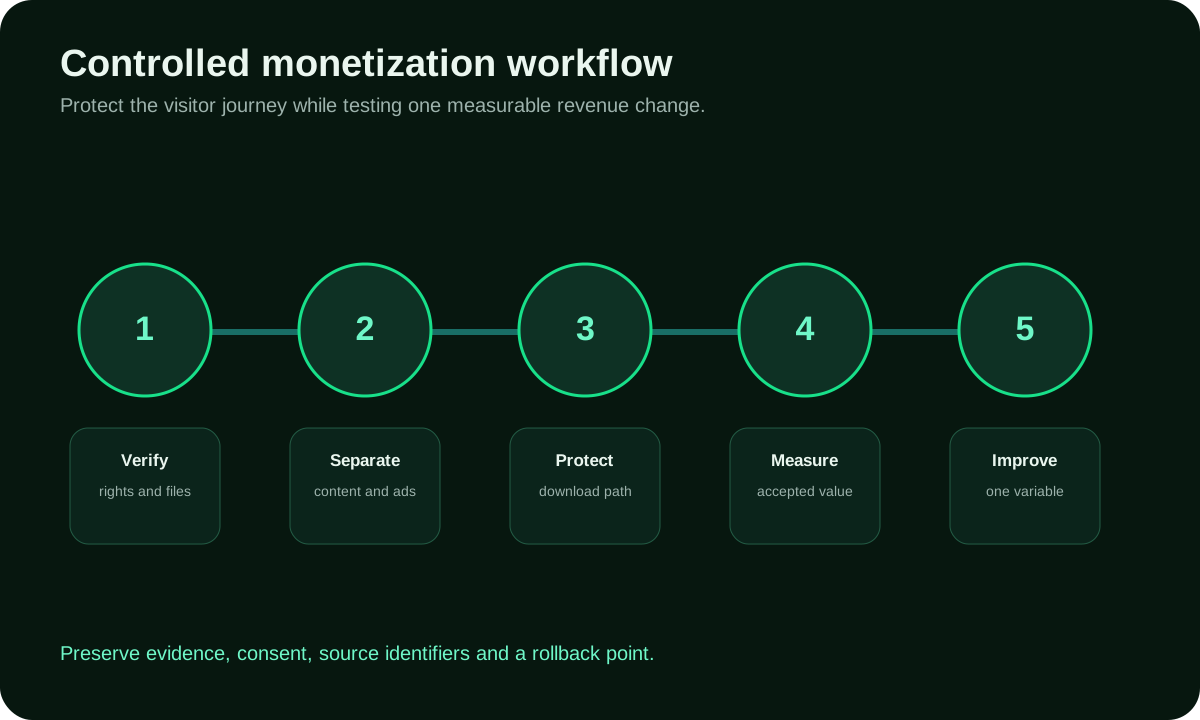
A controlled five-step download monetization workflow
- Verify files and rights. Confirm distribution permission, source, checksum, version, security review and the owner of each public item.
- Separate content, controls and commercial elements. Make the real download path unmistakable and document where advertising or affiliate content may appear.
- Protect the delivery journey. Test redirects, mobile layout, accessibility, safe destinations, error handling and the rollback process before launch.
- Measure accepted value. Track collected revenue, legitimate completed downloads, delivery cost, incidents, support and repeat usage over a mature window.
- Improve one variable. Adjust provider, format, placement or model separately so the result can be explained and reversed.
Example: a lawful utility download catalog
Imagine a publisher that distributes its own small utilities and maintains documentation for each version. The baseline shows stable organic traffic, high mobile usage and significant bandwidth cost. The team creates one file-detail template with a clearly labeled download control, version information, checksum, change log and support link.
The publisher tests a single reserved display placement below the file facts and a relevant affiliate module inside the installation guide. Each placement receives a separate identifier. The team tracks accepted revenue, completed downloads, page latency, support contacts, destination complaints and repeat usage. It blocks a creative source after a misleading update-style ad appears and documents the reason.
After the maturity window, the affiliate module contributes more net value with fewer complaints, while the display placement is kept only on desktop documentation pages. This example demonstrates a decision process, not a promised result. Real outcomes depend on demand, content, traffic, rights, security, eligibility and implementation.
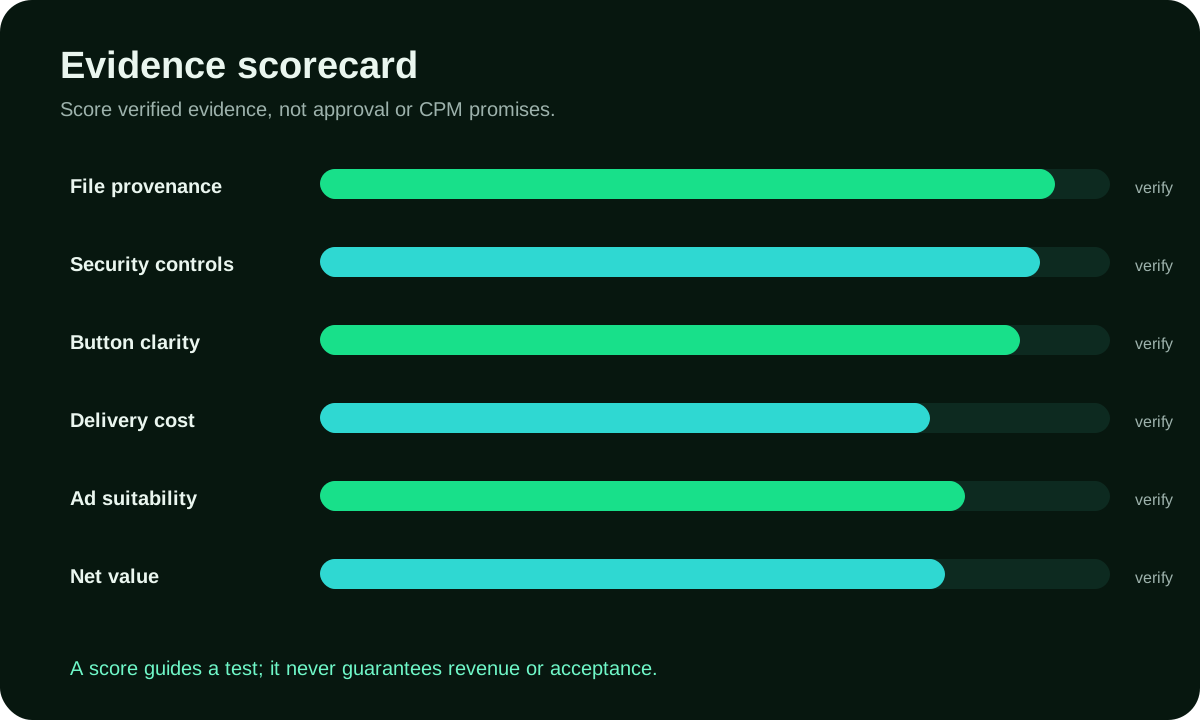
Score trust and control before revenue potential
Require evidence for file provenance, security review, clear controls, accessibility, provider suitability, reporting, payment and net economics. A download site should not receive a high launch score when the operator cannot identify the publisher, version or rights for the file, even when traffic volume is attractive.
Add automatic stop conditions. Examples include a malware or deceptive-destination report, unexplained forced redirects, a broken primary button, a material increase in complaints, a provider that cannot identify the source of unsafe creative or a technical change that prevents file verification. Revenue is not a reason to leave a harmful path active.
Put the guide into practice
Turn Monetize a Download Site With Clear, Safe User into a bounded campaign test
With “Score trust and control before revenue potential” documented, launch only the next reversible test. Set a spending limit, preserve the baseline and use source-level and audience controls so the next step depends on qualified outcomes for monetize a download site with clear, safe user, not activity volume.
Create My Free Account
How to compare download-site ad networks and alternatives
Verify that the provider accepts the file category, countries, traffic sources and page behavior. Ask how creatives are reviewed, whether source or zone blocking is available, how redirects are handled, what reporting dimensions exist and how invalid activity affects payment. Save written answers and the official policy version.
Compare implementation control. The site should be able to assign stable placement identifiers, reserve dimensions, disable a problematic unit and test only a defined page cohort. Avoid integrations that require opaque scripts across the entire domain before the provider can explain the demand and safeguards.
Compare alternatives on net value. A premium download, paid support plan, sponsor, donation model or affiliate relationship may fit a narrow catalog better than broad advertising. Use the same cost basis and maturity window. An AdSense alternative is not automatically an ad network; it is any lawful revenue model that can support the catalog without misleading visitors.
Launch checklist and rollback rules
Document file rights, version, checksum, scanning, provider policy, placement IDs, consent behavior, baseline metrics and the incident owner.
Watch unsafe destinations, button confusion, redirect chains, errors, latency, support reports, invalid activity and revenue adjustments.
Disable the change when it obscures the requested file, creates deceptive controls, introduces unsafe behavior or cannot be traced to a controllable source.
Keep a clean copy of the previous page and configuration. When a provider or creative source creates an incident, preserve the timestamp, placement, source ID, screenshots, destination and logs before removal. The evidence helps the provider investigate and prevents the same source from being re-enabled without review.
Limitations and responsible expectations
This guide cannot determine whether a specific file may be distributed, whether a provider will approve the site or whether local law permits a commercial model. Rights, licenses, privacy, consumer protection, export controls, security duties, tax and provider contracts may apply. Obtain qualified advice when the decision depends on those areas.
FroggyAds does not certify downloads and does not guarantee publisher revenue, approval, CPM, traffic quality, conversions, rankings, indexing or AI citation. FroggyAds is a self-serve advertising platform for media buyers. Traffic-quality controls reduce risk but cannot eliminate every invalid event or unsafe third-party action.
Verification resources
Sources to review before monetizing download pages
Security, policy and advertising standards change. Verify current official guidance for the exact file type, provider, market and implementation.
Google Safe Browsing
Review current guidance for identifying unsafe web resources and protecting visitors from malicious or deceptive destinations.
Google Search spam policies
Check current rules related to deceptive behavior, hacked content, malware and scaled low-value pages.
Google Publisher Policies
Verify whether the content, behavior, privacy setup and download-page implementation are eligible for a chosen publisher product.
FTC dark patterns report
Avoid interfaces that disguise advertising as the requested download or manipulate users into unwanted actions.
Coalition for Better Ads Standards
Review current consumer research on disruptive ad experiences before designing overlays, interstitials or mobile placements.
WCAG 2.2
Keep download controls, disclosures, consent and commercial content accessible to keyboard, screen-reader and mobile users.
Software download revenue
How software download sites can earn revenue without weakening trust
A software download site can monetize through clearly separated advertising, sponsorships, affiliate relationships, paid support, subscriptions or premium tools. In the monetize download site review, use this practical rule: The commercial element must never imitate the real download button, hide a fee, misstate ownership or make an unsafe file appear legitimate. Before you expand monetize download site, confirm this point in the campaign record: Net value matters more than the highest advertised cpm.
How to monetize a software download site
Start with verified rights, signed or otherwise validated files, visible publisher identity and one unmistakable primary download action. Add one revenue model at a time. Measure completed legitimate downloads, repeat use, support demand, security incidents, refunds, ad complaints and delivery cost before expanding commercial inventory.
Ads for a download site
Place ads away from the requested file action and label sponsorships or paid placements clearly. Avoid misleading buttons, forced redirects and aggressive frequency. A layout that raises short-term revenue but increases abandoned downloads, complaints or malware suspicion is not a successful monetization setup.
Make money from software downloads with a net-value model
Calculate accepted advertising or partner revenue after invalid-activity adjustments, payment fees, storage, bandwidth, file scanning, support, refunds and compliance work. Compare that result with subscriptions, donations, premium support and affiliate value. The best mix depends on audience intent, file rights, market eligibility and repeat usage, not on a universal network claim.
Questions about download site monetization
When is a download site ready to monetize?
It is ready after file rights, provenance, version, checksum, publisher, security review, and the real download route are documented. Revenue should sit around a safe file service rather than obscure it.
How should a first download-site revenue test begin?
Choose one lawful file category, one eligible page group, one commercial placement, and a fixed review window. Keep the requested file action unchanged and easy to identify.
What costs belong in download-site monetization?
Count storage, bandwidth, CDN, scanning, rights review, editorial work, support, refunds, payment, incident handling, and advertising operations. Judge collected net revenue after those costs.
How should different download audiences be treated?
Separate first-party software, open-source files, documents, media, drivers, utilities, or other authorized categories by their rights and safety needs. Apply market, device, and age or policy restrictions where relevant.
What makes an ad safe beside a download?
The commercial element must use a distinct label and design that cannot be mistaken for the file button, scanner result, or system message. Its destination should identify the advertiser and material terms.
Which technical checks protect the real file action?
Test file identity, checksum, scan status, version, button label, redirects, download completion, retry, mobile use, and slow connections. Preserve a fallback that keeps the legitimate file accessible.
How should download-site revenue be measured?
Review collected revenue, successful downloads, delivery cost, support, complaints, security incidents, repeat use, refunds, and provider deductions by page group. Gross CPM alone misses the service cost.
Why can a profitable placement still be a poor choice?
It may increase mistaken clicks, failed downloads, complaints, malware exposure, or support work. Compare the commercial result with file completion and visitor trust before keeping it.
What guardrail protects download-site users?
Verify distribution rights, scan and version files, separate ads from controls, and maintain abuse, removal, and incident procedures. Reject fake buttons, hidden fees, unsafe installers, and claims that misstate file ownership.
When can a download site add more monetization?
Expand after repeated periods preserve safe delivery, clear choices, acceptable support load, and positive net contribution. Add one placement or file cohort and retain a quick disable path.
Related publisher and monetization resources
Protect the requested file path
Build revenue around trust, not confusion
Verify rights and files, make the real action unmistakable, test one commercial change and measure net value after delivery and security cost. Remove any implementation that compromises the visitor's choice.
Related specialized monetization guides
Monetize a URL Shortener
Build revenue without hiding the requested destination.
Monetize a File Hosting Site
Price storage and delivery while protecting download clarity.
Search intent and monetization decision
Monetize a Download Site With Clear, Safe User Choices: the publisher decision this URL owns
Use this page when a site owner is deciding how Monetize a Download Site With Clear, Safe User Choices can create revenue without weakening the content experience that produces repeat visits.
Page-specific evidence path: For Monetize a Download Site With Clear, Safe User Choices, use the visible sections For your monetize download site decision, we recommend this account-team check: A download site earns trust before it earns revenue; In the monetize download site review, use this practical rule: What download site monetization means; Key takeaways before placing the first ad to evaluate this content-site monetization decision. The FAQ path asks When is a download site ready to monetize?; How should a first download-site revenue test begin?; What costs belong in download-site monetization?. Keep the decision terms campaign objective, audience targeting, bid, conversion tracking attached to this URL, and use Monetize Wordpress Site only for its adjacent monetization task.
| Checkpoint | What to decide | Evidence to retain |
|---|---|---|
| Audience context | For Monetize a Download Site With Clear, Safe User Choices, identify the pages, visitor intent and devices where monetization is appropriate. | Retain for Monetize a Download Site With Clear, Safe User Choices: Content category, traffic source, device and session depth. |
| Inventory design | For Monetize a Download Site With Clear, Safe User Choices, choose placements and formats that preserve navigation, readability and disclosures. | Retain for Monetize a Download Site With Clear, Safe User Choices: Placement map, viewability/eligibility, frequency and page-speed observations. |
| Yield + experience | For Monetize a Download Site With Clear, Safe User Choices, scale only when net value improves without unacceptable engagement or return-visit loss. | Retain for Monetize a Download Site With Clear, Safe User Choices: Net revenue, revenue per visit, bounce/engagement and repeat-visit signals. |
Transparent monetization example
Hypothetical example: if Monetize a Download Site With Clear, Safe User Choices records 60,000 eligible or served impressions and USD 130 in net advertising revenue over the same review window, the illustrative eCPM is USD 2.17. Replace those inputs with your own delivery and net-revenue data; this is not a FroggyAds earnings claim.
How should FroggyAds fit this decision?
For Monetize a Download Site With Clear, Safe User Choices, use the FroggyAds publisher or monetization workflow documented on this page only where it supports the content-site monetization task and the stated inventory constraints. Keep live delivery, net revenue and the page-specific decision terms campaign objective, audience targeting, bid, conversion tracking in the same record. Judge this URL against its own evidence path and do not treat a headline fill rate, eCPM or earnings estimate as guaranteed.
Direct answer
What matters first for Monetize a Download Site With Clear, Safe User Choices?
Start the download-site review with the inventory or audience condition this content-site monetization page owns. Use Before you expand monetize download site, confirm this point in the campaign record: A download site earns trust before it earns revenue; For your monetize download site decision, we recommend this account-team check: What download site monetization means; Key takeaways before placing the first ad to verify the implementation path, then reconcile delivery and net publisher value with When is a download site ready to monetize?; How should a first download-site revenue test begin?; What costs belong in download-site monetization?. Increase monetization pressure only when the page-specific revenue and user-quality evidence remain acceptable after the same review window.