
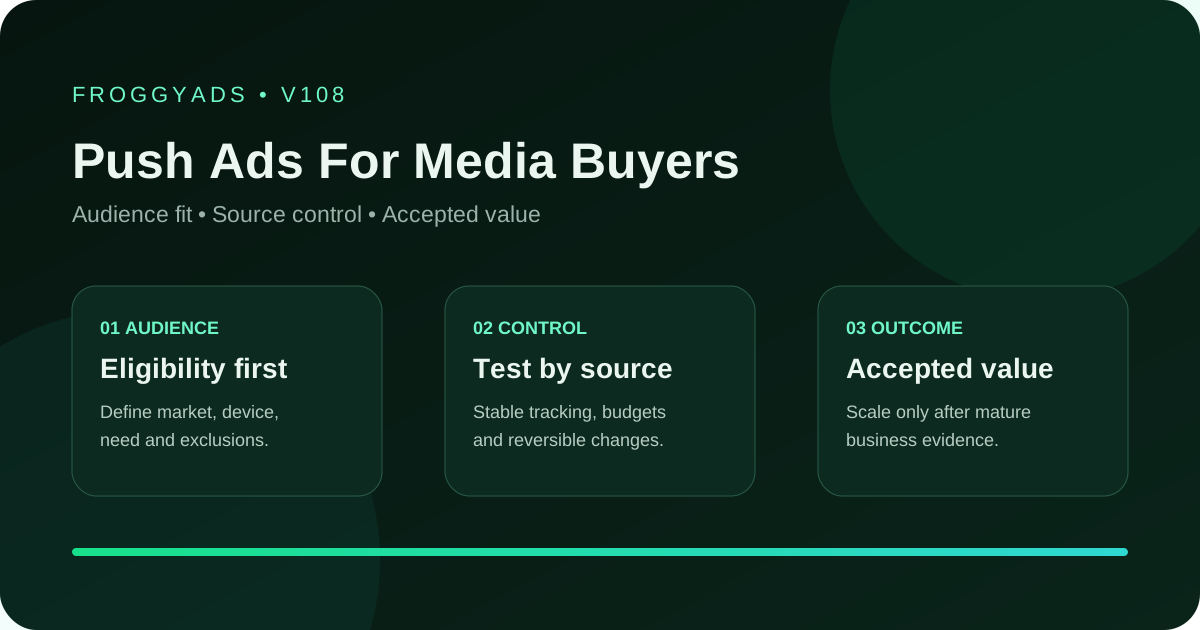
Push campaign planning for media buyers

Push Ads for Media Buyers: Control Delivery and Accepted Value

Push media buying requires two clocks: an operating clock for delivery, spend, route health, and caps, and a commercial clock for qualified and accepted outcomes after their validation window. Build identifiable message cells, preserve the destination contract, and make pacing or source actions from the first evidenced break in the journey rather than from a blended click rate.

FroggyAds Push advertising gives professional buyers direct targeting, bid, budget and source controls for an authorised notification campaign. You can keep a proven message cell separate from a new test, limit the initial exposure and review delivery by source. We recommend increasing one supported control at a time: the platform helps you manage the purchase while your advertiser's mature record determines whether the resulting customers justify more spend.

Push Ads For Media Buyers planning visual
Key takeaways

Define cells that a buyer can operate

  • Cell key, recipient-state proposition, source-backed message, landing version and approvals
  • Read back live FroggyAds settings, IDs, currency, time zone, schedule, limits, billing and the pause path
  • Monitor cap, cash, customer capacity and pending exposure on both the operating and commercial clocks

Notification context, message fatigue and accepted source value define a Push cell the buyer can operate. Confirm live campaign options and offer permission before launch.

Push media-buying decision clocks

Definition: Push Ads for media buyers is a format-specific paid campaign that connects a defined audience, truthful creative, compatible destination and accepted business event through measurable source identifiers.

Use the approved notification, destination release, FroggyAds source report and advertiser status file as the evidence chain for each Push decision.

Create a cell key that identifies offer, market, recipient-state proposition, creative, landing version, targeting configuration, and cohort start. Keep the name readable to the shift operator and the join key stable for analysis. Without this structure, creative and source decisions become attached to labels whose settings changed several times.

Write a message contract for each cell: who the notification is relevant to, which verified fact it communicates, what condition changes the decision, and what the destination will explain next. Preserve the source and approval. A buyer should be able to reject a catchy variant quickly when it cannot survive the landing page or merchant terms.

Configure delivery and validate the route

Configure delivery boundaries before choosing a pacing approach, then validate the route under the same approved limits. Record total authorised spend, daily ceiling, cash exposure, programme cap, validation delay, expected review windows, page and support capacity, and emergency pause owner. These values protect different constraints. Raising one control does not automatically authorise a change to the others.

Validate the Push route by inspecting the live FroggyAds interface and saving the targeting inputs, creative requirements, destination, bid or pricing control, currency, timezone, schedule where used, budget controls, campaign and creative IDs, report dimensions, billing context and pause path. Use the observed account state for setup. Do not infer a feature from another platform or previous market.

ClockInputsPermitted decision
ActivationApproved settings, destination and identifiersRelease the capped opening test or hold it
OperatingDelivery velocity, spend, route and capProtect the limit, repair or pause
CommercialMature accepted outcomes and rejection reasonsKeep, revise or exclude a comparable cell
ScaleMarginal cost, pending exposure and capacityApprove one bounded increase or wait
RecoveryKnown failure, corrected route and trusted settingsVerify the repair before resuming delivery
Decision rule: Do not choose or scale push ads for media buyers from headline reach, a low CPM, early clicks or isolated conversions. Require stable tracking, source evidence and mature accepted value.

Before spending, check the notification-to-destination route on the devices and browsers included in the plan. Validate the identifiers and event fields your tracking setup and advertiser permit, including duplicates, missing values and later corrections. If individual events cannot be matched, reconcile the supported campaign or cohort totals instead. Keep source-level conclusions within the granularity the records actually support.
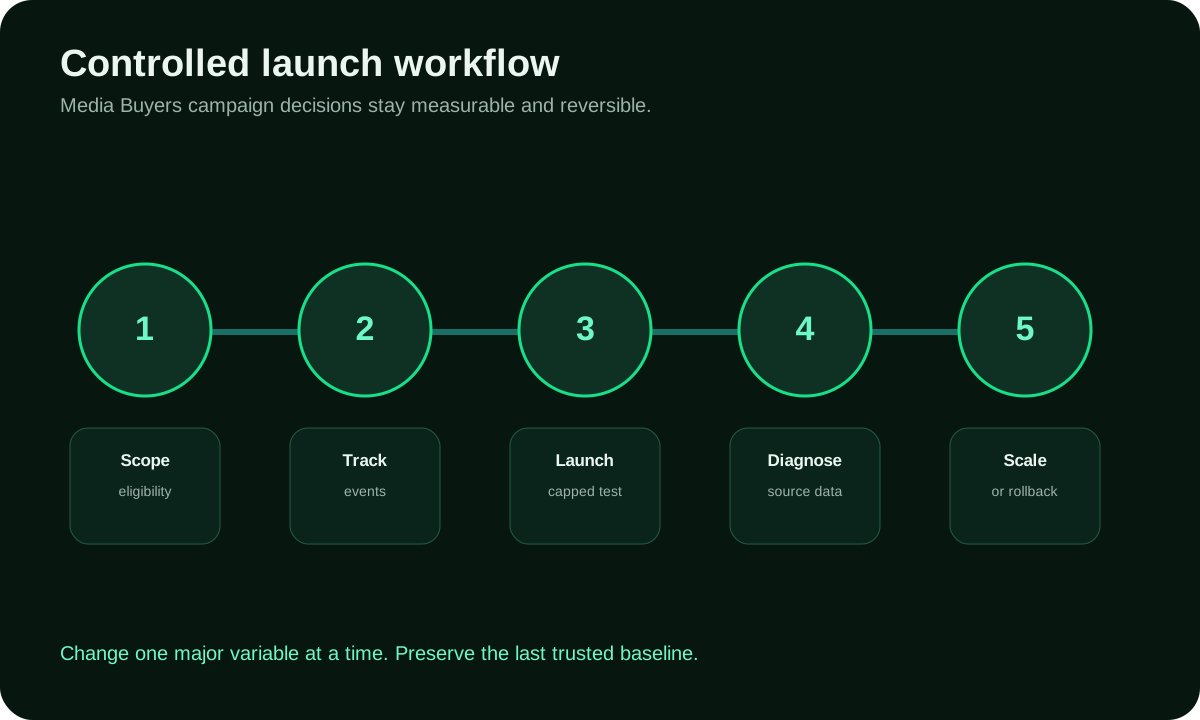
How should you launch and extend a Push cell?

Follow the five-step sequence to connect the notification, destination and budget decision. Maintain the proven comparison while a new message or source is tested under its own limit. An operational pause protects spend immediately; an expansion decision waits until the advertiser's validation window makes the commercial evidence usable.

1

Write the notification promise contract

State why the notification is relevant to the intended recipient and which verified fact earns the next click. Include the material condition that could change the person's decision. Save the approved wording, image and landing version, and reject a catchy hook when its urgency or benefit cannot be supported after the click.

2

Trace notification-to-destination continuity

Open the destination from the delivered notification and check that it continues the same claim, eligibility conditions and expected action. For example, a hypothetical buyer might pause a new message that attracts unsuitable responses at its loss limit while leaving an established cell unchanged. Record the qualification mismatch and the evidence needed for a retest. That is a diagnostic example, not a FroggyAds performance result.

3

Open a capped Push source cell

Save the selected FroggyAds targeting, bid, budget and source settings with the campaign and creative identifiers. Set the total test allowance, operational review point and pause owner before activation. Launch only the permitted message and destination pair, then confirm that delivery is occurring within the intended limits rather than funding an inherited configuration you have not checked.

4

Separate message fatigue from source quality

Compare message versions within compatible source, market, device and maturity windows. If response declines, review whether the same notification has lost relevance before excluding the source. Check qualified page actions and the advertiser's rejection reasons as well as clicks. Keep newer cohorts pending and use a capped refreshed-message test to investigate a suspected fatigue effect.

5

Extend one proven Push cohort

Extend one proven Push cohort only after documenting every pacing or price adjustment with the previous value, new value, observation window, hypothesis, expected delivery effect, commercial constraint, approver and rollback. Keep other material variables fixed when possible. If an urgent loss requires several changes, label the incident and do not use the resulting period as a clean optimisation test.

Push Ads For Media Buyers controlled workflow

Pace from evidence and exposure

Pace from evidence and exposure by reviewing source or supported inventory dimensions within compatible message and page cells. Identify the first loss point and the reason distribution. A source may deliver fewer accepted outcomes because the message mismatches its audience context, because the page fails on its device mix, or because the advertiser rule changed. Investigate before assigning a permanent quality label.

Budget for controlled notification learning

Separate the media allowance for a new notification from the budget supporting an established cell. Include creative, page work, monitoring and reconciliation effort, then decide how much cash can remain committed before the advertiser approves the outcomes. We recommend a test narrow enough to support a clear message or source decision; dividing a small allowance across too many combinations can leave every comparison inconclusive.

Wait for accepted Push outcomes

Validation delays determine when a recorded Push event can be treated as an accepted outcome. Compare cohorts at a similar age and retain rejection, reversal and correction reasons. While waiting, protect the media cap and monitor route health. Increase spend only when the supported mature evidence and the next allocation's full cost justify the additional exposure.

Measure value after outcomes mature

Calculate accepted CPA using media spend and validated outcomes from the same cohort. Then compare the next allocation with complete marginal cost, pending cash exposure and customer-handling capacity. Delivery can be healthy while the business result is still pending, so a fast spend rate should never stand in for an approved-value decision.

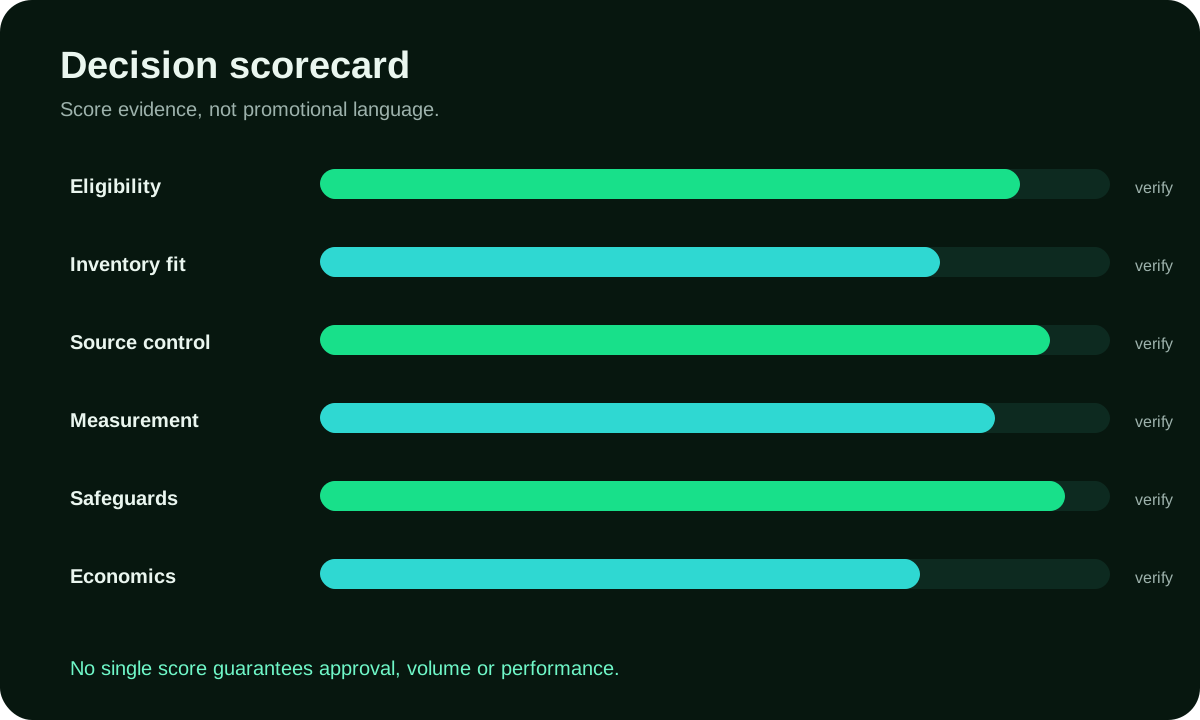
Push Ads For Media Buyers evaluation scorecard
SignalRead alongsideBuyer response
Impressions and reachSpend velocity and the authorised capConfirm delivery remains within the limit
Click or engagementNotification version and recipient contextCheck qualified visits before rewarding response
On-page behaviourDevice mix, page availability and conditionsRepair a destination or qualification mismatch
Accepted conversionMature advertiser status and rejection reasonsRetain or revise a comparable source-message cell
Mature value and marginComplete marginal cost and pending exposureFund the next capped allocation only when mature value supports it

Push buyer shift and scale record

Protect spend, routes, identifiers, caps, pending exposure, and a precise pause during each delivery window.

Consult the Push buyer shift and scale record when comparing compatible cohorts, source-message interactions, maturity reasons and marginal full cost.

Approve the next tranche, preserve incident recovery, verify handoff, and keep discovery separate from scale.

Audience boundary

Scale decisions need a memo identifying the supported cell, mature evidence, source concentration, pending exposure, next amount, pacing limit, customer capacity, observation target and stop rules. Expand one material dimension. New scale requires a new cohort even when the creative remains unchanged, because delivery mix and marginal price can move.

Destination continuity

When a critical failure occurs, capture the campaign state and affected identifiers before action. Pause the smallest safe scope, repair the route or asset, repeat the known-ID test, and begin a new cohort. Preserve incident spend and downstream outcomes. Recovery is complete when a second operator can reproduce the fix, not when the chart looks normal again.

Accepted outcome

Close each shift with a recorded handoff. Confirm spend against all limits, note unusual delivery, record open incidents, identify cohorts awaiting maturity, link the newest advertiser status file, list scheduled changes, and name the current pause owner. A clean handoff allows continuous operation without turning individual judgement into invisible account logic.

Make source and message decisions together

Pacing controls when and how quickly the authorised tranche is delivered; commercial optimisation decides whether the next tranche deserves release. A buyer may reduce delivery to protect a cap, cash position, validation queue, or customer capacity without concluding that the audience is weak. Record the operational constraint so later analysts do not read a pacing action as a performance verdict.

Define separate thresholds. Operating thresholds can use spend velocity, route failure, missing identifiers, or cap consumption. Commercial thresholds require mature accepted outcomes, full marginal cost, quality reasons, and enough comparable evidence. Keep the clocks visible on the dashboard or decision sheet. A cell may pass operational health while remaining commercially undecided.

Price and delivery changes call for a separate test of the marginal allocation, rather than an adjustment hidden in historical averages. Capture the new configuration, observed cost, source mix, message cell, pending exposure, and acceptance window. Compare the proposed amount with the current customer and review capacity. A historical winner can become unattractive at a different marginal cost or mix.

Give the shift operator clear authority to pace or pause within the approved boundary and reserve larger budget release for the named commercial owner. Rehearse escalation when thresholds conflict, such as strong accepted value but exhausted fulfilment capacity. This division lets the team act quickly without converting operational convenience into uncontrolled spend authority.

Map the campaign's downstream queues before raising a limit: creative review, landing capacity, tracking and exception review, merchant or advertiser validation, sales contact, fulfilment, support, fraud assessment where applicable, and finance reconciliation. For each queue, record current workload, safe headroom, delay signal, responsible owner, and the action that protects customers when capacity tightens. Compare delivery velocity with the slowest relevant queue rather than with media budget alone. A push cell can remain commercially promising while requiring slower pacing because accepted demand is arriving faster than the organisation can serve or validate it. Document that as an operational constraint, not a source-quality failure. Reopen delivery through small steps after the owner confirms headroom and pending exposure. This capacity map gives the FroggyAds buyer a defensible reason for pacing decisions and prevents an efficient acquisition cell from damaging the customer experience that determines longer-term value.

Rollback rule: Restore the last trusted configuration when accepted-event cost, rejection, refund, qualification or retention moves outside the approved range after a scale change.

How do Push owners divide message, pacing and acceptance work?

Assign the media buyer the permitted budget and source actions, the creative owner the notification's approved meaning, and the destination owner the next step. The advertiser supplies the acceptance decision; the shift operator monitors delivery and can pause within the agreed limits. Rehearse a hypothetical delivery spike so each owner knows which signal they receive and who can slow or stop spend before a validation or customer-handling queue is overloaded.

A Push test begins with the recipient state: explain why the notification is relevant now and ensure the landing page answers the expectation created by the short message.

Review creative fatigue by version and time period before changing sources. A message can lose response while the underlying source continues to produce suitable visitors for a refreshed proposition.

Match message, device and landing page

The page should explain the short notification's promise and material conditions before asking for the accepted action. Check the intended device path and review our pricing and entry information, supported ad formats, conversion tracking setup, traffic-quality controls, brand-safety guidance and editorial and fact-checking policy.

Verification resources

Check cost, claims and the destination before expanding

Hypothetical cost check: a Push cell spends USD 300 and the advertiser approves nine outcomes after the validation window. Media CPA is USD 300 ÷ 9 = USD 33.33, rounded to cents, before creative and operating expense. This is arithmetic rather than a FroggyAds result or forecast. Use your own reconciled cost and accepted-value records for the expansion decision.

Check Push claims against current advertising guidance

Advertising claims in a Push message should be checked against the FTC's guidance for truthfulness, supporting evidence and material conditions. A short notification should not imply a saving, urgency or customer benefit that the destination cannot substantiate. Keep the approved claim source and any required commercial disclosure with the message version.

Compare destination requirements with Google policies

Google's policy centre covers prohibited and restricted content, prohibited practices and editorial or technical requirements for Google advertising. Consult it when that route is part of your plan. For FroggyAds Push traffic, confirm the actual offer permission and rules governing the purchased route; another platform's policy page does not approve the notification or destination.

Microsoft Advertising help resources

Microsoft Advertising's help entry point addresses implementation questions for campaigns you operate on that platform. Keep those notes separate from the FroggyAds settings and source reports used for this Push cell. The help link is further reading, not evidence that FroggyAds offers a Microsoft-specific feature or has approved your offer.

Use IAB standards for Push supply checks

IAB Tech Lab publishes technical specifications and industry guidance. Use the relevant document to clarify the supply or measurement question with your implementation partner, then record the fields your actual route supports. The standards directory does not certify a particular Push campaign or establish that its outcomes are suitable customers.

Frequently asked questions about Push media buying

What are push ads for media buyers?

They are push-format traffic campaigns managed through identifiable message cells, spend controls, route evidence, and mature commercial outcomes.

Why use two decision clocks?

Operating checks protect delivery and spend promptly; the commercial clock waits for accepted outcomes to mature.

How does FroggyAds help professional buyers?

We provide self-serve campaign configuration, budget control, identifiers, reporting, and pause access for authorised tests.

What should a push cell key contain?

Identify the offer, market, proposition, creative, landing version, targeting configuration, and cohort start.

How should pacing changes be recorded?

Keep before and after values, evidence window, hypothesis, expected effect, approver, constraint, and rollback.

When should a source be excluded?

Act when compatible cell evidence and mature reasons support a scoped decision; retain the context and reopen condition.

What is marginal campaign cost?

It is the complete media and operating cost attributable to the proposed next tranche rather than the historical account average.

How should an incident be recovered?

Preserve state, pause the safe scope, repair, run known-ID tests, and start a clean post-fix cohort.

Can a high push click rate guarantee quality?

No. Clicks diagnose response; suitable, accepted outcomes after complete cost guide the business decision.

What is the next step?

Start with one message cell and two decision clocks, then create your free FroggyAds account for a bounded Push campaign.

Controlled self-serve media buying

Choose FroggyAds for controlled Push buying

Choose FroggyAds when your Push operation is ready for visible limits, identifiable message cells and evidence-led budget release. Our self-serve controls help you manage delivery now while protecting the commercial decision that matures after advertiser validation.

Search intent and buyer decision

Turn the next notification question into a controlled Push campaign

Recipient state shapes the next Push test: explain why the notification is relevant when it appears and what the destination must answer.

Message context: Record the delivered notification, image, schedule and device context together. A source ID alone cannot explain whether timing or presentation changed visitor intent.

Rejection diagnosis: When an advertiser rejects outcomes, compare the stated reason with the notification promise before lowering the bid. The correction may belong to qualification or landing continuity.

Rotation capacity: Limit the number of messages to the claims, fatigue, destination and version checks your team can maintain. More notifications do not improve learning when those checks fall behind.

Review areaEvidenceBuyer action
Message contextDelivered notification, device and scheduleCompare suitable recipients within the same message version
Cost and exposureMature accepted value, marginal cost and pending cashRelease one bounded step or keep the cap
RecoveryLast trusted notification and destination pairRestore the route and verify the correction

Control frequency and source actions

Control message: Keep an approved notification as the comparison while testing a refreshed hook within a compatible source and market. Review repeated response and exposure only where those data are available. Use source exclusions after mature evidence identifies an unsuitable cell; a fading message is not sufficient evidence that the whole source is poor.

Protect consent, claims and customer experience

Treat the landing-page opening as the second half of the Push unit: continue the verified promise and explain material conditions before asking for the accepted action. Check the applicable disclosure, privacy and consent requirements for the destination and measurement you use. Keep that customer path consistent while testing the notification. Create your free FroggyAds account

Direct answer

Connect notification context to an accepted advertiser outcome

Reporting in FroggyAds helps you locate the delivery or source question to investigate alongside permitted tracker and advertiser records. Attribute approved outcomes only at the level those reports support. A delivery report describes the media purchase; it does not establish a final sale or commission on its own.