
IP targeting precise reach and exclusion
Use IP whitelist and blacklist control for precise reach and exclusion, alongside GEO and source-level targeting.
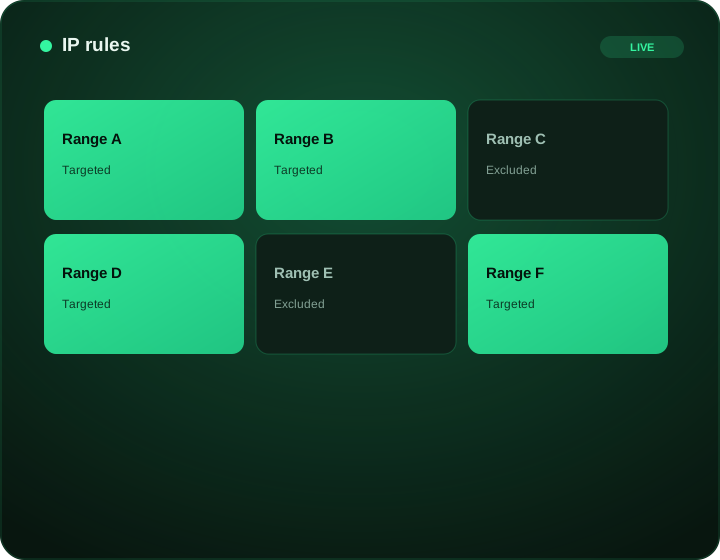
IP targeting precise reach and exclusion at a glance
What does this page explain about IP Targeting: Control Spend & Improve Performance?
Quick answer: FroggyAds IP targeting lets you include or exclude network addresses or ranges alongside geographic, device and source controls. Use a dated list with a clear purpose, verify the accepted entry format and check for conflicting restrictions. An IP address is not proof of a person's identity, household or exact location.
| Section | Distinct excerpt from this page |
|---|---|
| Overview | This is especially useful for campaigns that need network-level precision or want to exclude known low-quality ranges. |
| Where IP targeting helps | Use cases include excluding known invalid ranges, focusing on specific carrier or network environments, and adding a layer of control for sensitive campaigns. |
| Combining IP rules with the rest of your controls | Review performance by source ID and refine only the exclusions justified by your evidence. Adscore-supported screening helps identify invalid activity, while your own conversion checks remain necessary; no IP list or filter proves that every remaining visit is valuable. |
Reference for IP Targeting: Control Spend & Improve Performance: FTC guidance on online advertising and marketing.
- Planning: Overview.
- Control: Network-level precision.
- Decision: Use IP controls effectively.
Overview
IP targeting gives you another layer of precision and protection. With IP whitelist and blacklist control, you can focus delivery on specific networks or exclude unwanted ranges, complementing GEO, device and source-level targeting.
This is especially useful for campaigns that need network-level precision or want to exclude known low-quality ranges. Combined with Adscore-supported traffic-quality controls, IP controls help ensure your budget reaches the right environments.
IP targeting works alongside the rest of the FroggyAds control set. Read performance by source ID, apply IP and source rules together, and use SmartCPC as one bid-optimization input based on available campaign signals toward the segments that convert within your defined boundaries.
Network-level precision
IP whitelist
Focus delivery on chosen ranges.
IP blacklist
Exclude unwanted networks.
Layer with GEO
Combine with location and device.
Source control
Apply IP and source rules together.
Use IP controls effectively
IP targeting is a precision tool, best used with a clear goal: focus on specific networks, exclude known low-quality ranges, or protect campaigns that need network-level control.
Combine IP rules with GEO, device and source-level targeting for layered precision, read performance by source ID, and refine your whitelists and blacklists as data accumulates. SmartCPC supports bid optimization; review the resulting delivery and conversion cost rather than assuming every automated adjustment improves value.
Where IP targeting helps
Use cases include excluding known invalid ranges, focusing on specific carrier or network environments, and adding a layer of control for sensitive campaigns.
Paired with Adscore-supported traffic-quality controls, IP controls strengthen traffic quality. Source-level control ensures the rest of your delivery stays accountable.
Combining IP rules with the rest of your controls
IP targeting is most powerful as one layer in a stack, not a standalone tactic. Used alongside GEO, device and source-level controls, IP whitelists and blacklists add network-level precision: focus on the environments that perform and exclude ranges that consistently waste budget.
Treat your IP rules as living lists. Review performance by source ID and refine only the exclusions justified by your evidence. Adscore-supported screening helps identify invalid activity, while your own conversion checks remain necessary; no IP list or filter proves that every remaining visit is valuable. The combination gives you more ways to investigate network and source issues without treating a filter as a guarantee.
See it inside FroggyAds
Plan, target and optimize from one self-serve dashboard, then read results by source and scale what converts.
Start advertising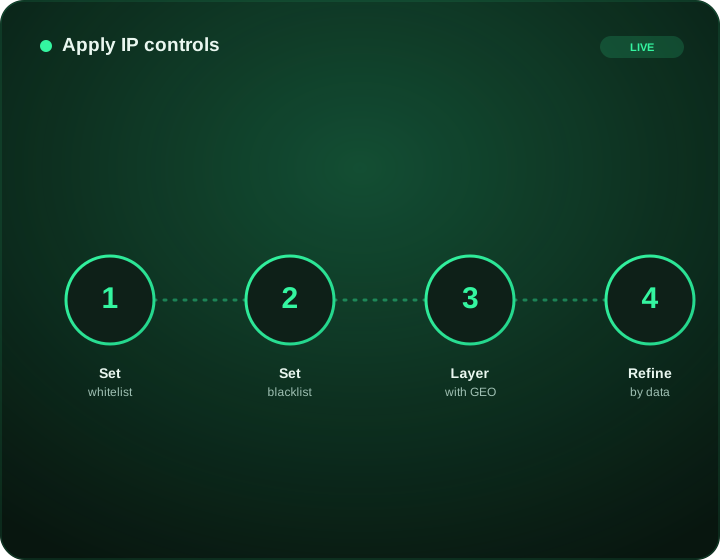
Frequently asked questions
What can I control with IP targeting on FroggyAds?
Our published IP targeting controls let you include or exclude specified network addresses or ranges alongside other campaign settings. Use them when you have a concrete reason to allow a network environment or prevent unwanted delivery. Keep that reason separate from assumptions about the people behind the addresses. IP rules complement our geographic and source controls; they do not identify a person's intent or guarantee a conversion.
What is the difference between an IP whitelist and an IP blacklist?
A whitelist, or allowlist, limits eligible delivery to the addresses you include. A blacklist, or blocklist, removes listed addresses from otherwise eligible traffic. Check the selected mode before saving: confusing inclusion with exclusion can reverse the intended audience. Keep a dated copy and a short reason for each group so you can undo an unhelpful rule without rebuilding the list from memory.
Is IP targeting the same as targeting a publisher source?
No. An IP rule concerns a network address; a source-ID rule concerns the identified traffic source in campaign reporting. A poor result from one publisher source does not justify excluding every user sharing an address range. With FroggyAds, use the control that matches the problem you found. Source-level exclusions are the clearer choice when the evidence points to a particular source rather than a network requirement.
Can an IP address identify an individual customer or household?
Do not treat it as a reliable personal identity. Multiple users can share an outward-facing address, and an address can change or be reassigned. A VPN or network gateway can also represent a connection far from the user's actual location. Use IP targeting for a documented network-level purpose, not to claim that you know who a visitor is, where they live or what they intend to buy.
Should I block an IP address after a few clicks without sales?
A few non-converting clicks are not enough to establish invalid traffic. Check the source, timing, landing-page behavior and conversion delay before deciding what happened. An overly broad exclusion can remove legitimate users on a shared network. We recommend a narrow, explainable rule when evidence supports it, alongside Adscore-supported screening and your own conversion checks rather than a promise that one list eliminates every bad event.
Why did my campaign stop receiving traffic after I added an IP list?
Check whether the list is in include or exclude mode, whether the entries are accepted by the interface and whether they conflict with your country, device or source settings. An allowlist can leave no eligible inventory even when each other setting looks reasonable. Compare the saved list with your intended network scope and restore the previous version when the change blocks the audience you meant to reach.
How should I prepare an IP list for upload?
Use the exact entry format supported in your current FroggyAds account and validate it before launching. Remove duplicate entries and record where the list came from, why it is needed and when it was checked. Confirm supported address families, range syntax and size limits in the interface or with support; do not assume that another network's CIDR or IPv6 examples are accepted here.
Can I combine IP targeting with country and device filters?
Yes, our published workflow combines IP rules with geographic, device and source-level targeting. Check the intersection of those rules, not each filter in isolation. For example, an approved network range may still produce no eligible visits after an incompatible country or device restriction is added. Keep necessary offer requirements, then remove only restrictions that do not serve a clear buying purpose.
How often should an advertiser review an IP exclusion list?
Review it when the network ownership, campaign offer or observed traffic changes, and give important lists a scheduled check. Keep the original reason and date so temporary troubleshooting exclusions do not become unexplained permanent rules. Retest a previously blocked range only when there is a practical reason to expect a different result, and keep the retest separate from established campaign traffic.
What should I measure before expanding an IP-targeted campaign?
Compare spend, eligible delivery, source mix and qualified outcomes with the same campaign before the rule changed. Look for unintended loss of legitimate traffic as well as reduced unwanted activity. A smaller audience is useful only when it better fits the offer. Choose FroggyAds for network controls you can combine with source-level decisions, and expand the tested rule only when the resulting customer quality supports it.
IP targeting precise reach and exclusion on FroggyAds
Create an account, deposit from $50 and launch on supply evaluated with Adscore and internal controls with full source-level control.
Use IP targeting as a bounded inclusion or exclusion rule, not as proof of a person's identity
IP targeting is most useful when the advertiser has a specific operational reason to include or exclude network addresses. It can help enforce a known business rule, isolate a technical environment or prevent delivery to addresses that repeatedly fail an approved campaign criterion. An IP address should not be treated as a permanent person identifier or as guaranteed evidence of physical location, household identity or intent.
Define the rule before uploading an IP list. State whether the list is an allowlist or blocklist, who supplied it, when it was last reviewed and what evidence justifies each group of addresses. The rule should have an owner and an expiry or review point. Without that record, a temporary operational decision can remain active long after the underlying network has changed.
| IP targeting decision | Control question | Evidence to retain |
|---|---|---|
| Purpose | Why is an IP rule needed? | Documented campaign or business requirement |
| List source | Who produced the addresses and when? | Version, owner and review date |
| Rule type | Is the list inclusive or exclusive? | Exact intended campaign effect |
| Layering | Which GEO, device or source rules also apply? | Final eligible audience definition |
| Measurement | What outcome proves the rule is useful? | Accepted conversions and delivery change |
| Rollback | When should the rule be removed? | Pause condition and prior configuration |
Network addresses can be dynamic, shared or reassigned. Mobile carriers, corporate networks, VPNs, proxies and other connection arrangements can make a single address represent more than one user context over time. That is why an IP rule should be treated as one campaign input rather than a definitive audience identity. Revalidate important lists and avoid permanent exclusions based only on an old address observation.
Layer IP controls with other eligibility rules only when the combination has a clear purpose. FroggyAds provides targeting options for geography, device, operating system, browser, carrier, category and source, along with source-level controls. If a campaign already has a valid country and device boundary, an additional IP rule should answer a separate question rather than duplicate restrictions that make delivery unnecessarily narrow.
Measure whether the rule changes the campaign in the intended way. Record eligible impression volume, source mix, clicks and accepted downstream outcomes before and after the IP change. If an allowlist sharply reduces delivery, confirm that the remaining sample is large enough to evaluate. If a blocklist improves blended performance, inspect whether the result is repeatable after the normal conversion window before expanding the exclusion.
Do not use IP targeting as a substitute for consent, account authentication or regulated identity checks. Advertising delivery and user verification are different functions. If the business needs to confirm who a person is, rely on the appropriate first-party or regulated process outside the ad-serving rule. Keeping those roles separate avoids turning a media control into a claim it cannot support.
Privacy review belongs in the workflow. Document why the addresses are being used, how long the list is retained, who can access it and how deletion or replacement is handled. Apply the current requirements that govern the advertiser's market and data flow. Collecting or retaining more address data than the campaign needs can create operational risk without improving targeting quality.
Use exclusions conservatively. A temporary technical anomaly, attribution failure or landing-page problem can make one IP group appear weak even when the media itself is not the cause. Check destination errors, redirect behavior, conversion recording and other campaign dimensions before turning a short-lived issue into a long-term blacklist rule. Preserve the reason for the action so it can be challenged later.
For inclusion lists, confirm that the audience definition is commercially meaningful. A list of addresses may correspond to offices, networks or prior observed activity, but the advertiser still needs a relevant proposition and a functioning destination. An IP allowlist cannot create intent by itself. Evaluate the resulting traffic against the same accepted conversion and value rules used elsewhere in the campaign.
Keep a rollback point. Before changing the list, save the current campaign state and note the expected effect. After enough data matures, compare the actual result with the expectation. If volume collapses, quality does not improve or the list is no longer current, revert the specific IP change instead of rebuilding unrelated targeting from memory.
IP targeting works best as a precise, reviewable control inside a broader media-buying system. FroggyAds can support that workflow with its verified targeting and source-management capabilities, while the advertiser retains responsibility for the list's purpose, provenance and privacy handling. The goal is a rule that can be explained, measured and safely removed when it no longer adds value.
IP targeting precise reach and exclusion: what should the advertiser decide next?
For IP targeting precise reach and exclusion, the feature is useful only when it changes a real buying, targeting or measurement decision. Start from the baseline described in IP targeting precise reach and exclusion at a glance, apply the control discussed around What does this page explain about IP Targeting: Control Spend & Improve Performance?, and preserve a rollback point so the effect on ip targeting can be interpreted.
On this IP targeting precise reach and exclusion page, the decision should remain tied to the existing evidence around IP targeting precise reach and exclusion at a glance, What does this page explain about IP Targeting: Control Spend & Improve Performance? and Overview. Those sections give ip targeting its specific context; the table below turns that context into campaign actions rather than adding another generic definition.
| Decision | What to verify | FroggyAds action |
|---|---|---|
| IP targeting precise reach and exclusion objective | Use IP targeting precise reach and exclusion at a glance to define the accepted business event and the maximum learning loss for ip targeting. | Launch one FroggyAds campaign objective for IP targeting precise reach and exclusion and keep the conversion definition stable. |
| IP targeting precise reach and exclusion audience | Use What does this page explain about IP Targeting: Control Spend & Improve Performance? to verify market, device, language and offer eligibility for ip targeting. | Apply only the FroggyAds targeting controls that change the real IP targeting precise reach and exclusion customer journey. |
| IP targeting precise reach and exclusion source evidence | Use Overview to keep source-level differences visible instead of relying on one blended ip targeting average. | Keep, cap, exclude or retest IP targeting precise reach and exclusion inventory from documented source evidence. |
| IP targeting precise reach and exclusion economics | Use Network-level precision to connect media spend with accepted conversions and downstream value for ip targeting. | Protect the IP targeting precise reach and exclusion test with a written budget boundary and a consistent attribution window. |
| IP targeting precise reach and exclusion scale rule | Use IP whitelist to define the exact evidence that earns the next budget increase for ip targeting. | Scale IP targeting precise reach and exclusion one major control at a time and compare marginal performance with the prior baseline. |
A page-specific FroggyAds test sequence for IP targeting precise reach and exclusion
- IP targeting precise reach and exclusion outcome: define the accepted event for ip targeting and the maximum loss permitted while the first test is learning.
- IP targeting precise reach and exclusion path: verify market eligibility, device experience, landing-page continuity and tracking against IP targeting precise reach and exclusion at a glance before buying more traffic.
- IP targeting precise reach and exclusion hypothesis: launch one bounded FroggyAds test tied to What does this page explain about IP Targeting: Control Spend & Improve Performance?; do not change bid, creative, audience and destination together.
- IP targeting precise reach and exclusion source review: compare qualified activity, accepted conversions, timing and cost by the source or segment dimensions relevant to Overview.
- IP targeting precise reach and exclusion scaling: use Network-level precision and IP whitelist to define what must reproduce before the next budget increase.
Why FroggyAds is relevant to IP targeting precise reach and exclusion
For IP targeting precise reach and exclusion, FroggyAds gives advertisers a self-serve DSP and ad-network workflow for buying supported traffic with campaign-level budgets and targeting. Depending on format and campaign context, available controls can include country, city, device, operating system, browser, carrier, category, source, ID and IP options. SmartCPC and Adscore-supported traffic-quality controls can support the ip targeting optimization process, while the advertiser's tracker, analytics and backend acceptance remain the final evidence for commercial quality.
Use IP whitelist as the final checkpoint for IP targeting precise reach and exclusion. If the accepted result does not reproduce after the next meaningful volume step, return to the last stable configuration instead of widening several controls at once.
How to tell whether IP targeting precise reach and exclusion is working
For IP targeting precise reach and exclusion, record the state before the feature changes, then compare the same evidence window after the change. Use IP targeting precise reach and exclusion at a glance to keep the ip targeting interpretation tied to a real campaign decision.
Reconcile IP targeting precise reach and exclusion on one evidence window
For IP targeting precise reach and exclusion, compare FroggyAds reporting with the advertiser's tracker, analytics and backend records for the same dates and attribution rules. Record media spend, relevant delivery events, qualified landing activity, accepted conversions and rejection reasons, then use What does this page explain about IP Targeting: Control Spend & Improve Performance? to investigate material gaps before they become optimization rules.
Diagnose the smallest failing layer in IP targeting precise reach and exclusion
If ip targeting delivery is weak, review eligibility, targeting, bid and inventory first. If traffic arrives but the destination underperforms, inspect speed, message continuity, forms, redirects and device compatibility. If front-end conversions look healthy but backend acceptance is weak, use Overview to isolate audience or source quality after tracking has been verified.
Set the next IP targeting precise reach and exclusion scale and stop rule
Write the exact IP targeting precise reach and exclusion result that earns more budget and the exact condition that pauses the test. Increase one major control at a time and compare marginal ip targeting performance with the prior configuration. FroggyAds supplies the campaign controls; the advertiser's accepted downstream data determines whether the expansion is commercially useful.
IP targeting precise reach and exclusion: preserve the evidence behind the next campaign change
For IP targeting precise reach and exclusion, keep a dated decision note that records the ip targeting campaign scope, the accepted conversion, the evidence window and the maximum additional loss allowed before another review. Tie that note to IP targeting precise reach and exclusion at a glance so the next FroggyAds action remains grounded in this page's actual subject.
Separate observation from explanation for IP targeting precise reach and exclusion. Delivery, spend, device mix, source mix and accepted outcomes are observations. Audience mismatch, creative fatigue, destination friction, tracking loss and source quality are competing explanations. Use Overview to test the narrowest explanation first; changing several ip targeting variables together makes the next result difficult to attribute.
Before increasing IP targeting precise reach and exclusion spend, preserve the last stable FroggyAds configuration and write the result that must reproduce after the next volume step. Use Network-level precision as the review point. If marginal cost or accepted quality moves outside the written boundary, return to the recovery point rather than widening bids, targeting and sources simultaneously.
This evidence record turns ip targeting into an auditable buying process: another media buyer should be able to see what was tested, what changed, which source or segment caused the result and why the next action was chosen. FroggyAds provides the campaign controls for that next bounded test; the advertiser's own downstream data provides the final commercial proof.
IP targeting precise reach and exclusion: the decision this URL owns
Use this page to decide when IP-based targeting is precise enough for the campaign without confusing an address signal with a verified person. Keep GEO/network context, privacy constraints and conversion evidence visible. Keep this URL focused on that decision; use X Ads Targeting for the adjacent task.
Decision inputs for IP targeting precise reach and exclusion: location targeting, device targeting, audience segment, custom audience. On this URL, use those inputs to understand the control and decide when to use it and keep each one tied to the same accepted-event definition.
Page-specific evidence path: Use the visible sections IP targeting precise reach and exclusion as evidence for IP targeting precise reach and exclusion. They should answer the page's own buying question before budget is increased; they are not interchangeable with the neighboring URL or with a generic traffic checklist.
| Checkpoint | Page-specific action | Evidence to retain |
|---|---|---|
| Signal fit | Confirm the IP-derived signal is relevant to the campaign objective. | GEO/network context and allowed targeting scope. |
| Test design | Hold creative and destination stable while testing the targeting layer. | Targeting rule, source IDs and comparable control traffic. |
| Decision | Keep the rule only if accepted outcomes improve after the same maturity window. | Accepted CPA/value and false-positive observations. |
Transparent decision example
Hypothetical example: For IP targeting precise reach and exclusion, if a controlled test spends USD 275 and records 7 accepted outcomes after the same review window, accepted cost is USD 39.29 per outcome. Replace the inputs with your own economics and the event definition appropriate to this page.
Why use FroggyAds for this step?
For IP targeting precise reach and exclusion, FroggyAds lets you isolate the targeting rule, preserve source-level evidence and compare the rule with a controlled alternative before reallocating spend. Create your free FroggyAds account.
IP targeting precise reach and exclusion — what matters first
IP targeting precise reach and exclusion is a campaign-control decision: state the problem the control solves, define the rule before enabling it, and measure its effect on delivery and accepted outcomes.