
Refine campaigns by browser.
Chrome, Safari, Firefox and Edge audiences differ in device, behavior and quality. Browser targeting on FroggyAds is a precise lever for refining who sees your ads.
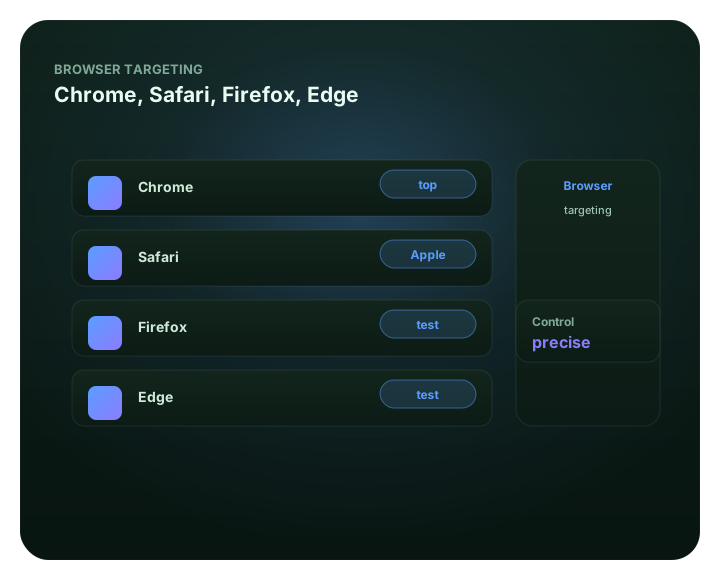
Refine campaigns by browser: at a glance
What does this page explain about Browser Targeting: Control Spend & Improve Performance?
Quick answer: Chrome, Safari, Firefox and Edge audiences differ in device, behavior and quality. Browser targeting on FroggyAds is a precise lever for refining who sees. Use browser to refine – often alongside device and OS. Browser targeting is rarely the first thing you set – but it is a powerful refinement once you have data. Isolating Safari (Apple ecosystem) traffic — See browser targeting inside the platform. Excluding browsers that send weak clicks — See browser targeting inside the platform. Browser-specific compatibility or creative — See browser targeting inside the platform.
| Section | Distinct excerpt from this page |
|---|---|
| A refinement lever for serious buyers | On FroggyAds you can target Chrome, Safari, Firefox, Edge and more, set per-browser bids, and exclude browsers that underperform. |
| Chrome | The largest share of web traffic across desktop and Android – your broadest browser segment. |
| Safari | Skews to Apple devices and iOS users; useful for isolating that ecosystem. |
Reference for Browser Targeting: Control Spend & Improve Performance: FTC guidance on online advertising and marketing.
- Planning: A refinement lever for serious buyers.
- Control: A fine lever, not a blunt one.
- Decision: Scale only proven segments.
A refinement lever for serious buyers
Browser targeting is rarely the first thing you set – but it is a powerful refinement once you have data. Certain browsers correlate with device type, OS and even traffic quality for specific offers, so trimming or boosting by browser can lift ROI without touching the rest of your setup.
On FroggyAds you can target Chrome, Safari, Firefox, Edge and more, set per-browser bids, and exclude browsers that underperform. Layer it with device, OS, GEO and source targeting, let SmartCPC help adjust bidding toward more efficient traffic based on available campaign signals and performance data. Results depend on tracking quality, conversion volume, the offer and campaign settings.
Best for
- Isolating Safari (Apple ecosystem) traffic
- Excluding browsers that send weak clicks
- Browser-specific compatibility or creative
- Refining after device/OS targeting
- Squeezing extra ROI from proven campaigns
See browser targeting inside the platform
For Refine campaigns by browser, the FroggyAds self-serve workflow keeps campaign setup, targeting, budget controls, source-level reporting and optimization in one dashboard so advertisers can make evidence-led keep, cap, exclude and retest decisions.
- Isolating Safari (Apple ecosystem) traffic — See browser targeting inside the platform
- Excluding browsers that send weak clicks — See browser targeting inside the platform
- Browser-specific compatibility or creative — See browser targeting inside the platform
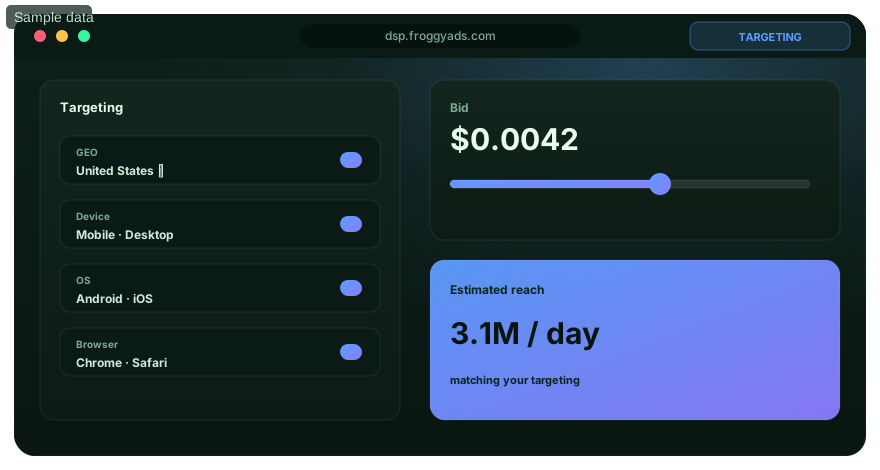
A fine lever, not a blunt one
Use browser to refine – often alongside device and OS.
Chrome
The largest share of web traffic across desktop and Android – your broadest browser segment.
Safari
Skews to Apple devices and iOS users; useful for isolating that ecosystem.
Firefox & Edge
Smaller but distinct segments worth testing separately for some offers.
Refine + exclude
Lower bids or exclude browsers that historically send weak traffic for your offer.
Target browsers on FroggyAds
Open an account and refine by browser from $50.
Browser targeting FAQ
For Refine campaigns by browser., which browser audiences can a FroggyAds campaign target?
Campaigns can target Chrome, Safari, Firefox, Edge, and other available browser segments. The dashboard shows the choices available for the campaign.
For Refine campaigns by browser., when is browser targeting most useful?
Browser targeting is most useful after broader GEO, device, and operating-system settings are in place. It can then isolate a segment that behaves differently for the offer.
For Refine campaigns by browser., can I remove a browser that performs poorly?
You can lower its bid or exclude that browser when tracked results show it is wasting spend. Keep the decision specific to the offer and campaign being measured.
For Refine campaigns by browser., why might a buyer test Safari traffic separately?
Safari traffic can help isolate users in the Apple ecosystem. A separate segment makes its conversion result easier to compare with browsers that have a different device mix.
For Refine campaigns by browser., what is the benefit of separating Chrome traffic?
Chrome often represents a broad web audience across desktop and Android. Separating it prevents that larger segment from masking the performance of smaller browser groups.
For Refine campaigns by browser., should the landing page be checked in every targeted browser?
Test the landing page and conversion path in each browser you plan to buy. A broken form, redirect, or creative interaction can make a healthy traffic segment appear unprofitable.
For Refine campaigns by browser., can browser segments use different bids?
Per-browser bids are available for refining campaign price. Set them from the tracked value of each browser segment rather than assuming one browser is always worth more.
For Refine campaigns by browser., how do I run a clean browser-targeting test?
Keep the offer, creative, GEO, and conversion tracking consistent while browser segments are compared. This makes the browser difference visible in the result.
For Refine campaigns by browser., how much evidence should I gather before blocking a browser?
Use enough tracked visits and conversions to identify a stable problem for that campaign. A brief swing in clicks is a weak basis for removing an entire browser audience.
For Refine campaigns by browser., can browser targeting and source controls work together?
Browser settings refine the audience, while source controls refine where that audience is reached. Review both dimensions so one poor source does not condemn an otherwise useful browser segment.
Refine by browser
Create your account and target by browser across 20B+ daily impressions.
Turn browser differences into controlled media-buying decisions
Browser targeting is most useful when it answers a specific performance question. A buyer might want to know whether Safari traffic converts differently from Chrome for an Apple-focused offer, whether a landing-page feature works reliably in Firefox, or whether one browser segment needs a different bid because its accepted conversion cost has remained different after enough data. Treat the browser setting as a measurable campaign dimension rather than as a shortcut for guessing who a user is.
Start with eligibility and technical compatibility. Open the exact landing page, form, checkout or pre-lander in every browser family that the campaign plans to buy. Check the page at the device sizes that matter, confirm that redirects preserve campaign parameters, and complete the conversion path yourself. A JavaScript error, unsupported input control, blocked popup, cookie-handling difference or slow asset can make legitimate media appear unprofitable. Fix technical friction before excluding an audience that may only be exposing a destination problem.
Keep browser, operating system and device separate in the analysis even though they are related. Safari often overlaps heavily with Apple environments, while Chrome can span Android, Windows and other systems. If the campaign changes browser, OS and device filters at the same time, the result cannot show which condition caused the difference. FroggyAds lets buyers combine targeting dimensions, so use that flexibility to build a clean test rather than a needlessly narrow audience.
| Browser-targeting decision | Evidence to collect | Action after enough data |
|---|---|---|
| Compatibility | Page load, form completion and conversion firing by browser | Repair the destination before judging media quality |
| Efficiency | Spend, accepted conversions and mature CPA by browser | Adjust bids or exclude only repeat weak segments |
| Source interaction | Browser result split by important sources | Avoid blaming a browser for one weak source |
| Creative fit | Downstream result by browser and creative concept | Keep materially stronger combinations visible |
| Scale | Incremental volume and quality after a controlled increase | Expand only while accepted economics remain stable |
| Retest | Fresh sample after landing-page or offer changes | Reopen previously weak segments when the cause changed |
Use accepted business outcomes rather than clicks alone. Browser groups can have different click behavior without producing a meaningful difference in sales, qualified leads, registrations or another advertiser-defined event. Carry campaign and source identifiers through the conversion path and allow the normal attribution window to mature. If the business has a later qualification step, reconcile that status too. A browser that generates inexpensive first-step conversions but weak final acceptance should not automatically receive more budget.
Source-level reporting is important because browser performance can be distorted by inventory composition. Suppose one browser appears expensive overall, but most of the loss comes from a small group of sources. Blocking the entire browser would discard useful inventory together with the weak placements. Review browser and source results together, then use FroggyAds source allowlists, blocklists and targeting controls to make the narrowest decision supported by evidence.
Set an evidence threshold before making exclusions. Small browser segments can swing sharply after one conversion, so a decision based on a few clicks may be unstable. Define a test budget, a minimum observation period and the conversion maturity window before launch. When a segment reaches the review point, compare cost, accepted outcome rate and technical quality with the campaign baseline. Record the reason for any bid or exclusion change so the decision can be reversed if later evidence disagrees.
Creative testing can also benefit from browser separation, especially when the destination experience differs across environments. Keep the offer and measurement constant while testing genuinely different messages. Do not make a browser-specific conclusion when the compared groups also saw different propositions. Once a concept wins within comparable conditions, verify that the improvement persists after more delivery instead of scaling from an early spike.
Browser targeting should not be used as a substitute for identity, intent or demographic proof. A browser family is a technical environment, not a guarantee about the person using it. Build the audience from legitimate campaign eligibility rules and use browser data to improve delivery efficiency. This keeps the optimization tied to observable behavior and avoids unsupported assumptions about users.
When a campaign is ready to scale, increase one major lever at a time. A higher bid, broader source set or larger daily budget can change the mix of available inventory, including the mix inside each browser segment. Compare the new period with the prior configuration after the same conversion window. If quality changes, isolate the changed inventory before undoing unrelated targeting choices.
FroggyAds gives advertisers a practical environment for this workflow because browser controls sit alongside geography, device, operating system, carrier, category and source-level management. The strongest use of those controls is disciplined iteration: define the question, verify the destination, collect enough evidence, make the smallest justified change, and keep a rollback point. That approach turns browser targeting from a checkbox into a repeatable optimization method.
A good browser strategy therefore remains dynamic. Revisit exclusions after a landing-page redesign, tracking change, new offer, creative refresh or material change in traffic mix. A segment that failed because of an old compatibility issue may become viable after the issue is repaired. The goal is not to create a permanent ranking of browsers. The goal is to keep campaign spend aligned with current, measured business value.
Refine campaigns by browser.: what should the advertiser decide next?
For Refine campaigns by browser., the feature is useful only when it changes a real buying, targeting or measurement decision. Start from the baseline described in Refine campaigns by browser: at a glance, apply the control discussed around What does this page explain about Browser Targeting: Control Spend & Improve Performance?, and preserve a rollback point so the effect on browser targeting can be interpreted.
On this Refine campaigns by browser. page, the decision should remain tied to the existing evidence around Refine campaigns by browser: at a glance, What does this page explain about Browser Targeting: Control Spend & Improve Performance? and A refinement lever for serious buyers. Those sections give browser targeting its specific context; the table below turns that context into campaign actions rather than adding another generic definition.
| Decision | What to verify | FroggyAds action |
|---|---|---|
| Refine campaigns by browser. objective | Use Refine campaigns by browser: at a glance to define the accepted business event and the maximum learning loss for browser targeting. | Launch one FroggyAds campaign objective for Refine campaigns by browser. and keep the conversion definition stable. |
| Refine campaigns by browser. audience | Use What does this page explain about Browser Targeting: Control Spend & Improve Performance? to verify market, device, language and offer eligibility for browser targeting. | Apply only the FroggyAds targeting controls that change the real Refine campaigns by browser. customer journey. |
| Refine campaigns by browser. source evidence | Use A refinement lever for serious buyers to keep source-level differences visible instead of relying on one blended browser targeting average. | Keep, cap, exclude or retest Refine campaigns by browser. inventory from documented source evidence. |
| Refine campaigns by browser. economics | Use Best for to connect media spend with accepted conversions and downstream value for browser targeting. | Protect the Refine campaigns by browser. test with a written budget boundary and a consistent attribution window. |
| Refine campaigns by browser. scale rule | Use See browser targeting inside the platform to define the exact evidence that earns the next budget increase for browser targeting. | Scale Refine campaigns by browser. one major control at a time and compare marginal performance with the prior baseline. |
A page-specific FroggyAds test sequence for Refine campaigns by browser.
- Refine campaigns by browser. outcome: define the accepted event for browser targeting and the maximum loss permitted while the first test is learning.
- Refine campaigns by browser. path: verify market eligibility, device experience, landing-page continuity and tracking against Refine campaigns by browser: at a glance before buying more traffic.
- Refine campaigns by browser. hypothesis: launch one bounded FroggyAds test tied to What does this page explain about Browser Targeting: Control Spend & Improve Performance?; do not change bid, creative, audience and destination together.
- Refine campaigns by browser. source review: compare qualified activity, accepted conversions, timing and cost by the source or segment dimensions relevant to A refinement lever for serious buyers.
- Refine campaigns by browser. scaling: use Best for and See browser targeting inside the platform to define what must reproduce before the next budget increase.
Why FroggyAds is relevant to Refine campaigns by browser.
For Refine campaigns by browser., FroggyAds gives advertisers a self-serve DSP and ad-network workflow for buying supported traffic with campaign-level budgets and targeting. Depending on format and campaign context, available controls can include country, city, device, operating system, browser, carrier, category, source, ID and IP options. SmartCPC and Adscore-supported traffic-quality controls can support the browser targeting optimization process, while the advertiser's tracker, analytics and backend acceptance remain the final evidence for commercial quality.
Use See browser targeting inside the platform as the final checkpoint for Refine campaigns by browser.. If the accepted result does not reproduce after the next meaningful volume step, return to the last stable configuration instead of widening several controls at once.
How to tell whether Refine campaigns by browser. is working
For Refine campaigns by browser., record the state before the feature changes, then compare the same evidence window after the change. Use Refine campaigns by browser: at a glance to keep the browser targeting interpretation tied to a real campaign decision.
Reconcile Refine campaigns by browser. on one evidence window
For Refine campaigns by browser., compare FroggyAds reporting with the advertiser's tracker, analytics and backend records for the same dates and attribution rules. Record media spend, relevant delivery events, qualified landing activity, accepted conversions and rejection reasons, then use What does this page explain about Browser Targeting: Control Spend & Improve Performance? to investigate material gaps before they become optimization rules.
Diagnose the smallest failing layer in Refine campaigns by browser.
If browser targeting delivery is weak, review eligibility, targeting, bid and inventory first. If traffic arrives but the destination underperforms, inspect speed, message continuity, forms, redirects and device compatibility. If front-end conversions look healthy but backend acceptance is weak, use A refinement lever for serious buyers to isolate audience or source quality after tracking has been verified.
Set the next Refine campaigns by browser. scale and stop rule
Write the exact Refine campaigns by browser. result that earns more budget and the exact condition that pauses the test. Increase one major control at a time and compare marginal browser targeting performance with the prior configuration. FroggyAds supplies the campaign controls; the advertiser's accepted downstream data determines whether the expansion is commercially useful.
Refine campaigns by browser.: the decision this URL owns
URL boundary for Refine campaigns by browser.: This URL owns Refine campaigns by browser.; Device Targeting Vs Browser Targeting is the nearest neighboring topic and should keep its separate task. Use this page only for the decision implied by Refine campaigns by browser..
Treat Refine campaigns by browser. as an operating decision, not a definition page. A targeting-focused media buyer should use it to understand the control and decide when to use it, with the same accepted outcome preserved from setup through review.
Decision inputs for Refine campaigns by browser.: location targeting, audience segment, custom audience, contextual targeting. Keep these inputs tied to accepted conversion or value event and the page-specific job: understand the control and decide when to use it.
A refinement lever for serious buyers is the measurement checkpoint for this URL. Resolve “For Refine campaigns by browser., when is browser targeting most useful?” while retaining audience segment, contextual targeting, spend and cohort age so the result can be reconciled with accepted conversion or value event.
Refine campaigns by browser: at a glance is an evidence checkpoint for Refine campaigns by browser.. To answer “For Refine campaigns by browser., which browser audiences can a FroggyAds campaign target?”, keep location targeting in the same campaign record and use it to understand the control and decide when to use it.
See browser targeting inside the platform is the action checkpoint for Refine campaigns by browser.. Before acting on “For Refine campaigns by browser., can I remove a browser that performs poorly?”, document custom audience, the resulting campaign action and the rollback or retest condition.
| Page checkpoint | How to use it | Evidence to retain |
|---|---|---|
| Refine campaigns by browser: at a glance | Use Refine campaigns by browser: at a glance to establish the first evidence boundary for Refine campaigns by browser.; then record which part of targeting rule, source identity, control group and mature outcome it changes. | Keep location targeting, source/campaign ID and the accepted-event definition together. |
| A refinement lever for serious buyers | Use A refinement lever for serious buyers as the second checkpoint and reconcile it with accepted conversion or value event before changing budget or source allocation. | Retain audience segment, spend, timestamp/cohort age and accepted/rejected outcomes. |
| See browser targeting inside the platform | Use See browser targeting inside the platform as the final checkpoint: if it does not change the evidence for accepted conversion or value event, keep the test narrow rather than scaling. | Document custom audience, the decision taken and the rollback or retest condition. |
Transparent Refine campaigns by browser. decision example
Hypothetical example: For Refine campaigns by browser., a hypothetical controlled cell that spends USD 190 and records 4 accepted conversion or value event after the same maturity window has an accepted cost of USD 47.50 per outcome. Replace the figures, outcome and review window with your own economics; this is not a FroggyAds performance claim.
Why use FroggyAds here?
Choose FroggyAds for the media-buying part of Refine campaigns by browser. when you need controllable traffic and source evidence; keep the commercial decision anchored to accepted conversion or value event, not delivery volume alone. Create your free FroggyAds account.
Refine campaigns by browser — what matters first
Refine campaigns by browser is a campaign-control decision: state the problem the control solves, define the rule before enabling it, and measure its effect on delivery and accepted outcomes.