Marketing technology and campaign operations

Ad Management Software: Control Budgets, Placements, Creatives and Results

Choose ad management software for the campaign work your team needs to control: setup, creative approvals, spending, source decisions and reporting. We recommend a focused FroggyAds traffic test when you need direct buying controls and clear evidence for the next allocation. For a wider software purchase, test the operator workflow and the records it preserves before adding another layer to your advertising stack.

ad management software
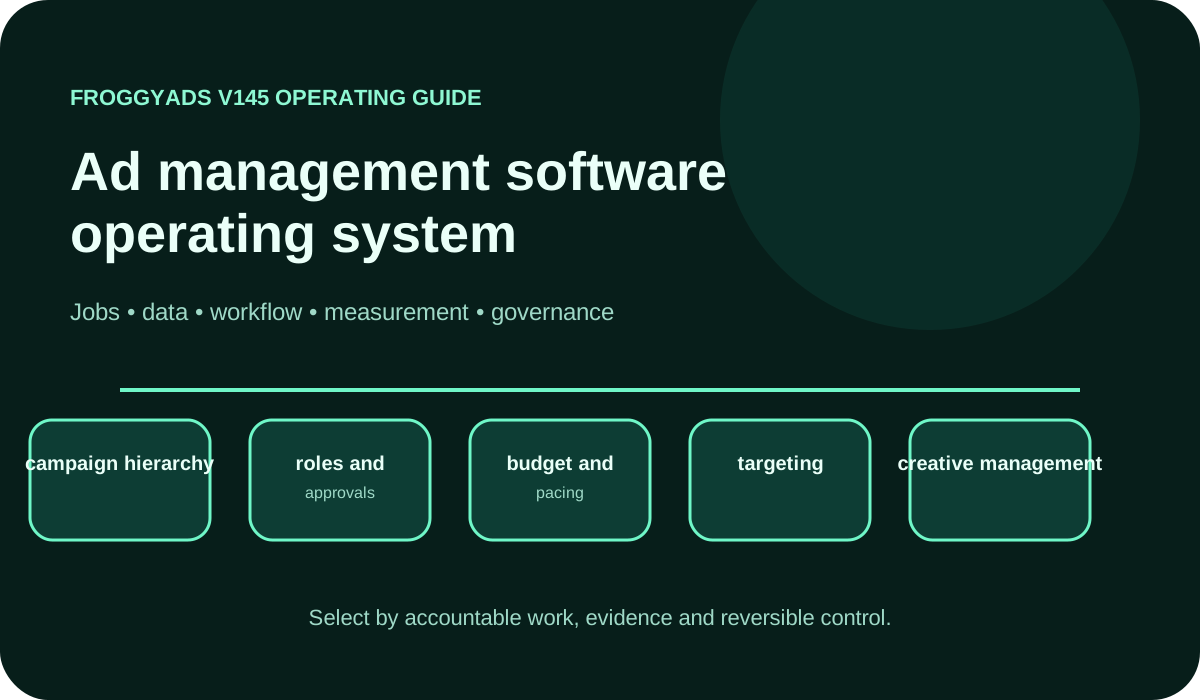
Ad management software operating model showing jobs, data, workflow, measurement and governance

What should ad management software help you control?

Quick answer: Ad management software organizes the work of running advertising campaigns, from setup and creative approval to spending changes and reporting. Evaluate it with a representative campaign and a named operating problem. Verify the permissions, budget controls, version records and export you require, then compare the result with your existing process. FroggyAds provides a self-serve traffic-buying workflow within that wider operating system; your analytics and business records still establish the accepted customer outcome.

SectionDistinct excerpt from this page
Campaign operating roleOperate one campaign from approved settings to a reconciled customer result.
Pilot selection ruleSelect the workflow that resolves a documented campaign error, delay or reporting gap.

Reference for Ad Management Software: Compare Options, Costs & Practical Fit: Google Ads: Choose your bid and budget.

What ad management software means in practice

Begin the software decision with a recurring campaign task that currently goes wrong. Perhaps an agency copies the wrong client budget, an affiliate buyer loses the link between a creative and its offer, or a shop cannot explain a source exclusion made last week. Identify the person who performs that task and the record needed to complete it correctly. Management software earns its place by making that work more dependable.

Draw the boundary around campaign operation. A management interface may coordinate assets and buying activity, but the media platform still reports its own delivery and the business still accepts or rejects the customer action. Decide which record takes precedence when totals disagree. For a FroggyAds purchase, keep our campaign settings and source results connected to the tracker or backend evidence used for the final allocation decision.

Use one realistic campaign to judge the minimum workflow. Have the assigned buyer create the setup, ask a reviewer to check a material creative change, and have the spending owner approve the allocation. Then inspect the report and stop delivery. Requirements that remain outside the demonstration stay unverified. This is a stronger selection basis than assuming a long menu list means the team can operate the system safely.

Capability model and system ownership

Map the campaign objects that your team actually handles: client or business unit, campaign, creative version, destination, spending limit and customer event. For each object, record the action the operator must perform and who may approve it. A budget edit and a new landing-page version may need different reviewers. Demonstrate the workflow the software provides rather than importing a permission model from another vendor.

Keep campaign identity stable when work passes between people. An agency account label should distinguish the client, while the campaign record should distinguish a new test from an established allocation. Link each creative to its destination and launch period. When the same budget appears in a buying tool and a management report, identify the authoritative setting and how a delayed import will be shown to the next operator.

Test integrations with the changes that matter to a campaign operator. Change one approved bid, replace a draft asset, pause a campaign and export the resulting record where the selected product supports those actions. Inspect whether the other system received the intended value and whether a failed update is visible. A connected account is useful only when the required action and its exception can be traced.

Ad management software capability scorecard

Use the scorecard as a series of observed tasks. Give a reviewer the requirement before the demonstration, ask the intended operator to perform it, and retain the output or failure state. Credit a requirement only within the account and workflow tested. If the team needs an administrator or an undocumented spreadsheet to finish, record that operating dependency with its cost rather than hiding it inside a pass.

CapabilityOperating questionEvidence required
campaign hierarchyCan the operator distinguish client, campaign, test and creative versions without changing the wrong record?A representative campaign tree, stable identifiers and a checked copy or edit operation.
roles and approvalsWhich user may create, approve, change spend, export or stop this campaign?A task completed with the assigned role and an attempted action that the role should reject.
budget and pacingCan the buyer set the intended allocation and identify an unexpected spending concentration?The approved limit, actual interval spend and a tested pause or corrective action.
targetingCan the team verify the eligible market, device and source rules before launch?Saved targeting settings and a review of the exclusions inherited by a copied campaign.
creative managementCan a reviewer trace the live creative to its approved destination and version?One approved asset, one changed version and the record showing which may be published.
trackingCan the campaign identifier and customer event survive the complete destination path?A reproducible test event, expected identifiers and a check for missing or duplicate collection.
optimization rulesWhat can an automated rule change, and how can the operator investigate or reverse it?The configured trigger, allowed adjustment, change record and tested stop procedure.
reporting and exportCan the report be reconciled with the original delivery and accepted customer records?A dated export with campaign keys, counting rules, currency, time zone and unresolved differences.

Connect the guide to live testing

Turn the scorecard into one controlled traffic purchase

Take one buying requirement from the scorecard into a FroggyAds campaign. Define the audience, supported format, offer and customer action you can validate. Keep the destination and acceptance rule stable while you test the relevant source or creative decision. Our bids, budgets and source reporting make the purchase actionable without pretending that a traffic test verifies every feature of a wider management suite.

Create My Free Account
Illustration of audience targeting controls for an ad management software test

Implementation workflow

Pilot one campaign type before migrating a whole advertising operation. Choose a workflow that represents the real workload: for example, creating a fresh creative under an existing spending limit and returning its result to an account manager. Record how the current process handles that task, including the time spent correcting mistakes. Keep that baseline so a more polished interface is not mistaken for a better operating result.

Prepare a small configuration sample with campaign names, audience settings, budget authority, creative status and the required tracking identifiers. Ask the receiving team to review those records before launch. The first buying allocation should be small enough for the business to investigate an error without losing the full learning budget. Keep the earlier settings and reports available until the new records reconcile.

After the pilot, list the tasks that became easier and the tasks that became more complicated. A faster launch may be offset by daily import checks or an approval handoff that still happens outside the product. Assign an owner to those remaining steps. Expand to another account only when its operator can repeat the workflow and explain the records without relying on the original implementer.

Measurement and reporting model

Measure the operating problem you selected. If copied campaign settings were wrong, count the setup errors caught before and after launch. If creative review caused delays, record approval time and incorrect live versions. If spending was the concern, compare approved limits with actual spend and the response to an anomaly. Keep those measures beside accepted acquisition cost so an operational improvement does not conceal a weaker customer result.

Build a reporting handoff that preserves the meaning of each total. Our buying record can show reported delivery and source activity; your tracker can attribute an action; your business system can confirm whether the lead or order qualifies. Check a small set of records across the systems, including a rejected action. Keep time-zone, currency and processing differences beside the report instead of forcing every total into artificial agreement.

Review the campaign changes introduced by the new workflow separately from established activity. A new creative batch, client account or source rule may have a different operating burden and customer result. Compare its recent records after the required review window. If a dashboard combines pending actions with accepted ones, retain the separate statuses before using it to authorize another allocation.

Governance, privacy and security

Translate governance requirements into operator tasks. Identify who may launch a campaign, approve a creative, change a spending limit and remove an account connection. Test the available roles with the people who will use them. When the software cannot enforce a required separation, document the independent approval or account procedure that contains the risk before the pilot expands.

Describe the data needed for campaign management before connecting additional systems. An operator may need a campaign identifier and event status without needing a full customer record. Record the intended purpose, responsible owner and applicable handling requirements for each transfer. Review consent or deletion changes with the relevant owner; do not assume that an available connection establishes permission to copy every field it exposes.

Include account access and recovery in the demonstration. Check the authentication methods, connection permissions and change records the selected product actually provides. Identify who can disconnect a compromised integration or stop spending if the usual operator is unavailable. Keep credential handling and incident responsibilities in your organization rather than leaving them as an unassigned dependency on a software subscription.

Choose the execution format

Choose formats your team can govern

Choose Push, Native, Display or Pop where supported by the campaign and suitable for the offer. Check who can produce, approve and maintain the required assets before allocating spend. In FroggyAds, connect the selected format to its targeting, bid, budget and source record. Evaluate the customer outcome separately from whether the management workflow made the campaign easier to operate.

Create My Free Account
Illustration comparing advertising formats for ad management software execution

A four-stage rollout example over 30 days

Days 1–5

Days 1–5: map one recurring campaign workflow and name its operator, reviewer and spend owner. Save the current setup time, error record and customer-event definition. Select the non-negotiable controls for the pilot, including how a campaign can be stopped. These dates are an illustrative plan; extend a stage when the evidence or approval it needs is incomplete.

Days 6–12

Days 6–12: configure naming, account connections and the permissions available in the selected product. Test a representative creative change and a report export with a small data sample. Compare the imported values with their original system. Keep the existing workflow available while any mapping, approval or access problem is corrected.

Days 13–21

Days 13–21: run a capped campaign through the new workflow alongside the old reporting process. Reconcile spend, creative version and accepted customer events, and record the effort of resolving exceptions. Include a pause and a recoverable correction in the pilot. If outcomes mature more slowly than this example allows, hold the decision until the review window closes.

Days 22–30

Days 22–30: compare the pilot with the original operating problem. Decide whether it improved the required control, report or completion time at an acceptable total cost. Document the remaining limitations and give the next migration a named owner. Retire duplicate reports or tools only after the records needed for final reconciliation have been retained.

Selection and proof of value

Write the selection weights around the operating failures you need to remove. A small affiliate team may prioritize readable source records and a recoverable setup, while an agency may place more weight on client separation and review handoffs. Use the same tasks for each shortlisted product. Keep an unavailable control or a failed export visible even when the vendor demonstration is otherwise persuasive.

Compare the cost of running the workflow, not only the advertised subscription. Include campaign connections, user access that actually applies, setup work, training, recurring reconciliation and the effort needed to leave. Estimate who will maintain each integration and exception record. A broader suite needs to justify that extra operating work against the specific control or time saving the pilot demonstrated.

Record the selection as a bounded decision: the campaign task tested, the assigned operator, the account scope, the evidence retained and the limitation accepted. Include what would reopen the choice, such as a changed client requirement or an export that no longer reconciles. This gives the next manager a reasoned operating decision instead of a permanent endorsement of a product category.

Failure modes and controls

Turn common campaign errors into checks the operator can perform. Review inherited targeting and budgets before a copy launches; confirm the approved asset and destination before a replacement goes live; inspect the change record before an automation rule is expanded. For an export dependency, test that the campaign keys and status history needed for reconciliation are present. A control should address a named failure, not merely add another checklist item.

Give exceptions their own working queue. Separate a rejected creative, a failed setting update, an unmatched conversion and an unexpected spending total, because each needs a different owner and correction. Save the affected campaign and version with the issue. Closing a support ticket is not the same as proving that the campaign record or customer count has been repaired.

Prepare a recoverable campaign state before a bulk edit or migration. Save the affected account and campaign identifiers, material settings, creative versions and export location. Name the person who can stop delivery and the person who will reconcile delayed outcomes. Test that the retained information is sufficient to explain the earlier setup; a screenshot alone may omit the source rule or version that made it work.

Put the guide into practice

Turn Ad Management Software into a bounded campaign test

With “Failure modes and controls” documented, launch only the next reversible test. Set a spending limit, preserve the baseline and use source-level and audience controls so the next step depends on qualified outcomes for ad management software, not activity volume.

Create My Free Account
Illustration of a campaign launch checklist for ad management software

Campaign documentation your next operator can use

A useful campaign handoff should let the next operator understand the current setup without reconstructing it from screenshots. Name the advertiser, objective, supported format, audience scope, destination and accepted customer event. Keep the approved configuration beside its review date. For agencies, identify which decisions the client approved and which routine adjustments the assigned buyer may make.

Retain a concise record of material changes: the earlier setting, the revised setting, the person responsible and the reason for the adjustment. Connect each creative to the version and destination actually approved for use. When a campaign is copied, check the inherited budget, targeting and links before treating the copy as ready to launch.

Write the exception record so another operator can act on it. State whether delivery stopped, a creative was rejected, tracking failed or a customer outcome remains pending. Include the affected campaign and the evidence that would close the issue. A handoff is useful when it identifies the next decision and its owner, rather than merely exporting a large report.

Use FroggyAds for the traffic-buying workflow

FroggyAds is a self-serve media buying platform for advertisers and media buyers. It supports campaign activation, targeting, source controls, budgeting and performance workflows across push, native, display and pop inventory. It is not presented as a full CRM, email automation suite, creative-authoring suite or universal marketing database. Use FroggyAds when controlled paid-media execution is the required layer, and integrate it with the systems that own customer records, creative production and final business outcomes.

Choose FroggyAds when the immediate job is to buy and optimize targeted traffic within your campaign plan. We give you a self-serve place to select supported formats, apply targeting and control bids, budgets and sources. Keep your own accepted-event and total-cost records beside the campaign. This lets the operator connect a practical buying adjustment with the customer outcome the business is trying to improve.

Ad Management Software decision workbook

Use this ad management software workbook to turn a named operating problem into a buying decision. Test the tasks your operators perform, preserve the evidence and compare the full effort of running the new workflow. Keep optional features outside the first pilot when they do not resolve that problem.

Requirements register

Write requirements as campaign tasks rather than broad preferences. Replace easy to use with a demonstration such as finding the current creative, checking its approved destination and changing one spending limit with the assigned role. Name the expected record and the condition that would reject the task. Keep requirements for another team or an unused channel outside the first pilot so they do not distort the buying decision.

Data contract

Create a small data dictionary for the management report. Record the campaign key, source key where available, creative version, spend currency, event timestamp and acceptance status. Identify the source of each field and the person who resolves a discrepancy. Export a sample with both accepted and rejected actions. Check that the relationships survive the export before assuming the complete account can be reconciled later.

Workflow simulation

Simulate a routine handoff and an exception with the actual team. Have the buyer prepare a campaign, the reviewer identify the approved creative and the reporting owner return its result. Then introduce a controlled issue, such as a draft asset that should not launch or a missing campaign identifier. Observe where the team has to leave the product, ask for administrator access or maintain a separate record to complete the task.

Economic model

Build the economic comparison from the pilot workload. Record the media spend separately from software charges and the staff time needed for setup, review, reporting and exception handling. Count a retired report or tool as a saving only when its work has actually ended. If the new workflow requires an extra daily check, include that cost before describing a faster campaign launch as a net benefit.

Acceptance gate

Approve wider use against the requirement that justified the pilot. The operator should be able to complete the campaign task, the reviewer should be able to inspect its evidence and the reporting owner should be able to reconcile the output. Record any control that remains outside the product. Keep expansion on hold if that unresolved dependency prevents the team from stopping spend, verifying the customer event or retaining usable records.

Quarterly control review

Review the workflow after a meaningful period of use and when its account scope changes. Check stale access, unused connections, repeated campaign exceptions, unreviewed automation and reports that no longer reconcile. Ask operators which manual steps have returned since the pilot. Retain a tested export and a replacement trigger so the business can reconsider the software without losing the history behind earlier campaign decisions.

Canonical rule: this page owns the documented intent represented by ad management software. New pages should be created only when a future keyword describes a materially different user problem, workflow, audience or decision, not merely a singular, plural, “best,” “top” or year variant.

Frequently asked questions

When does ad management software become necessary?

Consider dedicated software when campaign volume makes budgets, placements, creatives, approvals, and results difficult to control in separate tools. The product should repair a named operating risk or delay, with clear owners for the decisions it centralises.

How should an ad management system be piloted?

Use one representative campaign from brief to reconciliation, define roles, limits, approval states, source records, and success criteria, then run it beside the existing process. A bounded parallel trial exposes data and workflow gaps without risking the full account.

What costs belong in a management-software decision?

Include licences, seats, usage tiers, implementation, integrations, data storage, migration, training, governance, support, custom reports, and exit. Add staff time for maintaining rules and records so the total cost reflects ongoing operation.

Who needs a role in ad management software?

Campaign operators need controlled creation and pacing rights; creative reviewers need approval access; finance needs billing visibility; analysts need read-only exports; administrators need security controls. Grant the smallest role for each duty and test that no account can alter spend and approve its own work.

How can software keep campaign messages controlled?

Connect every approved creative to its brief, claim evidence, destination, version, placement rules, and expiry. Prevent draft or withdrawn assets from publishing, and make material edits trigger a fresh review rather than inheriting an old approval.

Which technical checks belong in a software pilot?

Verify authentication, roles, account connections, budget caps, change logs, creative states, link tracking, event imports, currencies, time zones, exports, alerts, backups, and emergency pause. Reconcile sample transactions with source systems.

How should management-software value be measured?

Compare setup and operating effort, approval time, budget variance, publishing defects, data agreement, reporting delay, and decision quality with the prior workflow. Centralisation is useful only when the combined records remain accurate and actionable.

What explains unreliable reports in ad management software?

Trace account imports, naming, identifiers, attribution, currencies, time zones, refunds, and update schedules from source to dashboard. Repair mapping and document the limitation before users make budget changes from an attractive but incomplete total.

Which risks should block a management-software rollout?

Do not expand when access cannot be constrained, changes are unlogged, critical data cannot be exported, caps fail, vendor handling is unsuitable, or rollback is unclear. The team must retain evidence and control outside a single interface.

When is ad management software ready for wider use?

Adopt it across more accounts after repeated cycles show accurate connections, dependable approvals, controlled spend, faster useful decisions, and manageable administration. Move one team or client at a time and independently reconcile each migration.

Official sources used for this guide

Use the official references for the controls and definitions each provider actually documents. Google Ads and Analytics describe their own budget, bidding and measurement systems; IAB Tech Lab explains industry vocabulary and supply transparency. Check the selected vendor directly for the feature, account and workflow you intend to buy rather than importing another provider's capabilities.

Launch a controlled paid-media test

Start your next campaign with FroggyAds when your management workflow is ready for a controlled traffic purchase. Select the supported format, audience and spending limit, verify the customer event and use our source reporting to review the result. Keep the operating effort and accepted acquisition cost together when deciding what to improve next.

Create My Free Account
Campaign operations

Ad Management Software Should Reduce Decision Friction

Ad management software earns its value when it helps a team launch, measure, and improve campaigns with fewer blind spots. The core functions are not just creating ads and setting budgets; they include organizing campaigns, controlling targeting, preserving a change history, comparing sources, monitoring spend, and connecting media metrics to accepted business outcomes.

For advertisers researching ad management software for small business or campaign management software for performance marketing, complexity should match the operating need. A small team may benefit more from a focused self-serve platform with clear budget and targeting controls than from a large enterprise suite filled with unused workflow layers. FroggyAds is designed to keep media buying practical: advertisers can create campaigns, select formats and targeting, control spend, and review performance within one buying environment.

What features matter most in online advertising management software?

Prioritize account security, campaign-level budget controls, format choice, geographic and device targeting, source-level optimization, reporting that can be exported or reconciled, and a workflow that makes changes easy to audit. Then consider collaboration, API access, automation, and advanced reporting according to team size. The best feature set is the one that makes the next decision clearer rather than simply increasing the number of settings available.

When deciding how to manage multiple paid advertising campaigns, use consistent names and preserve a separate hypothesis, budget and accepted event for each test. If you are comparing the best ad management platform for affiliates, check whether the workflow retains merchant approval and reversal evidence beside the source record. FroggyAds gives you traffic-buying controls; your operating process makes those decisions repeatable across offers.

Search intent and buyer decision

Choose management software for a defined campaign workflow

Name the management problem before selecting another platform. An agency may need a dependable client-approval handoff; an affiliate buyer may need source records that survive merchant validation; a small ecommerce team may need fewer accidental budget and creative changes. Test the relevant task, record the remaining limitation and compare the cost of operating it with the process you already use.

Operating evidence: retain the approved brief, budget authority, creative and destination versions, delivery record and accepted customer outcome. These records answer different questions. A campaign that launched faster may still have a measurement gap, while a technically complete report may still omit cancelled orders or rejected leads.

Decision before expansion: confirm which operating risk the pilot resolved, what new work it created and who will maintain the workflow. If the remaining limitation affects spending authority, customer acceptance or usable exports, keep the rollout bounded while it is corrected. Expand the process that earned the next account or team migration.

CheckpointPage-specific actionEvidence to keep
BoundarySelect one recurring campaign task and the control it currently lacks.The responsible operator, baseline effort or error, and a written completion condition.
Pilot recordsRun the task with the actual creative, spending limit and customer-event definition.Saved settings, approved versions, event records and the time spent resolving exceptions.
DecisionExpand the workflow only when the required control works at an acceptable operating cost.The pilot result, retained limitation, next owner and a practical rollback or replacement trigger.

Transparent decision example

Hypothetical example: suppose a traffic campaign spends USD 100 and produces 10 accepted outcomes after review. Accepted CPA is USD 10.00. This media-only calculation excludes any software or staff cost; add the charges and work that actually apply when comparing the whole workflow. The inputs illustrate the method and are not a FroggyAds price or performance result.

Why use FroggyAds for this step?

Choose FroggyAds for the traffic-buying part of your management workflow when our supported formats, targeting and campaign controls fit the offer. We help you put a clear audience and spending plan into action, then review delivery by source. Keep accepted customer outcomes and total operating cost as the basis for the next allocation. Create your free FroggyAds account.

Direct answer

Use a workflow that improves the next campaign decision

The right ad management software should make a recurring campaign task more dependable and its result easier to assess. Test the actual permissions, creative handoff, spending boundary and reporting path your team needs. For your next measured traffic purchase, use FroggyAds to put the approved plan into a controlled campaign.


