


- Understanding Remarketing Campaigns in Adwords
- Why Should You Implement a Remarketing Campaign in Adwords?
- 1. Reach Your Most Valuable Audiences:
- 2. Build Brand Recall:
- 3. Increase Conversions and ROI:
- 4. Customize Ads for Different Audiences:
- 5. Boost Ad Visibility Across the Web:
- What is Remarketing?
- Why Use Remarketing Campaigns?
- How to Create a Remarketing Campaign in AdWords
- Step 1: Set up a Remarketing Tag
- Step 2: Define Your Remarketing Audience
- Step 3: Create Your Remarketing Campaign
- The Power of Remarketing in AdWords
- Understanding Remarketing in Adwords
- Setting up Remarketing in Adwords
- Creating Effective Remarketing Campaigns
- Bid Strategies and Budget Optimization
- Measuring Success and Iterating
- 1. What is remarketing?
- 2. How can I create a remarketing campaign in Adwords?
- 3. Can I use remarketing if I don’t have a large advertising budget?
- 4. How does remarketing benefit my advertising strategy?
- 5. Can I exclude certain audiences from my remarketing campaign?
- 6. How long should I run a remarketing campaign?
- 7. Can I use remarketing for mobile app advertising?
- 8. How can I track the performance of my remarketing campaign?
- 9. Can I customize my remarketing ads?
- 10. What targeting options are available for remarketing campaigns?
- 11. Can I use remarketing to target users who have abandoned their shopping carts?
- 12. How can I improve the effectiveness of my remarketing ads?
- 13. Can I combine remarketing with other advertising strategies?
- 14. What are the best practices for creating remarketing lists?
- 15. Can I exclude specific websites or placements from my remarketing campaign?
- Conclusion
Remarketing campaigns in AdWords play a crucial role in online advertising, allowing businesses to re-engage with potential customers who have previously shown interest in their products or services. By displaying targeted ads to these individuals as they browse the web, businesses can stay top of mind and increase conversion rates. But how exactly can one create a successful remarketing campaign in AdWords?

Remarketing, also known as retargeting, involves displaying ads to individuals who have already visited a website or engaged with a mobile app. This form of advertising works by placing a cookie on the user’s device, enabling marketers to show relevant ads to these individuals as they navigate across different websites or interact with other applications.
To create a remarketing campaign in AdWords, one needs to start by defining goals and identifying the target audience. It is essential to determine what actions or behaviors website visitors should exhibit to trigger the display of remarketing ads. For example, businesses may want to target individuals who viewed specific product pages, added items to their shopping cart, or reached the checkout page without completing a purchase.

Next, one must create remarketing lists in AdWords. These lists group website visitors based on their actions or attributes. By creating different lists tailored to various user behaviors, businesses can serve highly relevant ads to each segment. AdWords provides various targeting options, allowing advertisers to apply specific rules to include or exclude certain visitors from their remarketing lists.
Once the remarketing lists are set up, it is crucial to design compelling and visually appealing display ads that will catch the attention of the target audience. AdWords provides a range of ad formats, including static images, HTML5 ads, dynamic ads, and video ads. It is essential to create ads that reflect the brand’s messaging and call-to-action, enticing users to revisit the website and potentially convert.

To maximize the effectiveness of a remarketing campaign, advertisers should consider implementing frequency caps. These caps limit the number of times a user sees the same ad, preventing ad fatigue and potential annoyance. Advertisers can set the frequency cap in AdWords, specifying the maximum number of impressions per day or per week for each user.
In addition to frequency capping, setting bid adjustments can also enhance the performance of a remarketing campaign. Advertisers can adjust bids for remarketing audiences based on their value or conversion likelihood. For example, businesses may choose to increase bids for users who have added items to their shopping carts but have not yet made a purchase, as they are more likely to convert.

Furthermore, advertisers should regularly monitor and analyze the performance of their remarketing campaigns. This can be done using the reporting and analytics tools provided by AdWords. By examining metrics such as click-through rates, conversion rates, and return on investment, businesses can identify areas for improvement and optimize their campaigns accordingly.
In conclusion, creating a remarketing campaign in AdWords is a powerful way for businesses to reconnect with potential customers and enhance conversion rates. By defining goals, creating remarketing lists, designing compelling ads, implementing frequency caps and bid adjustments, and monitoring campaign performance, advertisers can take full advantage of this effective online advertising strategy.

How Can I Successfully Create a Remarketing Campaign in Adwords to Boost my Online Advertising Strategy?
| Item | Details |
|---|---|
| Topic | How To Create Remarketing Campaign In Adwords |
| Category | Ads |
| Key takeaway | Remarketing campaigns in AdWords play a crucial role in online advertising, allowing businesses to re-engage with potential customers who have previously shown interest in their pr |
| Last updated | March 25, 2026 |
Understanding Remarketing Campaigns in Adwords
Remarketing campaigns in Adwords are a powerful tool in online advertising that allow you to reconnect with potential customers who have previously visited your website or shown interest in your products or services. By displaying targeted ads to these individuals as they browse other websites or use mobile apps, you can improve brand awareness, increase conversions, and maximize your return on investment (ROI).
Implementing a remarketing campaign involves placing a tracking code, known as a pixel or tag, on your website, which enables Adwords to track the browsing behavior of your site visitors. Once your audience has been established, you can create customized ad campaigns specifically tailored to this group, increasing the likelihood of engagement and conversion.
Why Should You Implement a Remarketing Campaign in Adwords?
The benefits of running a remarketing campaign in Adwords are numerous and can greatly enhance your overall online advertising strategy. Here are some advantages of incorporating remarketing into your advertising efforts:
1. Reach Your Most Valuable Audiences:
A remarketing campaign allows you to focus your advertising efforts on users who have already shown interest in your brand or products. By specifically targeting this audience, you increase the chances of conversion, as they are already familiar with your business. This highly targeted approach ensures that your ad budget is being spent on individuals who are more likely to engage with your ads and potentially make a purchase.

2. Build Brand Recall:
Remarketing campaigns are an excellent way to reinforce your brand messaging and increase brand recall. By displaying your ads to users who have previously visited your website, you remind them of your brand and increase the likelihood of them returning to make a purchase or explore your offerings further. This consistent exposure strengthens brand recognition and trust, making it more likely for customers to choose your brand over competitors.
3. Increase Conversions and ROI:
Remarketing campaigns are known for their ability to significantly increase conversions and ROI. By targeting individuals who have already demonstrated interest in your brand, products, or services, your ads have a higher chance of resonating with them and driving them to take the desired action, such as making a purchase or submitting a form. This focused targeting ensures that your ad budget is being spent effectively, potentially resulting in a higher ROI compared to other forms of online advertising.
4. Customize Ads for Different Audiences:
One of the key advantages of creating a remarketing campaign in Adwords is the ability to segment your audiences and tailor ads accordingly. By grouping users who have visited specific pages or performed certain actions on your website, you can create highly personalized ad campaigns that address their specific needs or interests. Customizing your ads can significantly improve engagement and conversion rates, as users are more likely to be interested in an ad that is directly relevant to their previous interactions with your website.

5. Boost Ad Visibility Across the Web:
With a remarketing campaign in Adwords, your ads have the potential to reach a wider audience, as they can be displayed on various websites across the internet. These ads can appear as display banners, text ads, or even dynamic ads tailored to the individual browsing behavior. As your potential customers continue browsing the web or using mobile apps, your ads can reappear, keeping your brand top of mind and increasing the likelihood of them returning to your website to complete a desired action.
Now that you understand the advantages of implementing a remarketing campaign in Adwords, let’s dive into the step-by-step process of creating an effective remarketing campaign to boost your online advertising strategy. In the following sections, we will explore how to set up your remarketing audience, create engaging ad creatives, define remarketing lists, and optimize your campaign for maximum results.
What is Remarketing?
Remarketing is a powerful online advertising technique that allows you to reach out to people who have previously visited your website or interacted with your mobile app. By targeting these potential customers with relevant ads, you can increase brand awareness, drive conversions, and ultimately improve your ROI.

Why Use Remarketing Campaigns?
Remarketing campaigns in Google AdWords offer a range of benefits for businesses of all sizes. Here are some reasons why you should consider incorporating remarketing into your advertising strategy:
- Increased brand exposure: By using remarketing, you can keep your brand in front of potential customers and maintain top-of-mind awareness.
- Higher conversion rates: Remarketing allows you to target people who have already shown interest in your products or services, increasing the chances of them converting.
- Improved ad relevance: With remarketing, you can tailor your ads specifically to people who have interacted with your website or app, ensuring they receive content that is highly relevant to their interests.
- Cost-effective advertising: Remarketing typically offers a higher ROI compared to other forms of online advertising, as you are targeting a pre-qualified audience.
How to Create a Remarketing Campaign in AdWords
Creating a remarketing campaign in Google AdWords is a relatively straightforward process. Here is a step-by-step guide on how to get started:
Step 1: Set up a Remarketing Tag
The first step is to add a remarketing tag to your website. This tag is a snippet of code provided by AdWords that needs to be added to every page of your website. The tag allows AdWords to track visitors and build an audience based on their interactions.

To set up the remarketing tag, follow these steps:
- Sign in to your AdWords account.
- Click on the “Tools & Settings” icon in the upper-right corner of the page.
- Select “Audience Manager” under the “Shared Library” section.
- Click on “Audience sources” in the left-hand navigation menu.
- Choose “Website visitors” and click on “Set up tag”.
- Follow the instructions provided by AdWords to install the remarketing tag on your website.
Step 2: Define Your Remarketing Audience
After you have set up the remarketing tag, it’s time to define your audience. You can create remarketing lists based on specific pages visited, actions taken, or time spent on your website. This allows you to segment your audience and deliver tailored ads to different groups of people.
To define your remarketing audience, follow these steps:
- Go to the “Audience Manager” in your AdWords account.
- Click on “Audience lists” in the left-hand navigation menu.
- Click on the blue “New” button and select “Website visitors”.
- Choose the criteria for your remarketing list, such as people who visited specific pages or completed certain actions.
- Set the membership duration for your audience. This determines how long a visitor will stay on your remarketing list after their last interaction.
- Save your audience and repeat the process for different segments if desired.
Step 3: Create Your Remarketing Campaign
Now that you have set up your remarketing tag and defined your audience, it’s time to create your remarketing campaign. Follow these steps to get started:
- Sign in to your AdWords account.
- Click on the “Campaigns” tab in the navigation menu.
- Click on the blue “+ Campaign” button and select “Display Network” as your campaign type.
- Give your campaign a name and set your budget and bidding strategy.
- In the “Audiences” section, click on the “Add campaign targeting” button.
- Select “Remarketing” and choose the remarketing list you want to target.
- Configure other campaign settings, such as ad formats, ad rotation, and ad scheduling.
- Create your ad groups and design compelling ads that will resonate with your remarketing audience.
- Set up conversion tracking to measure the success of your remarketing campaign.
- Save your campaign and launch it to start reaching out to your remarketing audience.
The Power of Remarketing in AdWords
Remarketing campaigns in Google AdWords have proven to be highly effective in driving conversions and increasing brand exposure. Here are some statistics that highlight the power of remarketing:
– Companies using remarketing strategies have reported an average conversion rate increase of 51% (Source: WordStream).
– Remarketing campaigns have shown to generate a click-through rate up to 10 times higher than regular display campaigns (Source: Google Ads).
– Research has found that 70% of customers who are retargeted with display ads are more likely to convert on your website (Source: Criteo).
Using remarketing in AdWords allows you to target a highly engaged audience and deliver personalized ads that can significantly impact your advertising results.
Key Takeaways: How to Create Remarketing Campaign in Adwords
Creating a successful remarketing campaign in Adwords can greatly enhance your online advertising efforts and drive more conversions. By targeting users who have previously engaged with your website, you can effectively reach a highly relevant audience and increase the likelihood of them taking further action. In this article, we will outline the key takeaways and insights on how to create an impactful remarketing campaign in Adwords.
Understanding Remarketing in Adwords
- Remarketing allows you to show targeted ads to users who have interacted with your website or app before.
- By utilizing Adwords, you can specifically tailor your remarketing campaigns based on your audience’s previous actions.
- Remarketing lists can be created based on various criteria, such as specific pages visited, time spent on site, or completed conversions.
- Remarketing can be a powerful tool for enhancing your overall advertising strategy and increasing your return on investment.
Setting up Remarketing in Adwords
- To set up remarketing in Adwords, you need to first install the remarketing tag on your website or app.
- Linking your Adwords account to your Google Analytics can provide you with additional insights and targeting options.
- Create remarketing lists based on specific user activities or behaviors on your website.
- Consider segmenting your audience into smaller, more targeted lists to cater to different user intents.
- Define the duration for which a user remains on your remarketing list, based on their actions and relevance.
Creating Effective Remarketing Campaigns
- Define your campaign goals and objectives to align your remarketing efforts with your advertising strategy.
- Create compelling and personalized ad content to connect with your targeted remarketing audience.
- Utilize strong call-to-actions to encourage users to take the desired action, such as making a purchase or signing up for a newsletter.
- Consider implementing dynamic remarketing to show customized product ads to users based on their previous interactions.
- Segment your remarketing campaigns based on different user behaviors or stages of the sales funnel.
Bid Strategies and Budget Optimization
- Choose the most suitable bid strategy for your remarketing campaign, such as maximizing conversions or target return on ad spend.
- Regularly monitor and analyze your campaign performance to identify opportunities for optimization.
- Adjust your bids based on the value and likelihood of conversion from your remarketing audience.
- Utilize audience exclusions to avoid showing ads to users who have already converted or are no longer relevant.
- Test different ad formats and placements to identify the most effective combinations for your remarketing campaigns.
Measuring Success and Iterating
- Track and measure the performance of your remarketing campaigns using Adwords conversion tracking and Google Analytics.
- Analyze key metrics such as click-through rates, conversion rates, and return on ad spend to evaluate the effectiveness of your campaigns.
- Identify any gaps or areas of improvement in your remarketing strategy and make data-driven optimizations.
- Continuously iterate and refine your remarketing campaigns to maximize their impact and drive better results over time.
In conclusion, creating a remarketing campaign in Adwords requires careful planning, strategic targeting, and ongoing optimization. By understanding the fundamentals of remarketing, setting up the necessary infrastructure, and implementing effective campaign strategies, you can leverage this powerful tool to connect with your audience and drive conversions. Remember to continuously measure and iterate to refine your campaigns and achieve the best possible results for your online advertising efforts.
FAQs – How To Create Remarketing Campaign In Adwords
1. What is remarketing?
Remarketing is a feature in Adwords that allows advertisers to target previous website visitors by showing them personalized ads when they browse various websites within the Google Display Network.
2. How can I create a remarketing campaign in Adwords?
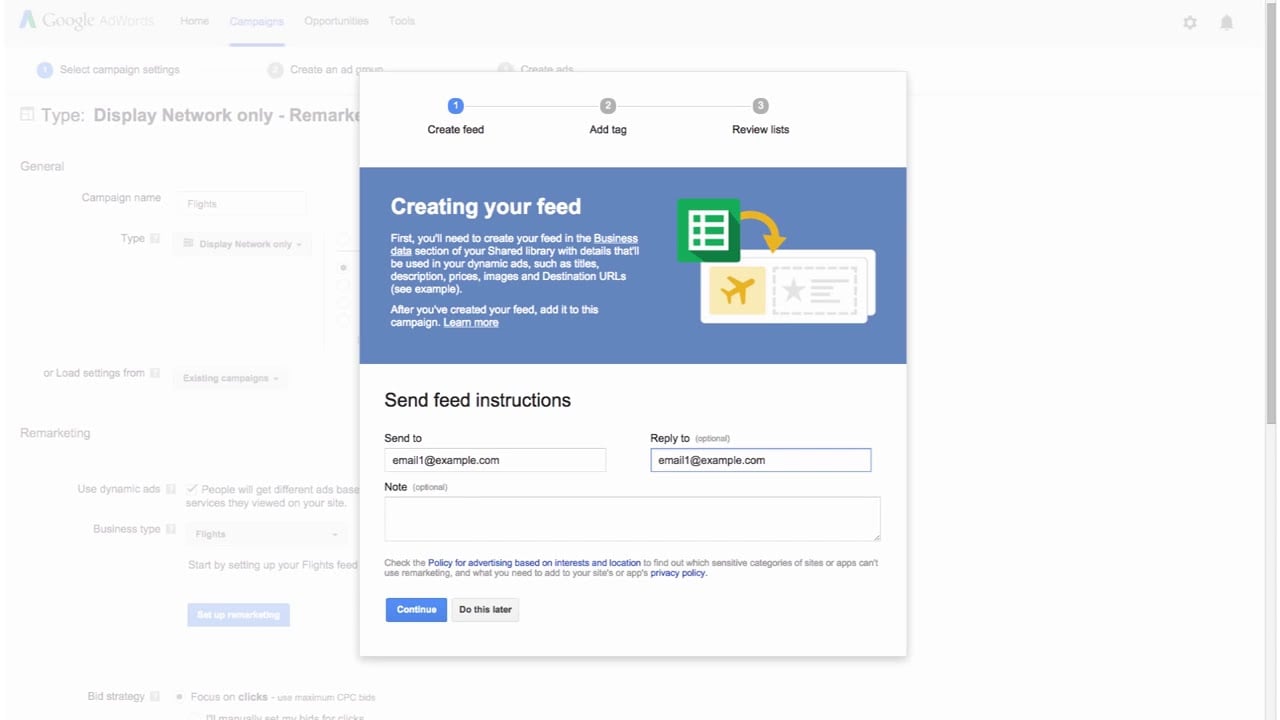
To create a remarketing campaign in Adwords, follow these steps:
- Log in to your Adwords account.
- Click on the “Campaigns” tab.
- Click the “+” button to create a new campaign.
- Choose the campaign type as “Display Network only.”
- Select your desired marketing goals and campaign settings.
- Under “Audiences” section, click on “Remarketing” and create a new remarketing list.
- Set up ad groups, ads, and bidding strategy for your remarketing campaign.
- Review and save your campaign.
3. Can I use remarketing if I don’t have a large advertising budget?
Absolutely! Remarketing campaigns in Adwords can be tailored to fit any budget. You have full control over your daily budget, bid strategy, and ad spend. You can start with a small budget and gradually increase it as you see positive results.
4. How does remarketing benefit my advertising strategy?
Remarketing helps to reinforce your brand, engage with potential customers who have already shown interest in your products or services, increase click-through rates, and improve conversions. By targeting a specific audience, remarketing allows you to focus your advertising efforts on people who are more likely to convert.
5. Can I exclude certain audiences from my remarketing campaign?
Yes, you can exclude specific audiences from your remarketing campaign. This can be useful if you want to target new customers or focus on a particular segment of your audience. Adwords provides various options for audience exclusion based on demographics, interests, and behavior.
6. How long should I run a remarketing campaign?
The duration of a remarketing campaign depends on your specific goals and objectives. Ideally, you should run the campaign for as long as it continues to provide a positive return on investment (ROI). Regularly monitor the performance of your campaign and make adjustments as needed.
7. Can I use remarketing for mobile app advertising?
Yes, you can use remarketing for mobile app advertising. Adwords offers options to create remarketing campaigns specifically for mobile apps, allowing you to re-engage users who have interacted with your app in the past.
8. How can I track the performance of my remarketing campaign?
Adwords provides detailed performance reports for your remarketing campaigns. You can track metrics such as impressions, clicks, conversions, click-through rates, and return on ad spend (ROAS) to evaluate the effectiveness of your campaign.
9. Can I customize my remarketing ads?
Yes, you can customize your remarketing ads to align with your branding and marketing objectives. Adwords offers various ad formats, including text ads, image ads, responsive ads, and video ads. You can also include dynamic elements in your ads, such as personalized product recommendations.
10. What targeting options are available for remarketing campaigns?
Adwords provides various targeting options for remarketing campaigns, such as:
- Custom Combination: Target users who meet specific criteria by combining multiple lists.
- Similar Audiences: Reach new users who share characteristics with your existing remarketing list.
- Demographic Targeting: Narrow down your audience based on age, gender, and other demographic factors.
- Interest Categories: Target users with specific interests relevant to your products or services.
11. Can I use remarketing to target users who have abandoned their shopping carts?
Yes, you can target users who have abandoned their shopping carts using remarketing. By showing them personalized ads that remind them of the products they left behind, you can encourage them to complete their purchase.
12. How can I improve the effectiveness of my remarketing ads?
To improve the effectiveness of your remarketing ads, consider implementing the following strategies:
- Create compelling and relevant ad content.
- Segment your audience to deliver personalized messages.
- Use audience exclusions to avoid irritating your audience.
- Run A/B tests to optimize your ads.
- Utilize ad scheduling to display ads at the right time.
13. Can I combine remarketing with other advertising strategies?
Absolutely! Remarketing can be combined with other advertising strategies to enhance your overall marketing efforts. You can integrate remarketing with search campaigns, YouTube advertising, and even email marketing to create a comprehensive and cohesive marketing strategy.
14. What are the best practices for creating remarketing lists?
When creating remarketing lists, consider the following best practices:
- Set realistic membership durations to ensure you target active users.
- Use rule-based targeting to define specific criteria for list inclusion.
- Exclude converted users from your lists to focus on potential customers.
- Regularly review and update your remarketing lists based on performance data.
15. Can I exclude specific websites or placements from my remarketing campaign?
Yes, you can exclude specific websites or placements from your remarketing campaign. Adwords allows you to manage your placements by adding exclusions, ensuring your ads do not appear on certain websites or apps that may not align with your brand or campaign objectives.
Conclusion
In conclusion, creating a remarketing campaign in AdWords is a valuable strategy for any online advertising service or advertising network. By targeting specific audiences who have already shown interest in a product or service, advertisers can increase brand visibility, engagement, and ultimately drive conversions.
Throughout this article, we explored the key steps and insights to successfully creating a remarketing campaign in AdWords. Firstly, we discussed the importance of defining clear campaign goals and objectives. By clearly outlining what advertisers hope to achieve, they can make more informed decisions throughout the campaign creation process.
Next, we delved into the process of setting up remarketing tags and audiences. Utilizing the AdWords remarketing tag and code, advertisers can track and target users who have previously interacted with their website or specific pages. This allows for more precise audience targeting and tailored ad messaging.
Furthermore, we explored the importance of segmenting audiences based on specific criteria such as behavior, demographics, or site content. This enables advertisers to deliver highly relevant and personalized ads to different audience segments, increasing the chances of engagement and conversion.
The article also highlighted the significance of creating compelling and attention-grabbing ad creatives. By leveraging compelling imagery, catchy headlines, and clear call-to-actions, advertisers can ensure that their ads stand out and resonate with their target audience. Additionally, we discussed the importance of testing and optimizing ad variations to constantly improve campaign performance.
Moreover, the article emphasized the importance of frequency capping to avoid overwhelming users with too many ads. Setting an optimal frequency cap ensures that users are exposed to the ads enough to stay engaged, but not to the point of annoyance.
Furthermore, we explored the different campaign types available in AdWords, such as display remarketing, dynamic remarketing, and video remarketing. Each campaign type is designed to cater to specific business needs and objectives, offering advertisers flexibility and versatility in their remarketing strategies.
Additionally, we discussed the importance of measuring and analyzing campaign performance. AdWords provides a range of metrics and tools to monitor campaign success, allowing advertisers to make data-driven decisions and optimize their campaigns for better results. By tracking key performance indicators such as click-through rates, conversion rates, and return on investment, advertisers can gain valuable insights and make necessary adjustments to improve campaign performance.
In conclusion, remarketing campaigns in AdWords present a powerful tool for online advertising services or advertising networks to effectively target and engage with potential customers. By following the key steps and insights discussed in this article, advertisers can create remarketing campaigns that drive conversions, increase brand visibility, and ultimately boost their advertising efforts.