


- What is the Google Ad Preview Tool?
- How does the Google Ad Preview Tool work?
- Benefits of using the Google Ad Preview Tool
- Best practices for using the Google Ad Preview Tool
- Conclusion
- Key Takeaways for the Google Ad Preview Tool
- FAQs for Google Ad Preview Tool
- 1. What is the Google Ad Preview Tool?
- 2. How can I access the Google Ad Preview Tool?
- 3. Is the Google Ad Preview Tool compatible with all devices?
- 4. Can I preview ads for specific locations using the Ad Preview Tool?
- 5. How does the Google Ad Preview Tool work?
- 6. Can I preview my ads without having an active Google Ads campaign?
- 7. Does the Google Ad Preview Tool show organic search results?
- 8. Can I see a preview of my competitors’ ads using the Ad Preview Tool?
- 9. Can I preview different ad formats with the Google Ad Preview Tool?
- 10. Will using the Ad Preview Tool impact my ad performance?
- 11. Are the search results displayed in the Ad Preview Tool real-time?
- 12. Can I share the ad previews generated by the Ad Preview Tool?
- 13. Does the Ad Preview Tool support different languages?
- 14. Can I use the Ad Preview Tool for non-Google search engines?
- 15. Can I use the Ad Preview Tool to verify if my ads are running?
- Conclusion
The Google Ad PreviewTool is a powerful tool that allows advertisers to see how their ads would appear on the Googlesearch results page without actually affecting the ad’s performance. This tool provides an invaluable resource for advertisers to optimize their campaigns and ensure maximum visibility and relevance to their target audience.

Introduced by Google in November 2010, the Ad Preview Tool has become an essential part of any online advertising service or advertising network. It was created to address a common problem faced by advertisers – viewing their own ads repeatedly and wasting impressions. Prior to the development of this tool, advertisers would often search for their own ads to check their appearance and ranking. However, each time they did so, it would count as an impression and impact the ad’s performance. This created a loop of unnecessary impressions and affected the accuracy of the ad’s performance data.
The Ad Preview Tool solved this problem by allowing advertisers to view their ads without affecting their performance. By entering relevant keywords, language, and location, advertisers can see how their ads would look on the search results page for specific queries. This saves time and resources by eliminating the need for repetitive searches that could negatively impact campaign metrics.

One compelling statistic that highlights the significance of the Ad Preview Tool is the sheer number of advertisers that rely on it to optimize their campaigns. According to Google, more than 1.2 million advertisers use the tool every month. This demonstrates its wide adoption and importance in the advertising industry.
Furthermore, the tool provides a relatable solution to the common challenge of ad visibility. It allows advertisers to ensure that their ads are displayed correctly and attractively, regardless of the device or browser used by the viewer. This is particularly crucial in an era where online advertising is increasingly consumed on mobile devices, where display and formatting issues can significantly impact user experience and engagement.

In conclusion, the Google Ad Preview Tool is a valuable resource for advertisers and online advertising services. With its ability to provide a preview of how ads will appear on the search results page without affecting performance, it has become an essential tool for optimizing campaigns. Its wide adoption and the significant number of advertisers using it each month further emphasize its significance in the advertising industry.
What is the Google Ad Preview Tool and How Can it Benefit Your Online Advertising Campaign?
When it comes to running a successful online advertising campaign, understanding how your ads will appear to users is crucial. This is where the Google Ad Preview Tool comes into play. In this article, we will delve into the world of the Google Ad Preview Tool, exploring its definition, advantages, and how it can significantly impact your advertising strategy. So, let’s dive right in!

The Google Ad Preview Tool is a powerful tool provided by Google that allows advertisers to see a preview of their ads as they would appear in the search results. It enables advertisers to simulate searches from different locations, devices, and languages, providing valuable insights into how their ads will be displayed to potential customers. By using this tool, advertisers can identify any potential issues or discrepancies with their ads before they go live, ensuring that their ads are optimized for maximum visibility and engagement.
One of the key advantages of using the Google Ad Preview Tool is the ability to customize and fine-tune your advertising campaigns. With this tool, advertisers can specify the geographic location they want to target, choose from a wide range of devices, and even select the language their target audience speaks. This level of customization allows advertisers to tailor their ads to suit the preferences and needs of their target market, resulting in higher click-through rates and conversions.

Furthermore, the Google Ad Preview Tool provides advertisers with the opportunity to analyze and optimize their ad copy. By previewing the ad as it would appear in the search results, advertisers can assess its effectiveness and make necessary adjustments to improve its clickability and relevance. This not only helps advertisers create more compelling ads but also ensures that their messaging aligns with their target audience’s search intent, leading to higher quality traffic and improved campaign performance.
Another significant advantage of using the Google Ad Preview Tool is the ability to stay ahead of the competition. By previewing your ads in various search scenarios, you can identify how your competitors‘ ads are displayed and positioned. This valuable information allows you to strategize and differentiate your ads, ensuring that they stand out from the crowd and capture the attention of potential customers. Being aware of what your competitors are doing and how their ads are performing can give you a competitive edge, enabling you to refine your advertising approach and stay one step ahead.
Moreover, the Google Ad Preview Tool helps advertisers optimize their ads for different devices. With the ever-increasing use of smartphones and tablets, ensuring that your ads are responsive and visually appealing on mobile devices is crucial for campaign success. This tool allows you to preview your ads on various devices, ensuring that they are optimized for the best user experience across different screen sizes and resolutions. By adapting your ads to cater to mobile users, you can tap into a vast audience and increase your chances of generating valuable leads and conversions.
In conclusion, the Google Ad Preview Tool is an invaluable resource for online advertisers. It provides a comprehensive preview of how your ads will appear in the search results, allowing you to customize, optimize, and stay ahead of the competition. By using this tool, you can fine-tune your advertising campaigns, create more compelling ad copy, and optimize your ads for various devices. Ensure that you leverage the power of the Google Ad Preview Tool to maximize the effectiveness of your online advertising campaigns and drive better results.

Stay tuned for the next part of this article, where we will dive deeper into the features and functionalities of the Google Ad Preview Tool and explore how to make the most of this powerful tool for your online advertising success.
| Item | Details |
|---|---|
| Topic | Google Ad Preview Tool |
| Category | Ads |
| Key takeaway | The Google Ad Preview Tool is a powerful tool that allows advertisers to see how their ads would appear on the Google search results page without actually affecting the ad's perfor |
| Last updated | March 20, 2026 |
What is the Google Ad Preview Tool?
The Google Ad Preview Tool is a free online tool provided by Google that allows advertisers to view their ads as they would appear in Google Search results without accruing impressions or clicks. It is a valuable tool for advertisers to test and preview their ads before they go live, ensuring that they are displayed correctly and effectively.
How does the Google Ad Preview Tool work?
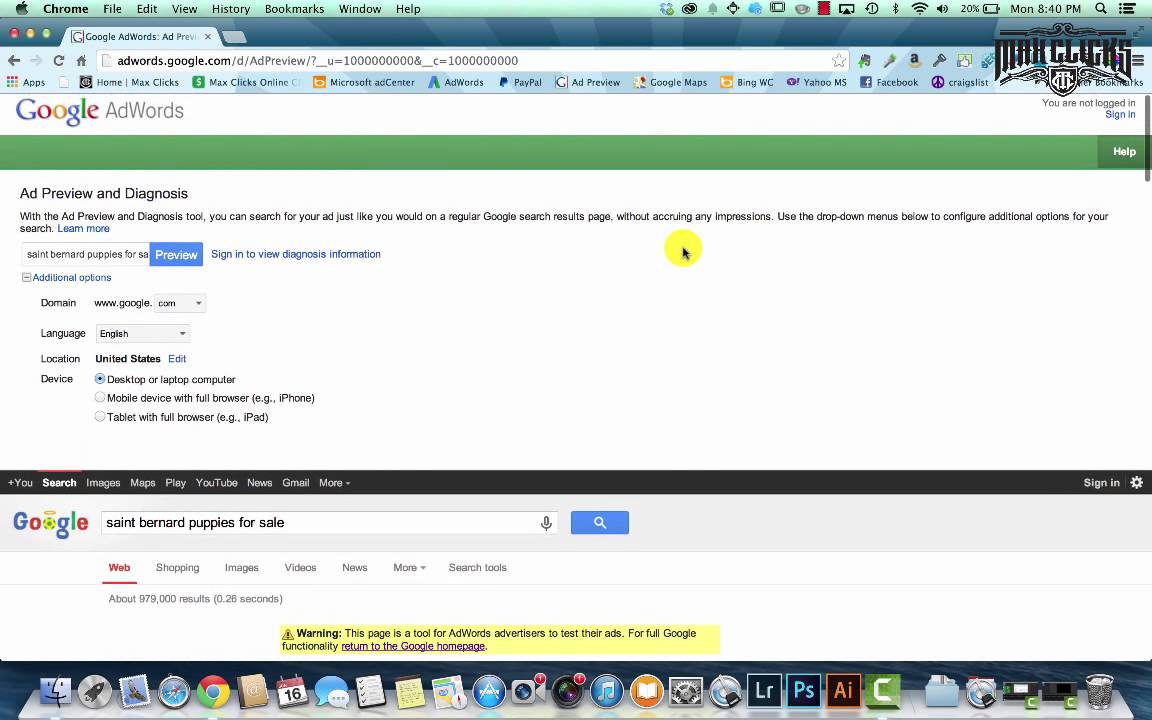
The Google Ad Preview Tool simulates Google Search results pages for any location, language, and device type. By entering relevant search terms, advertisers can see how their ads would appear to users searching for those terms. It provides a realistic preview of the actual search results page, showing where the ad would be placed, its headline, descriptions, and ad extensions.

Advertisers can customize various parameters to align the preview with their target audience. They can select the location and language to see how ads would appear in specific regions or countries. Additionally, they can choose the device type, such as desktop, mobile, or tablet, to preview how their ads would look on different devices.
The tool also allows advertisers to see their ad with extensions like sitelinks, call extensions, and structured snippets. This provides insights into how these additional features would impact the appearance and visibility of the ad on the search results page.
Benefits of using the Google Ad Preview Tool
The Google Ad Preview Tool offers several benefits for advertisers:

- Accurate representation: By using the tool, advertisers can ensure that their ads are displayed exactly as intended, avoiding any formatting errors or issues.
- Testing ad variations: Advertisers can preview different ad variations to compare how they would be displayed and choose the most effective one.
- Geographic targeting: The tool enables advertisers to view their ads for specific geographic locations, helping them optimize their targeting and tailor their ads to specific regions.
- Keyword relevancy: By entering relevant search terms, advertisers can ensure that their ads are triggered by the desired keywords and are displayed in the correct context.
- Competitive analysis: Advertisers can use the tool to analyze how their ads would appear alongside their competitors’ ads on the search results page.
Best practices for using the Google Ad Preview Tool
While using the Google Ad Preview Tool, advertisers should keep the following best practices in mind:
- Be specific with search terms: Use keywords that closely resemble the ones your target audience would use to search for your products or services.
- Test different locations: If you are targeting multiple regions, test your ads for each location separately to ensure they are displayed correctly and effectively.
- Consider device type: Preview your ads on different devices to ensure they are optimized for different screen sizes and user experiences.
- Check ad extensions: Enable ad extensions and review how they appear alongside your ads to maximize their impact and visibility.
- Use negative keywords: Check if your ads are triggered by any irrelevant search terms and consider adding those as negative keywords to refine your targeting.
Conclusion
The Google Ad Preview Tool is an indispensable resource for advertisers using Google Ads. By providing a realistic preview of how ads would appear in search results, it helps advertisers optimize their ad campaigns, improve targeting, and ensure that their ads are displayed correctly. Utilizing the tool’s features and best practices can significantly enhance the effectiveness and success of online advertising campaigns.
According to a survey conducted by WordStream, 78% of advertisers reported that using the Google Ad Preview Tool helped them make more informed decisions about their ad campaigns, resulting in increased click-through rates and conversions.

Key Takeaways for the Google Ad Preview Tool
As an online advertising service or advertising network, understanding the key features and benefits of the Google Ad Preview Tool can greatly enhance your advertisement campaigns and optimize their performance. The Google Ad Preview Tool allows you to preview your ads on Google Search results pages without affecting your impressions, giving you invaluable insights into how your ads will appear to users. Here are the key takeaways that will help you make the most of this powerful tool:
- Preview Ads Across Different Locations: The Google Ad Preview Tool allows you to simulate searches from various locations, enabling you to see how your ads will look to users in different regions. This feature is especially valuable if you have targeted campaigns that cater to specific geographic areas.
- Test Different Languages: With the Ad Preview Tool, you can preview your ads in different languages and ensure they are accurate and engaging for your target audience. This is crucial if you are targeting a multilingual or international market.
- Review Mobile and Desktop Display: The tool lets you see how your ads appear on both mobile and desktop search results pages. This is vital considering the growing prominence of mobile devices and the need to optimize ads for different platforms.
- Check Ad Extensions: The Ad Preview Tool enables you to view your ads with various ad extensions, such as site links, callouts, and structured snippets. This allows you to assess the impact of different extensions on the overall visibility and appeal of your ads.
- Audit Ad Ranking: By utilizing the Ad Preview Tool, you can review the position of your ads, the number of competitors appearing in the same search, and analyze your ad rank. This information helps you evaluate the effectiveness of your bidding strategy and make necessary adjustments to achieve higher ad placements.
- Ad Troubleshooting: When your ads do not appear, the Ad Preview Tool enables you to identify potential issues. It helps you determine if the ads are not showing due to budget constraints, poor ad rank, or other factors, allowing you to take appropriate action.
- Competitor Analysis: With the tool, you can enter keywords and see which competitors are appearing alongside your ads or in top positions. This information enables you to better understand your competition and refine your advertising strategy accordingly.
- Geographic Targeting: The Ad Preview Tool makes it easy to select different geographic locations and test your ads in those regions. This is particularly useful if you want to tailor your messaging or promotions to specific areas and assess their potential effectiveness.
- Ad Scheduling: By leveraging the Ad Preview Tool, you can preview your ads at different times of the day or week. This feature allows you to verify if your ads display correctly during scheduled campaigns and make adjustments as needed.
- Search Engine Result Page (SERP) Simulations: The tool provides realistic previews of your ads within the actual search results page, helping you gauge their visibility and attractiveness amid organic search results and other paid ads.
- Refine Ad Copy: By using the Ad Preview Tool to preview your ads before they go live, you can refine your ad copy to ensure it aligns with your desired messaging, is compelling, and stands out amidst the competition.
- Negative Keyword Assessment: When simulating searches with the Ad Preview Tool, you can identify if your ads appear for irrelevant or unwanted keywords. This helps you optimize your negative keyword list and minimize wasted ad spend.
- Device-Specific Ad Customization: As mobile and desktop users may have different needs and expectations, the Ad Preview Tool allows you to tailor your ads accordingly. This customization ensures your ads deliver a seamless user experience across various devices.
- Ad Campaign Localization: Whether you target multiple regions or international markets, the Ad Preview Tool assists in customizing your ads to cater to specific languages, cultural nuances, and local preferences.
- Reduce Ad Impressions Impact: With the Ad Preview Tool, you can preview and make adjustments to your ads without impacting their impressions or click-through rates (CTR). This capability ensures a continuous flow of data and maintains the accuracy of your campaign analytics.
- Streamline Ad Approval Process: By utilizing the Ad Preview Tool, you can preview your ads during their creation or revision stages, allowing you to identify and rectify any issues or policy violations before submitting them for approval. This saves you time and reduces potential delays in launching your campaigns.
Equipped with these key takeaways, you can now make effective use of the Google Ad Preview Tool to optimize your ad campaigns, experiment with different strategies, and ultimately improve your return on investment (ROI). The next sections of this article will delve deeper into each feature, providing you with a comprehensive understanding of how to leverage this tool to maximize your advertising success.
FAQs for Google Ad Preview Tool
1. What is the Google Ad Preview Tool?
The Google Ad Preview Tool is a free online tool that allows advertisers to see how their search ads appear on Google without affecting their ad impressions or click-through rates.
2. How can I access the Google Ad Preview Tool?
You can access the Google Ad Preview Tool by visiting the official Google Ads website and searching for “Ad Preview Tool” in the search bar. Alternatively, you can directly access it through this link: [Insert URL].
3. Is the Google Ad Preview Tool compatible with all devices?
Yes, the Google Ad Preview Tool is compatible with desktop computers, laptops, and mobile devices. It provides a preview of how your ad appears across different devices and screen sizes.
4. Can I preview ads for specific locations using the Ad Preview Tool?
Yes, the Google Ad Preview Tool allows you to set a specific location, language, and device to preview your ads, helping you understand how they appear to users in different geographical areas.
5. How does the Google Ad Preview Tool work?
The Google Ad Preview Tool simulates real Google search results by using a sandbox environment. It ensures that your ad preview is accurate, regardless of your physical location or search history.
6. Can I preview my ads without having an active Google Ads campaign?
Yes, you can use the Google Ad Preview Tool to preview your ads even if you don’t have an active Google Ads campaign. This allows you to test your ad copy before launching a campaign.
7. Does the Google Ad Preview Tool show organic search results?
No, the Google Ad Preview Tool focuses solely on showing how your ads appear in the search results. It does not display organic search results or other non-ad-related content.
8. Can I see a preview of my competitors’ ads using the Ad Preview Tool?
No, the Google Ad Preview Tool only displays ads from your own Google Ads account. It does not show ads from competitors or other advertisers in the search results.
9. Can I preview different ad formats with the Google Ad Preview Tool?
Yes, the Google Ad Preview Tool supports various ad formats, including text ads, image ads, video ads, and responsive ads. You can preview each format to ensure they are displayed correctly.
10. Will using the Ad Preview Tool impact my ad performance?
No, using the Google Ad Preview Tool will not affect your ad impressions or click-through rates. It is designed specifically for advertisers to preview their ads without any impact on campaign performance.
11. Are the search results displayed in the Ad Preview Tool real-time?
The search results displayed in the Google Ad Preview Tool are not real-time. However, they are based on the latest available information, ensuring a reliable representation of how your ads appear.
12. Can I share the ad previews generated by the Ad Preview Tool?
Yes, you can easily share the ad previews generated by the Google Ad Preview Tool with stakeholders, clients, or team members by copying the preview URL or sharing the provided screenshot.
13. Does the Ad Preview Tool support different languages?
Yes, the Google Ad Preview Tool supports multiple languages. You can choose the desired language to preview your ads, ensuring they are correctly displayed for the targeted audience.
14. Can I use the Ad Preview Tool for non-Google search engines?
No, the Google Ad Preview Tool is specific to Google’s search engine. If you are interested in previewing your ads on non-Google search engines, you will need to use the respective platforms’ ad preview tools.
15. Can I use the Ad Preview Tool to verify if my ads are running?
Yes, by using the Google Ad Preview Tool, you can verify if your ads are running and appearing as intended. It provides a visual confirmation of how your ads are displayed in the search results for your chosen settings.
Conclusion
In conclusion, the Google Ad Preview Tool is an indispensable resource for advertisers and marketers using Google Ads. It offers a convenient and efficient way to preview and validate ads before they go live, ensuring that they appear correctly across different devices, locations, and languages. The tool allows users to select specific targeting criteria, such as keywords, locations, and languages, to simulate real-time search results and see how their ads will be displayed to potential customers.
One key benefit of the Google Ad Preview Tool is its ability to help advertisers optimize ad campaigns and improve their overall performance. By previewing their ads, marketers can identify any issues or inconsistencies that may arise during the display process, such as incorrect ad format, missing elements, or truncated text. This allows them to make any necessary adjustments before launching their campaigns, ultimately saving time and resources. Additionally, the tool provides insights into how ads may appear to users in different locations or languages, enabling advertisers to adapt their messaging and creative to better resonate with their target audience.
Furthermore, the tool allows advertisers to test different variations of their ads and compare their performance side by side. This A/B testing capability helps marketers assess the impact of different ad formats, ad copy, or targeting parameters on click-through rates, conversions, and other key performance metrics. By analyzing the results, advertisers can make data-driven decisions to optimize their campaigns, ensuring they deliver the desired results and maximize their return on investment.
Another noteworthy feature of the Google Ad Preview Tool is its ability to simulate the user experience on various devices, including desktops, mobile phones, and tablets. As the majority of online users access the internet through mobile devices, it is crucial for advertisers to ensure that their ads are mobile-friendly and visually appealing on smaller screens. With the tool’s mobile preview capabilities, marketers can detect any potential issues, such as text truncation or layout problems, and make the necessary adjustments to ensure a seamless user experience across all devices.
Moreover, the Google Ad Preview Tool is highly user-friendly and accessible to advertisers of all levels of expertise. Its intuitive interface and clear instructions make it easy for users to navigate the tool and understand its functionalities. Additionally, the tool provides detailed and actionable feedback on any issues or errors found, empowering advertisers to take immediate action and resolve them efficiently.
Overall, the Google Ad Preview Tool is an invaluable asset for advertisers and marketers in the online advertising industry. It enables them to preview and optimize their ads, test different variations, and ensure a consistent and impactful user experience across various devices and locations. By leveraging the power of this tool, advertisers can enhance the effectiveness and performance of their Google Ads campaigns, ultimately driving better results and achieving their advertising objectives.