


- Gmail Adwords Targeting
- Benefits of Gmail Adwords Targeting
- Targeting Options in Gmail Adwords
- Best Practices for Gmail Adwords Targeting
- Key Takeaways:
- FAQs
- 1. What is Gmail Adwords targeting?
- 2. How does Gmail Adwords targeting work?
- 3. Can I target specific demographics with Gmail Adwords?
- 4. What types of ads can I run on Gmail?
- 5. How are Gmail ads different from regular email ads?
- 6. Can I target specific keywords with Gmail Adwords?
- 7. How can I measure the effectiveness of my Gmail Adwords campaigns?
- 8. Can I exclude certain email domains from my targeting?
- 9. Are there any restrictions on the content of Gmail ads?
- 10. How can I optimize my Gmail Adwords campaigns?
- 11. Can I use Gmail Adwords targeting for remarketing?
- 12. Can I run Gmail ads on mobile devices?
- 13. How does the cost of Gmail Adwords targeting compare to other advertising channels?
- 14. Can I integrate Gmail Adwords targeting with other Google advertising products?
- 15. How do I get started with Gmail Adwords targeting?
- Conclusion
Gmail AdWordsTargeting is a powerful tool utilized by online advertising services or advertising networks to reach their target audience. By understanding the intricate aspects of this targeting strategy, advertisers can enhance their campaigns and achieve higher conversion rates.

Did you know that Gmail AdWords Targeting allows advertisers to display their ads directly in the Gmail inbox of their potential customers? This method ensures that ads are seen by users who are already engaged and actively checking their emails. With the average person spending about six hours per day on their email, this provides advertisers with an enormous opportunity to deliver their message directly to their target audience.
Gmail AdWords Targeting was introduced by Google in 2015, with the aim of providing advertisers with more precise targeting options. This feature utilizes machine learning algorithms to analyze user behavior and interests based on keywords and email content. By leveraging this data, advertising networks can display relevant ads that align with the users’ preferences and interests.

One exciting element of Gmail AdWords Targeting is the ability to target ads based on specific keywords or phrases present in the user’s emails. For example, if a user frequently receives emails regarding travel destinations, an online travel agency can display ads tailored to the user’s travel preferences. This highly personalized approach not only increases the chances of conversion but also enhances the overall user experience by delivering relevant content.
Moreover, Gmail AdWords Targeting offers advertisers the opportunity to target ads based on the browsing history of users. By tracking the websites visited by users and their online activities, advertisers can display ads that cater to their interests and needs. This level of granularity allows advertisers to narrow down their target audience and ensures that their ads are valuable to users.

Since its inception, Gmail AdWords Targeting has become an invaluable tool for advertisers seeking to maximize their return on investment. The ability to reach a highly engaged and receptive audience directly in their Gmail inbox has proven to be a game-changer for many businesses. With millions of active Gmail users worldwide, the potential reach of this targeting strategy is vast.
In conclusion, Gmail AdWords Targeting has revolutionized the way advertisers approach online advertising. By leveraging user behavior and interests, advertisers can deliver highly personalized and relevant ads directly to their target audience. This targeted approach improves user experience, increases conversion rates, and enhances the overall effectiveness of advertising campaigns. With the ever-growing number of Gmail users worldwide, Gmail AdWords Targeting remains a vital tool for advertisers looking to stay ahead in the competitive online advertising landscape.

How can Gmail Adwords Targeting Improve Your Online Advertising Strategy?
Gmail Adwords targeting is a powerful tool that can greatly enhance your online advertising strategy. By utilizing this feature, you can reach a highly targeted audience and maximize the effectiveness of your advertising campaigns. But what exactly is Gmail Adwords targeting and how can it benefit your business? In this article, we will delve into the definitions and advantages of Gmail Adwords targeting and provide you with insights on how to make the most out of this feature.
| Item | Details |
|---|---|
| Topic | Gmail Adwords Targeting |
| Category | Marketing and Advertising |
| Key takeaway | Gmail AdWords Targeting is a powerful tool utilized by online advertising services or advertising networks to reach their target audience. |
| Last updated | February 18, 2026 |
Gmail Adwords Targeting
Gmail Adwords targeting is a powerful tool that allows advertisers to reach their target audience through Gmail, one of the most popular email platforms worldwide. Advertisers can utilize various targeting options to deliver their ads to potential customers who are actively engaging with their emails. In this article, we will dive into the different aspects of Gmail Adwords targeting, including its benefits, targeting options, and best practices.

Benefits of Gmail Adwords Targeting
Gmail Adwords targeting offers several benefits that can significantly enhance your advertising campaigns. Here are some key advantages:
- Reach a highly engaged audience: Gmail has over 1.5 billion active users, and people spend a significant amount of time in their email inbox. By leveraging Gmail Adwords targeting, you can connect with a wide range of potential customers who are actively engaged with their emails.
- Take advantage of user intent: Unlike traditional display ads, Gmail ads are displayed in a user’s inbox, allowing you to target users based on their email content. This means you can align your ads with the user’s intent, increasing the chances of capturing their attention and driving conversions.
- Access unique ad formats: Gmail ads offer unique ad formats, such as collapsible ads and promotion-focused ads, that can grab users’ attention and drive engagement. These formats provide advertisers with creative flexibility to stand out and deliver highly interactive and visually appealing ad experiences.
- Track performance effectively: Gmail Adwords targeting provides comprehensive reporting and measurement tools to track the performance of your campaigns. You can analyze metrics such as click-through rates, conversions, and cost per action, allowing you to optimize your campaigns for maximum effectiveness and return on investment.
Targeting Options in Gmail Adwords
Gmail Adwords targeting offers a range of options to help you reach your desired audience. Here are some key targeting options:
- Keyword targeting: With keyword targeting, you can choose specific keywords or phrases related to your product or service. Gmail Adwords will deliver your ads to users whose emails contain these keywords, ensuring that your ads are relevant and visible to potential customers.
- Affinity audience targeting: Affinity audience targeting allows you to reach users who have demonstrated a strong interest in a particular topic or category. For example, if you are promoting a fitness app, you can target users who have shown an interest in fitness-related content in their emails.
- Demographic targeting: Demographic targeting enables you to tailor your ads based on user demographics, such as age, gender, and location. This allows you to deliver personalized and relevant ads to specific segments of your target audience.
- Remarketing: With remarketing, you can target users who have previously interacted with your website or ads. This targeting option is particularly effective for nurturing potential customers and driving conversions by re-engaging them with tailored ads.
- Custom affinity audiences: Custom affinity audiences let you create audience segments based on specific interests and characteristics. You can define the audience based on URLs, apps, or places that users frequently visit, ensuring that your ads reach people who are most likely to be interested in your offering.
Best Practices for Gmail Adwords Targeting
To make the most out of Gmail Adwords targeting, consider implementing the following best practices:
- Experiment with different ad formats: Gmail ads offer various ad formats, so test different options to identify what works best for your target audience. Use eye-catching visuals, compelling copy, and clear call-to-actions to drive engagement and conversions.
- Refine your targeting: Continuously refine your targeting options based on data and analytics. Monitor the performance of your ads and make adjustments to optimize reach and relevance. Experiment with different combinations of targeting options to find the most effective approach.
- Create personalized content: Gmail ads provide an opportunity to deliver highly personalized content to your audience. Use dynamic content insertion to tailor your ads based on the user’s location, device, or interests. Personalized content boosts engagement and increases the chances of conversions.
- Optimize for mobile: As a significant portion of Gmail users access their email on mobile devices, ensure that your ads are optimized for mobile. Use responsive design and create mobile-friendly ad experiences to maximize engagement and conversions.
- Track and analyze performance: Regularly track and analyze the performance of your Gmail Adwords campaigns. Identify trends, patterns, and insights to make informed decisions. Use data-driven optimization strategies to continually improve the effectiveness and efficiency of your campaigns.
With Gmail Adwords targeting, you have the opportunity to reach a highly engaged audience, leverage user intent, and deliver personalized ads that drive results. By utilizing the various targeting options and following best practices, you can create successful advertising campaigns that effectively reach and engage your target audience.

According to recent research, Gmail has a 27% market share of global email open rates, making it a valuable platform for advertisers looking to connect with a wide audience. By incorporating Gmail Adwords targeting into your advertising strategy, you can tap into this market and achieve your business goals.
Key Takeaways:
Here are the key takeaways from the article on Gmail Adwords Targeting:
- Gmail Adwords Targeting is a powerful feature that allows advertisers to target their Google Adwords campaigns specifically to users of Gmail.
- With Gmail Adwords Targeting, advertisers can show their ads to users based on keywords, demographics, and interests.
- By targeting Gmail users, advertisers can reach a highly engaged audience who are actively checking and reading their emails.
- Gmail Adwords Targeting offers a variety of targeting options, including keyword targeting, demographic targeting, and interest-based targeting.
- Keyword targeting allows advertisers to show their ads to Gmail users based on specific keywords that are present in their emails.
- Demographic targeting allows advertisers to target Gmail users based on their age, gender, location, and language.
- Interest-based targeting allows advertisers to show their ads to Gmail users who have shown interest in specific topics or categories.
- Gmail Adwords Targeting also offers the option to exclude specific keywords, demographics, or interests, ensuring that ads are shown to the most relevant audience.
- Advertisers can create and manage Gmail Adwords campaigns through the Google Adwords platform.
- Gmail Adwords campaigns are charged on a pay-per-click (PPC) basis, meaning advertisers only pay when a user clicks on their ad.
- Gmail Adwords Targeting can be a cost-effective advertising strategy, as advertisers can reach a highly targeted audience at a relatively low cost.
- Gmail Adwords Targeting allows advertisers to track the performance of their campaigns through detailed reporting and analytics.
- Advertisers can optimize their Gmail Adwords campaigns by analyzing the performance data and making adjustments to their targeting and ad content.
- With Gmail Adwords Targeting, advertisers can create highly personalized and relevant ads that resonate with the Gmail users.
- Gmail Adwords Targeting can be used by businesses of all sizes and industries to promote their products and services.
- Gmail Adwords campaigns can be an effective way to increase brand awareness, drive traffic to a website, and generate leads or conversions.

FAQs
1. What is Gmail Adwords targeting?
Gmail Adwords targeting is a feature that allows advertisers to deliver relevant ads to users in their Gmail inbox. It enables you to reach potential customers with precision based on their interests, demographics, and online behavior.
2. How does Gmail Adwords targeting work?
Gmail Adwords targeting works by analyzing user data such as email content, online activity, and saved preferences. Advertisers can use this data to create personalized ads that are more likely to resonate with their target audience.
3. Can I target specific demographics with Gmail Adwords?
Yes, Gmail Adwords targeting allows you to specify demographics such as age, gender, location, and language. This helps you reach the right audience for your products or services.

4. What types of ads can I run on Gmail?
With Gmail Adwords targeting, you can run various types of ads such as text ads, image-based ads, and native ads. This flexibility allows you to choose the format that best suits your advertising goals.
5. How are Gmail ads different from regular email ads?
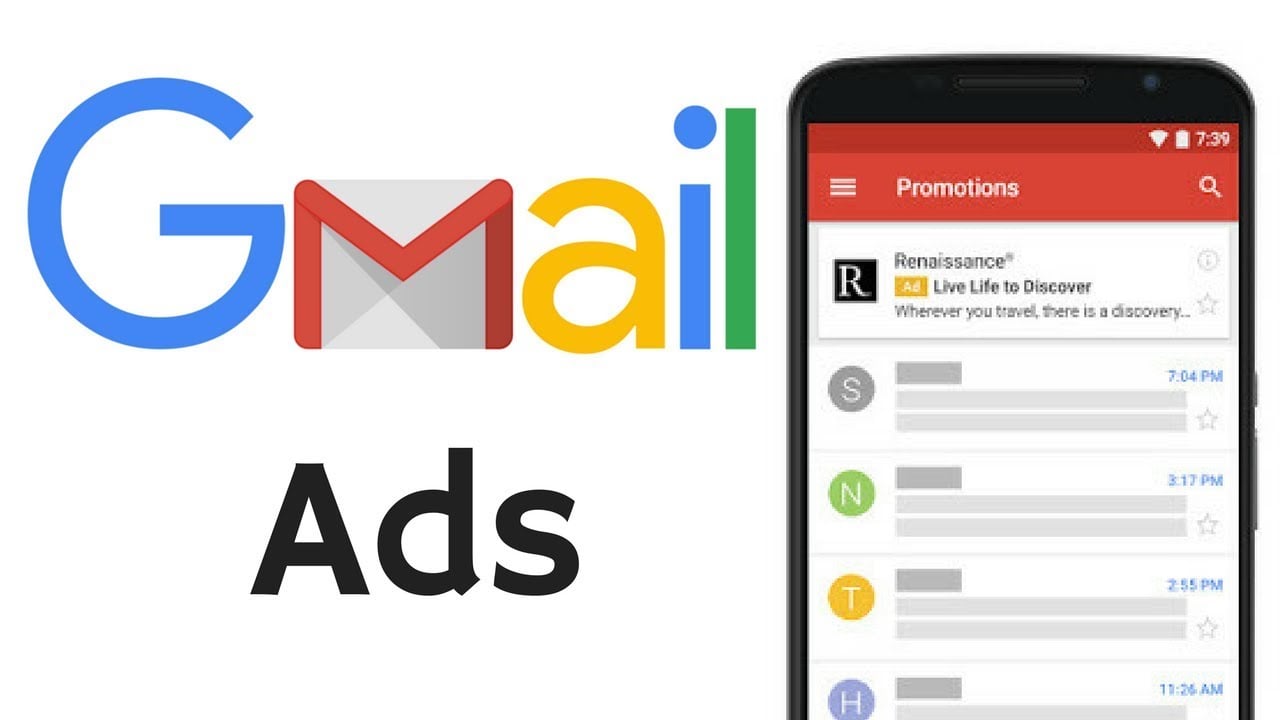
Gmail ads are different from regular email ads because they appear within a user’s inbox under the “Promotions” tab. They are designed to blend in with the other emails, making them less intrusive and more likely to be noticed by users.
6. Can I target specific keywords with Gmail Adwords?
Yes, Gmail Adwords targeting offers keyword targeting, which allows you to display your ads to users who have received or sent emails containing certain keywords related to your products or services.

7. How can I measure the effectiveness of my Gmail Adwords campaigns?
Google Adwords provides comprehensive reporting and analytics tools to measure the effectiveness of your Gmail Adwords campaigns. You can track metrics such as impressions, clicks, click-through rates, conversions, and return on investment (ROI) to determine the success of your campaigns.
8. Can I exclude certain email domains from my targeting?
Yes, with Gmail Adwords targeting, you can exclude specific email domains or addresses from your campaigns. This feature allows you to focus your advertising efforts on the most relevant audience.
9. Are there any restrictions on the content of Gmail ads?
Yes, there are some restrictions on the content of Gmail ads to ensure a positive user experience. The ads should not contain misleading or offensive content, and they must comply with Google’s advertising policies.
10. How can I optimize my Gmail Adwords campaigns?
To optimize your Gmail Adwords campaigns, you can experiment with different ad formats, targeting options, and ad creative. Regularly monitor the performance of your campaigns and make data-driven adjustments to improve your results.
11. Can I use Gmail Adwords targeting for remarketing?
Yes, Gmail Adwords targeting allows you to implement remarketing strategies by targeting users who have previously interacted with your brand. This helps you reconnect with potential customers and increase conversion rates.
12. Can I run Gmail ads on mobile devices?
Yes, Gmail ads are mobile-friendly and can be displayed on various devices, including smartphones and tablets. This ensures that your ads reach users on the go and maximizes your advertising reach.
13. How does the cost of Gmail Adwords targeting compare to other advertising channels?
The cost of Gmail Adwords targeting varies depending on factors such as competition, targeting options, and ad quality. However, it generally offers a cost-effective advertising solution compared to other channels, especially when used strategically to reach the right audience.
14. Can I integrate Gmail Adwords targeting with other Google advertising products?
Yes, Gmail Adwords targeting can be integrated with other Google advertising products such as Google Display Network and YouTube ads. This allows for a cohesive and comprehensive advertising strategy across multiple channels.
15. How do I get started with Gmail Adwords targeting?
To get started with Gmail Adwords targeting, you need to have a Google Adwords account. From there, you can create a new campaign, select Gmail ads as the campaign type, set your targeting options, create ad creative, and launch your campaign to start reaching potential customers in their Gmail inboxes.
Conclusion
In conclusion, Gmail Adwords Targeting is an effective and powerful tool for online advertisers and advertising networks. It allows advertisers to reach their target audience in a personalized and engaging way through the use of relevant ads in Gmail.
Firstly, the use of personalized ads in Gmail can greatly increase the likelihood of engagement and conversion. By targeting users based on their email contents, interests, and behaviors, advertisers can deliver highly relevant ads that are more likely to capture the attention of the users. This not only improves click-through rates but also increases the chances of conversions, leading to a higher return on investment for advertisers.
Secondly, Gmail Adwords Targeting provides valuable insights and data for advertisers to optimize their campaigns. By analyzing the performance of their ads, advertisers can gain insights into the interests and preferences of their target audience. This allows them to make data-driven decisions and adjust their advertising strategies accordingly, resulting in more effective and efficient campaigns over time.
Thirdly, Gmail Adwords Targeting offers a variety of targeting options to reach the desired audience. Advertisers can choose to target specific keywords, demographics, interests, and more, ensuring that their ads are shown to the right people at the right time. This level of precision targeting allows for better ad relevancy and ultimately, improves the overall effectiveness of the advertising campaigns.
Furthermore, Gmail Adwords Targeting is a cost-effective solution for advertisers. With the ability to set a budget and choose cost-per-click or cost-per-thousand-impressions pricing, advertisers have control over their spending. They only pay when a user engages with their ad, whether it is by clicking on it or by viewing it for a certain period of time. This ensures that advertisers are getting the most value out of their advertising budget.
Overall, Gmail Adwords Targeting is a powerful tool for online advertisers and advertising networks. It enables them to reach their target audience in a personalized and engaging way, delivering relevant ads that capture the attention and drive conversions. With its valuable insights and cost-effective pricing, it is a must-have for any advertiser looking to optimize their campaigns and achieve their marketing goals.